
ROCAM CR1027
ROCAM дирилдеген ойготкуч саат колдонуучусунун колдонмосу
Модели: CR1027
1. Киришүү
Thank you for choosing the ROCAM Vibrating Alarm Clock. This device is specifically designed to provide a reliable and effective wake-up solution for heavy sleepers, individuals with hearing impairments, and the deaf. Its powerful vibration, adjustable sound, and user-friendly features ensure you wake up on time without disturbing others. This manual provides detailed instructions on how to set up, operate, and maintain your alarm clock.
2. Коопсуздук маалыматы
- Аппаратты экстремалдык температурага, түз күндүн нуруна же жогорку нымдуулукка дуушар кылбаңыз.
- Аппаратты суудан жана башка суюктуктардан алыс кармаңыз.
- Аппаратты өз алдынча бөлүүгө же оңдоого аракет кылбаңыз. Жардам алуу үчүн кардарларды колдоо бөлүмүнө кайрылыңыз.
- Заряддоо үчүн берилген USB-C кабелин гана колдонуңуз.
- Keep out of reach of small children unless the child lock function is activated.
3. Пакеттин мазмуну
Сураныч, пакеттин мазмунун текшерип, бардык буюмдар бар экенин текшериңиз:
- ROCAM Vibrating Alarm Clock (CR1027)
- USB-C заряддоо кабели
- User Manual

Image: ROCAM Vibrating Alarm Clock and its packaging, including the device and charging cable.
4. Продукт бүтүп калдыview
Familiarize yourself with the various parts and controls of your ROCAM Vibrating Alarm Clock.

Image: Detailed diagram showing the top and bottom controls of the alarm clock.
Башкаруу каражаттары жана порттор:
- 1 / 2 Buttons: Alarm 1 and Alarm 2 settings.
- TIME / SNOOZE Button: Press to set time, press during alarm for snooze.
- - / + Баскычтар: Adjust values (time, volume, vibration).
- Type-C заряддоо порту: Аппаратты заряддоо үчүн.
- ON/OFF которуу: Негизги электр өчүргүч.
- Балдар кулпусун которуштуруу: Балдардын кулпусун иштетет/өчүрөт.
- Alarm Mode Switch (MON-SUN / MON-FRI / SAT-SUN): Selects alarm days.
- Vibration Level Switch (Low / Medium / High): Adjusts vibration intensity.
- Калыбына келтирүү баскычы: Аппаратты баштапкы абалга келтирет.
5. Орнотуу
5.1 Аппаратты заряддоо
Before first use, fully charge the alarm clock. Connect the provided USB-C cable to the charging port on the device and the other end to a USB power adapter (not included) or a computer USB port. The battery indicator on the display will show charging status. A full charge takes approximately 4 hours and provides 3-5 months of operation, depending on usage.
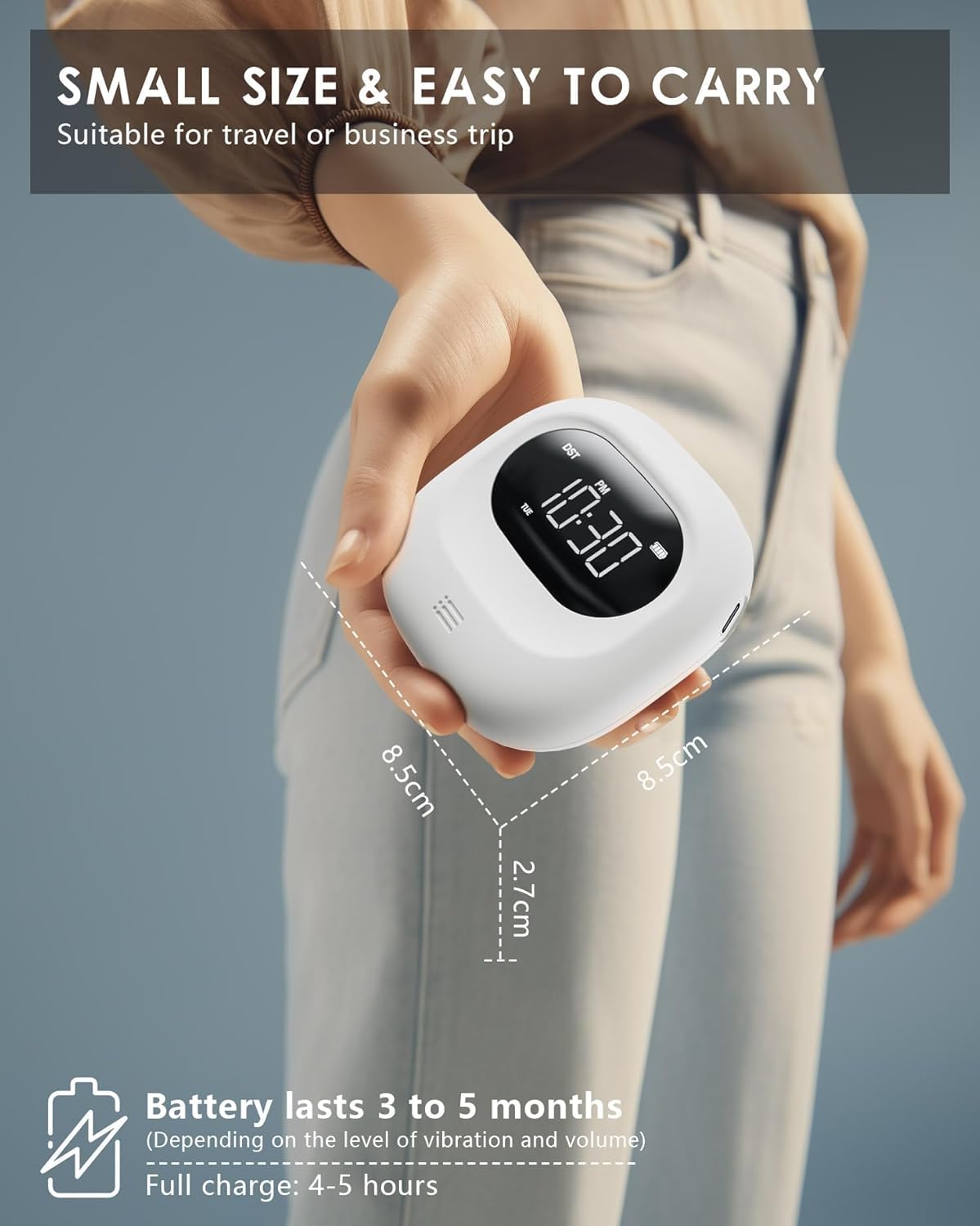
Image: The compact size of the alarm clock and its long battery life.
5.2 Убакытты коюу
- басып, кармап туруңуз TIME / SNOOZE баскычын сааттын сандары күйүп-өчө баштаганга чейин басыңыз.
- колдонуу - or + саатты тууралоо үчүн баскычтар.
- басыңыз TIME / SNOOZE мүнөт жөндөөсүнө өтүү үчүн кайра баскычын басыңыз. Колдонуу - or + мүнөт тууралоо үчүн.
- Басууну улантыңыз TIME / SNOOZE to cycle through year, month, day settings, adjusting with - or +.
- Басыңыз TIME / SNOOZE one last time to confirm and exit time setting mode.
6. Иштөө нускамалары
6.1 Ойготкучтарды орнотуу (кош ойготкуч)
The alarm clock features two independent alarms (Alarm 1 and Alarm 2).

Image: Dual alarm settings for different schedules.
- басып, кармап туруңуз 1 баскыч (1-сигнализация үчүн) же 2 (2-сигнализация үчүн) ойготкуч саатынын сандары күйүп-өчкөнгө чейин басыңыз.
- колдонуу - or + каалаган ойготкуч саатын коюу үчүн баскычтар.
- Press the alarm button (1 or 2) again to move to minute setting. Use - or + мүнөт коюу.
- Press the alarm button again to confirm and exit alarm setting mode.
- To activate/deactivate an alarm, short press the corresponding alarm button (1 or 2). An alarm icon will appear/disappear on the display.
6.2 Alarm Modes (Vibration, Sound, or Both)
You can choose from three alarm modes for each alarm:
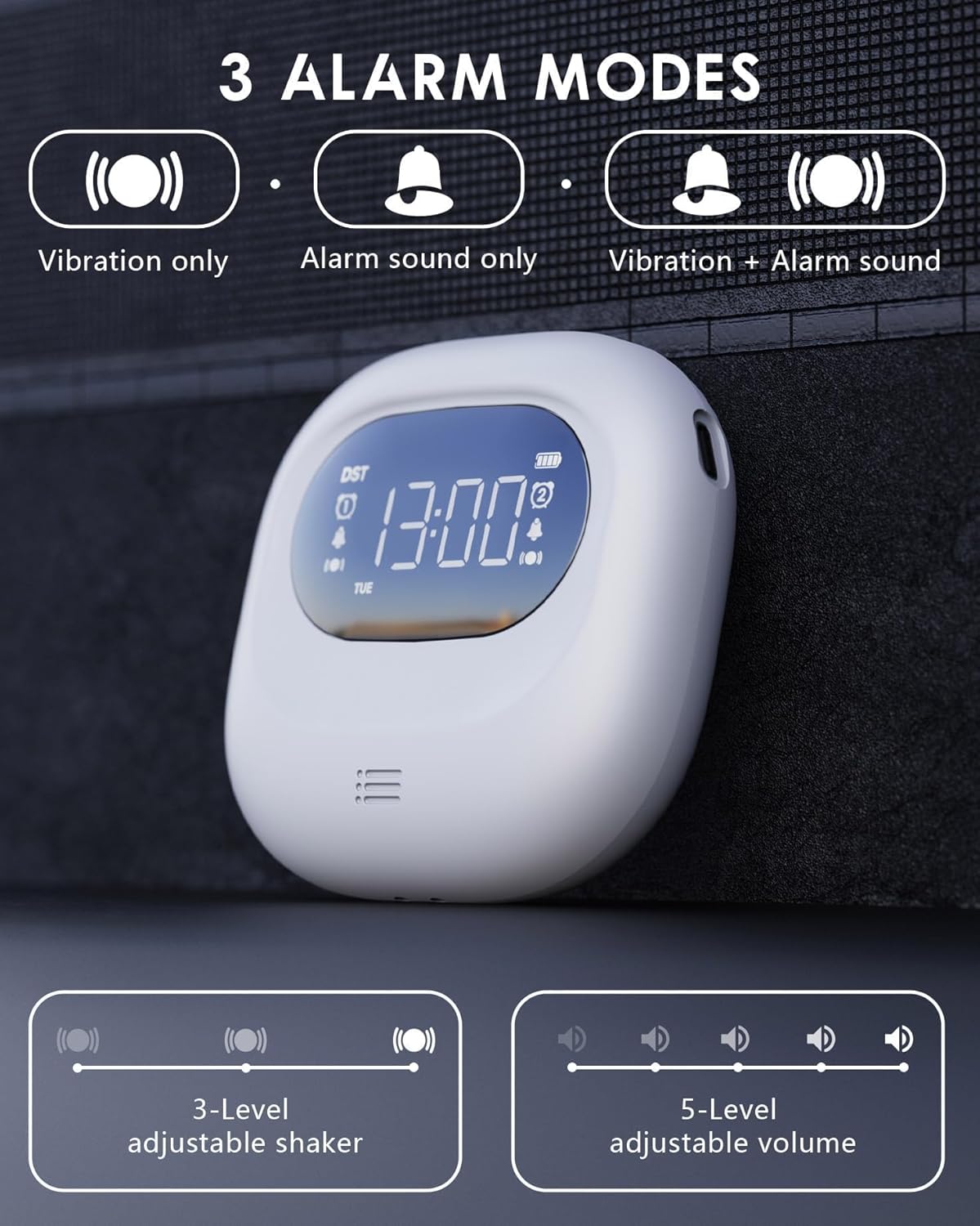
Image: Visual representation of the three alarm modes.
- Вибрация гана: Ideal for silent wake-up without disturbing others.
- Alarm Sound Only: Functions as a traditional alarm clock.
- Vibration + Alarm Sound: Provides maximum wake-up assurance.
To select the alarm mode, use the dedicated switch on the side/back of the device, usually labeled with icons for vibration, sound, or both.
6.3 Volume and Vibration Intensity Adjustment
Adjust the alarm volume and vibration intensity to your preference.

Image: Alarm clock with buzzing sound waves and 5 volume levels.
- Көлөмү: When the alarm is sounding, use the - or + buttons to adjust the volume (5 levels, 56-105 dB).

Image: Alarm clock on a pillow, showing three vibration intensity levels.
- Дирилдөөнүн интенсивдүүлүгү: Use the dedicated switch on the bottom of the device to select Low, Medium, or High vibration intensity (3 levels).
6.4 Тындыруу функциясы
Ойготкуч басылганда, басыңыз TIME / SNOOZE button to activate the snooze function. The alarm will pause for 9 minutes and then sound again. You can repeat this process multiple times.

Image: Alarm clock with snooze function details.
6.5 Time Format (12/24H, DST)
You can switch between 12-hour and 24-hour time formats, and activate Daylight Saving Time (DST).

Image: Display showing 12H, 24H, and DST time formats.
- 12/24H формат: During time setting, press the TIME / SNOOZE button after setting the day to toggle between 12H and 24H formats.
- Жайкы убакыт (DST): During time setting, press the TIME / SNOOZE button after setting the 12/24H format to activate or deactivate DST. An icon will appear/disappear on the display.
6.6 Балдарды кулпулоо функциясы
Жөндөөлөрдүн кокусунан өзгөрүп кетишинин алдын алуу үчүн, балдардан коргоо функциясын иштетиңиз.

Image: Alarm clock with child lock feature, shown near a sleeping child.
- табыңыз Child Lock switch on the bottom of the device.
- Slide the switch to the locked position to activate. The display will show a lock icon.
- Slide the switch to the unlocked position to deactivate.
6.7 Power Saving Screen Off Function
The alarm clock features an automatic screen off function to conserve battery life.

Image: Display showing power-saving features.
- The LED backlight will automatically turn off after 30 seconds of inactivity to enter power-saving mode.
- To wake up the display, press any button. Press the switch again for specific functions.
- Note: The backlight activates only during alarms or operations.
7. Техникалык тейлөө
7.1 Тазалоо
To clean the alarm clock, gently wipe it with a soft, dry cloth. Do not use abrasive cleaners, solvents, or immerse the device in water.
7.2 Батареяга кам көрүү
The device uses a built-in rechargeable Lithium-polymer battery. To prolong battery life:
- Батареяны бат-баттан толук кубаттап калуудан алыс болуңуз.
- Аппаратты дайыма колдонууда болбосо да, үзгүлтүксүз заряддаңыз.
- Эгерде түзмөк көпкө колдонулбаса, аны салкын, кургак жерде сактаңыз.
8. Кыйынчылыктарды
If you encounter any issues with your ROCAM Vibrating Alarm Clock, please refer to the table below for common problems and solutions.
| Көйгөй | Мүмкүн себеп | Чечим |
|---|---|---|
| Сигнализация үн чыгарбайт/дирилдебейт. | Ойготкуч иштетилген эмес. Incorrect alarm mode selected. Батарея аз. | Ensure alarm icon is displayed. Check alarm mode switch (vibration/sound/both). Аппаратты заряддаңыз. |
| Дисплей бош. | Энергияны үнөмдөө режими иштетилди. Түзмөк өчүк. Батарея түгөнүп калды. | Press any button to wake up display. ON/OFF которгучун текшериңиз. Аппаратты заряддаңыз. |
| Баскычтар жооп бербейт. | Балдар кулпусу иштетилди. Түзмөк тоңуп калды. | Deactivate child lock switch. Press the Reset button on the bottom of the device. |
| Убакыт туура эмес. | Убакыт туура коюлган эмес. DST setting incorrect. | Re-set the time following Section 5.2. Adjust DST setting. |
9. Техникалык шарттар
| Өзгөчөлүк | Деталь |
|---|---|
| Модель номери | CR1027 |
| Өлчөмдөрү (L x W x Y) | 8.5 x 3.81 x 8.5 см (3.35 x 1.5 x 3.35 дюйм) |
| Салмагы | 140 г (4.94 унция) |
| Power Source | Battery Powered (1 Lithium-polymer battery, included) |
| Батареянын иштөө мөөнөтү | 3-5 months (after 4h full charge) |
| Ойготкучтун үнү | 5 деңгээл (56-105 дБ) |
| Vibration Intensity | 3 levels (Low/Medium/High) |
| Дисплей түрү | Digital LED |
| Убакыт форматы | 12H/24H, DST compatible |
10. Кепилдик жана колдоо
ROCAM is committed to providing high-quality products and excellent customer service. This product comes with a 365-day service guarantee.
If you encounter any quality issues or require assistance, please do not hesitate to contact our expert support team. We value your feedback and continuously strive to improve our products.
Колдоо кызматы менен байланышуу: support@rocam.net
Ask a question about this manual
Ask about setup, troubleshooting, compatibility, parts, safety, or missing instructions. Manuals+ will review the question and use this page’s manual context to help answer it.