
Introduction
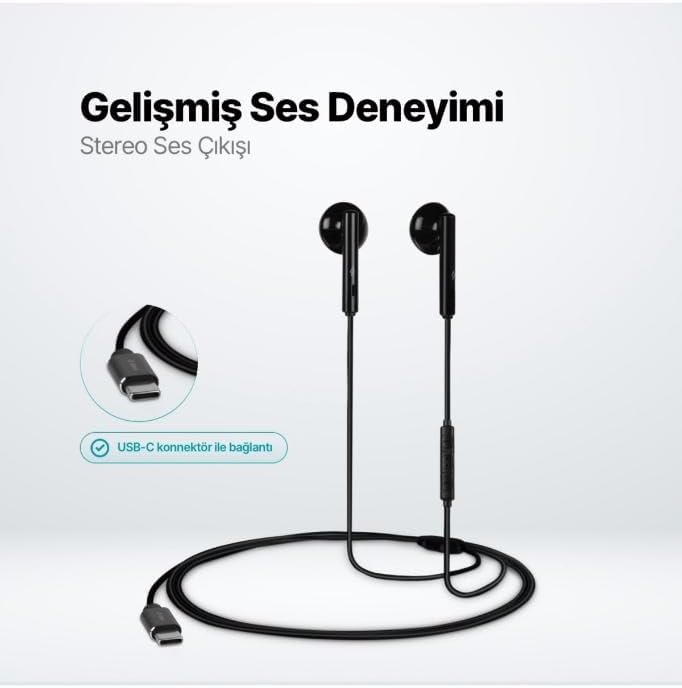
The TTEC Rio 2 Stereo USB-C Headset with Microphone is designed to provide a high-quality audio experience for music and calls. Its comfortable, lightweight design ensures a perfect fit and effective ambient noise isolation, allowing for hands-free communication and entertainment.
Негизги өзгөчөлүктөрү:
- Advanced stereo sound output for an immersive audio experience.
- Integrated microphone for clear phone calls.
- Smart inline controller for easy management of volume, calls, and music playback.
- Lightweight and ergonomic design for extended comfort.
- Universal USB-C connection.
Жайгашуу
To begin using your TTEC Rio 2 headset, follow these simple steps:
- Гарнитураны туташтыруу: Locate the USB-C port on your device (smartphone, tablet, laptop, etc.). Insert the USB-C connector of the TTEC Rio 2 headset firmly into the device's USB-C port.
- Түзмөктү таануу: Your device should automatically recognize the headset. If prompted, select the TTEC Rio 2 as the audio output and input device.
- Тууралоону тууралоо: Place the earbuds comfortably in your ears. The ergonomic design ensures a snug fit for optimal sound quality and noise isolation.
Иштөө нускамалары
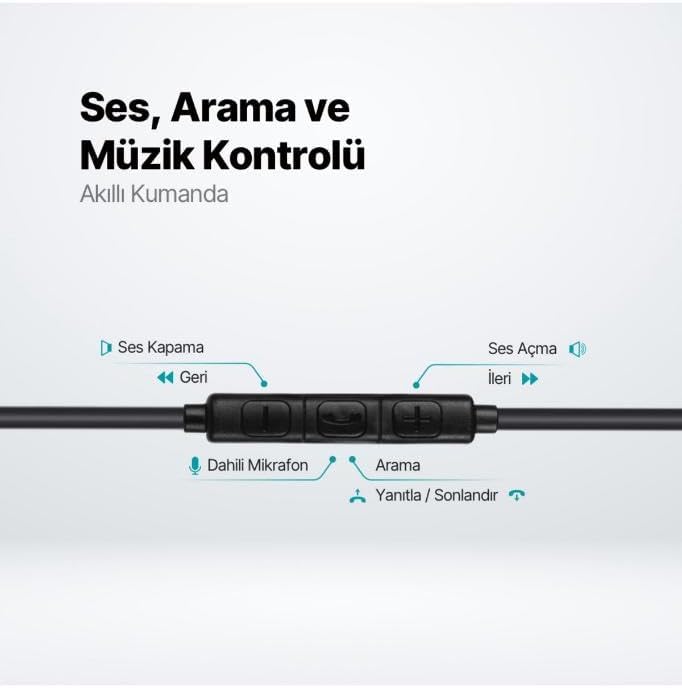
The TTEC Rio 2 headset features an inline smart controller for convenient management of your audio and calls.
Inline Controller Functions:
- Үнүн жогорулатуу (+): Аудионун үнүн жогорулатуу үчүн басыңыз.
- Үнүн төмөндөтүү (-): Аудионун үнүн азайтуу үчүн басыңыз.
- Play/Pause/Answer/End Call (Center Button):
- Single press to play or pause music.
- Single press to answer an incoming call.
- Single press to end an active call.
- Кирүүчү чалууну четке кагуу үчүн көпкө басыңыз.
- Next Track (Forward Button): Кийинки ырга өтүү үчүн басыңыз.
- Previous Track (Backward Button): Press to go back to the beginning of the current song or to the previous song.
- Камтылган микрофон: Located on the inline controller, it captures your voice for calls and voice commands.
Техникалык тейлөө
Proper care will extend the life and performance of your TTEC Rio 2 headset.
- Тазалоо: Кулакчындарды жана кабелди жумшак, кургак чүпүрөк менен акырын сүртүңүз. Катуу химиялык заттарды же абразивдүү материалдарды колдонбоңуз.
- Сактагыч: When not in use, store the headset in a clean, dry place. Avoid extreme temperatures. The included cable organizer clip can help prevent tangling.
- Нымдуулуктан качыңыз: Гарнитураны сууга же ашыкча нымдуулукка дуушар кылбаңыз.
- Этияттык менен мамиле кылуу: Avoid pulling on the cable or applying excessive force to the connectors.

Проблемаларды чечүү
If you encounter issues with your TTEC Rio 2 headset, refer to the following common solutions:
| Көйгөй | Мүмкүн чечим |
|---|---|
| Гарнитурадан үн жок. |
|
| Микрофон иштебей жатат. |
|
| Үн сапаты начар же бурмаланган. |
|
| Hissing or static noise. |
|
Техникалык шарттар
| Өзгөчөлүк | Деталь |
|---|---|
| Бренд | TTEC |
| Модель номери | 2KMM14S |
| Байланыш | USB-C |
| Наушник форма фактору | In-Ear |
| Кулак жайгаштыруу | In-Ear |
| Микрофон | Камтылган |
| Пакеттин өлчөмдөрү | 19.8 x 8.5 x 3.1 см |
| Элемент Салмагы | 40 грамм |
| ASIN | B0D3XJ5SP7 |
Кепилдик жана колдоо
For warranty information and customer support, please refer to the documentation included with your purchase or visit the official TTEC webсайт. Ар кандай кепилдик дооматтары үчүн сатып алганыңыздын далилин сактаңыз.