
Introduction
The AOSHIDA SMSL B2 is a versatile HiFi Bluetooth Receiver and Digital-to-Analog Converter (DAC) designed to enhance your audio experience. It features a high-performance CS43131 decoding chip and QCC5125 Bluetooth 5.1 chip, offering multiple input and output options for seamless integration with various audio systems.
This manual provides detailed instructions on setting up, operating, and maintaining your SMSL B2 device, along with troubleshooting tips and product specifications.
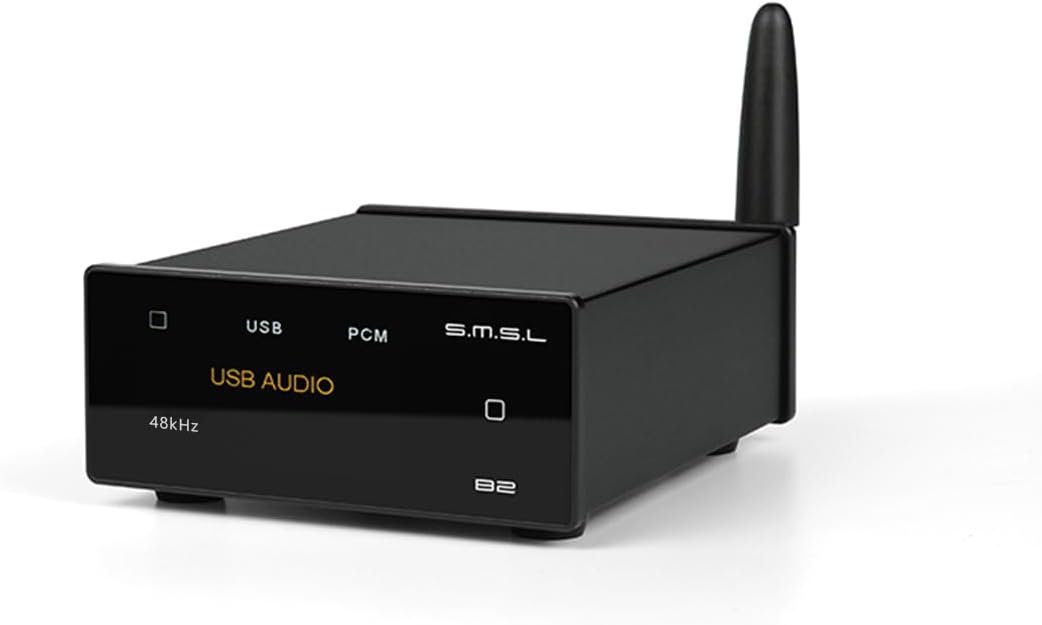
Сүрөт: алдыңкы view of the AOSHIDA SMSL B2 HiFi Bluetooth Receiver, a compact black device with a display and an antenna.
Пакеттин мазмуну
Баштоодон мурун, таңгактагы бардык буюмдардын бар экендигин текшериңиз:
- SMSL B2 Unit
- Bluetooth антеннасы
- Type-C USB кабели
- Колдонуучунун Колдонмосу (бул документ)
- Кепилдик картасы

Image: A visual representation of the SMSL B2 unit and its included accessories: Bluetooth antenna, Type-C cable, user manual, and warranty card.
Орнотуу колдонмосу
1. Power Connection
Connect the provided Type-C USB cable to the USB IN port on the back of the SMSL B2 unit. Connect the other end of the cable to a DC 5V 1A or higher power adapter (not included). Important: Do not use fast charging adapters to power the SMSL B2.
Screw the Bluetooth antenna into the designated antenna port on the back of the unit.

Image: Diagram showing the SMSL B2 unit with the USB-C power cable and Bluetooth antenna connected to its rear panel.
2. Audio Output Connection
The SMSL B2 offers multiple audio output options:
- RCA чыгаруу: Use RCA cables to connect the L (left) and R (right) RCA output jacks on the SMSL B2 to the corresponding analog input jacks on your ampкөтөргүч же активдүү спикерлер.
- Оптикалык чыгаруу: Use an optical cable to connect the OPTICAL output port on the SMSL B2 to the optical input of your DAC or audio receiver.
- Коаксиалдуу чыгаруу: Use a coaxial cable to connect the COAXIAL output port on the SMSL B2 to the coaxial input of your DAC or audio receiver.

Сүрөт: Арткы view of the SMSL B2 showing its USB-C input, optical, coaxial, and RCA output ports, with examples of connected devices like amplifiers and active speakers.
Иштөө нускамалары
Күйгүзүү/өчүрүү
To power on the SMSL B2, short press the square touch button on the right side of the front panel. To power off, press and hold the same button.
Киргизүү булактарын алмаштыруу
The SMSL B2 supports both Bluetooth and USB input. To switch between input sources, short press the square touch button on the front panel. The 1.9-inch LCD color screen will display the current input mode (e.g., "Bluetooth" or "USB AUDIO").

Image: The SMSL B2 front panel displaying "Pairing" and indicating the touch button for switching input sources.
Bluetooth режими
- Switch the SMSL B2 to Bluetooth mode. The screen will display "Bluetooth" and "Pairing".
- On your mobile phone, tablet, or laptop, enable Bluetooth and search for available devices.
- Select "SMSL B2" from the list of devices to pair. Once connected, the screen will show "Connected".
- Begin playing audio on your connected device. The SMSL B2's display will show the artist and title of the song, the encoding format (e.g., LDAC, aptX), and the sampле чен.

Image: A smartphone screen showing "SMSL B2" as a connected Bluetooth device, illustrating the pairing process.

Image: The SMSL B2's 1.9-inch LCD screen displaying song information (artist, title), Bluetooth codec (LDAC), and sample rate (96kHz) during playback.
USB DAC режими
The SMSL B2 can function as a plug-and-play USB DAC for your computer, laptop, or tablet. No driver installation is required for most operating systems.
- Connect the SMSL B2 to your computer/laptop/tablet using the provided Type-C USB cable.
- Switch the SMSL B2 to USB AUDIO mode using the front panel button. The screen will display "USB AUDIO".
- On your computer, select "SMSL B2" as the default audio output device in your sound settings.
- Begin playing audio from your computer. The SMSL B2 will process the digital audio signal.

Image: The SMSL B2 connected via USB-C to a laptop, with the display showing "USB AUDIO" and "44.1kHz", demonstrating its plug-and-play USB DAC functionality.
Техникалык тейлөө
- Аппаратты таза, жумшак, кургак чүпүрөк менен сүртүңүз. Катуу химиялык заттарды же абразивдүү тазалагычтарды колдонуудан алыс болуңуз.
- Ашыкча ысып кетүүнүн алдын алуу үчүн аппараттын айланасында туура желдетүүнү камсыз кылыңыз.
- Аппаратты түз күн нурунан жана экстремалдык температурадан алыс салкын, кургак жерде сактаңыз.
- Аппаратты түшүрүүдөн же катуу таасирлерден сактаныңыз.
Проблемаларды чечүү
| Көйгөй | Мүмкүн себеп | Чечим |
|---|---|---|
| Күч жок | Power cable not connected or faulty adapter. | Ensure the Type-C USB cable is securely connected and the power adapter meets DC 5V 1A or higher specifications. Avoid fast charging adapters. |
| Аудио чыгышы жок | Incorrect input source selected, incorrect output connection, or volume too low. | Verify the correct input mode (Bluetooth/USB) is selected on the B2. Check all audio cable connections (RCA, Optical, Coaxial). Ensure the connected amplifier/speakers are powered on and volume is adequate. For USB, ensure "SMSL B2" is selected as the default audio device on your computer. |
| Bluetooth жупташуу көйгөйлөрү | Device not in pairing mode, or too many paired devices. | Ensure the B2 is in Bluetooth pairing mode (display shows "Pairing"). Turn off Bluetooth on other nearby devices to avoid interference. Try restarting both the B2 and your source device. |
| Display not showing song info in USB mode | Бул функция Bluetooth режиминде гана жеткиликтүү. | The display of song title and artist is a feature specific to Bluetooth input. This information is not displayed when using USB input. |
Техникалык шарттар
| Өзгөчөлүк | Деталь |
|---|---|
| Модел | B2 |
| Декоддоо чип | CS43131 |
| Bluetooth чип | QCC5125 (Bluetooth 5.1) |
| Колдоого алынган Bluetooth кодектери | LDAC, SBC, AAC, aptX_HD, aptX_LL, aptX |
| Киргизүүлөр | USB түрү-C, Bluetooth |
| Чыгуулар | Оптикалык, коаксиалдык, RCA |
| USB Input Compatibility | PCM 24Bit/48kHz (Plug & Play for PC/Laptop/Tablet) |
| RCA Output Dynamic Range | 128дБ чейин |
| Дисплей | 1.9-inch LCD Color Screen (Touchscreen) |
| Электр камсыздоо | DC 5V 1A (via USB Type-C, fast charging adapters prohibited) |
| Өлчөмдөрү (L x W x Y) | 3.54 x 3.03 x 1.38 дюйм (90 x 77 x 35 мм) |
| Салмагы | 3.17 унция (90 грамм) |
| Аудио чыгаруу режими | Стерео |
| Өндүрүүчү | SMSL |

Image: Diagram illustrating the compact dimensions of the SMSL B2 unit: 35mm height, 90mm depth, and 77mm width, with a weight of 150g.
Кепилдик жана колдоо
The SMSL B2 comes with a warranty as detailed on the included Warranty Card. Please refer to the card for specific terms and conditions.
For technical support, troubleshooting assistance beyond this manual, or warranty claims, please contact AOSHIDA customer service through their official channels. You can often find support information on the AOSHIDA brand store page on Amazon or their official webсайт.
Visit the official AOSHIDA Store: AOSHIDA Store on Amazon