
Andoer 0226b5d0-9fdc-46fa-87a1-023ef5ed8edc
Andoer 4K Digital Camera User Manual
Model: 0226b5d0-9fdc-46fa-87a1-023ef5ed8edc
Introduction
This manual provides detailed instructions for the safe and effective use of your Andoer 4K Digital Camera. Please read this manual thoroughly before operating the camera and retain it for future reference. This camera is designed for capturing high-quality photos at 48MP and videos at 4K resolution, featuring a 2.8-inch screen, 16X digital zoom, auto-focus, anti-shake technology, and a built-in flash.
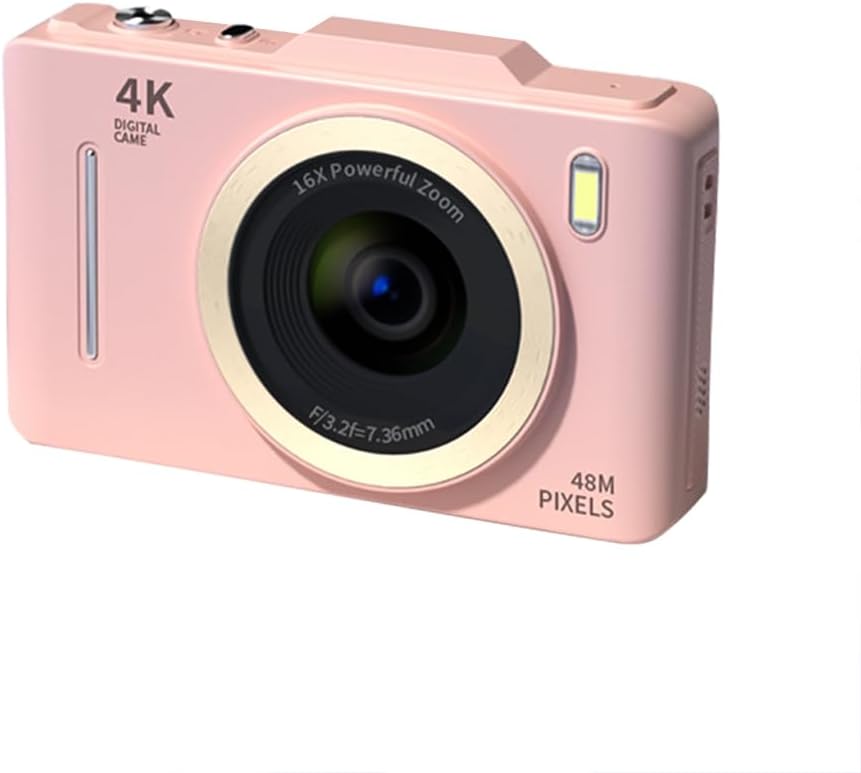
Сүрөт: алдыңкы view of the Andoer 4K Digital Camera in pink, showcasing its lens, flash, and 4K Digital Camera branding.
Маанилүү коопсуздук маалыматы
Эскертүү:
- Not suitable for children. Please read the product instructions and applicable age range carefully before purchase and use.
- Камераны сууга же ашыкча нымдуулукка дуушар кылбаңыз.
- Камераны жерге түшүрүүдөн же катуу тийүүдөн сактаныңыз.
- Use only specified batteries and charging methods.
- Камераны ажыратууга же өзгөртүүгө аракет кылбаңыз.

Image: A warning label indicating that the product is not suitable for children, with the warning translated into multiple languages.
Пакеттин мазмуну
Пакетте бардык буюмдар бар экенин текшериңиз:
- Andoer 4K Digital Camera
- USB кабели
- Кайра заряддалуучу литий батареясы
- User Manual
- Билек боосу (пакетке жараша өзгөрүшү мүмкүн)
Продукт бүттүview
Камеранын компоненттери менен таанышыңыз:
- Объектив: Сүрөттөрдү тартуу үчүн негизги оптикалык компонент.
- Flash: Provides additional light in low-light conditions.
- 2.8 дюймдук LCD экран: үчүн viewing live feed, reviewing photos/videos, and navigating menus.
- Башкаруу баскычтары: Power, Shutter, Zoom (W/T), Menu, OK, Display, Delete.
- USB порт: Заряддоо жана маалыматтарды өткөрүү үчүн.
- Батарея бөлүмү: Кайра заряддоого болгон батарейканы камтыйт.
- Эстутум картасынын слоту: For inserting an SD card (not included).

Сүрөт: Арткы view of the camera highlighting the 2.8-inch display screen and various control buttons for navigation and operation.
Жайгашуу
1. Батареяны орнотуу жана заряддоо
- Камеранын ылдый жагында жайгашкан батарея бөлүкчөсүнүн капкагын ачыңыз.
- Insert the provided lithium battery, ensuring the correct polarity.
- Батарея уясынын капкагын бекем жабыңыз.
- Connect the camera to a power source using the USB cable for charging. The charging indicator light will illuminate.
- Индикатор өчкөндө заряддоо аяктады.
2. Эстутум картасын орнотуу
A memory card (SD card, not included) is required to store photos and videos.
- Эстутум картасынын уячасын, адатта, батарея бөлүмүнүн жанына жайгаштырыңыз.
- SD-картаны металл контакттары камеранын алдына каратып, чыкылдаганча кыстарыңыз.
- Алып салуу үчүн, картаны ал чыгып кеткенче акырын басыңыз.
Иштөө нускамалары
Күйгүзүү/өчүрүү
- басып, кармап туруңуз Күч камераны күйгүзүү же өчүрүү үчүн баскыч.
Сүрөт тартуу
- Камераны күйгүзүңүз.
- 2.8 дюймдук LCD экранды колдонуп, сүрөтүңүздү кадрга алыңыз.
- басыңыз Жабык button halfway down to activate auto-focus (AF).
- Once focused, press the Жабык сүрөткө тартуу үчүн баскычын толугу менен басыңыз.
Видеолорду жаздыруу
- Камераны күйгүзүңүз.
- Switch to video mode (refer to the on-screen icons or menu for mode selection).
- басыңыз Жабык жазууну баштоо үчүн баскыч.
- басыңыз Жабык жазууну токтотуу үчүн кайра баскычын басыңыз.
Zoom функциясы
- колдонуу W (Wide) and T (Telephoto) buttons to adjust the 16X digital zoom.

Image: A visual comparison demonstrating the effect of 1x digital zoom versus 16x digital zoom, showing how the camera can magnify distant subjects.
Flash колдонуу
- The built-in flash can be activated in low-light conditions. Access flash settings via the menu to select modes like Auto Flash, Fill-in Flash, or Flash Off.

Image: Illustrates the effect of the built-in flash, showing a scene with and without flash to demonstrate improved lighting in dark environments.
Anti-Shake Feature
- The camera features digital anti-shake technology to reduce blur caused by camera movement. This feature is typically active by default or can be enabled in the settings menu.

Image: Demonstrates the effectiveness of the anti-shake feature by comparing a clear image taken with anti-shake mode to a blurry image without it, both showing people in motion.
Сулуулук чыпкалары
- Access the menu to apply various beauty filters (e.g., Original, Cool colors, Retro, Black and white) to your photos for creative effects.

Image: Displays different beauty filter options available on the camera, including Original, Cool colors, Retro, and Black and white, applied to a portrait.
Кыймылды аныктоочу видео
- Enable motion detection in the video settings. The camera will automatically start recording when movement is detected within the frame.

Image: Illustrates the motion detection feature, showing a dog in motion with a white square indicating the detection area.
Ойнотуу жана кайраview
- басыңыз Ойнотуу button (often labeled with a play icon) to view тартылган сүрөттөр жана видеолор.
- Медиаңызда жылдыруу үчүн навигация баскычтарын колдонуңуз.
- басыңыз Жок кылуу керексиз нерселерди алып салуу баскычы files.
Компьютерге туташуу
- Камераны компьютериңизге берилген USB кабели аркылуу туташтырыңыз.
- The camera will appear as a removable disk drive, allowing you to transfer files.
Техникалык тейлөө
- Линзаны тазалоо: Камера линзалары үчүн атайын жасалган жумшак, түксүз кездемени колдонуңуз. Абразивдүү материалдарды же катуу химиялык заттарды колдонбоңуз.
- Экранды тазалоо: Wipe the LCD screen gently with a soft, dry cloth.
- Сактагыч: When not in use for extended periods, remove the battery and store the camera in a cool, dry place away from direct sunlight.
- Батареяга кам көрүү: Fully charge the battery before first use. Avoid completely draining the battery frequently to prolong its lifespan.
Проблемаларды чечүү
| Көйгөй | Мүмкүн чечим |
|---|---|
| Камера күйбөйт. | Батарея туура орнотулганын жана толук заряддалганын текшериңиз. |
| Сүрөткө тартуу/видео жаздыруу мүмкүн эмес. | Check if a memory card is inserted and has sufficient free space. Ensure the camera is in the correct mode (photo/video). |
| Сүрөттөр бүдөмүк. | Ensure the lens is clean. Check lighting conditions. Enable anti-shake feature. Hold the camera steady. |
| Флэш иштебей жатат. | Check flash settings in the menu; ensure it's not set to 'Flash Off'. |
| Камера компьютер тарабынан таанылган жок. | Ensure the USB cable is securely connected. Try a different USB port or cable. Restart both camera and computer. |
Техникалык шарттар
| Өзгөчөлүк | Деталь |
|---|---|
| Бренд | Андоер |
| Модель номери | 0226b5d0-9fdc-46fa-87a1-023ef5ed8edc |
| Натыйжалуу дагы эле чечим | 48 депутат |
| Video Resolution | 4K (2160p) |
| Screen Size | 2.8 дюйм |
| Digital Zoom | 16X |
| Автофокус | Yes (Contrast Detection) |
| Image Stabilization | Санариптик анти-силкинүү |
| Камтылган Flash | Ооба |
| Батарея түрү | Литий ион |
| Фото формат | JPEG |
| Video Format | MP4 |
| Тышкы интерфейс | USB |
| Сенсор түрү | CMOS |
| Түс | Pink (variant) |
| Сууга туруктуулук деңгээли | Сууга чыдамдуу эмес |
Кепилдик жана колдоо
For warranty information and technical support, please refer to the documentation included with your purchase or visit the official Andoer webсайт. Кепилдик дооматтар үчүн сатып алганыңыздын далилин сактаңыз.
Andoer Official Store: Visit Andoer Store on Amazon
Ask a question about this manual
Ask about setup, troubleshooting, compatibility, parts, safety, or missing instructions. Manuals+ will review the question and use this page’s manual context to help answer it.