
ANKEWAY AW1030-EU
ANKEWAY Wireless Carplay Screen for Motorcycle User Manual
Model: AW1030-EU
1. Киришүү
This manual provides comprehensive instructions for the installation, operation, and maintenance of your ANKEWAY Wireless Carplay Screen for Motorcycle. This device is designed to enhance your riding experience by integrating smartphone functionalities like navigation, music, and communication directly onto your motorcycle's handlebars.

Figure 1: ANKEWAY Wireless Carplay Screen for Motorcycle.
2. Негизги өзгөчөлүктөрү
- Зымсыз CarPlay & Android Auto: Seamlessly connect your smartphone for navigation, calls, music, and messages.
- Built-in Dual Bluetooth: Connect both your smartphone and a Bluetooth helmet/headphones simultaneously.
- 5-inch HD IPS Touchscreen: Clear and responsive display with 1024x600 resolution.
- Universal Motorcycle Compatibility: Designed to fit all motorcycle models with included mounting kit.
- IP67 Waterproof & Anti-Theft Design: Withstands various weather conditions and features a removable anti-theft stand.
- Кеңири иштөө температурасы: Functions smoothly from -20°C to 70°C.
3. Пакеттин мазмуну
Пакетте бардык буюмдар бар экенин текшериңиз:
- ANKEWAY Wireless Carplay Screen Unit
- Motorcycle Mounting Kit (including bracket and screws)
- Power Cable (for battery connection)
- USB-C Power Cable (alternative power source)
- Installation Tools (wrench, screwdriver)
- Колдонуучунун Колдонмосу (бул документ)

2-сүрөт: Таңгактын курамы жана өлчөмдөрү.
4. Орнотуу жана орнотуу
4.1 Аппаратты орнотуу
- Select a suitable location on your motorcycle's handlebars for optimal visibility and access.
- Attach the mounting bracket securely to the handlebar using the provided screws and tools. Ensure it is tightened firmly to prevent movement during riding.
- Slide the ANKEWAY Carplay Screen unit onto the mounting bracket until it clicks into place. The anti-theft design allows for easy removal when parked.
4.2 Кубат туташтыруу
The device can be powered via direct battery connection or a USB-C port.
- Батареяга түз туташуу: Connect the provided power cable to your motorcycle's 12V battery. Ensure correct polarity (red to positive, black to negative). It is recommended to connect to a switched power source to prevent battery drain when the motorcycle is off.
- USB-C туташуу: If your motorcycle has a USB-C port, you can use the USB-C power cable for convenience.
4.3 Баштапкы күйгүзүү
Once connected to power, the device should automatically power on. If not, check the power connections.
5. Иштөө нускамалары
5.1 Connecting to CarPlay / Android Auto
- Смартфонуңуздун Bluetooth жана Wi-Fi иштетилгенин текшериңиз.
- On the ANKEWAY screen, navigate to the CarPlay or Android Auto icon and tap it.
- The screen will display a pairing name. On your smartphone, search for this Bluetooth device and pair with it.
- Follow the on-screen prompts on both the ANKEWAY screen and your smartphone to complete the connection. Once paired via Bluetooth, the Wi-Fi connection for CarPlay/Android Auto will establish automatically.
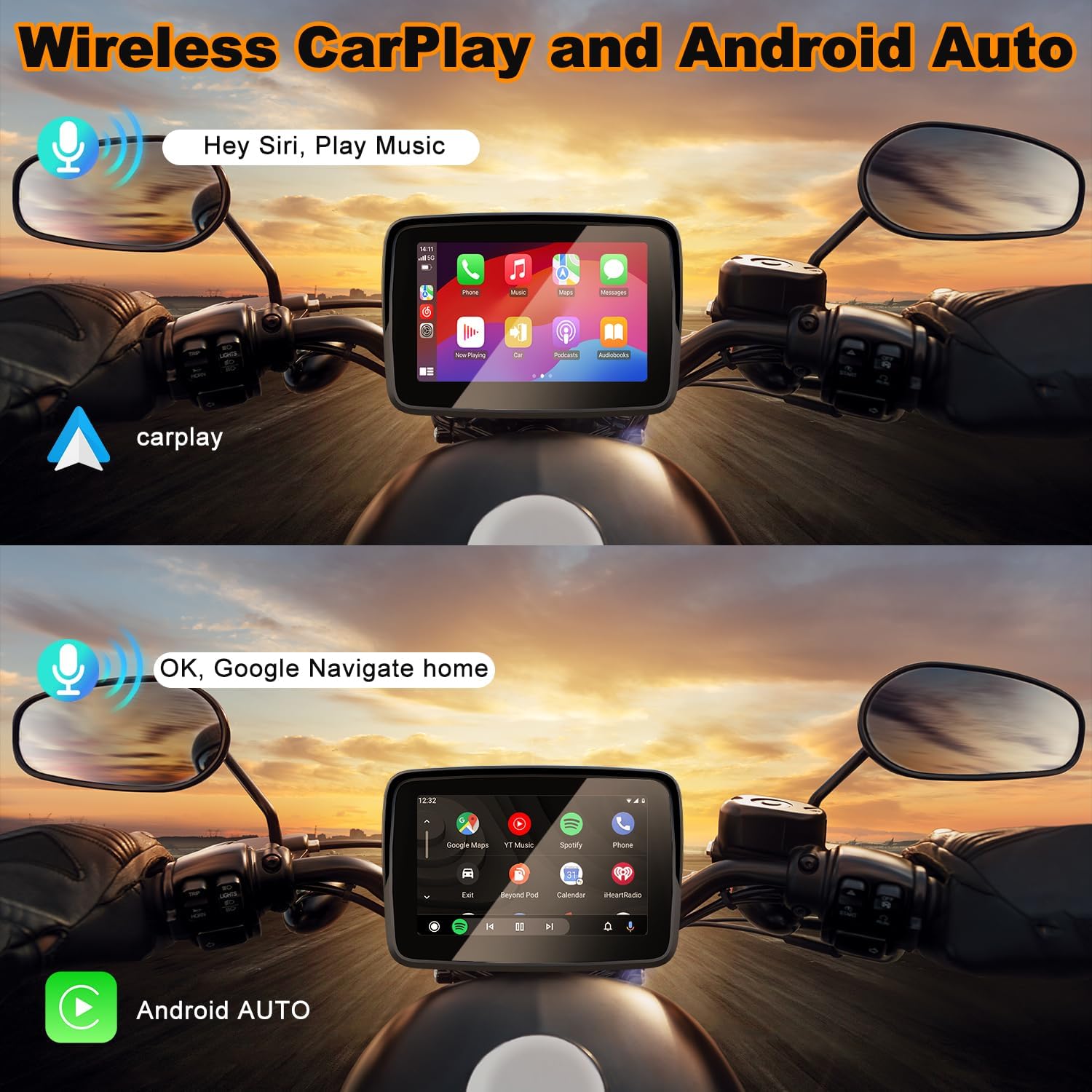
3-сүрөт: Зымсыз CarPlay жана Android Auto интерфейси.
5.2 GPS навигациясы
Once connected to CarPlay or Android Auto, you can use your preferred navigation apps (e.g., Apple Maps, Google Maps, Waze) directly on the ANKEWAY screen. Voice commands via Siri or Google Assistant are supported for hands-free operation.

Figure 4: GPS Navigation and Multimedia Functions.
5.3 Dual Bluetooth Connection (Helmet/Headphones)
The ANKEWAY screen features dual Bluetooth, allowing connection to both your smartphone and a Bluetooth-enabled helmet or headphones for audio output and hands-free calls.
- Ensure your helmet or earphone is turned on and in pairing mode.
- On the ANKEWAY screen, go to the Bluetooth settings.
- Издөө and select your helmet/earphone from the list of available devices to pair.
- Маанилүү: Do not connect your mobile phone directly to the Bluetooth helmet or earphone, as this may interfere with the pairing process with the ANKEWAY screen.

Figure 5: Bluetooth Helmet Setup.
5.4 Мультимедиа ойнотуу
Play music, podcasts, and audiobooks through your connected smartphone via CarPlay or Android Auto. Audio will be routed to your paired Bluetooth helmet or headphones.
5.5 Чалуулар жана билдирүүлөр
Make and receive calls, and send/receive messages using voice commands or the touchscreen interface, all while keeping your hands on the handlebars.
6. Техникалык тейлөө жана кам көрүү
- Тазалоо: жумшак колдонуу, damp cloth to clean the screen and device body. Avoid abrasive cleaners or solvents.
- Суу өткөрбөйт рейтинги: The device is IP67 waterproof, meaning it is protected against dust and can withstand immersion in water up to 1 meter for 30 minutes. However, avoid prolonged submersion or high-pressure water jets.
- Температура: The device operates smoothly in temperatures from -20°C to 70°C. Avoid exposing it to extreme temperatures outside this range for extended periods.
- Сактагыч: When not in use for extended periods, store the device in a cool, dry place. Consider removing it from the motorcycle to prevent theft.

Figure 6: Weather Resistance.
7. Кыйынчылыктарды
| Көйгөй | Мүмкүн себеп | Чечим |
|---|---|---|
| Түзмөк күйбөйт. | Электр энергиясы жок; зымдар туура эмес туташтырылган; сактагыч күйүп кеткен. | Check power cable connections and polarity. Ensure the motorcycle's ignition is on if connected to a switched power source. Check vehicle's fuse box. |
| Cannot connect to CarPlay/Android Auto. | Bluetooth/Wi-Fi off on phone; phone not compatible; interference. | Ensure phone's Bluetooth and Wi-Fi are on. Confirm phone supports wireless CarPlay/Android Auto. Try restarting both devices. Ensure no other devices are interfering with Bluetooth pairing. |
| No audio from helmet/headphones. | Helmet/headphones not paired; volume too low; phone connected directly to helmet. | Ensure helmet/headphones are paired to the ANKEWAY screen, not directly to the phone. Adjust volume on both devices. Re-pair if necessary. |
| Сенсордук экран жооп бербейт. | Software glitch; extreme temperature. | Restart the device. Ensure operating temperature is within specified range (-20°C to 70°C). |
8. Техникалык шарттар
- Экрандын өлчөмү: 5 дюйм
- Экран түрү: Full IPS Touch Screen
- Экрандын чечилиши: 1024x600
- Видео форматтары: MP4, 3GP, WMV, MKV, AVI, FLV, MOV
- Сүрөт форматы: JPG
- Электр камсыздоо: 12V
- Иштөө агымы: Maximum 2A
- Иштөө температурасы: -20°Cден 70°Cге чейин
- Суу өткөрбөйт рейтинги: IP67
- Тилдер: English, Spanish, French, Italian, German, etc.
- Модель номери: AW1030-EU
9. Кепилдик жана колдоо
ANKEWAY offers a 12 айлык кепилдик жана өмүр бою техникалык колдоо for this product. We are committed to providing high-quality customer service and products.
9.1 Микропрограмма жаңыртуулары
Our technical support team regularly releases firmware update packages to continuously improve the system experience. If you need to update, please contact the technical support team to get the upgrade package.
9.2 Колдоо кызматы менен байланышуу
For any issues, questions, or to request firmware updates, please contact us:
- Электрондук почта: ankeway@ding.com
- WhatsApp: Scan QR code or click here for WhatsApp support
Figure 7: WhatsApp Support QR Code.
Ask a question about this manual
Ask about setup, troubleshooting, compatibility, parts, safety, or missing instructions. Manuals+ will review the question and use this page’s manual context to help answer it.