
1. Киришүү
This manual provides detailed instructions for the safe and effective operation of your WLLKIY ET31C/ET32C Automotive Signal Generator Multimeter. This device combines the functions of a signal generator and a multimeter, designed for automotive diagnostics and testing. It can simulate various automotive sensor signals, test ignition coils, and perform standard multimeter measurements.

Figure 1: WLLKIY ET31C/ET32C Automotive Signal Generator Multimeter and included accessories.
2. Коопсуздук маалыматы
Please read and understand all safety warnings and operating instructions before using this instrument. Failure to follow these instructions may result in electric shock, fire, or serious injury.
- Унаалар менен иштегенде ар дайым коопсуздук көз айнеги сыяктуу тиешелүү жеке коргонуу каражаттарын кийиңиз.
- Эгерде түзмөк бузулгандай көрүнсө же сыноо өткөргүчтөрү бузулган болсо, аны колдонбоңуз.
- Ensure the device is powered off before connecting or disconnecting test leads.
- Ток чынжырлары менен байланышуудан сактаңыз.
- Do not exceed the maximum input ratings specified in the specifications section.
- Аппаратты нымдуулуктан жана экстремалдык температурадан алыс кармаңыз.
3. Пакеттин мазмуну
Төмөндө тизмеленген нерселердин баары пакетиңизде бар экенин текшериңиз:
- 1 x Signal Generator Multimeter (ET31C or ET32C model)
- 1 х Сыноолордун жуптары
- 1 x Pair of Alligator Clip Wires
- 1 x USB Type-C Cable (for ET32C charging, or data for both)
- 1 x Англис колдонуучу колдонмо
Note: For ET31C, 3x 1.5V AAA batteries are required and are not included. The ET32C model includes a built-in 4.2V lithium battery.
4. Орнотуу
4.1 Аппаратты күйгүзүү
- For ET31C: Open the battery compartment on the back of the device. Insert 3x 1.5V AAA batteries, ensuring correct polarity. Close the compartment.
- For ET32C: The device has a built-in rechargeable battery. If the battery is low, connect the included USB Type-C cable to the device and a suitable USB power source (e.g., computer USB port, USB wall adapter).
- Press and hold the power button (usually marked with a power symbol) to turn on the device.
4.2 Сыноо өткөргүчтөрүн туташтыруу
Connect the test leads or alligator clip wires to the appropriate input jacks on the bottom of the device.
- COM Jack: Common (negative) input for all measurements and signal output.
- VΩHz Jack: Том үчүн оң киргизүүtage, каршылыкты, жыштыкты, сыйымдуулукту, диодду жана үзгүлтүксүздүктү өлчөө.
- Чыгуу Джек: Positive output for signal generation.
5. Иштөө нускамалары
5.1 Режимдердин ортосунда которулуу
The device operates in two primary modes: Signal Generator and Multimeter. Use the РЕЖИМ button to switch between these functions. The current mode will be displayed on the 2.8-inch screen.
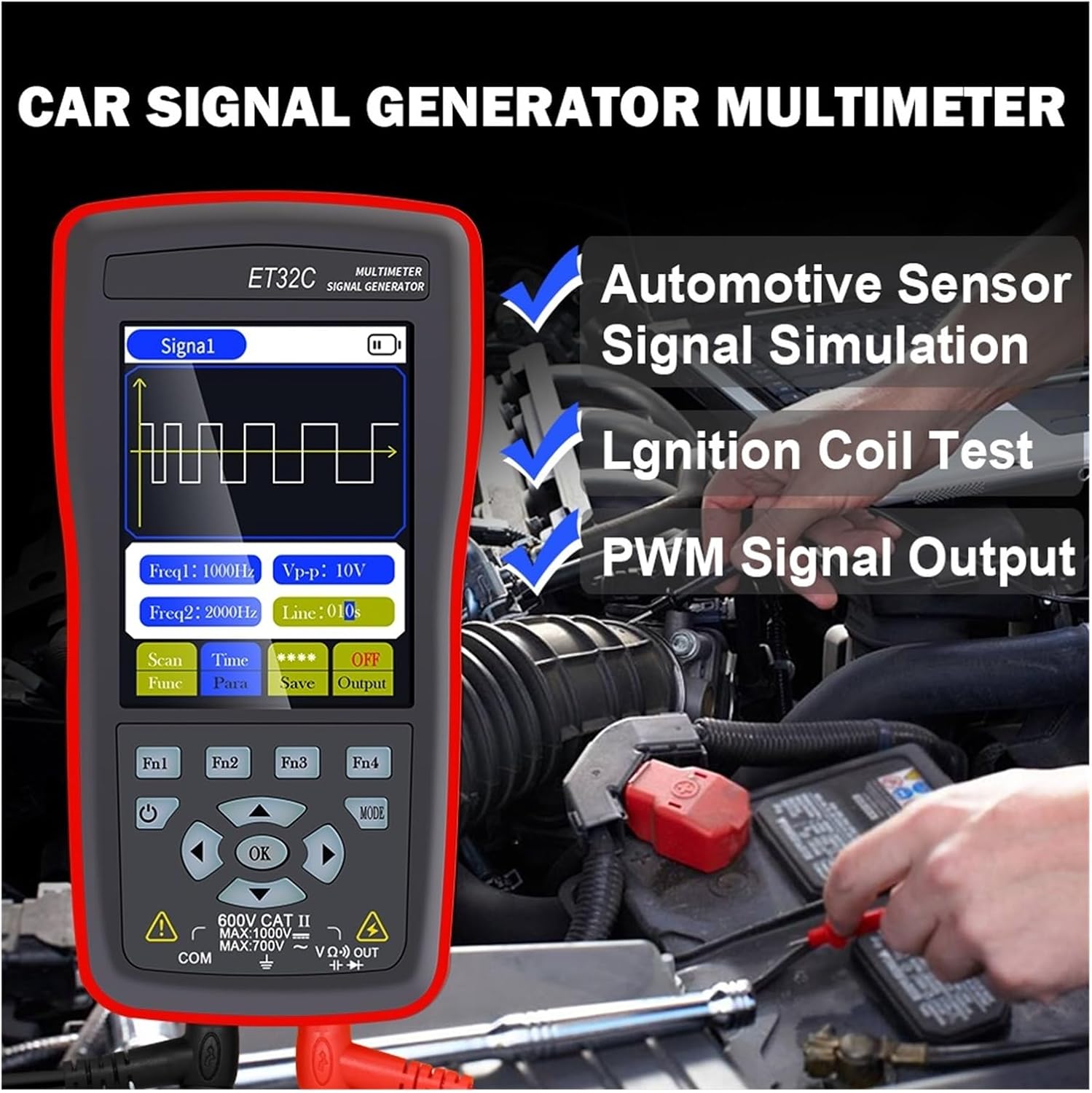
Figure 2: The device in use for automotive sensor signal simulation and ignition coil testing.
5.2 Signal Generator Functions
This mode allows you to generate various electrical signals for testing automotive components.
- Signal Types: Sine wave, Square wave, Combined wave (e.g., 58+2, 10+1 missing teeth), Scan wave, and DC wave.
- Жыштык диапазону: 1Hz to 9999Hz (adjustable in 1Hz steps).
- Output Voltage (Чокудан Чокуга): -12V to +12V (adjustable in 1V steps).
- Жумуш цикли (Square Wave үчүн): 1%дан 99%ке чейин.
- Scan Wave: Simulates crankshaft/camshaft signal changes from low to high speed (scan time 1s to 999s).
- Combined Wave: Allows setting of missing teeth signals (e.g., 58+2, 10+1). Maximum combined wave combinations: 99+99.
- Толкун формасынын сакталышы: The instrument supports storing up to 50 sets of waveform parameters.

Figure 3: Display illustrating combined wave signal generation with missing teeth settings.

Figure 4: The device's waveform storage feature, allowing up to 50 sets of parameters to be saved.
5.2.1 Automotive Signal Simulation
The signal generator can simulate Hall-type and magneto-electric crankshaft and camshaft signals. This is useful for diagnosing engine management systems without needing to run the engine.
- Supports simulation for both gasoline and diesel vehicles.
- Simulate various sensor outputs to test ECU responses.

Figure 5: The device functioning as a vehicle maintenance signal source, simulating sensor outputs.
5.2.2 Ignition Coil Control
The device can control ignition coils, solenoid valves, and relays to test their functionality.
- Coil control power: Less than 30V/1A.
- Connect the output to the component to be tested and observe its operation.

Figure 6: Screen showing the ignition coil test function, used to verify normal operation of coils, solenoid valves, and relays.
5.3 Мультиметрдин функциялары
In multimeter mode, the device performs standard electrical measurements.
- DC Voltage: Max 1000V.
- AC Voltage: Max 750V.
- Каршылык: Max 40MΩ.
- Сыйымдуулугу: Max 100uF.
- Жыштыгы: Max 50KHz.
- Милдеттик цикл: 0.1%дан 99.9%ке чейин.
- Диод сыноо: 0V ден 1.5V чейин.
- Үзгүлтүксүздүк тести: Resistance value for continuity detection: Max 30Ω.
- Дисплей: 4000 counts, updates 3 times per second.

Figure 7: The device's multimeter display showing a measurement, alongside details of the 2.8-inch screen with 320x480 resolution.
6. Техникалык шарттар
6.1 Жалпы спецификациялар
- Дисплей: 2.8 дюймдук, 320 * 480 чечим
- Сенсордук экран: Колдоого алынбайт
- USB интерфейси: C түрүндөгү USB
- Battery (ET31C): 3 * 1.5V AAA batteries (not included)
- Battery (ET32C): Камтылган 4.2V литий батареясы
- Сактоо температурасы: -20°Cден 60°Cге чейин (-4°Fтен 140°Fге чейин)
- Иштөө температурасы: 0°Cден 50°Cге чейин (32°F—122°F)
- Нымдуулук: <85% RH (конденсацияланбаган)
- Продукциянын өлчөмдөрү (LxWxH): 134 мм * 69 мм * 25 мм
- Продукт Салмагы: 125 g (excluding accessories)
6.2 Сигнал генераторунун параметрлери
- Sine Wave/Square Wave Frequency Range: 1 Гц ~ 9999 Гц
- Sine Wave/Square Wave Frequency Step: 1 Гц
- Sine Wave/Square Wave Peak Range: -12V ~ +12V
- Sine Wave/Square Wave Peak Step: 1V
- Scan Wave Scan Time Range: 1с ~ 999с
- Maximum Combined Wave Combinations: 99+99
- Output Voltage диапазону: -12V ~ +12V
- Output Voltage Кадам: 1V
- Coil Control Power: Less than 30V/1A
- Толкун формасынын сакталышы: 50 комплект
- Duty Setting (for Square Wave only): 1% ~ 99%
6.3 Мультиметрдин параметрлери
- Максималдуу DC Input Voltage: 1000V
- Максималдуу AC киргизүү көлөмүtage: 750V
- Maximum Measured Resistance: 40МΩ
- Maximum Measured Capacitance: 100 uF
- Maximum Frequency Measurement: 50 KHz
- Duty Cycle Measurement Range: 0.1% ~ 99.9%
- Diode Measurement Range: 0V ~ 1.5V
- Maximum Resistance for Continuity Detection: 30Ω
- Көрсөтүүлөрдүн саны: 4000 эсеп
- Жаңыртуу ылдамдыгы: секундасына 3 жолу
7. Техникалык тейлөө
- Тазалоо: Аппаратты жумшак менен сүртүңүз, гamp кездеме. Абразивдүү тазалагычтарды же эриткичтерди колдонбоңуз.
- Сактагыч: Store the device in a cool, dry place away from direct sunlight and extreme temperatures. If storing for extended periods, remove AAA batteries from the ET31C model.
- Battery Care (ET32C): For optimal battery life, avoid fully discharging the battery frequently. Charge the device regularly if not in use for long periods.
- Сыноочулар: Ар бир колдонуудан мурун сыноо зымдарында кандайдыр бир бузулуулар (кесилген жерлер, жаракалар) бар-жогун текшериңиз. Бузулган зымдарды дароо алмаштырыңыз.
8. Кыйынчылыктарды
| Көйгөй | Мүмкүн себеп | Чечим |
|---|---|---|
| Түзмөк күйбөйт. |
|
|
| Incorrect readings in Multimeter mode. |
|
|
| No signal output from Signal Generator. |
|
|
9. Кепилдик жана колдоо
For warranty information and technical support, please refer to the documentation provided with your purchase or contact WLLKIY customer service directly. Contact details can typically be found on the manufacturer's official webсайтында же продуктунун таңгагында.