
1. Киришүү
Thank you for choosing the OBZ F2 Desktop Barcode Scanner. This device is designed to provide efficient and accurate barcode scanning for various applications, including retail, logistics, and payment processing. Its hands-free operation, automatic detection, and broad compatibility make it a versatile tool for enhancing productivity.
This manual provides essential information on setting up, operating, and maintaining your OBZ F2 scanner. Please read it thoroughly before use to ensure proper functionality and to prevent damage.
2. Коопсуздук маалыматы
- Сканерди экстремалдык температурага, нымдуулукка же тике күн нуруна калтырбаңыз.
- Сканерди түшүрүүдөн же катуу таасирлерге дуушар кылуудан качыңыз.
- Сканерди ажыратууга же өзгөртүүгө аракет кылбаңыз. Бул кепилдикти жокко чыгарат.
- Keep the scanning window clean to ensure optimal performance. Use a soft, dry cloth for cleaning.
- Бул аппарат имараттын ичинде гана колдонууга арналган.
3. Пакеттин мазмуну
Please check the package contents upon opening. The standard package should include:
- OBZ F2 Desktop Barcode Scanner
- USB кабели (тиркелген)
- Колдонуучунун Колдонмосу (бул документ)
4. Продукт бүтүп калдыview
The OBZ F2 scanner features a compact, desktop design with an integrated USB cable for easy connectivity. Its omnidirectional scanning capability allows for quick and efficient reading of various barcode types.

Figure 4.1: OBZ F2 Desktop Barcode Scanner in use, demonstrating QR code scanning from a smartphone.

4.2-сүрөт: Арткы view of the OBZ F2 scanner showing the integrated USB cable for connection.

Figure 4.3: Product dimensions and material details. Note the protective film on the scan window that should be removed before first use.
5. Орнотуу
The OBZ F2 Barcode Scanner is designed for plug-and-play operation, requiring no software or driver installation.
- Сканерди таңгактан чыгаруу: Сканерди таңгагынан кылдаттык менен чыгарып алыңыз.
- Коргоочу пленканы алып салуу: Peel off any protective film from the scanning window.
- Компьютерге туташуу: Plug the USB cable of the scanner into an available USB port on your computer or POS system.
- Системаны таануу: Your operating system will automatically detect and configure the scanner. This may take a few seconds.
- Колдонууга даяр: Таанылгандан кийин, сканер штрих-коддорду сканерлеп баштоого даяр.
6. Иштөө нускамалары
The OBZ F2 scanner utilizes automatic detection and CMOS image technology for efficient and accurate scanning.
6.1. Штрихкоддорду сканерлөө
- Hands-Free операциясы: Place the scanner on a flat surface. There is no need to pick it up.
- Автоматтык аныктоо: The scanner will automatically activate when a barcode is presented within its scanning area.
- Позициялоо: Hold the barcode (on paper, label, or digital screen) within the scanner's field of view. The scanner will emit a light beam to read the code.
- Ырастоо: A successful scan is typically indicated by an audible beep and/or a visual confirmation light.

6.1-сүрөт: Мисample of a payment process using the OBZ F2 scanner to read a QR code from a mobile device.
6.2. Колдоого алынган штрих-код түрлөрү
The OBZ F2 scanner supports a wide range of 1D and 2D barcode symbologies, including those found on labels, paper, and digital displays (mobile phones, computer screens).

Figure 6.2: The scanner supports various 1D codes (e.g., Code128, Code39, UPC, EAN13) and 2D codes (e.g., QR Code).
6.3. Системанын шайкештиги
The scanner is compatible with a variety of operating systems, ensuring broad usability across different setups.
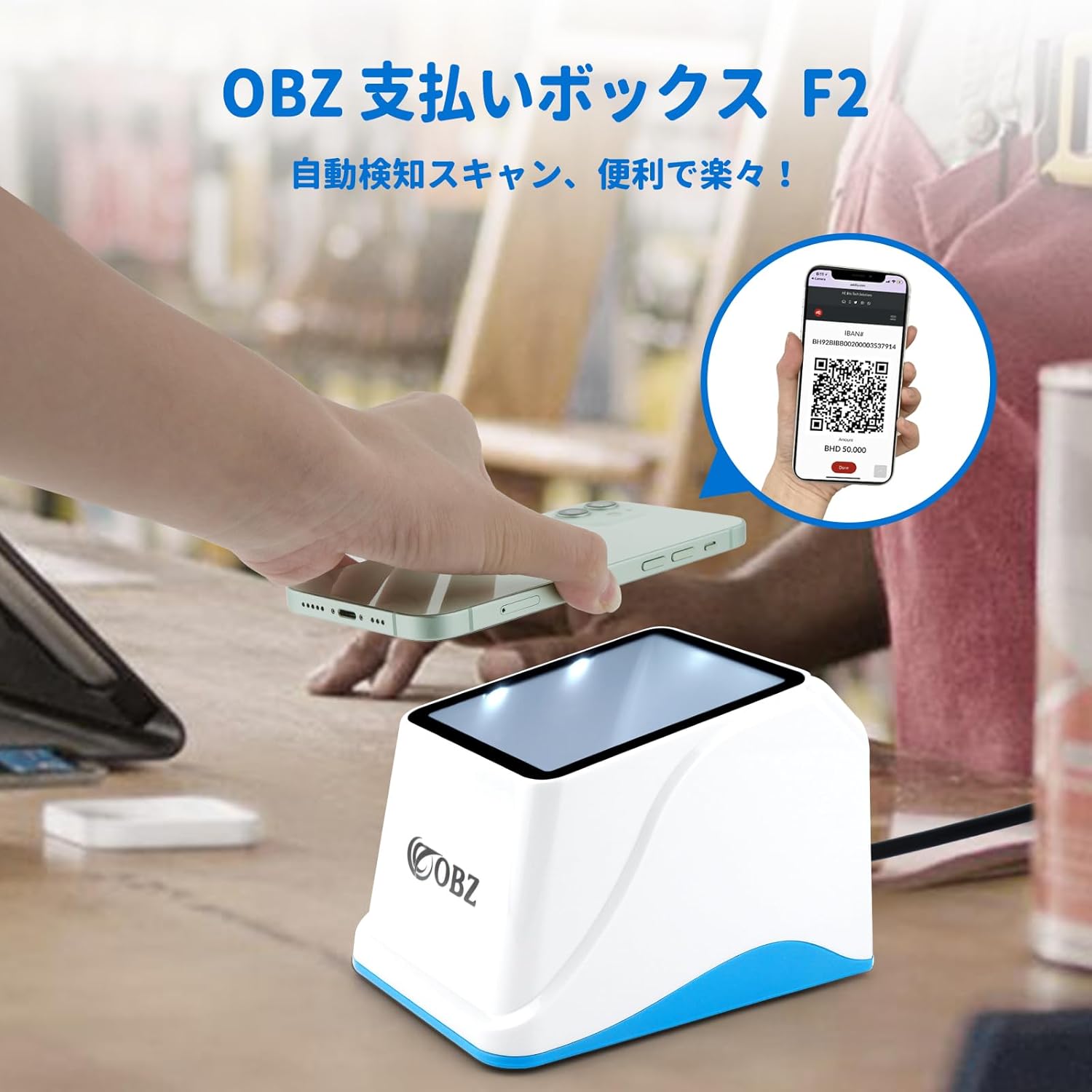
Figure 6.3: Compatible with Windows (XP/7/8/10/11), Linux, Android, and Mac OS. It integrates seamlessly with common office software like Word, Excel, and TXT applications.
7. Техникалык тейлөө
Proper maintenance ensures the longevity and optimal performance of your OBZ F2 scanner.
- Сканерлөө терезесин тазалоо: Regularly clean the scanning window with a soft, lint-free cloth. For stubborn smudges, slightly dampкездемени суу же жумшак, абразивдүү эмес тазалоочу каражат менен сүртүңүз. Катуу химиялык заттарды же абразивдүү материалдарды колдонбоңуз.
- Жалпы тазалоо: Сканердин сыртын кургак же бир аз кургак чүпүрөк менен сүртүңүзamp чаңды жана кирди тазалоо үчүн кездеме.
- Сактагыч: Колдонулбай турган учурда, сканерди таза, кургак жерде, күндүн түз нурунан жана өтө жогорку температурадан алыс сактаңыз.
8. Кыйынчылыктарды
If you encounter issues with your OBZ F2 scanner, please refer to the following common problems and solutions:
| Көйгөй | Мүмкүн себеп | Чечим |
|---|---|---|
| Сканер күйбөйт же жооп бербейт. | USB кабели туура эмес туташкан же USB порту бузук. | USB кабелинин сканерге да, компьютерге да бекем сайылганын текшериңиз. Башка USB портун колдонуп көрүңүз. |
| Сканер штрих-коддорду окубайт. | Barcode is damaged, poorly printed, or not supported. Scanning window is dirty. Insufficient lighting. | Try scanning a different, known-good barcode. Clean the scanning window. Ensure adequate lighting. Verify the barcode type is supported. |
| Scanner reads slowly or intermittently. | Scanning window is dirty. Barcode is not presented correctly. | Clean the scanning window. Ensure the barcode is flat and within the optimal scanning range. |
| No sound or incorrect sound settings. | Sound settings need adjustment. | Refer to the user guide (PDF) for instructions on adjusting the volume and sound settings. This typically involves scanning specific configuration codes. |
Бул чечимдерди колдонуп көргөндөн кийин көйгөй чечилбесе, кардарларды колдоо менен байланышыңыз.
9. Техникалык шарттар
| Өзгөчөлүк | Description |
|---|---|
| Модел | F2 (NF2-JP) |
| Түс | Ак + Көк |
| Өлчөмдөрү (L x W x Y) | 136мм x 95мм x 96мм |
| Салмагы | 180г |
| Кабелдин узундугу | 1.2 м |
| Материал | ABS + PC |
| Туташуу ыкмасы | USB кабели |
| Скандоо технологиясы | CMOS Image |
| Scan бурчу | 360 градус |
| Колдоого алынган символдор | 1D: Code128, Code39, UPC, EAN13, etc. 2D: QR Code, etc. |
| Шайкештик | Windows XP/7/8/10/11, Linux, Android, Mac OS |
10. Кепилдик жана колдоо
OBZ provides a үч жылдык кепилдик for this barcode scanner from the date of purchase. This warranty covers manufacturing defects and malfunctions under normal use.
For technical support, warranty claims, or any inquiries regarding your OBZ F2 Barcode Scanner, please contact our customer service team through the platform where you purchased the product. Please have your purchase details and product model number ready when contacting support.