
1. Киришүү
Thank you for choosing the VOLT PLUS TECH Pro Earbuds YD03. This manual provides essential information on how to set up, operate, and maintain your new wireless earbuds. Please read it carefully to ensure optimal performance and longevity of your device.
Пакеттин мазмуну
- Зымсыз кубаттоо кутусу
- 2 x Earbuds (Left and Right)
- Заряддоо кабели (USB-C)
- User Manual
- Кулак жаздыкчалары (бир нече өлчөмдө)

Image 1.1: The VOLT PLUS TECH Pro Earbuds YD03, showing both earbuds and the charging case with its LED display.
2. Баштоо
Кулакчындарды жана кутуну кубаттоо
Before first use, fully charge the earbuds and the charging case. The charging case also functions as a power bank for the earbuds.
- Connect the provided USB-C cable to the charging port on the case and to a compatible USB power source.
- Корпустагы LED санарип дисплейи кубаттоо абалын жана батареянын зарядынын пайызын көрсөтөтtage.
- Place the earbuds into their respective slots in the charging case. They will begin charging automatically. The LED display will indicate the charge level of each earbud (L for left, R for right).
- Толук кубаттоо, адатта, болжол менен 2 саатты талап кылат.

Image 2.1: The charging case connected via USB-C cable, illustrating the charging process and LED display.
Аспабыңыз менен жупташуу
Кулакчыныңызды Bluetooth иштетилген түзмөк менен жупташтыруу үчүн төмөнкү кадамдарды аткарыңыз:
- Күйгүзүү: Remove both earbuds from the charging case. They will automatically power on and enter pairing mode. A blue indicator light will flash on the earbuds. If they do not power on automatically, press and hold the touch area on each earbud for 3-5 seconds until the blue indicator light flashes.
- Bluetooth иштетүү: On your smartphone, tablet, or other device, go to the Bluetooth settings and ensure Bluetooth is turned on.
- Издөө Түзмөк: In the list of available Bluetooth devices, search for "YD03".
- Туташуу: Select "YD03" to pair. The earbuds will provide a voice prompt "Connected" once pairing is successful.
- Жалгыз кулакчын режими: The earbuds feature an inaural separation design, allowing you to use either the left or right earbud independently. Simply remove one earbud from the case, and it will connect as a single unit.

Image 2.2: Illustration of the flexible single or dual earbud operation, allowing either earbud to function as the primary unit.
3. Кулакчындарды иштетүү
Touch Controls
The VOLT PLUS TECH Pro Earbuds feature intuitive touch controls on each earbud. The functions are as follows:
| Акция | Сол кулакчын (L) | Оң кулакчын (R) |
|---|---|---|
| Ойнотуу/Тыныгуу | 1 жолу кыска басыңыз | 1 жолу кыска басыңыз |
| Мурунку ыр | Эки жолу чыкылдатыңыз | Жок |
| Кийинки ыр | Жок | Эки жолу чыкылдатыңыз |
| Үндү төмөндөтүү | Үч жолу чыкылдатыңыз | Жок |
| Үндү көтөрүү | Жок | Үч жолу чыкылдатыңыз |
| Чалууга жооп берүү/аяктоо | 1 жолу кыска басыңыз | 1 жолу кыска басыңыз |
| Чакырууну четке кагуу | 2 секунд узак басуу | 2 секунд узак басуу |
| Үн жардамчысын иштетүү (мисалы, Siri) | 1.5 секунд узак басуу | 1.5 секунд узак басуу |
| Game/Music/Video Mode Switch | Touch switch under 4 seconds | Touch switch under 4 seconds |

Image 3.1: Visual representation of the touch control functions for both left and right earbuds.
4. Өзгөчөлүктөрү
The VOLT PLUS TECH Pro Earbuds YD03 are equipped with advanced features for an enhanced audio experience:
- Bluetooth 5.3 технологиясы: Provides a stable and efficient wireless connection with a range of up to 33 feet. The upgraded chip ensures faster pairing and more reliable transmission.
- Quad Microphones with CVC 8.1 Noise Reduction: Each earbud is equipped with two microphones, totaling four, which utilize CVC 8.1 technology to reduce ambient noise by up to 30 dB during calls, ensuring clear communication.
- IPX4 сууга туруктуулугу: The earbuds are designed with an IPX4 waterproof nano-coating, protecting them from splashes, sweat, and light rain. Эскертүү: Кубаттоочу куту суу өткөрбөйт.
- LED Digital Display Charging Case: The charging case features a clear LED screen that displays the battery percentage of the case and the individual charge levels of the left (L) and right (R) earbuds. This allows for easy monitoring of power status.
- Integrated Power Bank Functionality: The charging case has a 2000mAh battery capacity, providing multiple recharges for the earbuds, extending total playtime up to 25+ hours.
- Жогорку тактыктагы аудио: Enjoy immersive sound with 8D stereo surround effect and a graphene composite diaphragm for optimized high-frequency details.
- Сенсордук башкаруу: Manage music playback, calls, volume, and voice assistant activation directly from the earbuds.

Image 4.1: Diagram highlighting the advanced Bluetooth 5.3 core chip for stable connectivity.
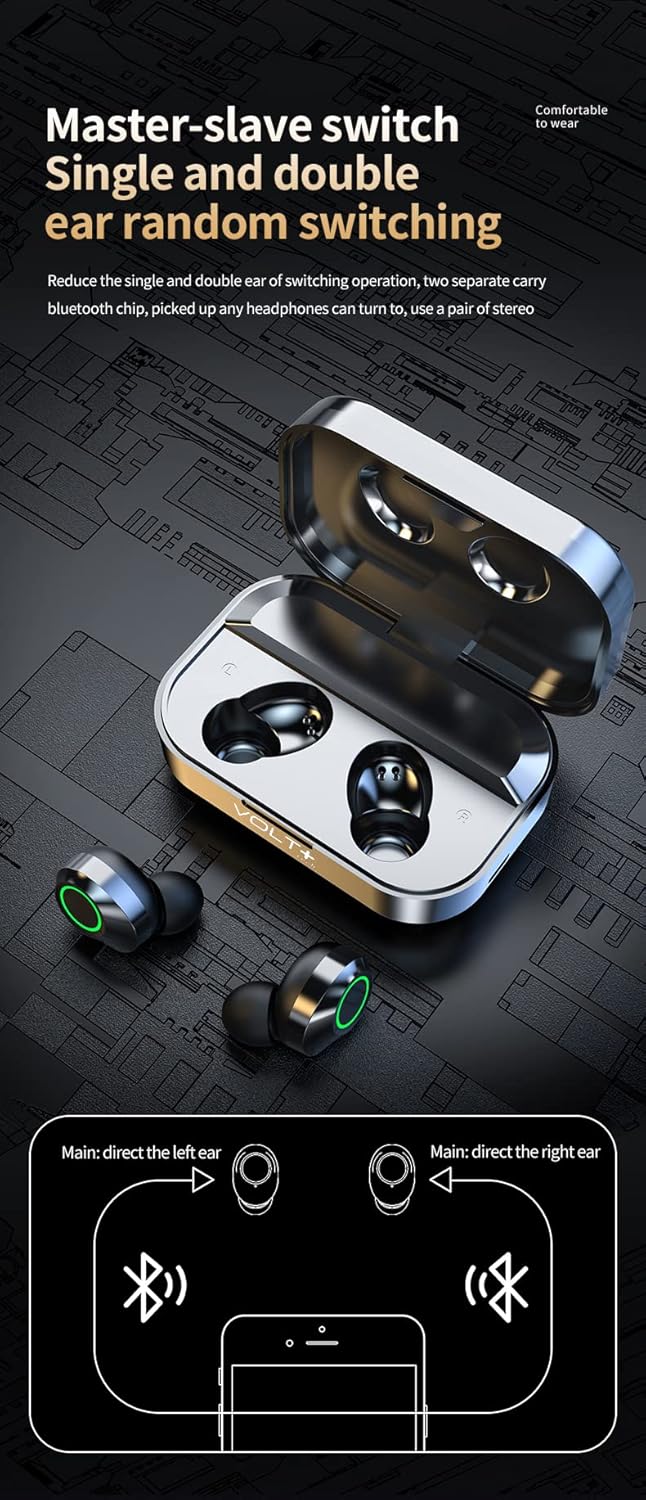
Image 4.2: Close-up of the LED digital display on the charging case, indicating battery levels for the case and individual earbuds.
5. Техникалык тейлөө
Туура кам көрүү кулакчындарыңыздын узак иштөөсүн жана иштешин камсыз кылат:
- Тазалоо: Regularly clean the earbuds and charging case with a soft, dry, lint-free cloth. Avoid using abrasive materials or harsh chemicals. Gently clean the ear tips and speaker mesh to prevent wax buildup.
- Сактагыч: When not in use, store the earbuds in their charging case to protect them from dust and damage. Keep the case closed.
- Батареяга кам көрүү: To maintain battery health, avoid fully discharging the earbuds and case frequently. Charge them regularly, even if not used for extended periods. Store in a cool, dry place away from extreme temperatures.
- Суу таасири: While the earbuds are IPX4 water-resistant, avoid submerging them in water. Dry them thoroughly if they get wet before placing them back in the charging case. Ensure the charging port is dry before charging.
6. Кыйынчылыктарды
Эгерде кулакчындарыңыз менен кандайдыр бир көйгөйгө туш болсоңуз, төмөнкү кеңири таралган чечимдерди караңыз:
| Көйгөй | Мүмкүн чечим |
|---|---|
| Кулакчындар түзмөк менен жупташкан жок |
|
| Бир гана кулакчын иштейт |
|
| Үн жок же үнү төмөн |
|
| Заряддоо куту заряддалбай жатат |
|
7. Техникалык шарттар
| Өзгөчөлүк | Спецификация |
|---|---|
| Модель аты | YD03 |
| Bluetooth версиясы | 5.3 |
| Зымсыз байланыш технологиясы | Bluetooth |
| Bluetooth диапазону | 33 Фут (10 метр) |
| Noise Control | Active Noise Cancellation, Passive Noise Cancellation, Sound Isolation (CVC 8.1) |
| Микрофондор | Quad Microphones (2 per earbud) |
| Сууга туруктуулук деңгээли | IPX4 (Кулакчындар гана) |
| Кулак жайгаштыруу | Кулакта |
| Башкаруу ыкмасы | тийүү |
| Заряддоо корпусунун батареясынын сыйымдуулугу | 2000 мАч |
| Жалпы ойноо убактысы (капка менен) | 25+ саатка чейин |
| Earbud Playtime (бир кубаттоо) | 5+ саат |
| Заряддоо убактысы | Болжол менен 2 саат |
| Наушник уясы | USB-C (заряддоо кутусу үчүн) |
| Шайкеш түзмөктөр | Android, Apple iPhone (including iPhone 15 Pro), iOS, Mac, Windows |
| Элемент Салмагы | 4 унция (жалпысынан) |
| Продукциянын өлчөмдөрү | 1.5 x 1 x 1.5 дюйм (болжол менен) |
8. Кепилдик жана колдоо
For warranty information or technical support, please refer to the contact details provided with your purchase or visit the official VOLT PLUS TECH webсайт. Ар кандай кепилдик дооматтары үчүн сатып алганыңыздын далилин сактаңыз.