
1. Продукт бүтүп калдыview
The PHOINIKAS G2000 Gaming Headset is designed to provide an immersive audio experience across multiple gaming platforms. Featuring 50mm audio drivers for surround sound and deep bass, a noise-cancelling microphone, and comfortable over-ear design, it is suitable for extended gaming sessions.

Image 1: PHOINIKAS G2000 Gaming Headset, showcasing its design and blue/red color scheme.
2. Кутуда эмне бар
- PHOINIKAS G2000 Gaming Headset
- User Manual
- 3.5mm Y-splitter cable (for PC use)
3. Техникалык шарттар
| Өзгөчөлүк | Деталь |
|---|---|
| Модель аты | G2000 |
| Байланыш технологиясы | Зымдуу (3.5 мм уяча, LED үчүн USB) |
| Аудио драйверинин өлчөмү | 50мм |
| Noise Control | Үн изоляциясы |
| Микрофон | Noise-Cancelling, Adjustable |
| Шайкештик | PC, PS5, PS4, Xbox Series X/S, Switch, Laptops, Tablets, Phones |
| Башкаруу түрү | Volume Control, Mic On/Off |
| Кулак жайгаштыруу | Кулак үстүндө |
| Материал | Пластик |
| Элемент Салмагы | 1.06 фунт |
4. Орнотуу нускамалары
The PHOINIKAS G2000 headset offers multi-platform compatibility. Follow the instructions below for your specific device.

Image 2: Connection diagram for various gaming platforms.
4.1 PC/Laptop Connection
- Connect the 3.5mm audio cable from the headset to the 3.5mm Y-splitter.
- Plug the green connector of the Y-splitter into your PC's headphone jack and the pink connector into the microphone jack.
- For LED lighting, connect the USB cable to an available USB port on your PC or laptop.
4.2 PS4/PS5/Switch/Tablet/Phone Connection
- Connect the 3.5mm audio cable directly into the controller (PS4/PS5) or the device's 3.5mm audio jack (Switch, Tablet, Phone).
- The USB connection is only for LED lighting and is not required for audio or microphone functionality on these devices.
4.3 Xbox One Connection
- For older versions of Xbox One controllers without a 3.5mm jack, an additional Microsoft adapter (not included) is required.
- Connect the 3.5mm audio cable from the headset into the controller (or adapter).
- The USB connection is only for LED lighting.

Image 3: Detailed compatibility chart showing audio, mic, mute, and LED functionality per device.
5. Иштөө нускамалары
The PHOINIKAS G2000 headset features convenient in-line controls for easy management of audio and microphone functions.
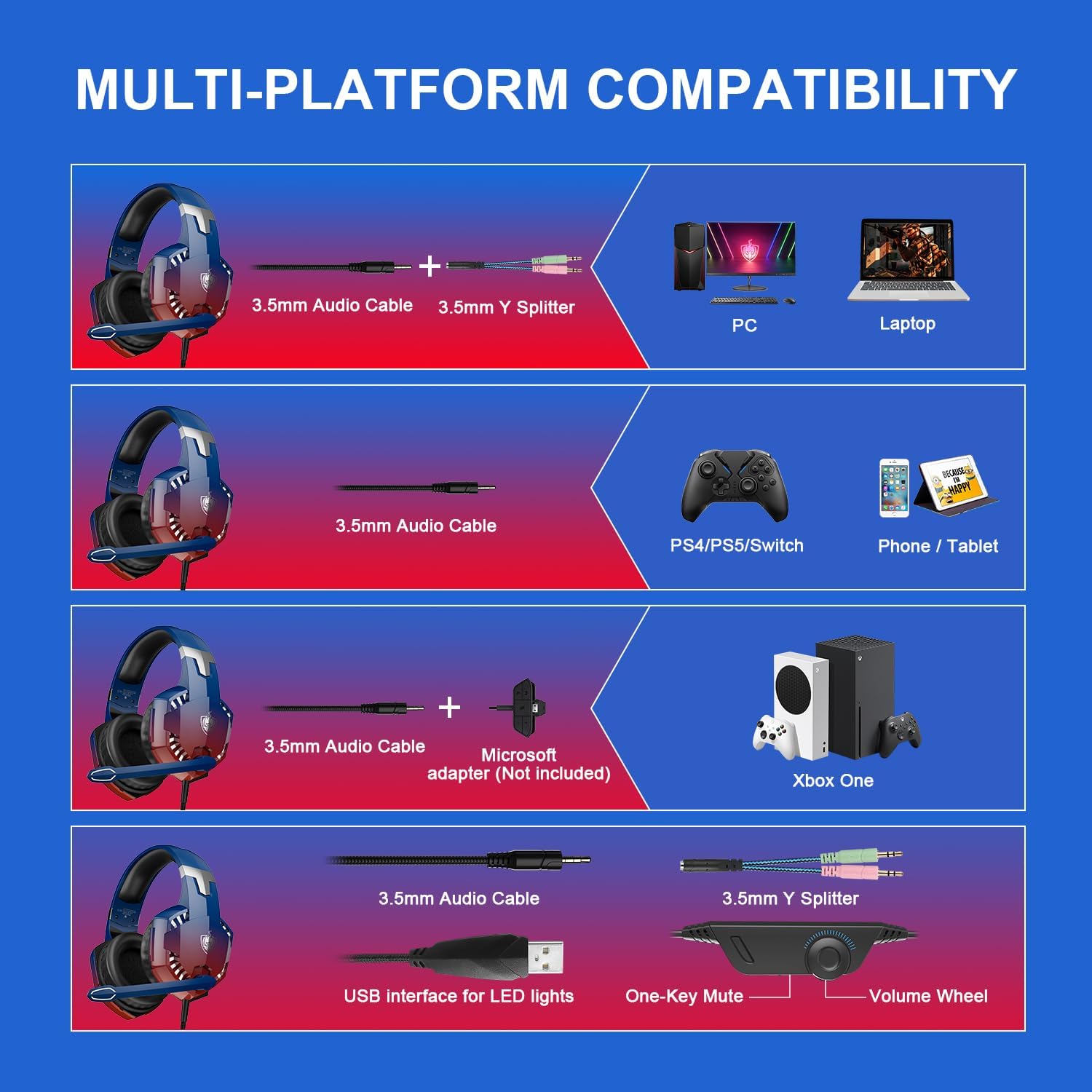
Image 4: In-line control unit with volume wheel and microphone switch.
5.1 Үндү башкаруу
Adjust the volume using the scroll wheel located on the in-line control unit. Rotate the wheel up to increase volume and down to decrease it.
5.2 Микрофонду үнсүз кылуу
To mute or unmute the microphone, use the switch on the in-line control unit. Slide the switch to the microphone icon to unmute, and away from it to mute.
5.3 Ызы-чууну жок кылуучу микрофон
The headset features an omnidirectional, 360° flexible, noise-cancelling microphone designed for clear communication by reducing external noise.

Image 5: The noise-cancelling microphone in use.
5.4 LED жарыктандыруу
The headset's LED lights are powered via the USB connection. Plug the USB cable into an available USB port to activate the lighting. Note that the USB connection is solely for lighting and does not transmit audio.
6. Comfort and Ergonomics
The PHOINIKAS G2000 headset is designed for comfort during prolonged use.
- Жөнгө салынуучу баш боосу: The headband can be adjusted to fit various head sizes, ensuring a secure and comfortable fit.
- Soft Ear Pads: The over-ear cups are equipped with soft, breathable ear pads to reduce pressure and prevent discomfort during long gaming sessions.

Image 6: Soft and comfortable ear pads for extended wear.

Image 7: Telescopic adjustment design for a personalized fit.
7. Техникалык тейлөө
To ensure the longevity and optimal performance of your PHOINIKAS G2000 Gaming Headset, follow these maintenance guidelines:
- Тазалоо: Гарнитураны сүртүү үчүн жумшак, кургак чүпүрөктү колдонуңуз. Кулакчалар үчүн, бир аз damp кездемени колдонсо болот, бирок колдонуудан мурун алардын толугу менен кургак экенин текшериңиз. Катуу химиялык заттардан же абразивдүү тазалоочу каражаттардан алыс болуңуз.
- Сактагыч: Гарнитураны салкын, кургак жерде, күн нуру түз тийбеген жана өтө жогорку температурадан алыс сактаңыз. Гарнитуранын үстүнө оор буюмдарды койбоңуз.
- Кабельге кам көрүү: Do not pull on the cables forcefully. Always grasp the plug when disconnecting. Avoid sharp bends or kinks in the cable.
8. Кыйынчылыктарды
Гарнитураңызга байланыштуу көйгөйлөргө туш болсоңуз, төмөнкү жалпы чечимдерди караңыз:
- Аудио жок:
- 3.5 мм аудио уяча түзмөккө толугу менен сайылганын текшериңиз.
- Check the in-line volume control and ensure it is not set to minimum.
- Түзмөгүңүздүн аудио чыгаруу жөндөөлөрү гарнитураны колдонууга конфигурацияланганын текшериңиз.
- For PC, ensure the Y-splitter is correctly connected to both headphone and microphone jacks.
- Микрофон иштебейт:
- Ensure the microphone mute switch on the in-line control is in the 'unmute' position.
- Гарнитура тандалганын текшерүү үчүн түзмөгүңүздүн микрофон киргизүү жөндөөлөрүн текшериңиз.
- For PC, confirm the Y-splitter's microphone connector is correctly plugged in.
- For Xbox One, confirm if an adapter is needed and correctly connected.
- LED жарыктары күйбөйт:
- USB кабелинин кубат берүүчү USB портуна бекем сайылганын текшериңиз.
- Note that LED lights are only active when the USB is connected.
If these steps do not resolve the issue, please contact PHOINIKAS customer support.
9. Расмий продукт Video
Көрүү үчүн бул видеону көрүңүзview of the PHOINIKAS G2000 Gaming Headset.
Video 1: PHOINIKAS G2000 Gaming Headset product demonstration. This video provides a visual guide to the headset's features and design.
10. Кепилдик жана колдоо
PHOINIKAS products are subject to quality inspection and after-sales service. For specific warranty details or technical support, please refer to the warranty card included with your product or visit the official PHOINIKAS webсайт.
For frequently asked questions, you may find answers to common queries:
- Q: What is the difference between 2.4G wireless technology and Bluetooth wireless technology?
A: 2.4G wireless with low-latency chip is compatible with PS4/PS5/PC/Switch and other devices through the transmitter. Bluetooth matching can be connected, but is not compatible with gaming devices. This G2000 model is wired. - Q: How is it compatible with Xbox One devices?
A: 2.4G wireless/Bluetooth is not compatible. Non-3.5mm connector Xbox One versions require an additional adapter.