
1. Киришүү
The AVer VC520 Pro3 is an advanced conferencing system designed for mid-to-large room meetings. It features a 36X total zoom Pan-Tilt-Zoom (PTZ) camera, enhanced AVer SmartFrame technology, Preset Framing, and a Sony Wide Dynamic Range (WDR) sensor. The system offers 3-way outputs, including HDMI connectivity, for versatile streaming options and a superior video and audio experience. A key feature is Smart Composition, an embedded AI function that swiftly captures high-quality close-up images of meeting participants. Coupled with an extended speakerphone solution, the VC520 Pro3 delivers a comprehensive video conferencing experience.
2. Кутуда эмне бар
Пакетте бардык компоненттер бар экенин текшериңиз:
- VC520 Pro3 Camera
- USB 2.0 Type-B дан Type-A кабелине
- VC520 Pro3 Speakerphone
- Camera to Speakerphone Cable (33ft/10m)
- Алыстан башкаруу
- Power Adapter and Power Cord (6ft/1.8m)
- Дубалга орнотулган кронштейн
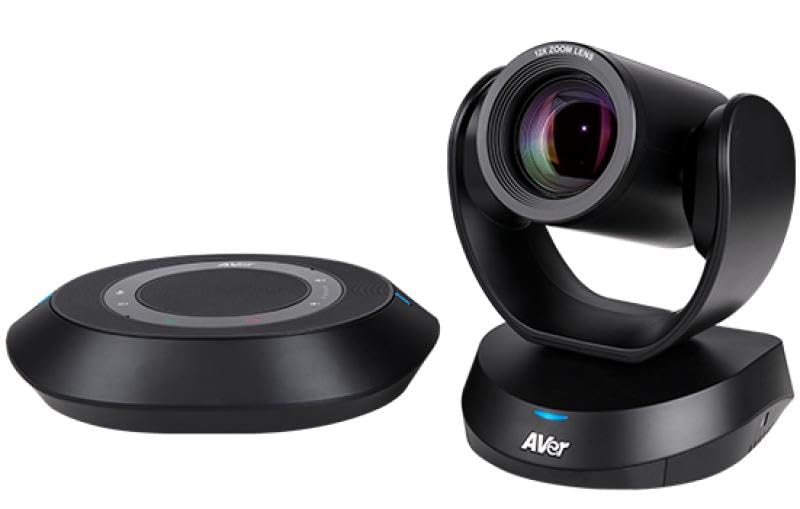
Image: The AVer VC520 Pro3 Conference Camera and Speakerphone components.
3. Орнотуу нускамалары
- Камераны жайгаштырыңыз: Place the VC520 Pro3 Camera on a stable surface or mount it to a wall using the provided wall-mount bracket. Ensure it has a clear view жолугушуу аймагынан.
- Динамикти туташтырыңыз: Connect the VC520 Pro3 Speakerphone to the camera using the Camera to Speakerphone Cable. This cable is 33 feet (10 meters) long, allowing flexible placement.
- Туташуу кубаты: Plug the power adapter into the camera and then into an electrical outlet.
- Компьютерге туташуу: Connect the camera to your computer using the supplied USB 2.0 Type-B to Type-A Cable. The system is designed for simplified connectivity with a single USB cable.
- Байланыштарды текшерүү: Ensure all cables are securely connected. The system should power on automatically.
4. Иштөө нускамалары
4.1 Камеранын иштеши
- Pan-Tilt-Zoom (PTZ): Use the remote control to adjust the camera's pan, tilt, and 36X total zoom (12x optical zoom).
- SmartFrame: The integrated AVer SmartFrame technology automatically frames participants, ensuring everyone is visible.
- Алдын ала коюлган кадр: Configure and recall specific camera positions for quick adjustments during meetings.
- Акылдуу курамы: This AI-enhanced feature automatically adjusts the camera to focus on participants, providing high-quality close-up images.
4.2 Speakerphone Operation
- Audio Clarity: The speakerphone is engineered with echo cancellation and noise suppression technologies for clear audio.
- Үндү көзөмөлдөө: Adjust the speakerphone volume using the controls on the unit or the remote control.
- Үнсүз функция: Use the mute button on the speakerphone or remote control to mute the microphone.
4.3 Программанын шайкештиги
The AVer VC520 Pro3 is compatible with a wide range of video conferencing applications, including:
- Чоңойтуу
- Microsoft командалары
- Skype for Business, Skype
- Google Meet
- Intel Unite
- RingCentral
- V-Cube, LiveOn
- CyberLink U Meeting
- TrueConf
- Adobe Connect
- Cisco WebEx
- Fuze
- GoToMeeting
- Vidyo
- vMix
- WebRTC
- Wirecast
- XSplit
5. Техникалык тейлөө
To ensure the longevity and optimal performance of your AVer VC520 Pro3, follow these maintenance guidelines:
- Тазалоо: Gently wipe the camera lens and exterior surfaces with a soft, dry, lint-free cloth. Avoid using abrasive cleaners, solvents, or harsh chemicals, as these can damage the finish or optical components.
- Сактагыч: Узак мөөнөткө колдонулбаганда, аспапты кургак, салкын жерде, тике күндүн нурунан жана өтө температурадан алыс сактаңыз.
- Кабелдик башкаруу: Бардык кабелдердин тыкан жайгашканын жана бузулуп калбашы үчүн чыңалуу астында эместигин текшериңиз.
6. Кыйынчылыктарды
If you encounter issues with your VC520 Pro3, refer to the following common troubleshooting steps:
- Видео чыгаруу жок:
- Check all cable connections, especially the USB cable to your computer and the power cable to the camera.
- Ensure the camera is powered on (check indicator lights).
- Verify that the correct camera is selected in your video conferencing software settings.
- Try connecting the camera to a different USB port on your computer.
- No Audio from Speakerphone:
- Ensure the speakerphone is properly connected to the camera.
- Check the volume level on the speakerphone and in your computer's audio settings.
- Verify that the speakerphone is not muted.
- Confirm that the VC520 Pro3 speakerphone is selected as the audio output device in your conferencing software.
- Camera Not Recognized by Computer:
- Компьютериңизди өчүрүп күйгүзүңүз.
- Башка USB кабелин колдонуп көрүңүз.
- Ensure your operating system and conferencing software are up to date.
For further assistance, please refer to the official AVer support webсайтка же кардарларды тейлөөгө кайрылыңыз.
7. Техникалык шарттар
| Бренд | AVer |
| Модель номери | COMVCPRO3 (VC520 Pro3) |
| Видео тартуунун резолюциясы | 1080p толук HD |
| Оптикалык масштаб | 12x (36x Total Zoom) |
| Байланыш технологиясы | USB |
| Линзанын түрү | Wide Angle |
| Фокус түрү | Автофокус |
| Өзгөчөлүктөрү | Bundled Camera, Speakerphone and Remote; Enterprise Grade PTZ Camera with SmartFrame; Tabletop Speakerphone; Certified for Zoom; Certified for Microsoft Teams |
| Колдоого алынган аудио формат | MP2, AAC |
| Түс | Кара |
| UPC | 848090009653 |
8. Кепилдик жана колдоо
Кепилдик: The AVer VC520 Pro3 Conference Camera comes with a 3 жылдык кепилдик сатып алынган күндөн тартып. Кепилдик дооматтары үчүн сатып алганыңыздын далилин сактап коюңуз.
Техникалык колдоо: For technical assistance, product inquiries, or warranty service, please visit the official AVer website or contact their customer support department. Detailed contact information and support resources can typically be found on the AVer webсайт.