
Introduction
This manual provides detailed instructions for the MILOUZ Smart Watch IDW26. It covers setup, operation, maintenance, and troubleshooting to ensure optimal use of your device. The MILOUZ Smart Watch IDW26 features a 1.83-inch HD touch screen, Alexa Built-in, call answering and making capabilities, and comprehensive health monitoring including heart rate, SpO2, and sleep tracking. It is also IP68 waterproof and supports 100 sports modes.
Кутуда эмне бар
- MILOUZ Smart Watch IDW26
- Заряддоо кабели
- Колдонуучунун Колдонмосу (бул документ)
Жайгашуу
1. Акылдуу саатты кубаттоо
Before initial use, fully charge your MILOUZ Smart Watch. Connect the magnetic charging cable to the charging contacts on the back of the watch and plug the USB end into a power adapter (not included) or a computer's USB port. A full charge typically takes approximately 2 hours.

Image: The MILOUZ Smart Watch connected to its magnetic charging cable, displaying battery status.
The watch has a working time of up to 7 days and a standby time of 30 days on a single charge.
2. Өнөктөш колдонмону жүктөп алуу
Бардык функциялардын кулпусун ачуу жана маалыматтарды шайкештештирүү үчүн, жүктөп алыңыз Абдан жарашыктуу app from your smartphone's app store (available for Android and iOS devices). Издөө "Veryfit" and install the application.
3. Смартфонуңуз менен жупташуу
- Смартфонуңузда Bluetooth иштетилгенин текшериңиз.
- Open the Veryfit app and follow the on-screen instructions to create an account or log in.
- Колдонмодо түзмөктү жупташтыруу бөлүмүнө өтүңүз (адатта түзмөктүн сүрөтчөсү же "Түзмөк кошуу" менен көрсөтүлөт).
- Select your MILOUZ Smart Watch from the list of available devices. The watch's model number (IDW26) may appear.
- Смартфонуңузда жана акылдуу саатыңызда жупташтыруу өтүнүчүн ырастаңыз.
- Жупташтырылгандан кийин, саат телефонуңуз менен убакытты жана маалыматтарды шайкештештирет.
Акылдуу саатты иштетүү
Негизги навигация
The MILOUZ Smart Watch features a 1.83-inch HD touch screen for intuitive navigation. Swipe left, right, up, or down to access different menus and functions. Tap to select an option, and typically swipe right or press the side button to return to the previous screen or watch face.
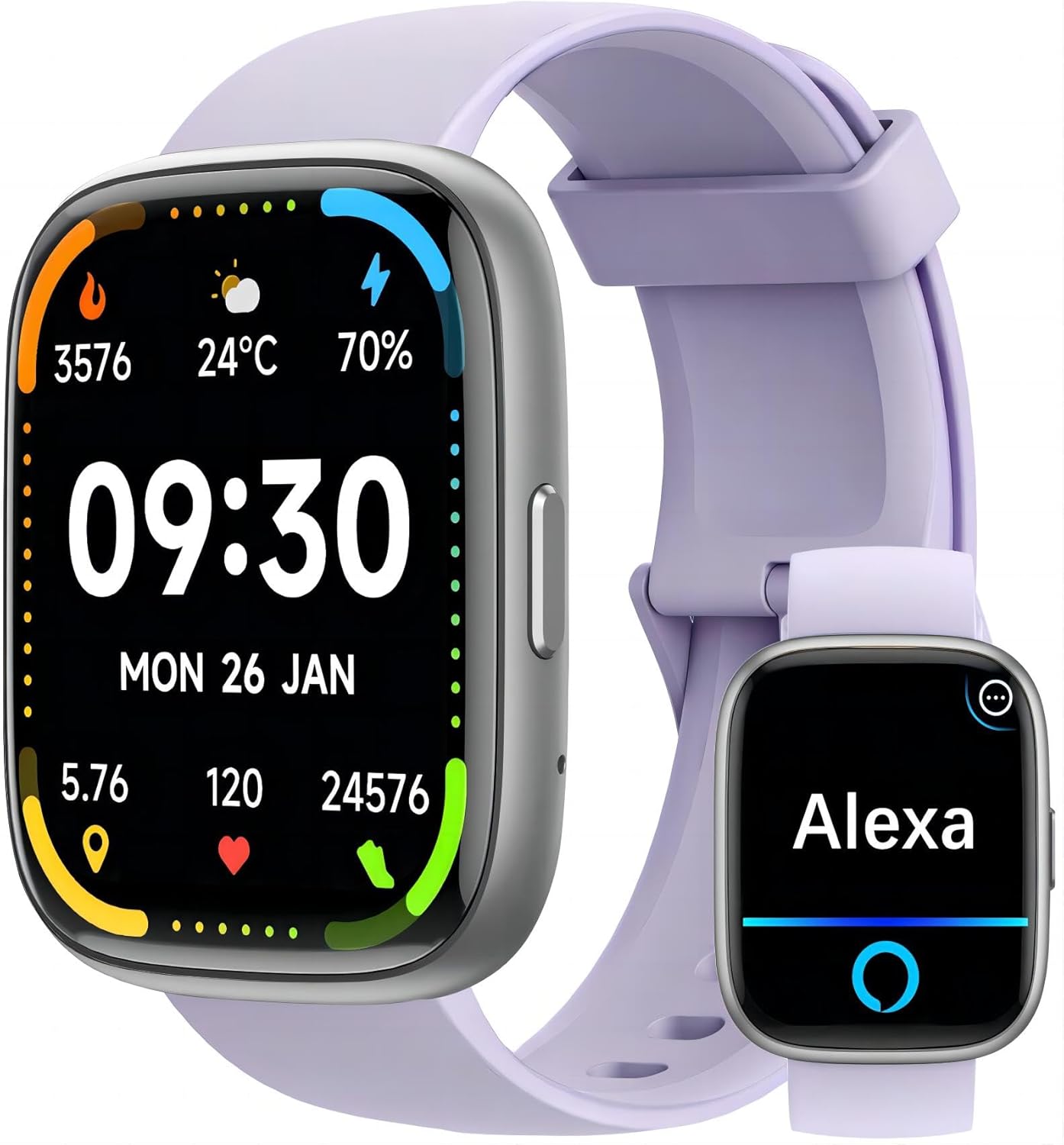
Image: The MILOUZ Smart Watch main display and an Alexa interface screen.
Call Functions (Answer/Make Calls)
After successful Bluetooth pairing, your smart watch can answer and make calls directly. The watch includes a built-in speaker and microphone.
- Чалууларга жооп берүү: When a call comes in, the watch will display the caller ID. Tap the green phone icon on the screen to answer.
- Чалууларды жасоо: Access the phone function on your watch to view call history, frequent contacts, or use the dial pad to make a call.

Image: The MILOUZ Smart Watch showing an incoming call and various call management options.
Alexa орнотулган
The MILOUZ Smart Watch integrates Alexa Voice Assistant. Ensure your watch is connected to your smartphone and the Veryfit app is running in the background for Alexa functionality. Tap the Alexa icon on your watch and speak your commands or questions.

Image: The MILOUZ Smart Watch showing message notifications and the Alexa voice assistant interface.
Message Reminders
Receive notifications for calls, SMS, and various social media apps directly on your watch. Ensure that message notifications are enabled in the Veryfit app and your phone's settings for the watch to display them.
Саат жүздөрүн ыңгайлаштыруу
The watch supports over 200 personalized dials and DIY dial options. You can change the watch face through the Veryfit app to match your style or display preferred information.

Image: A collection of diverse watch faces available for the MILOUZ Smart Watch.
Multi-Function Smartwatch Features
The MILOUZ Smart Watch offers a range of functions accessible through its interface:
- Активдүүлүккө көз салуу
- Phone (Call functions)
- Кабарлар
- Alexa үн жардамчысы
- Машыгуу режимдери
- Машыгуу жазуулары
- Стресс мониторинги
- Дем алуу тренинги
- Clock (Alarm, Timer, Stopwatch)
- Аба ырайы
- Музыкалык башкаруу
- Камераны башкаруу
- Телефонду табуу
- Аялдардын ден соолугун көзөмөлдөө
- Ичимдик эстөө
- Уйкунун мониторинги
Ден соолукту көзөмөлдөө функциялары
The MILOUZ Smart Watch provides 24-hour health monitoring capabilities.

Image: The MILOUZ Smart Watch showing health metrics like heart rate, SpO2, and menstrual cycle tracking, alongside sleep monitoring data.
- Жүрөктүн кагышын көзөмөлдөөчү: Күн бою жүрөктүн кагышын үзгүлтүксүз көзөмөлдөйт.
- SpO2 монитору: Сиздин кандын кычкылтек менен каныккандыгын өлчөйт.
- Уйку монитору: Уйку режимиңизди, анын ичинде терең уйку, жеңил уйку жана сергек убакытты талдайт.
- Female Menstruation Monitor: Provides tracking and predictions for menstrual cycles.
100 Спорт режимдери
The watch supports over 100 sports modes, allowing you to track various activities such as running, swimming, cycling, yoga, and more. It records workout data including duration, distance, calories burned, and heart rate.

Image: Various sports activities being performed, illustrating the 100 sports modes feature of the MILOUZ Smart Watch.
Сууга туруктуулук (IP68)
The MILOUZ Smart Watch is rated IP68 waterproof, meaning it is resistant to dust and can withstand immersion in water up to 1.5 meters for up to 30 minutes. It is suitable for daily use, hand washing, and swimming. However, it is not recommended for hot showers, saunas, or diving, as steam and hot water can affect the seals.
Image: The MILOUZ Smart Watch being used during a swimming activity, demonstrating its IP68 waterproof rating.
Техникалык тейлөө
- Тазалоо: Саатыңызды жана боону жумшак менен дайыма тазалап туруңуз, damp кездеме. Катуу химиялык заттарды же абразивдүү материалдарды колдонуудан алыс болуңуз.
- Кургатуу: Сууга түшкөндөн кийин, саатты заряддоодон же узак убакытка колдонуудан мурун толугу менен кургак экенин текшериңиз.
- Сактагыч: Колдонулбаган убакта саатты салкын, кургак жерде сактаңыз.
- Ашыкча температурадан сактаныңыз: Саатты өтө жогорку же төмөнкү температурага дуушар кылбаңыз, анткени бул батареянын иштөө мөөнөтүнө жана иштешине таасир этиши мүмкүн.
Проблемаларды чечүү
- Күйгүзүлбөйт: Саат толук заряддалганын текшериңиз. Аны заряддагычка кеминде 10 мүнөт туташтырыңыз.
- Телефон менен жупташтырууга мүмкүн эмес:
- Телефонуңузда Bluetooth иштетилгенин текшериңиз.
- Саат телефонуңуздун Bluetooth диапазонунда экенин текшериңиз.
- Телефонуңузду да, акылдуу саатыңызды да өчүрүп-күйгүзүңүз.
- Veryfit колдонмосу эң акыркы версияга жаңыртылганын текшериңиз.
- If previously paired, try unpairing and re-pairing the device through the Veryfit app and your phone's Bluetooth settings.
- Call Function Not Working:
- Confirm the watch is successfully paired for calls (sometimes a separate Bluetooth connection for calls is needed).
- Check microphone and speaker settings on the watch.
- Саат телефонуңуздун Bluetooth диапазонунда экенин текшериңиз.
- Alexa жооп бербейт:
- Verify the watch is connected to your phone and the Veryfit app is active.
- Телефонуңузда активдүү интернет байланышы бар экенин текшериңиз.
- Check Alexa settings within the Veryfit app.
- If you walk too far from your phone, Alexa functionality may be interrupted and require re-connection.
- Туура эмес ден соолук маалыматы:
- Саат билегиңизге бекем тагылганын, туурасы билек сөөгүнөн бир манжага жакын экенин текшериңиз.
- Өлчөө учурунда ашыкча кыймылдан качыңыз.
- Note that smart watch health data is for reference only and not intended for medical diagnosis.
- Билдирмелер көрүнбөйт:
- Check notification permissions for the Veryfit app in your phone's settings.
- Ensure notifications are enabled for specific apps within the Veryfit app.
- Verify the watch is connected to your phone.
Техникалык шарттар
| Өзгөчөлүк | Деталь |
|---|---|
| Модель номери | IDW26 |
| Screen Size | 1.83 дюймдук HD сенсордук экран |
| Байланыш | Bluetooth |
| Операция системасы | Android Wear 1.0 (Compatible with Android & iOS) |
| Суу каршылык | IP68 |
| Батарея түрү | Литий полимери |
| Заряддоо убактысы | Болжол менен 2 саат |
| Жумуш убактысы | 7 күнгө чейин |
| Күтүү убактысы | 30 күнгө чейин |
| Ден соолук мониторинги | Heart Rate, SpO2, Sleep, Female Health |
| Спорт режимдери | 100+ |
| Өзгөчөлүктөр | Alexa Built-in, Answer/Make Calls, Message Reminders, Music Control, Camera Control |
| Элемент Салмагы | 3.17 унция |
| Пакеттин өлчөмдөрү | 10.71 x 4.17 x 0.75 дюйм |
Кепилдик жана колдоо
For warranty information and customer support, please refer to the documentation included with your purchase or visit the official MILOUZ website. If you encounter any issues not covered in this manual, please contact MILOUZ customer service for assistance.
MILOUZ Official Store: MILOUZ Store on Amazon