
1. Киришүү
This manual provides detailed instructions for the proper use, setup, and maintenance of your NUROUM HP31SN Wireless Headset. Please read this manual thoroughly before using the product to ensure optimal performance and longevity.
1.1 Пакеттин мазмуну
Пакетиңизде бардык буюмдар бар экенин текшериңиз:
- 1x HP31SN Headset
- 1x USB Charging/Data Cable
- 1x Колдонуучунун колдонмосу
1.2 Негизги өзгөчөлүктөрү
- AI-Powered ENC Noise Cancellation: Suppresses up to 99.9% of background noise for clear calls.
- Bluetooth 5.3 & Multi-Point Connection: Ensures fast pairing, stable connectivity up to 33 feet, and simultaneous connection to two devices.
- Оңой башкаруулар: Intuitive buttons for call management and audio control, including a dedicated mute button.
- Батареянын узак иштөө мөөнөтү: Up to 35 hours of talk time and 45 hours of music playback on a single charge.
- All-Day Comfort & Ergonomic Design: Features pillow-soft ear cushions, a stretchable headband, 250° rotatable boom mic, and 180° rotatable ear muff for versatile wearing.
- Versatile Connectivity & Broad Compatibility: Connects via Bluetooth or USB-A/Type-C cable, compatible with Windows, Mac, Linux, Android, iOS, and platforms like Teams, Zoom, Webэкс.
2. Продукт бүтүп калдыview
2.1 Headset Components and Controls
Familiarize yourself with the various parts and controls of your HP31SN headset.

Image: Headset controls diagram.
- Көлөм +: Press once to increase volume. Press and hold for 1 second to skip to the next track.
- Көлөм -: Press once to decrease volume. Press and hold for 1 second to go to the previous track.
- MFB (көп функциялуу баскыч): Press once to answer/end calls. Press and hold for 1 second to reject calls.
- Үнсүз баскычы: Press once to mute/unmute the microphone.
- Кубатты күйгүзүү / өчүрүү Гарнитураны күйгүзүү же өчүрүү үчүн жылдырыңыз.
- 250° Rotatable Boom Mic: The microphone boom can be rotated 250 degrees to be worn on either the left or right ear.
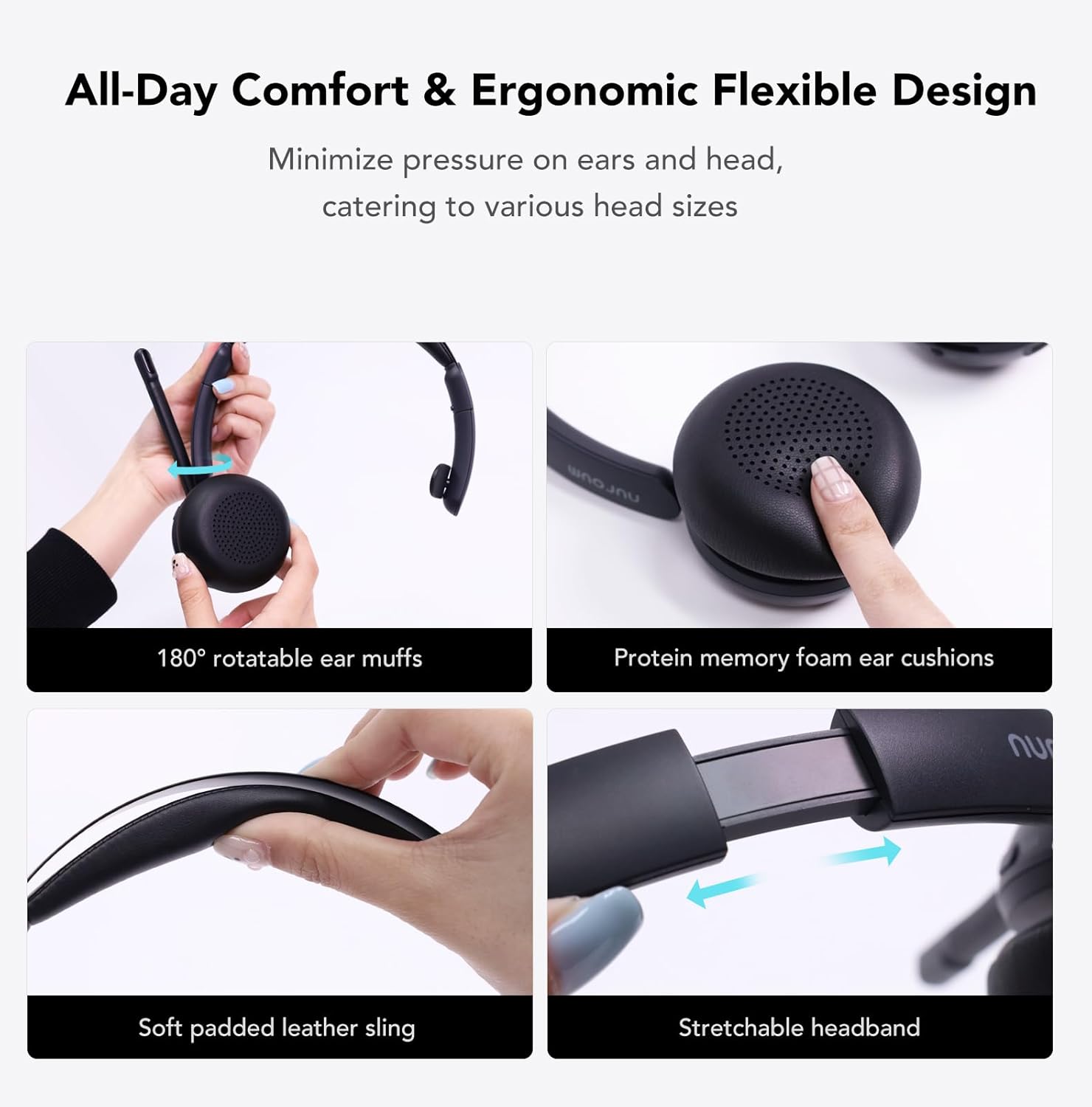
Image: Microphone boom rotation.
3. Баштоо
3.1 Гарнитураны заряддоо
Биринчи жолу колдонуудан мурун, гарнитураны толугу менен кубаттаңыз. Толук кубаттоо болжол менен 2 саатты талап кылат.

Image: Headset charging options.
- Connect the provided USB cable to the headset's Type-C port.
- USB кабелинин экинчи учун кубат булагына туташтырыңыз (мисалы, компьютердин USB порту, USB дубал адаптери).
- Гарнитурадагы LED индикатору кубаттоо абалын көрсөтөт (чоо-жайын LED индикатору бөлүмүн караңыз).
3.2 Күйгүзүү/өчүрүү
- Күйгүзүү үчүн: Slide the Power ON/OFF switch to the 'ON' position. The LED indicator will light up.
- Өчүрүү үчүн: Slide the Power ON/OFF switch to the 'OFF' position. The LED indicator will turn off.
3.3 Bluetooth жупташтыруу
The headset supports Bluetooth 5.3 for quick and stable connections.

Image: Bluetooth pairing and multi-point connection.
- Гарнитура өчүрүлгөнүн текшериңиз.
- Press and hold the MFB button for approximately 3-5 seconds until the LED indicator flashes blue and red alternately, indicating pairing mode.
- Түзмөгүңүздө (смартфон, планшет, компьютер) Bluetooth иштетип, жеткиликтүү түзмөктөрдү издеңиз.
- Select "NUROUM HP31SN" from the list of devices.
- Туташтырылгандан кийин, LED индикатору акырындык менен көк болуп жанат.
3.4 Көп чекиттүү туташуу
The HP31SN headset can connect to two Bluetooth devices simultaneously.
- Pair the headset with the first device as described in section 3.3.
- Биринчи түзмөктө Bluetooth'ду өчүрүңүз. Гарнитура жупташтыруу режимине кайра кирет.
- Гарнитураны экинчи аппарат менен жупташтырыңыз.
- Turn on Bluetooth on the first device. The headset should automatically connect to both devices.
- You can now seamlessly switch between audio sources from both connected devices.
3.5 Зымдуу туташуу
If Bluetooth is not available or the battery is low, you can use the headset as a wired USB headset.

Image: Wired connection options and device compatibility.
- Connect the provided USB cable to the headset's Type-C port.
- USB кабелинин экинчи учун компьютериңиздин USB-A же USB-C портуна туташтырыңыз.
- The computer should automatically recognize the headset as an audio device.
4. Операция
4.1 Чалууларды башкаруу
- Чакырууга жооп берүү: MFB баскычын бир жолу басыңыз.
- Чакырууну аяктоо: Press the MFB button once during an active call.
- Чакырууну четке кагуу: Press and hold the MFB button for 1 second when an incoming call rings.
- Микрофондун үнүн басуу/ачуу: Press the Mute button once during a call.
4.2 Аудио ойнотуу
- Ойнотуу/тындыруу: MFB баскычын бир жолу басыңыз.
- Көлөмү: Үндү катуулатуу + баскычын бир жолу басыңыз.
- Үнүн азайтуу: Үндү катуулатуу баскычын бир жолу басыңыз.
- Кийинки трек: Көлөмү + баскычын 1 секунд басып туруңуз.
- Мурунку трек: Press and hold the Volume - button for 1 second.
4.3 AI-Powered ENC Noise Cancellation
The headset features advanced Environmental Noise Cancellation (ENC) to ensure your voice is heard clearly, even in noisy environments. This feature is always active during calls.
Image: AI-Powered ENC Noise Cancellation in action.
4.4 Расмий продукт Video
Watch the official product video for a visual guide on features and usage.
Video: NUROUM HP31DN/SN Wireless Headset with Mic for Work. This video demonstrates the headset's features, including noise cancellation, multi-point connection, and long battery life.
5. Comfort and Ergonomics
The HP31SN headset is designed for extended wear comfort.

Сүрөт: Ыңгайлуулук үчүн эргономикалык дизайн өзгөчөлүктөрү.
- 180° Rotatable Ear Muff: Adjust the ear muff for a comfortable fit on your ear.
- Protein Memory Foam Ear Cushion: Provides soft cushioning for prolonged use.
- Soft Padded Leather Sling: Reduces pressure on the head.
- Stretchable Headband: Adjusts to various head sizes for a secure and comfortable fit.
6. Батарея маалыматы
The HP31SN headset offers extended battery performance.

Сүрөт: Батареянын иштөө мөөнөтү бүттүview.
- Заряддоо убактысы: Толук кубаттоо үчүн болжол менен 2 саат.
- Сүйлөшүү убактысы: 35 саатка чейин.
- Музыка ойнотуу убактысы: 45 саатка чейин.
7. Шайкештик
The HP31SN headset is broadly compatible with various devices and communication platforms.

Image: Device and platform compatibility.
- Операциялык системалар: Compatible with Windows, Mac, Linux, Android, and iOS.
- Түзмөктөр: PCs, Macs, Laptops, Cell Phones, Tablets.
- Платформалар: Works seamlessly with popular conferencing applications such as Teams, Zoom, Webex, Google Meet, Skype, GoToMeeting, and more.
8. Техникалык шарттар
| Өзгөчөлүк | Спецификация |
|---|---|
| Модель аты | AW-HP31SN |
| Байланыш технологиясы | Зымсыз (Bluetooth) |
| Зымсыз байланыш технологиясы | Bluetooth 5.3 |
| Bluetooth диапазону | 33 Фут (10 метр) |
| Noise Control | AI-Powered ENC Noise Cancellation |
| Батареянын иштөө мөөнөтү (сүйлөшүү убактысы) | 35 саатка чейин |
| Батареянын иштөө мөөнөтү (музыканы ойнотуу) | 45 саатка чейин |
| Заряддоо убактысы | Болжол менен 2 саат |
| Наушник формасы | Кулактагы (бир кулак) |
| Микрофонду айландыруу | 250° |
| Ear Muff Rotation | 180° |
| Материал | Fabric, Leather, Plastic |
| Элемент Салмагы | 0.33 килограмм (11.6 унция) |
| Түс | Боз |
9. Кыйынчылыктарды
Эгерде сиз гарнитураңыз менен көйгөйлөргө туш болсоңуз, төмөнкү кеңири таралган көйгөйлөрдү жана чечимдерди караңыз:
| Көйгөй | Чечим |
|---|---|
| Гарнитура күйбөйт. | Гарнитуранын кубатталганын текшериңиз. Аны USB кабели аркылуу кубат булагына туташтырыңыз. |
| Түзмөк менен жупташтыруу мүмкүн эмес. | Ensure the headset is in pairing mode (LED flashing blue/red). Turn off and on Bluetooth on your device. Move the headset closer to your device. |
| Аудио жок же аудио сапаты начар. | Check device volume and headset volume. Ensure the headset is selected as the audio output device on your computer/phone. Re-pair the headset. |
| Микрофон иштебей жатат. | Ensure the microphone is not muted. Check that the headset is selected as the input device in your application settings. Adjust the microphone boom closer to your mouth. |
| Көп чекиттүү байланыш маселелери. | Ensure both devices have Bluetooth enabled and the headset is connected to both. Disconnect and reconnect from both devices. |
10. Техникалык тейлөө
- Гарнитураны дайыма жумшак, кургак чүпүрөк менен тазалаңыз.
- Гарнитураны экстремалдык температурага, нымдуулукка же тике күн нуруна тийгизүүдөн сактаңыз.
- Гарнитураны бөлүктөргө бөлүүгө же өзгөртүүгө аракет кылбаңыз, анткени бул кепилдикти жокко чыгарат.
- Колдонбогондо гарнитураны салкын, кургак жерде сактаңыз.
11. Коопсуздук маалыматы
- Do not use the headset at high volume levels for extended periods to prevent hearing damage.
- Be aware of your surroundings when using the headset, especially in situations requiring attention (e.g., driving, walking near traffic).
- Гарнитураны балдардан жана үй жаныбарларынан алыс кармаңыз.
- Берилген заряддоо кабелин же тастыкталган эквивалентти гана колдонуңуз.
12. Кепилдик жана колдоо
Your NUROUM HP31SN Wireless Headset comes with a standard manufacturer's warranty. For detailed warranty information, please refer to the warranty card included in your package or visit the official NUROUM webсайт.
For technical support, troubleshooting assistance, or any product-related inquiries, please contact NUROUM customer service through the contact information provided on the official webсайт же сатып алуу платформаңыз.