
1. Киришүү
This manual provides detailed instructions for the installation, operation, and maintenance of your Labgear 6-Port Gigabit PoE Network Switch (Model 60052PI). This unmanaged switch is designed to simplify network setups by integrating power and data delivery over a single Ethernet cable, making it suitable for various environments including offices, homes, and industrial settings. Please read this manual thoroughly before using the device to ensure proper setup and optimal performance.
2. Продукт бүтүп калдыview
The Labgear 6-Port Gigabit PoE Network Switch features 4 Gigabit PoE ports and 2 Gigabit uplink ports, offering robust connectivity and power for your network devices.
Негизги өзгөчөлүктөрү:
- Power Over Ethernet (PoE): Delivers power and data simultaneously over a single Ethernet cable to compatible devices.
- Гигабит ылдамдыгы: Supports 10/100/1000Mbps data transfer rates for high-speed network performance.
- Кеңейтилген берүү диапазону: Features an AI extend mode for data transmission up to 300 meters at a reduced speed (10Mbps) on PoE ports.
- AI Watchdog: Automatically monitors PoE devices and restarts unresponsive ones to ensure continuous operation.
- VLAN колдоо: Enhances network security and performance by segmenting the network and isolating ports.
- Unmanaged Design: Plug-and-play functionality requires no complex configuration.
- Узак металл корпус: Ишенимдүү коргоону жана натыйжалуу жылуулукту таратууну камсыз кылат.
Пакеттин мазмуну:
- Labgear 6-Port Gigabit PoE Network Switch (Model 60052PI)
- Электр кабели
- Instruction Manual
Физикалык мүнөздөмөсү:
2.1-сүрөт: Фронт view of the Labgear 6-Port Gigabit PoE Network Switch, showing the six RJ45 ports and LED indicators.

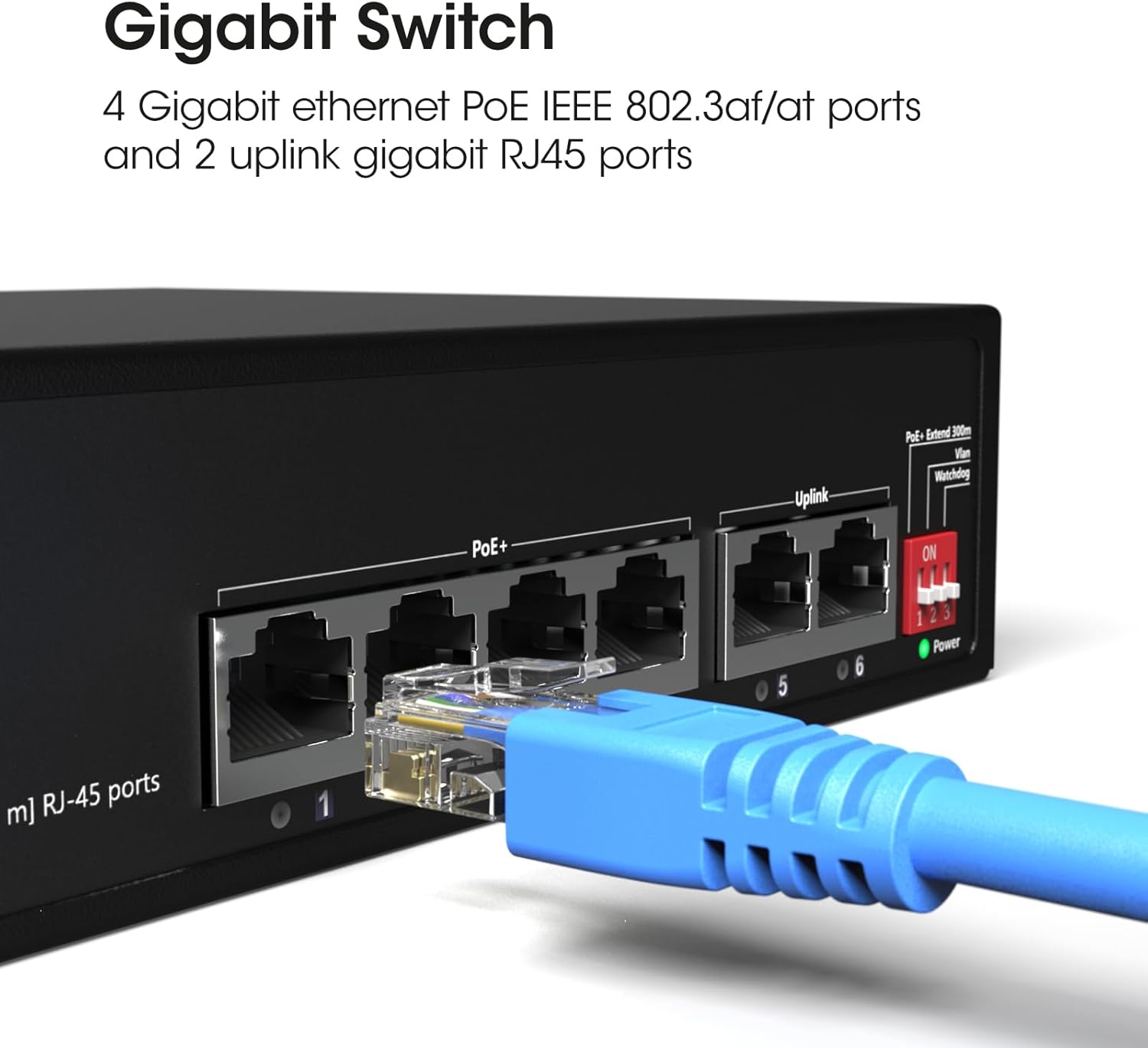
2.2-сүрөт: А деталдуу view of the switch's ports, illustrating the 4 Gigabit Ethernet PoE ports (1-4) and 2 uplink Gigabit RJ45 ports (5-6). A blue Ethernet cable is shown connected to one of the ports.

2.3-сүрөт: Бул view highlights the side of the switch, featuring the DIP switches that control functions like PoE+ Extend 300m, VLAN, and Watchdog, which are crucial for configuring the device's operational mode.
3. Орнотуу
3.1 Орнотуу
- Place the switch on a stable, flat surface or mount it to a wall using appropriate hardware (not included).
- Ашыкча ысып кетүүнүн алдын алуу үчүн түзмөктүн айланасында жетиштүү желдетүүнү камсыз кылыңыз.
- Keep the switch away from direct sunlight, heat sources, and moisture.
3.2 Кубатты туташтыруу
- Connect the provided power cable to the power input port on the switch.
- Электр кабелинин экинчи учун стандарттуу электр розеткасына сайыңыз.
- Verify that the Power LED indicator on the switch illuminates, indicating that the device is receiving power.
3.3 Тармактык түзүлүштөрдү туташтыруу
- Connect your PoE-compatible devices (e.g., IP cameras, wireless access points) to ports 1-4 using standard Ethernet cables. These ports will provide both data and power.
- Connect your router, NVR, or other network backbone devices to the uplink ports (5-6) using standard Ethernet cables. These ports are for data transmission only.
- Ensure all cable connections are secure. The Link/Act LEDs for connected ports should illuminate, indicating an active connection.
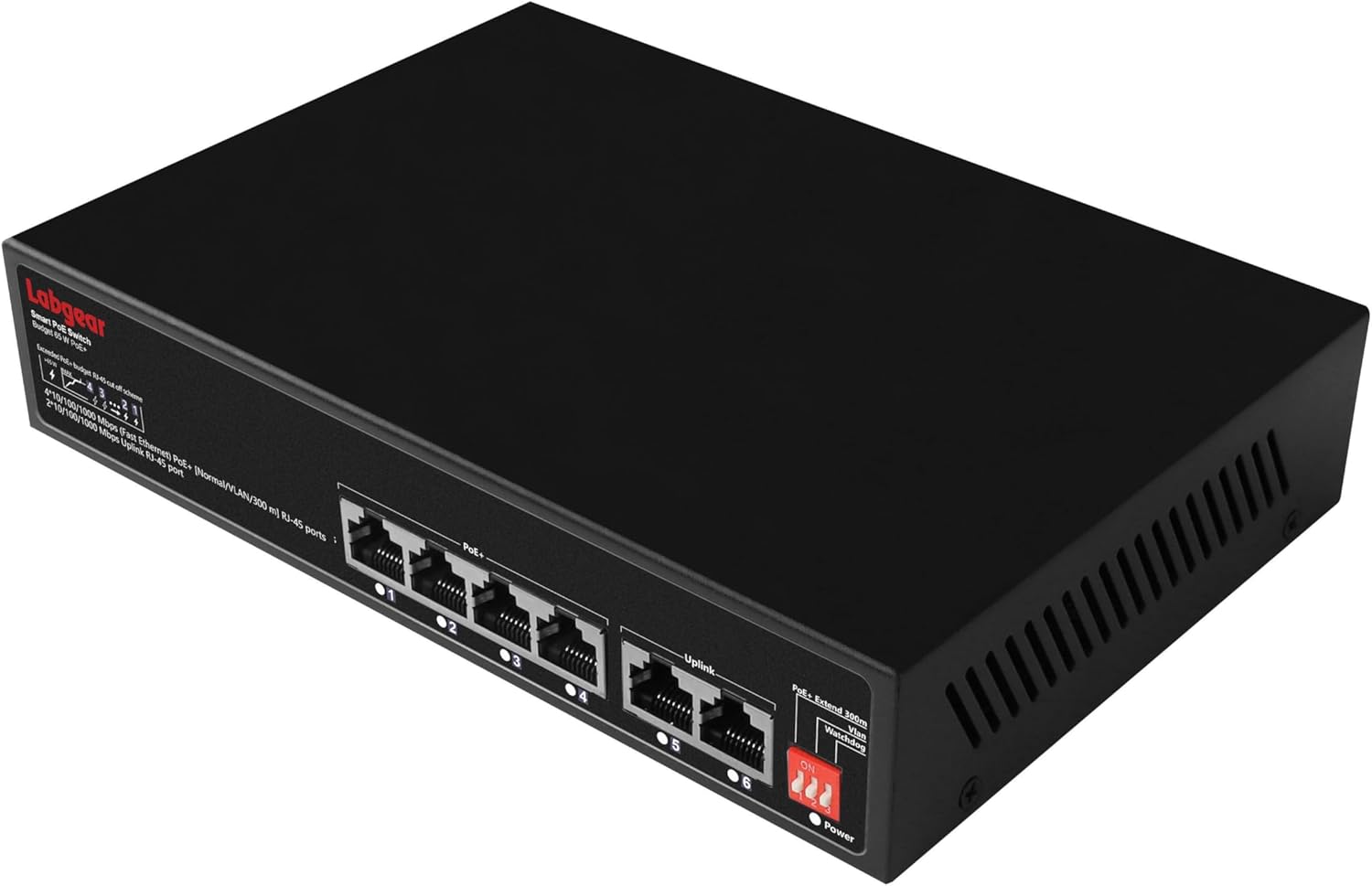
3.1-сүрөт: The Labgear switch with several network cables connected, indicating active Power Over Ethernet (PoE) connections and data transmission.
3.4 DIP которуштуруу конфигурациясы
The switch features DIP switches on its side panel to enable advanced functionalities. Configure these switches мурун powering on the device for the settings to take effect.
| Которуу | Позиция | Функция | Description |
|---|---|---|---|
| 1 | ON | PoE+ Extend 300m | Extends PoE transmission distance up to 300 meters at 10Mbps for ports 1-4. |
| ӨЧҮРҮҮ | Кадимки режим | Standard PoE transmission up to 100 meters at Gigabit speeds for ports 1-4. | |
| 2 | ON | VLAN | Enables port isolation for ports 1-4, preventing direct communication between them while allowing communication with uplink ports. |
| ӨЧҮРҮҮ | Кадимки режим | All ports can communicate freely. | |
| 3 | ON | Watchdog | Activates AI Watchdog feature for ports 1-4, automatically detecting and restarting unresponsive PoE devices. |
| ӨЧҮРҮҮ | Кадимки режим | AI Watchdog feature is disabled. |
4. Иштөө нускамалары
4.1 Негизги операция
Once powered on and connected, the Labgear 6-Port Gigabit PoE Network Switch operates automatically. It is an unmanaged switch, meaning it requires no software configuration. Data and power (for PoE devices) will be transmitted as soon as devices are connected to the appropriate ports.
4.2 LED көрсөткүчтөрү
- Power LED: Ажыраткыч күйгүзүлгөндө күйөт.
- Шилтеме/Акт LED'лери (ар бир порт үчүн):
- Катуу жашыл: A device is connected and active.
- Жаркылдаган жашыл: Маалыматтар өткөрүлүп же кабыл алынууда.
- Өчүк: Эч кандай түзмөк туташкан эмес же туташкан түзмөк иштебейт.
- PoE LEDs (ports 1-4):
- Катуу жашыл: Туташкан түзмөккө PoE кубаты берилип жатат.
- Жаркылдаган жашыл: PoE power is being supplied, and data is being transmitted.
- Өчүк: No PoE device is connected or no power is being supplied.
4.3 Advanced Features (DIP Switch Controlled)
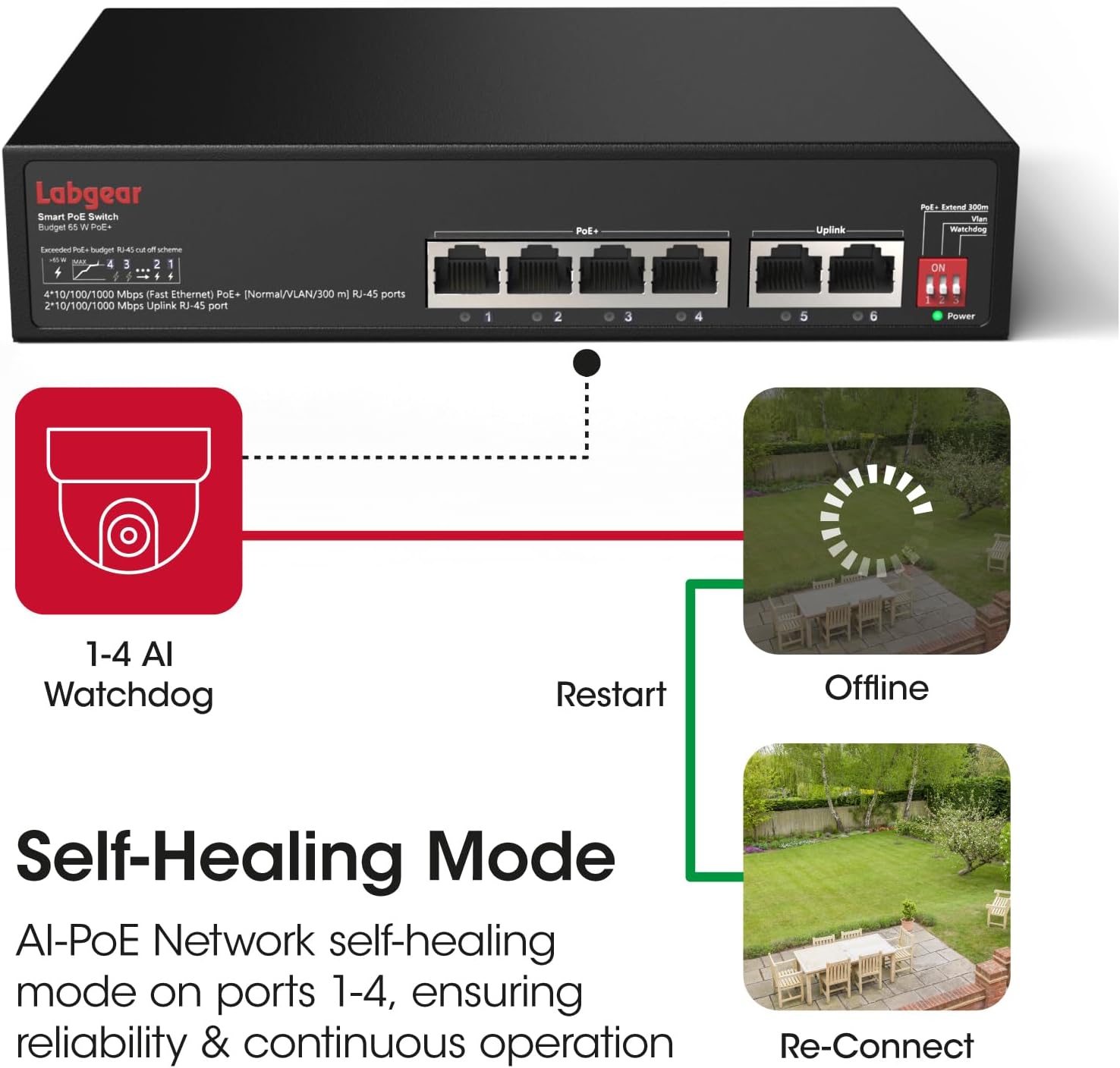
4.1-сүрөт: A visual representation of the AI Watchdog feature, demonstrating how the switch automatically detects and restarts unresponsive PoE devices, such as surveillance cameras, to ensure continuous operation.

4.2-сүрөт: This diagram illustrates the switch's VLAN support for network segmentation and its compatibility with a range of devices, including cameras, computers, printers, access points, extenders, and routers.
- PoE+ Extend 300m: When DIP switch 1 is ON, ports 1-4 operate in extended mode, allowing PoE devices to be placed up to 300 meters away. Note that in this mode, the data rate for these ports is reduced to 10Mbps. For distances up to 100 meters, keep DIP switch 1 OFF for full Gigabit speed.
- VLAN: With DIP switch 2 ON, ports 1-4 are isolated from each other. This means devices connected to ports 1-4 cannot communicate directly with each other but can still communicate with devices connected to the uplink ports (5-6). This feature is useful for enhancing security in surveillance systems or segmenting network traffic.
- кароолчу ит: When DIP switch 3 is ON, the AI Watchdog function is enabled for ports 1-4. The switch will continuously monitor the status of connected PoE devices. If a device becomes unresponsive, the switch will automatically cut and restore power to that port, effectively restarting the device to restore functionality.
5. Техникалык тейлөө
5.1 Тазалоо
- Тазалоодон мурун өчүргүчтүн өчүрүлгөнүн жана розеткадан ажыратылганын текшериңиз.
- Аппараттын сыртын сүртүү үчүн жумшак, кургак чүпүрөктү колдонуңуз.
- Суюк тазалагычтарды же аэрозолдук спрейлерди колдонбоңуз, алар аппаратты бузушу мүмкүн.
5.2 Айлана-чөйрөнү коргоо
- Operate the switch within its specified temperature and humidity ranges.
- Avoid placing the switch in areas with excessive dust, vibration, or electromagnetic interference.
6. Кыйынчылыктарды
Жалпы маселелер жана чечимдер:
- Кубат жок:
- Кубат кабелинин өчүргүчкө да, розеткага да бекем туташтырылганын текшериңиз.
- Электр розеткасынын иштешин текшериңиз.
- Портто шилтеме/аракет жок:
- Ethernet кабелинин туташуусун эки учунан тең текшериңиз. Башка кабелди колдонуп көрүңүз.
- Туташкан аппараттын күйгүзүлгөнүн жана туура иштегенин текшериңиз.
- Verify that the DIP switches are configured appropriately for your network setup (e.g., if in extended mode, the connected device must support 10Mbps).
- PoE түзмөгү электр кубатын албай жатат:
- Ensure the device is connected to a PoE port (1-4).
- Confirm the connected device is PoE-compatible (IEEE 802.3af/at standard).
- Check the total power budget (65W) and individual port power limits (up to 30W per port) to ensure it's not exceeded.
- If AI Watchdog is enabled, ensure it's not causing intermittent restarts if the device is stable.
- Жай тармак ылдамдыгы:
- If DIP switch 1 (Extend 300m) is ON, ports 1-4 will operate at 10Mbps. Turn it OFF for Gigabit speeds if the distance is within 100 meters.
- Оптималдуу иштеши үчүн бардык туташкан түзмөктөр жана кабелдер Gigabit Ethernet колдоого алынсын.
7. Техникалык шарттар
| Өзгөчөлүк | Спецификация |
|---|---|
| Модель номери | 60052PI |
| Порттар | 4 x 10/100/1000Mbps PoE RJ45 Ports, 2 x 10/100/1000Mbps Uplink RJ45 Ports |
| PoE стандарты | IEEE 802.3af / боюнча |
| PoE Power бюджети | 65W total, up to 30W per port |
| Маалыматтарды өткөрүү ылдамдыгы | 10/100/1000 Мбит/сек (Гигабит Ethernet) |
| Extended Transmission | Up to 300m at 10Mbps (DIP switch controlled) |
| Өзгөчөлүктөрү | AI Watchdog, VLAN Support, Extend Mode |
| Interface Type | RJ45 |
| Иштин материалы | Металл |
| Түс | Кара |
| Тtage | 48 вольт (ток) |
| Элемент Салмагы | 1.96 фунт (болжол менен 0.89 кг) |
| Пакеттин өлчөмдөрү | 10.04 x 8.27 x 1.77 дюйм (болжол менен 25.5 x 21 x 4.5 см) |
8. Кепилдик жана колдоо
8.1 Кепилдик маалыматы
Labgear products are designed for reliability and performance. This product comes with a standard manufacturer's warranty. Please refer to the warranty card included in your package or visit the official Labgear webӨнүмүңүздүн кепилдик мөөнөтү жана камтуусу боюнча белгилүү бир шарттар жана эрежелер үчүн сайтты караңыз.
8.2 Техникалык колдоо
If you encounter any issues or have questions regarding the installation or operation of your Labgear 6-Port Gigabit PoE Network Switch, please contact Labgear customer support. Support contact details can typically be found on the product packaging, the official Labgear webсайт, же кепилдик картасы.


