
iKF iKF Alive
iKF Alive Wireless Noise-Cancelling Neckband Earphones User Manual
Model: iKF Alive
1. Продукт бүтүп калдыview
The iKF Alive Wireless Noise-Cancelling Neckband Earphones offer an immersive audio experience with advanced features. Designed for comfort and durability, these earphones are suitable for daily use, sports, and gaming.
- Активдүү ызы-чууну жокко чыгаруу: Up to -49dB noise reduction for undisturbed listening.
- Magnetic Neckband Design: Prevents loss and offers convenient storage.
- IPX5 Суу өткөрбөйт: Терге жана жамгырга туруктуу, машыгуу үчүн идеалдуу.
- Узартылган ойноо убактысы: Up to 20 hours of playback (16 hours with ANC).
- HiFi стерео үн: Equipped with 13mm composite speakers for superior audio quality.
- Төмөн күтүү режими: Ensures seamless audio synchronization for gaming and videos.
- Көп чекиттүү туташуу: Connects to two devices simultaneously for easy switching.

Figure 1: iKF Alive Wireless Noise-Cancelling Neckband Earphones.
2. Кутуда эмне бар
Сураныч, кутудан чыкканда пакеттин мазмунун текшериңиз:
- iKF Alive Earphones x 1
- USB кубаттоо кабели x 1
- Колдонуучунун колдонмосу x 1
3. Орнотуу
3.1 Наушниктерди заряддоо
Before first use, fully charge the earphones. A full charge takes approximately 1.5 hours.
- Connect the provided USB charging cable to the charging port on the neckband and a power source.
- LED индикатору кубаттоо абалын көрсөтөт.
- Once fully charged, the earphones provide up to 20 hours of playtime (16 hours with Active Noise Cancellation enabled).

Figure 2: Battery life and charging indication.
3.2 Bluetooth жупташтыруу
The iKF Alive earphones use Bluetooth 5.4 for stable connectivity.
- Наушниктердин кубатталганын жана өчүрүлгөнүн текшериңиз.
- Press and hold the multi-function button until the LED indicator flashes blue and red, indicating pairing mode.
- Түзмөгүңүздө (смартфон, планшет ж.б.) Bluetooth иштетиңиз жана жеткиликтүү түзмөктөрдү издеңиз.
- Select "iKF Alive" from the list of devices to connect.
- Туташкандан кийин LED индикатору көк түскө айланат.
3.3 Көп чекиттүү туташуу
The earphones support connecting to two devices simultaneously.
- Кулакчындарды жогоруда сүрөттөлгөндөй биринчи түзмөк менен жупташтырыңыз.
- Биринчи түзмөктө Bluetooth'ду өчүрүңүз.
- Put the earphones back into pairing mode and connect to the second device.
- Биринчи түзмөктө Bluetooth'ту кайра иштетиңиз. Кулакчындар эки түзмөккө тең автоматтык түрдө туташышы керек.

Figure 3: Multipoint connection via the iKF App.
4. Иштөө нускамалары
4.1 Негизги башкаруу каражаттары
The earphones feature a 3-button control panel on the neckband for easy management of music and calls.
- Күйгүзүү/өчүрүү: Көп функциялуу баскычты басып, кармап туруңуз.
- Ойнотуу/тындыруу: Көп функциялуу баскычты бир жолу басуу.
- Үнүн жогорулатуу/төмөндөтүү: '+' же '-' баскычтарын басыңыз.
- Кийинки / Мурунку трек: Long press the '+' or '-' buttons.
- Чалууга жооп берүү/аяктоо: Көп функциялуу баскычты бир жолу басуу.
- Чакырууну четке кагуу: Көп функциялуу баскычты көпкө басыңыз.
- Үн Жардамчысын жандыруу: Көп функциялуу баскычты эки жолу басыңыз.
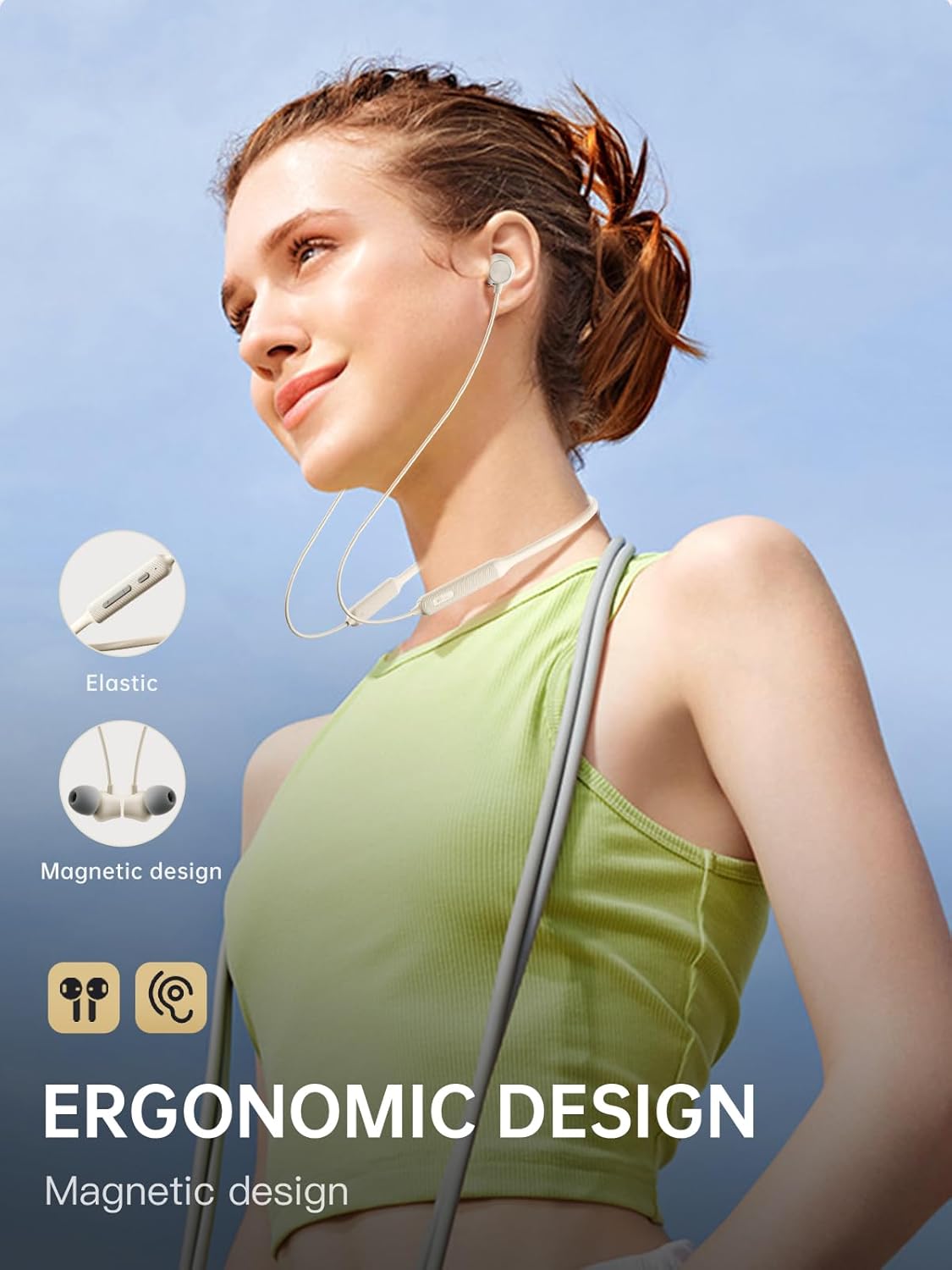
Figure 4: Ergonomic design and magnetic earbud feature.
4.2 Активдүү ызы-чууну жокко чыгаруу (ANC)
The iKF Alive earphones feature up to -49dB Active Noise Cancellation to minimize ambient noise.
- ANC которуштуруу: Use the dedicated ANC button on the neckband or control via the iKF App.
- The iKF App allows for three adjustable noise reduction gears to suit different environments.

5-сүрөт: Иштеп жаткан активдүү ызы-чууну жокко чыгаруу.
4.3 HiFi Stereo Sound and Low Latency
Experience high-fidelity audio and seamless synchronization.
- The 13mm composite speakers deliver rich, detailed HiFi stereo sound.
- Activate the low latency mode (38ms) for gaming and video streaming to ensure audio and visuals are perfectly synchronized.

Figure 6: Internal structure of the 13mm HiFi speaker driver.
4.4 iKF App Control
Enhance your experience with the iKF App, available for both Android and iOS devices.
- Customize noise cancellation levels.
- Access headphone positioning features.
- Manage in-ear detection settings.
- Configure sleep mode and custom touch controls.
5. Техникалык тейлөө
5.1 Сууга туруктуулук
The iKF Alive earphones are IPX5 waterproof, providing protection against sweat and light rain.
- Avoid submerging the earphones in water.
- Суунун киришине жол бербөө үчүн кубаттоо портунун капкагы бекем жабылганын текшериңиз.
- Wipe off any sweat or moisture after use with a soft, dry cloth.

Figure 7: Designed for sports with IPX5 water resistance.
5.2 Тазалоо жана сактоо
- Regularly clean the ear tips and earphone surfaces with a soft, slightly damp кездеме.
- Катуу химиялык заттарды же абразивдүү материалдарды колдонбоңуз.
- Наушниктерди салкын, кургак жерде, күндүн тике тийген нурунан жана экстремалдык температурадан алыс сактаңыз.
- The magnetic earbuds help keep the neckband tidy and prevent tangling when not in use.
6. Кыйынчылыктарды
Эгерде кандайдыр бир көйгөйлөргө туш болсоңуз, төмөнкү кеңири таралган чечимдерди караңыз:
| Көйгөй | Мүмкүн чечим |
|---|---|
| Наушник күйбөйт | Наушниктердин толук заряддалганын текшериңиз. |
| Түзмөк менен жупташтыруу мүмкүн эмес | Make sure earphones are in pairing mode (flashing blue/red). Turn off and on Bluetooth on your device. Forget previous pairings and try again. |
| Үн жок же үнү төмөн | Кулакчындардын жана туташкан түзмөктүн үн деңгээлин текшериңиз. Кулакчындардын туура туташканын текшериңиз. |
| АНК эффективдүү иштебей жатат | Ensure ANC is enabled. Adjust ear tips for a secure seal. Clean any debris from the microphone ports. |
| үзгүлтүктүү байланыш | Ensure no obstacles between earphones and device. Move closer to the device. Avoid strong electromagnetic interference. |
Эгер көйгөй чечилбесе, кардарларды колдоо менен байланышыңыз.
7. Техникалык шарттар
| Өзгөчөлүк | Деталь |
|---|---|
| Модель аты | iKF Alive |
| Бренд | iKF |
| Байланыш | Зымсыз (Bluetooth 5.4) |
| Кулак жайгаштыруу | In-Ear |
| Форма фактору | Моюн боосу |
| Активдүү ызы-чууну жокко чыгаруу | -49дБ чейин |
| Сууга туруктуулук деңгээли | IPX5 |
| Оюн убактысы | 20 саатка чейин (ANC менен 16 саат) |
| Заряддоо убактысы | Болжол менен 1.5 саат |
| Аудио кечигүү | 38 Миллисекунд |
| Айдоочу түрү | Dynamic Driver (13mm composite speakers) |
| Импеданс | 32 Ом |
| Башкаруу түрү | Button, Touch (via App) |
| Өзгөчөлүктөр | Multipoint Pairing, Noise Cancellation, Fast Charging |
| Шайкеш түзмөктөр | Cellular Phones, Phones |
| Материал | Силикон |
8. Кепилдик жана колдоо
iKF provides a standard warranty for this product. Please refer to the warranty card included in your package for specific terms and conditions.
For technical support, troubleshooting assistance, or warranty claims, please contact iKF customer service through the official webсайт же сатуучу.
Ask a question about this manual
Ask about setup, troubleshooting, compatibility, parts, safety, or missing instructions. Manuals+ will review the question and use this page’s manual context to help answer it.