
Introduction
This manual provides essential instructions for the safe and efficient use of your Aiwa AW-KF4 Portable Bluetooth Speaker. Please read this manual thoroughly before using the product and retain it for future reference.
The Aiwa AW-KF4 is a portable Bluetooth speaker designed for robust audio performance with dynamic LED lighting, a rechargeable battery, and resistance to water and dust (IPX6). It offers versatile connectivity options including Bluetooth, USB, and AUX input.
Пакеттин мазмуну
Carefully unpack your speaker and ensure all items are present and in good condition. If any items are missing or damaged, please contact your retailer.
- Aiwa AW-KF4 Portable Bluetooth Speaker
- USB-C заряддоо кабели
- Instruction Manual

Image: The Aiwa AW-KF4 speaker in its retail packaging, showing the speaker and branding.
Продукт бүттүview
The Aiwa AW-KF4 speaker features a compact, cylindrical design with integrated controls and dynamic LED lighting. It is built for portability and durability.
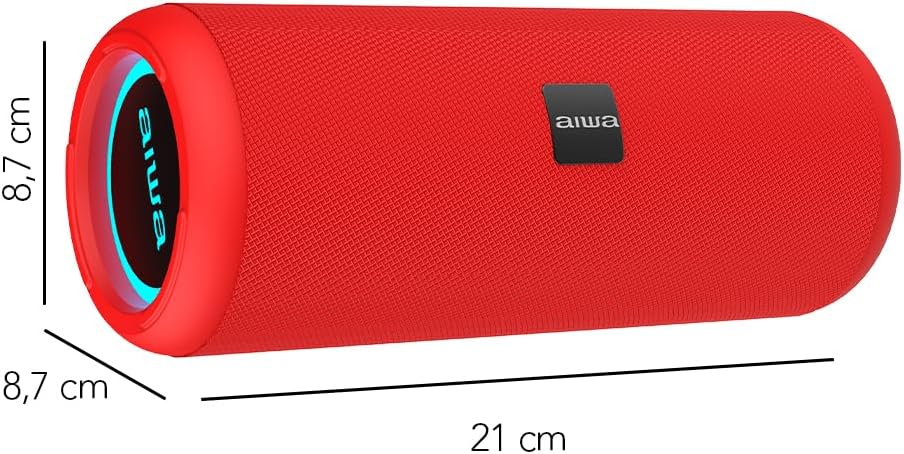
Image: A red Aiwa AW-KF4 speaker showing its approximate dimensions: 21 cm in length and 8.7 cm in diameter.

Image: Two Aiwa AW-KF4 speakers (red and black) illustrating key features: 20W output, LED lighting, TWS function, IPX6 water resistance, Bluetooth, USB, and SD card compatibility.

Image: A collage showing the Aiwa AW-KF4 speaker in various outdoor settings, emphasizing its IPX6 water resistance, up to 10 hours of battery life, and hands-free calling capability with an integrated microphone.
Жайгашуу
1. Динамикти кубаттоо
Before first use, fully charge the speaker. Use the provided USB-C cable to connect the speaker to a compatible USB power adapter (not included) or a computer's USB port.
- Заряддоо индикатору заряддоо учурунда күйөт.
- Толук кубаттоо болжол менен 3 саатты талап кылат.
- Толук заряддалгандан кийин, индикатор жарыгы өзгөрүшү же өчүп калышы мүмкүн.
A fully charged battery provides up to 10 hours of playback, depending on volume level and usage.
2. Күйгүзүү/өчүрүү
- To power on: Press and hold the Power button for a few seconds until you hear an audible prompt and the LED lights activate.
- To power off: Press and hold the Power button for a few seconds until you hear an audible prompt and the LED lights turn off.
Иштөө нускамалары
1. Bluetooth Жупташтыруу
The speaker will automatically enter Bluetooth pairing mode when powered on for the first time or if no device is connected. The LED indicator will flash, indicating it's ready to pair.
- Динамиктин күйүп турганын жана жупташтыруу режиминде экенин текшериңиз.
- Смартфонуңузда, планшетиңизде же башка аудио түзмөгүңүздө Bluetooth'ду иштетиңиз.
- Издөө "AW-KF4" in the list of available Bluetooth devices.
- Select "AW-KF4" to connect. You will hear a confirmation sound once paired.
- The LED indicator will stop flashing and remain solid.
Динамик 10 метрге (33 фут) чейин Bluetooth диапазонуна ээ.
2. Чыныгы зымсыз стерео (TWS) функциясы
The TWS function allows you to pair two Aiwa AW-KF4 speakers together for a stereo sound experience.

Image: A visual representation of the TWS (True Wireless Stereo) function, showing two Aiwa AW-KF4 speakers being used together for synchronized sound.
- Ensure both AW-KF4 speakers are powered on and not connected to any Bluetooth device.
- On one speaker (this will be the primary speaker), press and hold the TWS button (if available, or a designated button as per specific model instructions) until you hear a pairing tone.
- Эки динамик бири-бирине автоматтык түрдө туташат. Туташтырылгандан кийин ырастоо сигналы чыгат.
- Эми, "Bluetooth жупташтыруу" бөлүмүндө сүрөттөлгөндөй, Bluetooth түзмөгүңүздү негизги динамикке туташтырыңыз.
Note: Refer to the specific button layout on your speaker for the exact TWS pairing button.
3. USB жана AUX ойнотуу
- USB ойнотуу: Аудио камтыган USB флэш-дискти салыңыз files USB портуна салыңыз. Динамик автоматтык түрдө музыканы аныктап, дисктен ойной баштайт.
- AUX ойнотуу: Connect an audio device using a 3.5mm AUX cable (not included) to the AUX input port. The speaker will switch to AUX mode.
4. Жарык диоддору
The speaker features dynamic LED lights. These lights typically activate automatically when the speaker is powered on. Specific controls for changing light modes or turning them off may be available via a dedicated button on the speaker (refer to your speaker's button layout).
5. Башкаруу
The speaker features tactile controls for various functions:
- Кубат баскычы: Күйгүзүү/өчүрүү үчүн басып туруңуз.
- Ойнотуу/тындыруу баскычы: Музыканы ойнотуу же тындыруу үчүн басыңыз.
- Үндү жогорулатуу/Кийинки трек: Үнүн жогорулатуу үчүн басыңыз. Кийинки трекке өтүү үчүн басып туруңуз.
- Үнүн азайтуу/Мурунку трек: Үндү азайтуу үчүн басыңыз. Мурунку трек үчүн басып, кармап туруңуз.
- Режим баскычы: Press to switch between Bluetooth, USB, and AUX modes.
- Чакыруу баскычы (эгер бар болсо): Press to answer/end calls. Press and hold to reject calls.
Note: Button functions may vary slightly. Consult the diagrams in your physical manual for precise button identification.
Техникалык тейлөө
To ensure the longevity and optimal performance of your Aiwa AW-KF4 speaker, follow these maintenance guidelines:
- Тазалоо: Use a soft, dry cloth to clean the speaker's exterior. Do not use abrasive cleaners, solvents, or harsh chemicals.
- Суу туруктуулугу (IPX6): The speaker is resistant to strong water jets. It is not designed for submersion. Ensure all port covers are securely closed before exposing the speaker to water or dust. After exposure to water, wipe the speaker dry before charging.
- Сактагыч: Динамикти түз күн нурунан жана өтө температурадан алыс салкын, кургак жерде сактаңыз.
- Батареяга кам көрүү: Батареянын иштөө мөөнөтүн сактоо үчүн, көп колдонулбаса дагы, динамикти үзгүлтүксүз кубаттап туруңуз. Батареянын узак убакыт бою толугу менен заряддалышына жол бербеңиз.

Image: The Aiwa AW-KF4 speaker positioned near a pool, illustrating its IPX6 water resistance feature, suitable for outdoor and poolside use.
Проблемаларды чечүү
Динамикиңизде көйгөйлөргө туш болсоңуз, төмөнкү жалпы көйгөйлөрдү жана чечимдерди караңыз:
| Көйгөй | Мүмкүн болгон себеп / Чечим |
|---|---|
| Динамик күйбөйт. |
|
| Bluetooth аркылуу жупташтыруу мүмкүн эмес. |
|
| Үн жок. |
|
| Үндүн бузулушу. |
|
| TWS жупташтыруу ишке ашпай калды. |
|
Техникалык шарттар
| Модель аты | AW-KF4 (AWKF4B) |
| Бренд | Айва |
| Динамик чыгаруу күчү | 20 Ватт RMS |
| Frequency Response | 80 Hz (minimum specified) |
| Байланыш технологиясы | Bluetooth 5.0, USB, AUX |
| Аудио чыгаруу режими | Стерео |
| Турак жай материалы | Пластик |
| Динамик түрү | Вуфер |
| Сууга туруктуулук деңгээли | IPX6 (Resistant to strong water jets) |
| Bluetooth диапазону | 10 метрге чейин (33 фут) |
| Микрофондор | 1 (for hands-free calling) |
| Батарея сыйымдуулугу | 2000 мАч литий-ион |
| Батареянын иштөө мөөнөтү | Up to 10 hours (varies with volume and usage) |
| Заряддоо убактысы | Болжол менен 3 саат |
| Киргизүү көлөмүtage | 5 вольт |
| Импеданс | 4 Ом |
| Башкаруу ыкмасы | Tactile Buttons |
| Өлчөмдөрү (L x D) | Болжол менен 21 см x 8.7 см |
| Шайкеш түзмөктөр | Смартфондор, планшеттер |
| Origin | Кытай |
Кепилдик жана колдоо
Your Aiwa AW-KF4 Portable Bluetooth Speaker comes with a 1 жылдык өндүрүүчүнүн кепилдиги сатып алынган күндөн тартып. Бул кепилдик нормалдуу колдонуудагы өндүрүш кемчиликтерин камтыйт.
Кепилдик төмөнкүлөрдү камтыбайт:
- Damage caused by misuse, abuse, negligence, or accident.
- Уруксатсыз оңдоодон же өзгөртүүлөрдөн келтирилген зыян.
- Кадимки эскирүү.
For warranty claims or technical support, please contact your retailer or the official Aiwa customer service in your region. Please have your proof of purchase and product model number (AW-KF4) ready when contacting support.