
1. Продукт бүтүп калдыview
The STUDIOFINIX 4-Channel Mini Bluetooth Amplifier is designed to power passive speakers, offering versatile connectivity options including Bluetooth 5.1, TWS, AUX, MIC, and USB. Its compact design allows for easy integration into various audio setups, from home entertainment to marine applications.
Негизги өзгөчөлүктөрү
- Жалпы шайкештик: Suitable for wall-mounted, ceiling-mounted, marine, bookshelf, and other passive speakers.
- Bluetooth 5.1: Ensures faster transmission speed, longer distance, and stable performance for wireless audio streaming.
- Оңой орнотуу: Small and lightweight design for convenient placement on flat surfaces or within pre-cut speaker openings.
- Көп функциялуу: Supports Bluetooth, TWS (True Wireless Stereo), AUX, MIC, and USB inputs, along with MONO output.
Кутуда эмне бар
- 4-канал Bluetooth Amplifier Box (x1)
- 24V5A Power Adapter (x1)
- Колдонуучунун колдонмосу (x1)
- Бурағыш (x1)
- Бурамалар (x2)
- Кубат кабели (x1)

Image: Contents of the package, including the amplifier, power adapter, power cord, screwdriver, screws, and user manual.
2. Продукциянын схемасы жана башкаруу элементтери
менен таанышыңыз amplifier's layout and control functions.
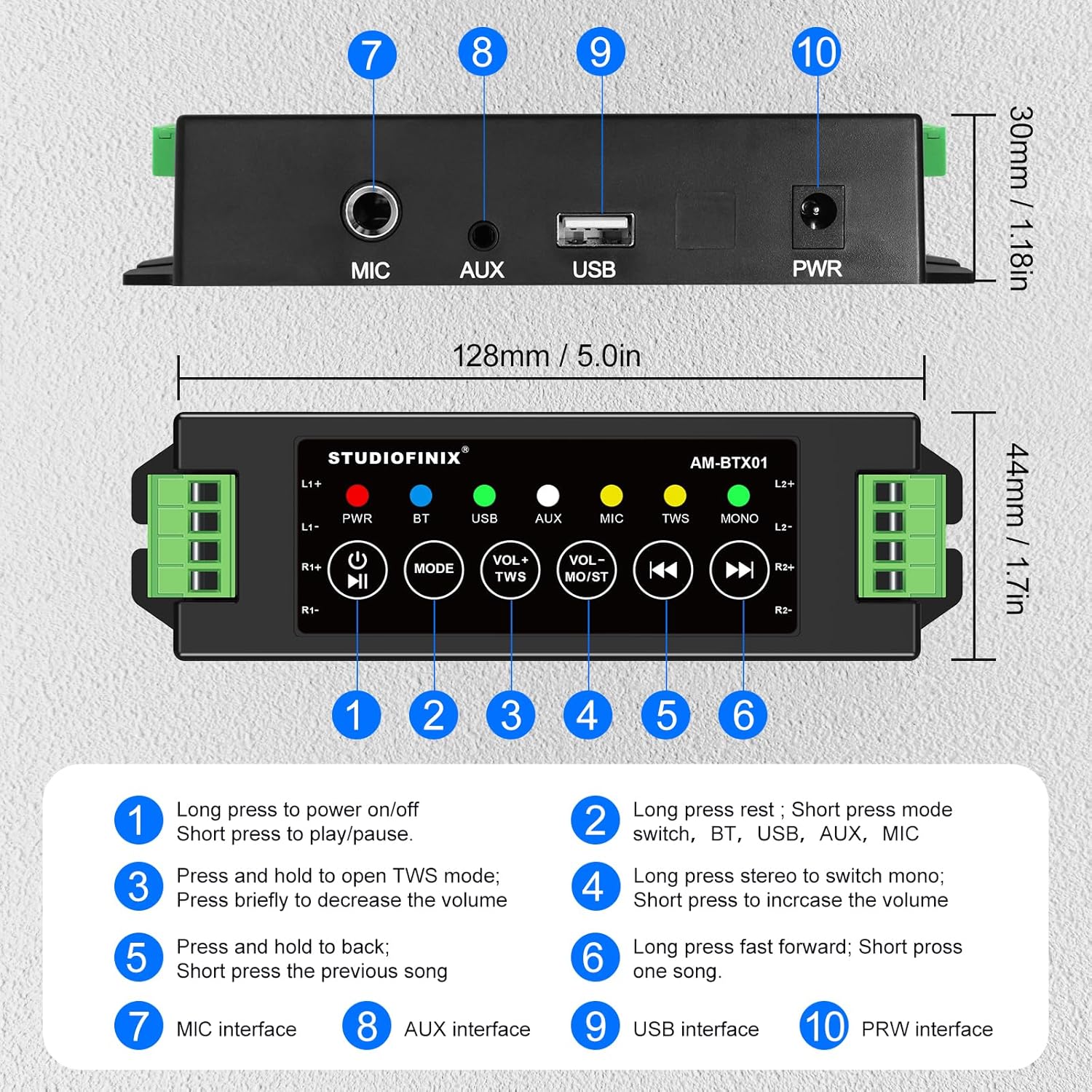
Image: Top and rear view -ныкы amplifier, highlighting numbered controls and interfaces.
Control Functions
| Жок. | Control/Interface | Функция |
|---|---|---|
| 1 | Кубат баскычы / Ойнотуу / Тыным | Long press to power on/off. Short press to play/pause audio. |
| 2 | Режим баскычы | Long press to reset. Short press to switch between BT, USB, AUX, and MIC modes. |
| 3 | VOL- / TWS Button | Press and hold to open TWS mode. Briefly press to decrease the volume. |
| 4 | VOL+ / MONO Button | Long press to switch between stereo and mono output. Briefly press to increase the volume. |
| 5 | Мурунку трек баскычы | Press and hold to fast backward. Short press for the previous song. |
| 6 | Кийинки трек баскычы | Long press to fast forward. Short press for the next song. |
| 7 | MIC Interface | Input for microphone connection. |
| 8 | AUX интерфейси | Input for auxiliary audio devices. |
| 9 | USB интерфейси | Input for USB audio sources. |
| 10 | PWR интерфейси | Power input for the 24V5A adapter. |
3. Орнотуу жана орнотуу
Пассивдүү динамиктерди туташтыруу
The amplifier supports up to four passive speakers. Ensure proper polarity when connecting speaker wires.
- Identify the positive (+) and negative (-) terminals on your passive speakers.
- Connect the positive (+) wire from each speaker to the corresponding L1+, L2+, R1+, R2+ terminals on the ampөмүрлүү.
- Connect the negative (-) wire from each speaker to the corresponding L1-, L2-, R1-, R2- terminals on the ampөмүрлүү.
- Use the included screwdriver to secure the speaker wires in the terminal blocks.
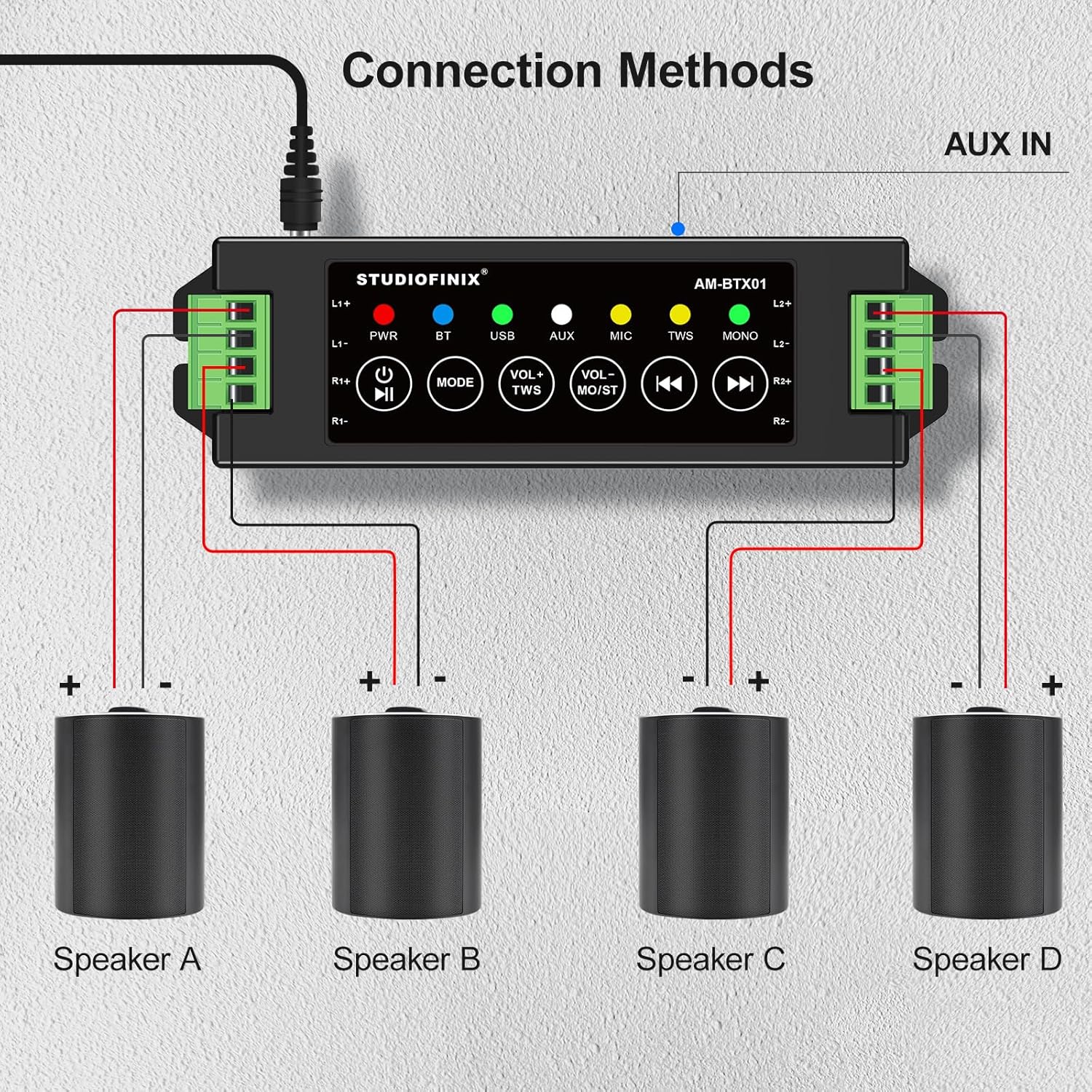
Image: Visual guide for connecting four speakers to the amplifier's output terminals.
Power Connection
Connect the provided 24V5A power adapter to the PWR interface (10) on the amplifier, then plug the adapter into a suitable power outlet.

Image: Detail of the amplifier's power input (PWR) and auxiliary input (AUX) ports.
4. Операция
Күйгүзүү/өчүрүү
Long press the Power Button (1) to turn the amplifier on or off. The PWR indicator light will illuminate when the device is powered on.
Bluetooth Жупташтыруу
- камсыз кылуу amplifier is powered on and in Bluetooth (BT) mode. The BT indicator light will flash, indicating it's ready for pairing.
- Мобилдик түзмөгүңүздө (смартфон, планшет ж.б.) Bluetooth иштетип, жеткиликтүү түзмөктөрдү издеңиз.
- Select "STUDIOFINIX" or a similar name from the list of devices to pair.
- Once paired, the BT indicator light will become solid, and you will hear a confirmation tone.
TWS (Чыныгы Wireless Stereo) режими
TWS mode allows you to pair two STUDIOFINIX amplifiers for a true wireless stereo experience.
- Экөөнү камсыз кылыңыз amplifiers are powered on and not connected to any Bluetooth device.
- On one amplifier, press and hold the VOL- / TWS Button (3) until you hear a confirmation tone, indicating TWS pairing mode.
- эки amplifiers will automatically search and pair with each other. Once paired, one amplifier will act as the master and the other as the slave.
- Now, connect your mobile device to the master amplifier via Bluetooth as described above. Audio will play through both amplifiers in stereo.

Image: Visual representation of two amplifiers being paired using the TWS function.
Input Mode Selection (AUX, USB, MIC)
Short press the Mode Button (2) to cycle through the available input modes: Bluetooth (BT), USB, AUX, and MIC. The corresponding indicator light will illuminate for the active mode.
Үндү башкаруу жана ойнотуу
- Үндү тууралоо: Briefly press the VOL- / TWS Button (3) to decrease volume, and the VOL+ / MONO Button (4) to increase volume.
- Ойнотуу/тындыруу: Short press the Power Button (1) to play or pause audio.
- Мурунку/Кийинки трек: Short press the Previous Track Button (5) for the previous song, and the Next Track Button (6) for the next song.
- Тез алдыга/артка: Long press the Previous Track Button (5) to fast backward, and the Next Track Button (6) to fast forward.
Моно/Стерео которуу
Long press the VOL+ / MONO Button (4) to switch the audio output between stereo and mono modes. The MONO indicator light will show the current setting.
5. Кыйынчылыктарды
| Көйгөй | Мүмкүн себеп | Чечим |
|---|---|---|
| Күч жок | Кубат адаптери туташкан эмес же туура эмес. | Кубат адаптери кубаттоого бекем туташканын текшериңиз amplifier and a working power outlet. Check if the power adapter is functional. |
| Динамиктерден үн жок | Incorrect speaker wiring; volume too low; wrong input mode selected; device not paired. | Verify speaker wire connections for correct polarity. Increase volume. Ensure the correct input mode (BT, AUX, USB, MIC) is selected. Confirm Bluetooth device is paired. |
| Bluetooth туташпай жатат | AmpКөтөргүч жупташтыруу режиминде эмес; түзмөк өтө алыс; тоскоолдук. | камсыз кылуу amplifier is in BT mode and the BT indicator is flashing. Move your device closer to the amplifier. Avoid strong electromagnetic interference. Try resetting Bluetooth on both devices. |
| TWS жупташтырылган жок | One or both amplifiers already paired; incorrect TWS activation. | Экөөнү камсыз кылыңыз amplifiers are unpaired from other Bluetooth devices. Follow TWS pairing instructions carefully, initiating TWS mode on only one ampбиринчи көтөргүч. |
| Үн сапаты начар | Low quality audio source; speaker impedance mismatch; loose connections. | Жогорку сапаттагы аудиону колдонуңуз files. Ensure speakers are compatible with the amplifier's output. Check all cable connections. |
6. Техникалык шарттар
| Өзгөчөлүк | Деталь |
|---|---|
| Бренд | STUDIOFINIX |
| Модель номери | RM |
| Динамиктин максималдуу чыгаруу күчү | 120 Ватт |
| Байланыш технологиясы | Bluetooth |
| Аудио чыгаруу режими | Стерео |
| Монтаж түрү | Дубалга орнотуу, шыпка орнотуу |
| Коргоочу материал | Plastic Or Metal |
| Аудио каналдардын саны | 4.0 |
| Зымсыз технология | Bluetooth |
| Connectivity Protocol | AUX, Bluetooth |
| Башкаруу ыкмасы | тийүү |
| Элемент Салмагы | 0.53 килограмм |
| Шайкеш түзмөктөр | Ноутбук, смартфон, планшет |
| Power Source | Электр зымдары |
7. Коопсуздук маалыматы
- ачыкка чыгарбагыла ampкөтөргүчтү сууга же ашыкча нымдуулукка алып келиңиз.
- Аппаратты жылуулук булактарынын жанына же тике күн нуруна коюудан алыс болуңуз.
- Зыяндын алдын алуу үчүн берилген кубат адаптерин гана колдонуңуз.
- Аппаратты өзүңүз ачууга же оңдоого аракет кылбаңыз. Квалификациялуу тейлөө кызматкерлерине кайрылыңыз.
- Балдар жетпеген жерде сактаңыз.
8. Продукт видеосу
Video: An official product video from Studiofinix Direct demonstrating the 4-Channel Mini Bluetooth Amplifier for Passive Speakers, showcasing анын өзгөчөлүктөрү жана функционалдуулугу.
9. Кепилдик жана колдоо
This STUDIOFINIX product comes with a limited warranty. For detailed warranty information or technical support, please refer to the contact information provided in your product packaging or visit the official STUDIOFINIX webсайт.