
1. Киришүү
Thank you for choosing the TNICER G10 Motorcycle Intercom with 2K Camera. This device combines a high-definition camera with advanced intercom features, designed to enhance your riding experience by providing communication, entertainment, and reliable video recording. Please read this manual thoroughly before use to ensure proper operation and to maximize the device's potential.

Image 1.1: The TNICER G10 Motorcycle Intercom unit with an included 64GB TF card.
2. Пакеттин мазмуну
Пакетиңизде бардык буюмдар бар экенин текшериңиз:
- G10 Негизги блок
- Speaker & Arm Microphone
- Cord Microphone
- Айлануучу база
- 3M Double-sided Adhesive Mat
- 3M Single-sided Adhesive Mat
- Динамик Velcro
- Speaker Thickening Spacer
- Микрофон Velcro
- Металл клип
- USB заряддоо кабели
- Instruction Manual
- 64 ГБ эстутум картасы

Image 2.1: Visual representation of all components included in the TNICER G10 package.
3. Продукт бүтүп калдыview
The TNICER G10 integrates a 2K camera with a motorcycle intercom system. Key features include:
- 2K HD камера: Equipped with a Sony IMX335 sensor for clear video recording and 5-megapixel photo capture.
- EIS Anti-Shake Technology: Electronic Image Stabilization minimizes blur for stable video footage during rides.
- Rotatable Lens & Body: The camera lens can rotate 30 degrees, and the main unit can rotate 360 degrees for optimal shooting angles.
- 8-Person Intercom: Supports group communication for up to 8 riders with a maximum range of 1000 meters.
- Bluetooth 5.2 & Wi-Fi: Advanced connectivity for stable communication and app control.
- 2000 мАч Батарея: Provides up to 5 hours of continuous video recording.
- IP67 Суу өткөрбөйт: Ар кандай аба ырайынын шарттарына туруштук берүү үчүн иштелип чыккан.
- Music Sharing & FM Radio: Enjoy music with a fellow rider or tune into FM radio stations.
- CVC & DSP Noise Canceling: Reduces wind noise and engine sounds for clear audio.

Сүрөт 3.1: An overview of the TNICER G10's main functionalities and specifications.
4. Орнотуу жана орнотуу
4.1 Аппаратты заряддоо
Before first use, fully charge the G10 unit. Connect the USB charging cable to the device and a power source. The charging indicator will show the charging status.
4.2 Эстутум картасын орнотуу
Insert the provided 64GB TF card into the designated slot on the G10 unit. The device supports up to 256GB TF cards for extended recording.

Image 4.1: Proper insertion of the 64GB memory card for recording.
4.3 Туулгага орнотуу
Choose between the metal clip or the adhesive mount for securing the G10 to your helmet. Ensure the mount is firmly attached and the unit is stable.
- Attach the rotatable base to your helmet using either the metal clip or the 3M adhesive mat.
- Slide the G10 main unit onto the rotatable base until it clicks into place.
- Adjust the unit's position using the 360-degree rotatable body and the 30-degree rotatable camera lens to achieve the desired camera angle.

Image 4.2: The G10's rotatable bracket allows for flexible positioning on the helmet.

Image 4.3: The G10 offers both 30-degree lens rotation and 360-degree body rotation for precise camera angle adjustment.
4.4 Connecting Speakers and Microphones
Carefully route the speaker and microphone wires inside your helmet and connect them to the G10 unit. Use the provided Velcro pads to secure the speakers and microphone in optimal positions for clear audio.
5. Иштөө нускамалары
5.1 Күйгүзүү/өчүрүү
- Күйгүзүү: Индикатор жарыгы күйгүчө кубат баскычын болжол менен 3 секунд басып туруңуз.
- Өчүрүү: Күйгүзүү баскычын болжол менен 3 секунд басып, индикатор өчкөнчө кармап туруңуз.
5.2 Камеранын иштеши
The G10 features a 2K HD camera with EIS anti-shake technology.
- Жаздырууну баштоо: Press the Camera button once to begin video recording. The indicator light will change to confirm recording.
- Жаздырууну токтотуу: Press the Camera button again to stop recording.
- Сүрөткө тартуу: While not recording, press and hold the Camera button for 2 seconds to take a 5-megapixel photo.
- Цикл жаздыруу: The device automatically records in a loop, overwriting the oldest files when the memory card is full. Important moments can be protected by the G-sensor.

Image 5.1: The G10's 2K HD camera captures clear footage with a wide field of view.

Image 5.2: Demonstrating the effectiveness of EIS anti-shake technology for stable video recording.
5.3 Домофон функциялары
The G10 supports group intercom for up to 8 riders.
- Жупташтыруу: Use the one-touch auto pairing function to connect multiple G10 devices. Refer to the detailed pairing instructions in the full manual for specific steps. The G10 is also compatible with many third-party Bluetooth intercoms.
- Group Talk: Once paired, riders can communicate within a 1000-meter range.

Image 5.3: The G10 supports communication for up to 8 riders over a distance of 1000 meters.
5.4 Music and FM Radio
- Музыка ойнотуу: Музыка ойнотуу үчүн смартфонуңузду Bluetooth аркылуу туташтырыңыз.
- Музыка бөлүшүү: Two riders can share music within a 50-meter range. Ensure the intercom function is off when using music sharing.
- FM радиосу: Activate the FM radio function to listen to local stations.
- Үн эффекттери: Adjust between three sound effect modes (Bass Boost, Treble Boost, Mid-range Boost) to customize your audio experience.

Image 5.4: Music sharing and customizable sound effects enhance the audio experience.
5.5 Wi-Fi жана колдонмону башкаруу
The G10 has built-in Wi-Fi for seamless connection to its dedicated smartphone application.
- Колдонмону жүктөө: Download the official TNICER app from Google Play Store or Apple App Store.
- реалдуу убакыт View: Connect via Wi-Fi to view түз эфирдеги камерадан алынган тамак-ашtagсмартфонуңузда e.
- File Башкаруу: Download recorded videos and photos directly to your phone for easy sharing and backup.
- Орнотууларды тууралоо: Configure camera and intercom settings through the app.

Image 5.5: The G10's built-in Wi-Fi allows for real-time viewing and control via a smartphone app.
6. Батарея жана заряддоо
The G10 is equipped with a 2000mAh rechargeable battery.
- Тынымсыз жаздыруу: 5 саатка чейин.
- Сүйлөшүү убактысы: 35 саатка чейин.
- Музыка ойнотуу: 38 саатка чейин.
- Заряддоо убактысы: Болжол менен 3 саат.
Always use the provided USB charging cable. Avoid using damaged cables or chargers.
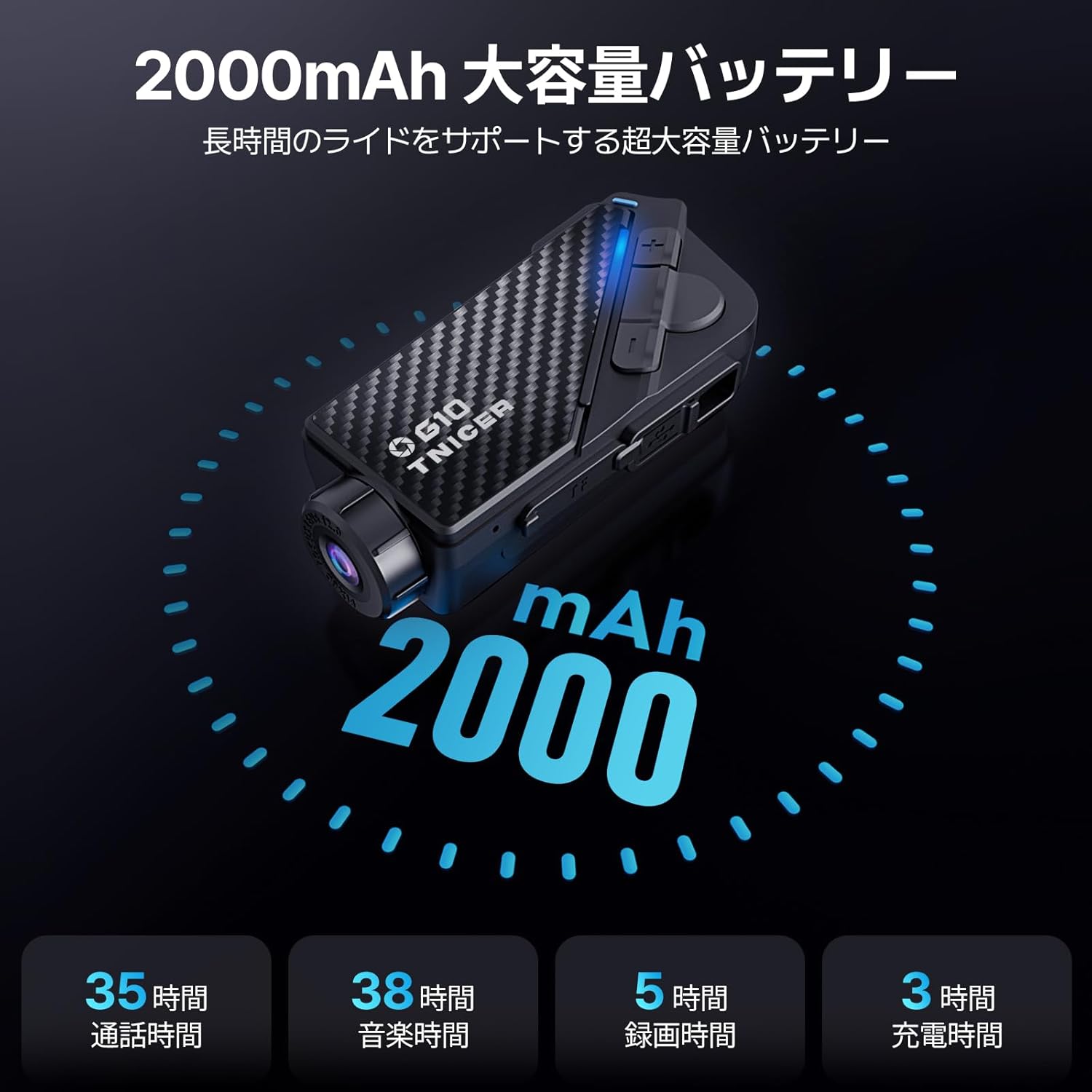
Image 6.1: Battery performance metrics for the TNICER G10.
7. Кароо жана тейлөө
- Тазалоо: жумшак колдонуу, damp cloth to clean the device. Do not use harsh chemicals or abrasive cleaners.
- Суу каршылык: The G10 is IP67 waterproof. While it can withstand rain, avoid submerging it in water for extended periods.
- Сактагыч: Аппаратты колдонбогондо салкын, кургак жерде сактаңыз.
- Батареяга кам көрүү: For optimal battery life, avoid extreme temperatures and fully charge the device periodically if stored for long durations.
8. Кыйынчылыктарды
If you encounter issues with your G10, try the following solutions:
- Түзмөк күйбөй жатат: Батарея заряддалганын текшериңиз. Кубат булагына туташып, кайра аракет кылыңыз.
- No audio from speakers: Check speaker connections. Ensure volume is not muted or too low.
- Домофон туташпай жатат: Ensure both devices are in pairing mode and within range. Try re-pairing the devices.
- Video recording issues: Эстутум картасы туура салынганын жана жетиштүү бош орун бар экенин текшериңиз. Зарыл болсо, эстутум картасын форматтаңыз (бул бардык маалыматтарды өчүрөт).
- Wi-Fi туташуу көйгөйлөрү: Ensure Wi-Fi is enabled on the G10 and your smartphone. Restart both devices and try connecting again.
For further assistance, please refer to the comprehensive troubleshooting section in the full instruction manual or contact customer support.
9. Техникалык шарттар
| Өзгөчөлүк | Спецификация |
|---|---|
| Бренд | TNICER |
| Модель номери | G10 |
| Видео тартуунун резолюциясы | 2K |
| Сүрөттүн резолюциясы | 5 мегапиксел |
| Image Stabilization | Санариптик (EIS) |
| Объективдин айлануусу | 30 градус |
| Body Rotation | 360 градус |
| Домофон тобунун өлчөмү | 8 атчанга чейин |
| Домофон диапазону | 1000 метрге чейин |
| Bluetooth версиясы | 5.2 |
| Байланыш технологиясы | Bluetooth, WIFI |
| Батарея сыйымдуулугу | 2000mAh |
| Үзгүлтүксүз жаздыруу убактысы | 5 саатка чейин |
| Talk Time | 35 саатка чейин |
| Музыканы ойнотуу убактысы | 38 саатка чейин |
| Заряддоо убактысы | Болжол менен 3 саат |
| Эстутум картасын колдоо | Up to 256GB TF card (64GB included) |
| Видео тартуу форматы | MP4 |
| Суу өткөрбөйт рейтинги | IP67 |
| Noise Canceling | CVC & DSP |
| Өлчөмдөр | 20.4 x 10.9 x 8.9 см (Пакет) |
| Салмагы | 450 г (Пакет) |
10. Кепилдик жана колдоо
The TNICER G10 comes with a standard manufacturer's warranty. Please refer to the warranty card included in your package for specific terms and conditions. For technical support, product inquiries, or warranty claims, please contact TNICER customer service through the retailer where you purchased the product or visit the official TNICER webсайт.