
1. Киришүү
Welcome to the user manual for your KTC 24 Inch 1500R Curved Gaming Monitor. This document provides essential information for setting up, operating, maintaining, and troubleshooting your new monitor. Please read through these instructions carefully to ensure optimal performance and longevity of your device.

Figure 1: KTC 24 Inch 1500R Curved Gaming Monitor
2. Пакеттин мазмуну
Төмөндө тизмеленген нерселердин баары пакетиңизге камтылганын текшериңиз:
- 24 inch Curved Gaming Monitor (x1)
- HDMI 2.0 Signal Cable (x1)
- Кубат адаптери (x1)
- Кубат кабели (x1)
- Бурағыш (x1)
- Кепилдик картасы (x1)
- Негиз (x1)
3. Продукт бүтүп калдыview
3.1 Негизги өзгөчөлүктөрү
- Immersive 1500R Curvature & High Refresh Rate: Experience an enveloping visual field with the 1500R curved screen, paired with a 165Hz refresh rate for exceptionally smooth motion.
- Жандуу түстүү дисплей: Enjoy rich and accurate colors with 250cd/m2 brightness, 8-bit color depth, 16.7 million colors, a 3000:1 dynamic contrast ratio, and 90% DCI-P3 color gamut coverage.
- Adaptive Sync технологиясы: Eliminates screen tearing and stuttering, providing fluid and artifact-free gameplay.
- Ultra-Fast 1ms Response Time: Minimizes motion blur and ghosting, ensuring clear and responsive visuals in fast-paced scenes.
- Versatile Connectivity & Ergonomics: Equipped with 2x HDMI 2.0 ports, 1x DisplayPort 1.4, and an audio out jack. The monitor supports VESA 100x100mm mounting and offers tilt adjustment from -5 degrees to -20 degrees for comfortable viewing.
- Көздүн ыңгайлуулугунун өзгөчөлүктөрү: Integrated Flicker-Free technology and a Blue Light Filter help reduce eye strain during extended use.
3.2 Порттор жана башкаруу каражаттары
Familiarize yourself with the monitor's connection ports and control interface.

Figure 2: Monitor Dimensions and Port Layout
- Туруктуу кубат киргизүү: Кубат адаптерин бул жерге туташтырыңыз.
- HDMI 2.0 порттору (x2): Connect to devices such as PCs, gaming consoles (e.g., PS5), or other HDMI-compatible media players.
- DisplayPort 1.4 (x1): Connect to devices with DisplayPort output for high-resolution and high-refresh-rate signals.
- Аудио чыгышы: Тышкы кулакчындарды же динамиктерди туташтырыңыз.
- OSD Rocker Switch: Located on the rear, this joystick-like control is used to navigate the On-Screen Display (OSD) menu and adjust monitor settings.
4. Орнотуу нускамалары
4.1 Стендди чогултуу
- Carefully remove the monitor and its base components from the packaging.
- Attach the monitor stand base to the stand neck using the provided screws and screwdriver.
- Align the assembled stand with the mounting points on the back of the monitor. Securely fasten the stand to the monitor.
4.2 Кубатка туташуу
- Электр шнурунун кубат адаптерине туташтырыңыз.
- Plug the power adapter into the DC power input port on the monitor.
- Электр шнурунун экинчи учун розеткага сайыңыз.
4.3 Баштапкы түзмөккө туташуу
Use the appropriate cable (HDMI or DisplayPort) to connect your computer, gaming console, or other video source to the monitor.
- Connect one end of the HDMI or DisplayPort cable to the corresponding port on your source device.
- Connect the other end of the cable to an available HDMI or DisplayPort input on the monitor.
- If using external audio, connect your headphones or speakers to the Audio Out port.
4.4 Баштапкы күйгүзүү
Press the power button (often integrated into the OSD rocker switch) to turn on the monitor. The monitor should automatically detect the active input source. If not, you may need to manually select the input source via the OSD menu.
5. Иштөө нускамалары
5.1 Экрандык менюнун навигациясы
The On-Screen Display (OSD) menu allows you to adjust various monitor settings. Use the OSD rocker switch on the back of the monitor to navigate:
- Press the switch inward to enter the OSD menu or confirm a selection.
- Move the switch up/down/left/right to navigate through menu options.
- Move the switch left to exit a submenu or the OSD menu.
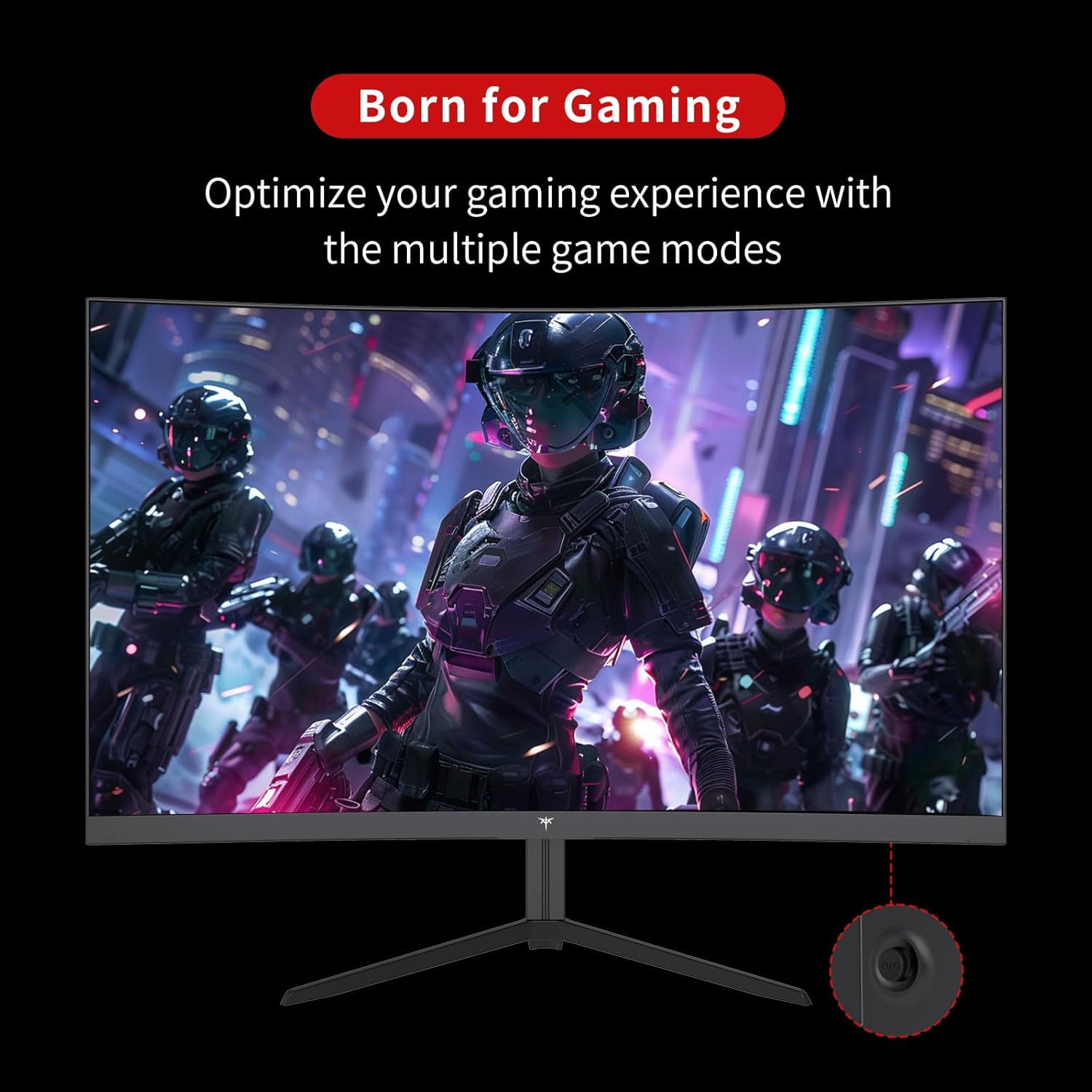
Figure 3: OSD Rocker Switch for Menu Navigation
5.2 Дисплей орнотуулары
OSD менюсунда сиз төмөнкүлөрдү өзгөртө аласыз:
- Жарыктык/Контраст: Жалпы жарыктыктын жана контрасттын деңгээлин тууралаңыз.
- Түс жөндөөлөрү: Түс температурасын, өңүн жана каныккандыгын так жөндөө.
- Аспект катышы: Select between various aspect ratio modes (e.g., Full, 1:1).
5.3 Оюн функциялары
Enhance your gaming experience with these dedicated features:
- Адаптивдүү синхрондоштуруу (FreeSync): Enable this feature in the OSD menu and on your graphics card settings to synchronize the monitor's refresh rate with your GPU's frame rate, eliminating screen tearing.

Figure 4: FreeSync ON vs. FreeSync OFF Visual Comparison
- Game Assists: Access features like customizable crosshairs, a black stabilizer to enhance visibility in dark game areas, and an on-screen game timer.

Figure 5: In-Game Assist Features
5.4 Көзгө кам көрүүнүн өзгөчөлүктөрү
To reduce eye strain during prolonged use:
- Flicker-Free технологиясы: This monitor is designed to eliminate screen flickering, which can cause eye fatigue.
- Көк жарык чыпкасы: Activate the low blue light mode in the OSD menu to reduce harmful blue light emissions.

Figure 6: Eye Comfort Features in Action
5.5 Расмий продукт Video
Watch this official product video for a visual guide to the monitor's features and capabilities:
Video 1: Official KTC product video showcasing the 24-inch curved gaming monitor's features, including its 165Hz refresh rate, 1ms response time, and 1500R curvature, with dynamic visuals.
6. Техникалык тейлөө
Туура тейлөө мониторуңуздун узак мөөнөттүү жана оптималдуу иштешин камсыз кылат:
- Экранды тазалоо: Жумшак, түксүз кездемени жеңил колдонуңуз dampened with water or a specialized screen cleaner. Avoid using alcohol-based cleaners or abrasive materials.
- Жалпы кам көрүү: Keep the monitor in a clean, dry environment. Avoid exposing it to direct sunlight, extreme temperatures, or high humidity. Do not block ventilation openings.
- Колдонулбаганда өчүрүү: Энергияны үнөмдөө жана анын иштөө мөөнөтүн узартуу үчүн мониторду узак мөөнөткө колдонбогондо өчүрүңүз.
7. Кыйынчылыктарды
Эгерде сиз мониторуңузда көйгөйлөргө туш болсоңуз, төмөнкү жалпы көйгөйлөрдү чечүү кадамдарын караңыз:
| Көйгөй | Мүмкүн себеп | Чечим |
|---|---|---|
| Экранда сүрөт жок | Электр кабели ажыратылган; Видео кабели ажыратылган; Туура эмес киргизүү булагы тандалды. | Электр жана видео кабелдеринин бекем туташтырылганын текшериңиз. OSD менюсу аркылуу туура киргизүү булагын тандаңыз. |
| Сүрөт бүлбүлдөгөн | Video cable issue; Graphics card driver outdated; Refresh rate mismatch. | Check video cable connection. Update graphics card drivers. Ensure refresh rate is set correctly in your system settings. |
| Түстөр туура эмес көрүнөт | Түс жөндөөлөрү туура эмес конфигурацияланган; Видео кабель бузулган. | OSD менюсунан түс жөндөөлөрүн тууралаңыз. Башка видео кабелин колдонуп көрүңүз. |
| Монитор күйбөйт | Power cable disconnected; Power outlet not working. | Verify power cable connection to both monitor and outlet. Test the outlet with another device. |
8. Техникалык шарттар
Detailed technical specifications for the KTC 24 Inch 1500R Curved Gaming Monitor:
| Спецификация | Нарк |
|---|---|
| Модель номери | 99 Null 5 |
| Screen Size | 24 дюйм |
| Ийрилик | 1500R |
| Резолюция | FHD 1080p (1920 x 1080 пиксел) |
| Жаңыртуу ылдамдыгы | 165Hz (up to 180Hz as per product title) |
| Жооп убактысы | 1ms |
| Панел түрү | VA |
| Аспект катышы | 16:9 |
| Сүрөттүн жарыктыгы | 250 Candela (cd/m2) |
| Түс гаммасы | 90% DCI-P3, 110% sRGB |
| Динамикалык контраст катышы | 3000:1 |
| HDR колдоо | Ооба |
| Байланыш | 2x HDMI 2.0, 1x DisplayPort 1.4, Аудио чыгыш |
| VESA шайкештиги | 100x100мм |
| Тилтти тууралоо | -5 degrees to -20 degrees |
| Продукциянын өлчөмдөрү | 24 x 18 x 5 дюйм |
| Элемент Салмагы | 6.17 фунт |
| Тtage | 12 вольт (ток) |
| Screen Surface Description | Мт |
9. Кепилдик жана колдоо
Your KTC 24 Inch 1500R Curved Gaming Monitor comes with a warranty. Please refer to the included Warranty Card in your package for detailed information regarding warranty terms, conditions, and duration.
For technical support, service inquiries, or any questions not covered in this manual, please contact KTC customer support through the official channels provided on your warranty card or the KTC webсайт.