Introduction
This manual provides instructions for the Generic replacement remote control designed for various Bauhn Smart UHD LED HDTV Android TV models. This remote functions as an infrared (IR) replacement and does not require complex pairing. For optimal compatibility, ensure your original remote control visually matches the replacement remote shown in this manual.
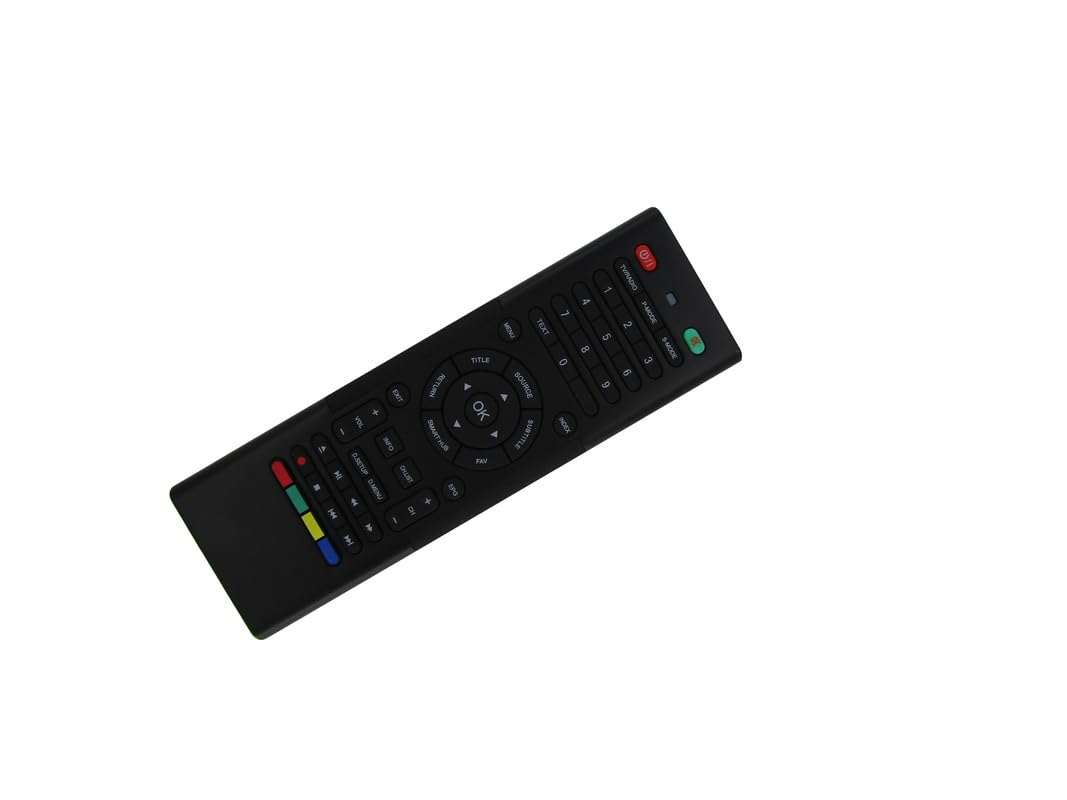
Image: The Generic replacement remote control, displaying both its primary button-side and the secondary QWERTY keyboard-side.
Жайгашуу
1. Батареяны орнотуу
- Пульттун артындагы батарея отсегин табыңыз.
- Батареянын капкагын жылдырыңыз.
- Insert two (2) AAA batteries, ensuring the correct polarity (+/-) as indicated inside the compartment.
- Батареянын капкагын бекем жабыңыз.

Сүрөт: Арткы view of the remote control with the battery cover detached, revealing the empty battery compartment for AAA batteries.
2. Алгачкы колдонуу
This remote control is an infrared (IR) replacement and typically does not require any programming or pairing. Once batteries are installed, point the remote directly at your Bauhn TV and begin operation. Ensure there are no obstructions between the remote and the TV's IR receiver.
Иштөө нускамалары
The remote features a dual-sided design: a standard TV remote layout on one side and a QWERTY keyboard on the other for easier text input.
Front Side: Standard TV Controls
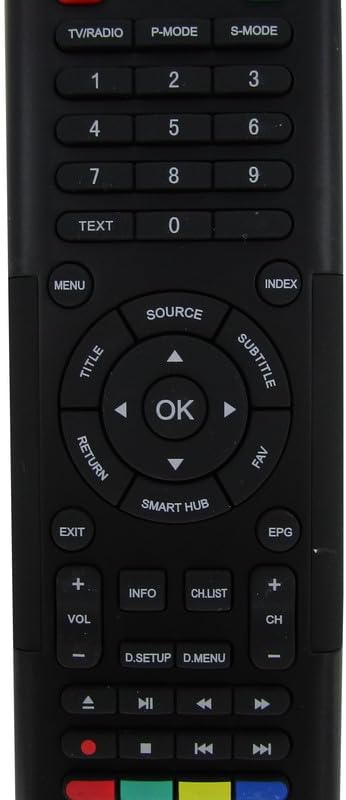
Сүрөт: деталдуу view of the front face of the remote control, highlighting the power, channel, volume, navigation, and media control buttons.
- Кубат баскычы: Телевизорду күйгүзөт же өчүрөт.
- ТВ / РАДИО: ТВ жана радио режимдеринин ортосунда которулат.
- P-MODE / S-MODE: Picture Mode and Sound Mode selection.
- Сан баскычтары (0-9): Түздөн-түз канал тандоо.
- ТЕКСТ: Телетекст кызматтарына кирет.
- МЕНЮ: Сыналгынын негизги менюсун ачат.
- БУЛАК: Киргизүү булактарын тандайт (HDMI, AV ж.б.).
- Navigation Pad (Up/Down/Left/Right) & OK: Менюларды багыттоо жана тандоолорду ырастоо.
- TITLE / SUBTITLE: Accesses title or subtitle options.
- КАЙТУУ / ЧЫГУУ: Мурунку экранга кайтат же менюдан чыгат.
- SMART HUB: Accesses the TV's smart features/apps.
- EPG: Электрондук программалык колдонмо.
- VOL +/-: Үн көлөмүн тууралайт.
- CH +/-: Каналдарды өзгөртөт.
- МААЛЫМАТ: Программа жөнүндө маалыматты көрсөтөт.
- CH.LIST: Канал тизмесин көрсөтөт.
- Медиа башкаруу баскычтары (ойнотуу, тындыруу, токтотуу, артка түрүү, алдыга жылдыруу): Медианы ойнотууну көзөмөлдөйт.
- Түс баскычтары (кызыл, жашыл, сары, көк): Функциялар телевизордун менюсуна же тиркемесине жараша өзгөрүп турат.
Rear Side: QWERTY Keyboard
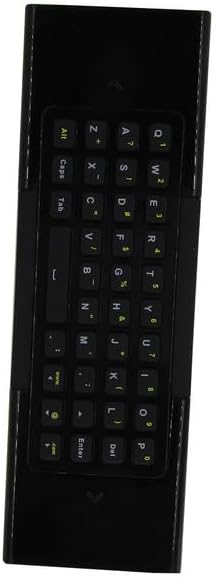
Сүрөт: деталдуу view of the reverse side of the remote control, featuring a full QWERTY keyboard for text input.
The QWERTY keyboard on the back of the remote allows for convenient text entry in smart TV applications, web browsers, and search functions. Simply flip the remote to use the keyboard. The remote may automatically detect which side is facing up and activate the corresponding input mode.
Техникалык тейлөө
Батареяны алмаштыруу
Пульттун жообу солгундап же иштебей калганда батарейкаларды алмаштырыңыз. Ар дайым эки AAA батарейканы жаңысына алмаштырыңыз. Эски жана жаңы батареяларды же батарейкалардын ар кандай түрлөрүн аралаштырбаңыз.
Тазалоо
Алыстан башкаруу пультун тазалоо үчүн жумшак, кургак чүпүрөктү колдонуңуз. Өтө кир болсо, бир азampкездемени суу менен сүртүңүз. Катуу химиялык заттарды, абразивдүү тазалоочу каражаттарды же ашыкча нымдуулукту колдонуудан алыс болуңуз, анткени алар пульттун бетине же ички компоненттерине зыян келтириши мүмкүн.
Проблемаларды чечүү
- Пульт жооп бербей жатат:
- Батареялар туура полярдуулук менен туура салынганын текшериңиз.
- Эски батареяларды жаңы AAA батареялары менен алмаштырыңыз.
- Пульттун инфракызыл эмиттери менен телевизордун инфракызыл кабыл алгычынын ортосунда так көрүнүү сызыгы бар экенин текшериңиз. Бардык тоскоолдуктарды алып салыңыз.
- Пульттун түз телевизорго багытталганын текшериңиз.
- Айрым функциялар иштебейт:
- This is a replacement remote. While designed for broad compatibility, it may not replicate every single function of your original remote, especially for highly specific or proprietary features.
- Ensure your TV model is among those listed as compatible. If your specific model is not listed, full functionality cannot be guaranteed.
- Пульт үзгүлтүккө учурап иштейт:
- Бул батареянын кубаты аз экенин билдириши мүмкүн. Батареяларды алмаштырыңыз.
- Инфракызыл сигналга тоскоол болушу мүмкүн болгон күчтүү жарык булактарын (мисалы, түз күн нуру же ачык флуоресценттик чырактар) текшериңиз.
Техникалык шарттар
| Бренд | Жалпы |
| Өндүрүүчү | Easytry |
| Шайкеш түзмөктөр | Television (Bauhn Smart UHD LED HDTV Android TV models) |
| Колдоого алынган түзмөктөрдүн максималдуу саны | 1 |
| Батареялар талап кылынат | 2 AAA батарейка |
| Өзгөчө өзгөчөлүк | Ergonomic, Replacement, QWERTY Keyboard |
| Түс | Кара |
| ASIN | B0D7MFQJMX |


