
Introduction
The Moman G4 Interchangeable Shells are designed to customize the appearance of your Moman H2E Intercom. This kit includes two US Flag pattern shells and two Dark Green pattern shells, allowing you to personalize your intercom unit. These shells are made from durable plastic and are specifically compatible with the Moman H2E Intercom model.

Image: Moman H2E Intercom units featuring the US Flag and Dark Green interchangeable shells, shown mounted on helmets. This illustrates the customization options available with the G4 shells.
Пакеттин мазмуну
Төмөндө тизмеленген нерселердин баары пакетиңизге камтылганын текшериңиз:
- Moman G4 Interchangeable Shell (US Flag Pattern) x 2
- Moman G4 Interchangeable Shell (Dark Green Pattern) x 2
Орнотуу жана орнотуу
Follow these steps to replace the shells on your Moman H2E Intercom unit:
- Prepare the Intercom: Ensure your Moman H2E Intercom unit is powered off before beginning the installation process.
- Remove Existing Shell: Gently locate the edges of the currently installed shell on your H2E Intercom. Apply slight pressure and carefully pry the shell off. It is designed to be removable.
- Align New Shell: Take one of the Moman G4 interchangeable shells (US Flag or Dark Green) and align its clips with the corresponding slots on the Moman H2E Intercom unit.
- Attach New Shell: Press the new shell firmly onto the intercom unit until you hear a click, indicating it is securely fastened. Ensure all clips are engaged and the shell sits flush with the intercom body.
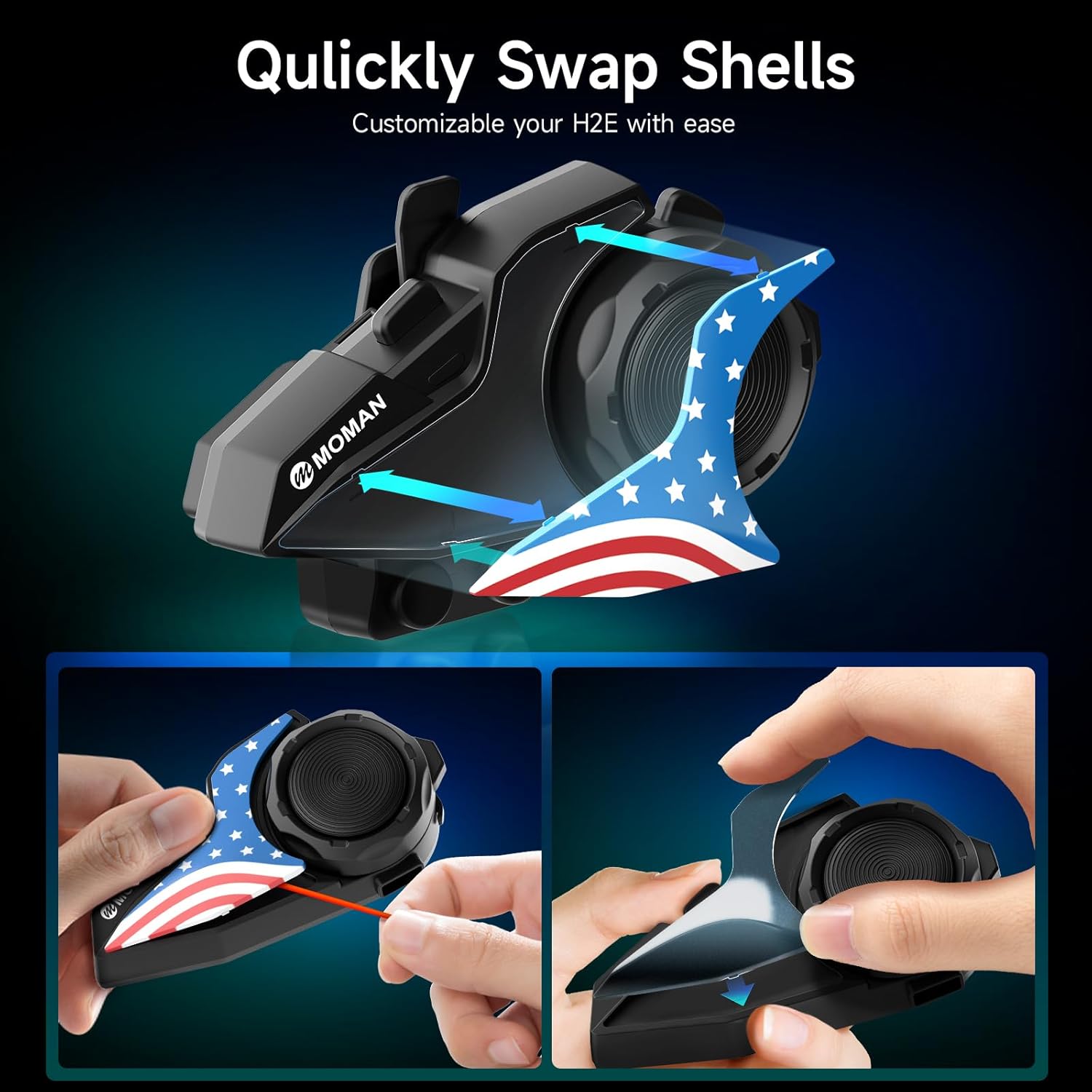
Image: A visual guide demonstrating the process of removing an old shell and attaching a new Moman G4 interchangeable shell to the H2E Intercom unit. Arrows indicate the direction of removal and attachment.
Техникалык тейлөө
To ensure the longevity and appearance of your Moman G4 Interchangeable Shells, follow these maintenance guidelines:
- Тазалоо: Wipe the shells with a soft, damp cloth to remove dust and dirt. Avoid using abrasive cleaners or solvents, as these can damage the plastic and printed patterns.
- Сактагыч: When not in use, store unused shells in a clean, dry place away from direct sunlight and extreme temperatures to prevent discoloration or warping.
- Суу каршылык: These shells are not water-resistant. Avoid prolonged exposure to water.
Проблемаларды чечүү
If you encounter any issues during the installation of your Moman G4 Interchangeable Shells, consider the following:
- Shell Does Not Fit: Ensure you are attempting to install the shells on a Moman H2E Intercom. These shells are specifically designed for this model and may not fit other intercom units.
- Shell Feels Loose: Re-check the alignment of the clips and slots. Apply firm, even pressure until the shell clicks into place. If it still feels loose, inspect the clips on both the shell and the intercom for any damage.
Техникалык шарттар
| Бренд | Моман |
| Модель номери | H2EG4 |
| Шайкеш түзмөктөр | Moman H2E Intercom |
| Материал | Пластик |
| Үлгү | US Flag, Dark Green |
| Сууга туруктуулук деңгээли | Сууга чыдамдуу эмес |
| Кошумча функциялар | Lightweight, Customizable |
Кепилдик жана колдоо
The Moman G4 Interchangeable Shells come with a 1 жылдык кепилдик from the date of purchase. This warranty covers manufacturing defects under normal use. It does not cover damage caused by misuse, accidents, or unauthorized modifications.
For technical support, warranty claims, or any questions regarding your Moman product, please contact Moman customer service. You can find contact information on the official Moman webсайт же сатып алуу платформасы аркылуу.

Image: An illustration highlighting Moman's professional customer service, including a 365-day warranty and support from a local language service team, available to reply within 24 hours on working days.