Introduction
The ZGCINE NPF-02 is a versatile NP-F battery charger and power adapter designed for photographers and videographers. It supports USB-C Power Delivery (PD) for both input and output, offering 25W fast charging capabilities. Additionally, it features two DC output ports, allowing it to supply power to various devices such as cameras and monitors.
This device is compatible with NP-F series batteries, including F550, F750, and F970 models, providing efficient charging and reliable power distribution for your equipment.
Пакеттин мазмуну:
- 1x ZGCINE NPF-02 Charger/Adapter
- 1x Таза кездеме
Продукт бүттүview
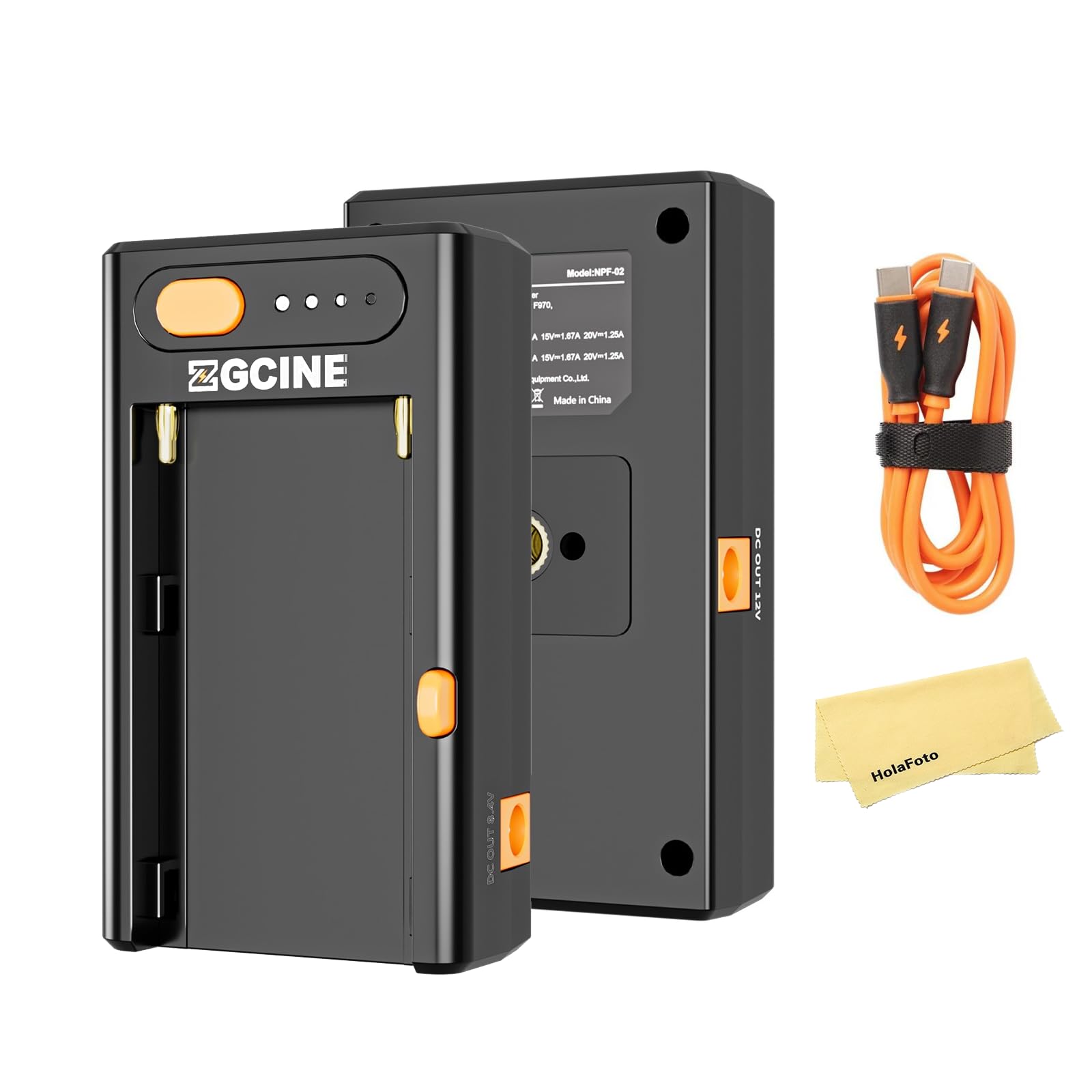
Алдыңкы жана арткы view of the ZGCINE NPF-02, showcasing анын компакттуу конструкциясы жана ар турдуу порттору.

The ZGCINE NPF-02 with an NP-F battery inserted, ready for use.
The NPF-02 features a dedicated slot for NP-F batteries, a USB-C PD input/output port, and two DC output ports (8.4V and 12V). It also includes LED indicators to show battery status.
Жайгашуу
- NP-F батареясын салыңыз: Align your NP-F series battery (F550, F750, or F970) with the battery slot on the NPF-02. Gently slide the battery into place until it clicks securely.
- Connect Power Source (for charging): To charge an NP-F battery, connect a USB-C PD compatible power adapter (not included) to the USB-C PD IN/OUT port on the NPF-02 using a USB-C cable. The LED indicators will illuminate to show charging status.
- Connect External Devices (for power output):
- For cameras or monitors requiring 8.4V, connect them to the DC OUT 8.4V port.
- For cameras or monitors requiring 12V, connect them to the DC OUT 12V port.
- For mobile phones or other USB-C powered devices, connect them to the USB-C PD IN/OUT port.

Connecting the USB-C cable to the NPF-02 for charging or power output.
Иштөө нускамалары
Charging NP-F Batteries
When an NP-F battery is inserted and a USB-C PD power source is connected, the NPF-02 will begin charging the battery. The LED indicators will show the current charge level. Charging times vary by battery model:
- F550 Battery: Approximately 78 minutes for a full charge.
- F750 Battery: Approximately 120 minutes for a full charge.
- F970 Battery: Approximately 200 minutes for a full charge.

Illustration of fast charging capabilities and approximate charging times for different NP-F battery models.
Using as a Power Source
With an NP-F battery inserted, the NPF-02 can act as a power source for other devices:
- DC чыгаруу: Connect your camera, monitor, or LED light to the appropriate DC OUT port (8.4V/3A or 12V/3A). Ensure the voltage matches your device's requirements.
- USB-C PD чыгышы: Connect mobile phones, laptops, or other USB-C powered devices to the USB-C PD IN/OUT port. The NPF-02 supports various PD output profiles: 5V/3A, 9V/2.8A, 12V/2.1A, 15V/1.67A, 20V/1.25A.

The NPF-02 connected to a camera and a laptop, demonstrating its multi-functional power output capabilities.
Батарея деңгээлинин көрсөткүчтөрү
The four LED dots on the NPF-02 indicate the approximate battery charge level of the inserted NP-F battery. Press the orange button next to the LEDs to check the current level.
Техникалык тейлөө
- Тазалоо: Use the provided clean cloth or a soft, dry cloth to wipe the device. Avoid using harsh chemicals or abrasive materials.
- Сактагыч: Store the NPF-02 in a cool, dry place away from direct sunlight and extreme temperatures. Remove the NP-F battery if storing for extended periods.
- Колдонуу: Аппаратты этияттык менен колдонуңуз. Аны түшүрүүдөн же катуу таасирлерден сактаныңыз.
Проблемаларды чечүү
| Көйгөй | Мүмкүн себеп | Чечим |
|---|---|---|
| Device not charging / not powering external devices. |
|
|
| External device (e.g., camera) not entering PD charging mode or not receiving sufficient power. |
|
|
| NP-F battery drains quickly or device stops working after a short period. |
|
|
Техникалык шарттар
| Өзгөчөлүк | Деталь |
|---|---|
| Модел | NPF-02 |
| USB-C PD киргизүү/чыгаруу | 5V/3A, 9V/2.8A, 12V/2.1A, 15V/1.67A, 20V/1.25A (макс. 25Вт) |
| DC чыгаруу 1 | 8.4V/3A |
| DC чыгаруу 2 | 12V/3A |
| Бири -бирине шайкеш батареялар | NP-F series (F550, F750, F970) |
| F550 Charging Time | Болжол менен 78 мүнөт |
| F750 Charging Time | Болжол менен 120 мүнөт |
| F970 Charging Time | Болжол менен 200 мүнөт |
| Өлчөмдөр | 3.74 x 3.74 x 0.98 дюйм |
| Салмагы | 5.3 унция |
| Өндүрүүчү | ZGCINE |
Расмий продукт Video
Watch this official video for a visual guide to the ZGCINE NPF-02's features and functionality, including its various ports and how it interacts with NP-F batteries.
Кепилдик жана колдоо
For any questions, technical assistance, or warranty inquiries regarding your ZGCINE NPF-02, please contact the seller directly. If you made your purchase through Amazon, navigate to your Amazon Order Page and click on "problem with this order." The seller, HolaFoto, aims to respond to inquiries within 24 hours during working days.
Сураныч, кепилдик дооматтар үчүн сатып алуу далилиңизди сактап коюңуз.