
1. Киришүү
This manual provides detailed instructions for the safe and effective operation of the PEAKMETER PM8231 Series Smart Digital Multimeter. This device is a compact, automatic portable digital multi-tester designed for various electrical measurements, including AC/DC Voltage, Resistance, Continuity, and Non-Contact Voltage (NCV) detection. It features a 2000-count display, data hold function, work light, and backlight for enhanced usability.
Please read this manual thoroughly before using the multimeter to ensure proper operation and to prevent potential hazards.
2. Коопсуздук маалыматы
WARNING: To avoid electrical shock or damage to the meter, please observe the following safety rules:
- Өлчөөлөрдү жүргүзүүдөн мурун, ар дайым сыноо өткөргүчтөрү туура туташтырылганын жана функция которгучу туура диапазонго коюлганын текшериңиз.
- Баалангандан ашык колдонбоңузtage, which is CAT III 600V for this device.
- Before opening the case to replace batteries, always remove the test leads from the circuit and the meter.
- Do not operate the meter if it appears damaged or if the test leads are damaged.
- Том менен иштөөдө өтө этият болуңузtag60V DC же 30V AC RMS жогору, анткени алар шок коркунучун жаратат.
- Conforms to safety standards EN61010-1, EN61010-2-033, EN61326.

2.1-сүрөт: Арткы view of the PM8231 multimeter, highlighting the battery compartment and critical safety warnings regarding electrical shock and compliance with IEC61010-1, 600V CAT III standards.
3. Продукт бүтүп калдыview жана өзгөчөлүктөрү
The PEAKMETER PM8231 is a versatile digital multimeter designed for ease of use and reliability. Key features include:
- Smart Automotive Digital Multimeter: Automatic portable design.
- Дайындарды кармоо: Көрсөтүлгөн өлчөөнү жеңил окуу үчүн токтотот.
- NCV аныктоо: Байланышсыз томtagтүз байланышсыз жандуу зымдарды аныктоо үчүн электрондук аныктоо.
- Work Light & Backlight: Enhances visibility in dimly lit environments.
- 2000 саны дисплей: Provides clear and precise readings.
- Үзгүлтүксүздүк тести: Ачык же жабык чынжырларды текшерет.
- Авто диапазон: Тиешелүү өлчөө диапазонун автоматтык түрдө тандайт.

3.1-сүрөт: Фронт view of the PM8231 multimeter, showing the display, function buttons, and connected test leads.
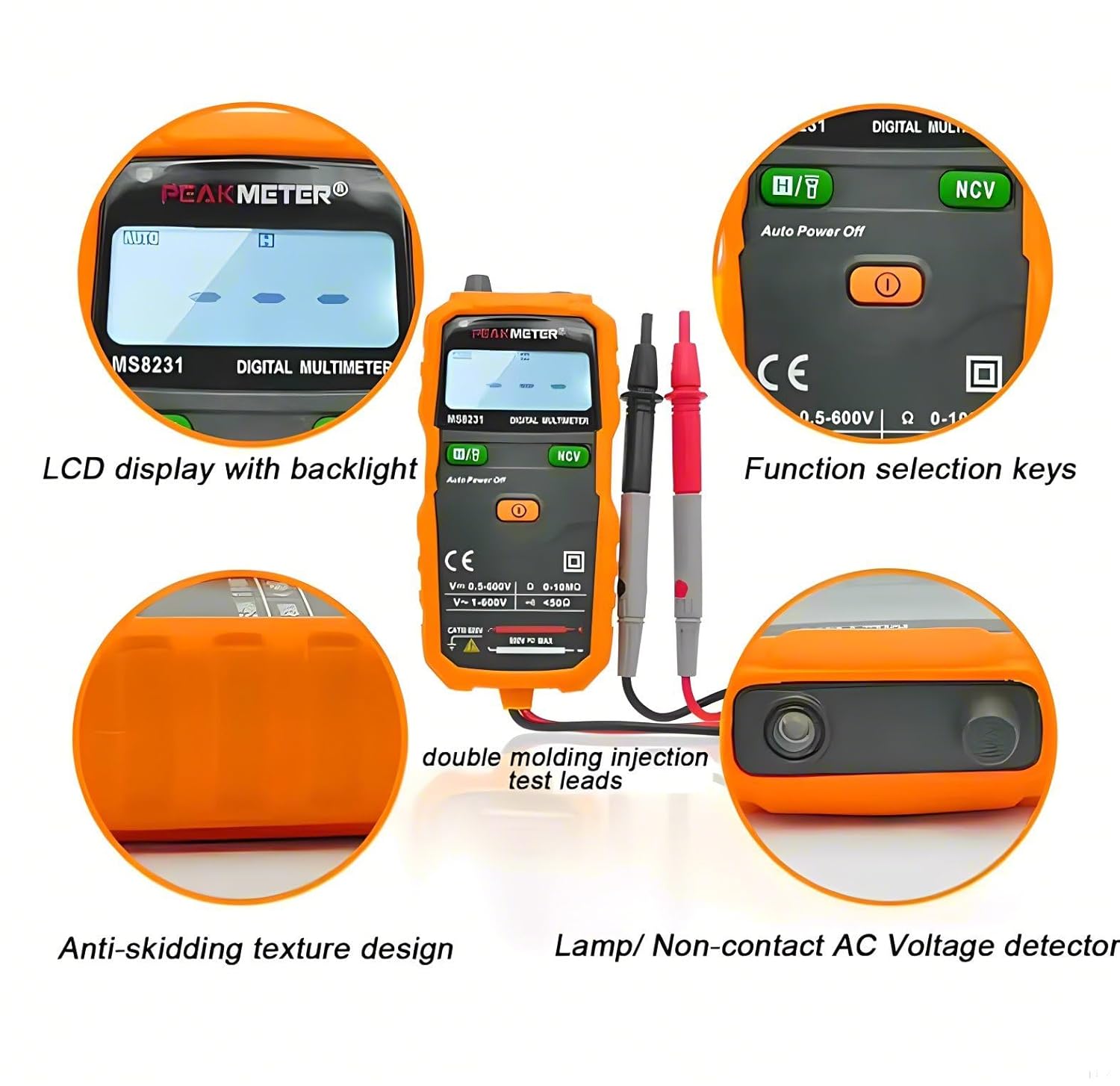
3.2-сүрөт: Breakdown of PM8231 features, illustrating the LCD display with backlight, function selection keys, anti-skidding texture design for grip, and the integrated lamp/Non-Contact AC Voltagдетектор.

3.3-сүрөт: Physical dimensions of the PM8231 multimeter, indicating its compact size for portability.
4. Орнотуу
4.1. Батареяны орнотуу
The PM8231 multimeter requires 2 x 1.5V AAA batteries (included). To install or replace batteries:
- Ensure the multimeter is turned off and disconnect all test leads from the input terminals and any circuits.
- Locate the battery compartment cover on the back of the unit (refer to Figure 2.1).
- Капкактын бекитүүчү бурамасын(ларын) бошотуу үчүн бурагычты колдонуңуз.
- Remove the cover and insert the batteries, observing the correct polarity (+ and -).
- Капкакты кайра ордуна коюп, бурамалар(дар)ды бекемдеңиз.
4.2. Сыноо линияларын туташтыруу
Connect the red test lead to the "VΩmA" input jack and the black test lead to the "COM" input jack. Ensure a secure connection before use.
5. Иштөө нускамалары
The PM8231 features an auto-ranging function, simplifying operation. The device will automatically select the appropriate range for most measurements.
5.1. Күйгүзүү/өчүрүү
Press the orange power button (①) to turn the multimeter on. The device features an "Auto Power Off" function to conserve battery life. Press the power button again to turn it off.
5.2. AC/DC Voltage Өлчөө
- Connect the test leads to the circuit in parallel with the load.
- Мультиметр автоматтык түрдө AC же DC чыңалууну аныктайтtage жана окууну көрсөтүңүз.
- Максималдуу киргизүү көлөмүtage 600 В.
5.3. Каршылык Өлчөө
- Каршылыкты өлчөөдөн мурун чынжырдын токтун өчүрүлгөнүн текшериңиз.
- Connect the test leads across the component or circuit segment.
- The multimeter will display the resistance value in Ohms (Ω).
5.4. Үзгүлтүксүздүк тести
- Схема кубаты өчүрүлгөнүн текшериңиз.
- Сынамык өткөргүчтөрдү чынжыр же компонент боюнча туташтырыңыз.
- If continuity exists (resistance less than 50Ω), the multimeter will emit an audible beep.
5.5. Контактсыз томtage (NCV) аныктоо
NCV функциясы AC көлөмүн аныктоого мүмкүндүк беретtagэ түз байланышсыз, ток өткөрүүчү зымдарды аныктоо үчүн пайдалуу.
- Press and hold the "NCV" button.
- Move the top end of the multimeter near the suspected live wire or outlet.
- Аппарат AC том бар экенин көрсөтөтtagвизуалдык жана/же үн сигналдары аркылуу.

5.1-сүрөт: The PM8231 multimeter demonstrating its NCV function, detecting voltagфизикалык байланышсыз электр розеткасынын жанында.
5.6. Маалыматты кармоо функциясы
Press the "H/T" button to hold the current reading on the display. Press it again to release the hold function.
5.7. Work Light and Backlight
The multimeter includes a work light for illuminating the measurement area and a backlight for the display, enhancing visibility in dark conditions.

5.2-сүрөт: The PM8231 multimeter's flashlight feature in use, providing illumination for working in low-light environments, alongside its clear LCD and backlight.
6. Техникалык тейлөө
6.1. Тазалоо
Ишти жарнама менен сүртүңүзamp кездеме жана жумшак жуугуч. Абразивдерди же эриткичтерди колдонбоңуз. Киргизүү терминалдарын кирден жана нымдан тазалаңыз.
6.2. Батареяны алмаштыруу
Дисплейде батареянын индикатору пайда болгондо, батареяларды 4.1-бөлүмдө сүрөттөлгөндөй алмаштырыңыз. Батареяны өз убагында алмаштыруу так көрсөткүчтөрдү жана түзмөктүн туура иштешин камсыз кылат.
6.3. Сыноо өткөргүчтөрүн текшерүү
Regularly inspect the test leads for any signs of damage, such as cracked insulation or exposed metal. Replace damaged leads immediately to prevent electrical shock.
7. Кыйынчылыктарды
- Дисплей жок/күйгүзүлгөн: Батареянын орнотулушун текшерип, батарейкалары түгөнүп калбагандыгын текшериңиз. Керек болсо алмаштырыңыз.
- Туура эмес окуулар: Ensure test leads are properly connected and the measurement function is correctly selected. Check for damaged test leads.
- "OL" or "OVER" on Display: Indicates an overload or out-of-range measurement. The multimeter is auto-ranging, but extremely high values may exceed its capacity.
- Үзгүлтүксүздүк сигналы жок: Check if the circuit is de-energized. Ensure the resistance is below 50Ω for the beep to activate.
8. Техникалык шарттар
The following tables detail the technical specifications for the PM8231 and related models.

8.1-таблица: Specifications for PM8231 and PM8232 models, including measurement ranges, accuracy, and general features.

8.2-таблица: Specifications for the PM8232A model, including measurement ranges, accuracy, and general features.
- Дисплей: 2000 саны
- Электр камсыздоо: 2 x 1.5V AAA батареялары
- Салмагы: Болжол менен 150г
- Dimensions (PM8231): 132 мм × 61 мм × 26 мм (5.2 x 2.4 x 1.0 дюйм)
- Safety Standard/Rating: EN61010-1, EN61010-2-033, EN61326, CAT III 600V
9. Кепилдик жана колдоо
This PEAKMETER product is covered by a manufacturer's warranty against defects in materials and workmanship. Please refer to the warranty card included with your product for specific terms and conditions. For technical support or service inquiries, please contact your retailer or visit the official PEAKMETER webсайт.