
1. Киришүү
This manual provides detailed instructions for the installation, operation, and maintenance of the Yitouniu EWeLink 2-Channel Smart WiFi Switch Relay. This device enables remote control of household appliances and electronic devices via a mobile application, RF remote control, and voice commands through smart assistants like Alexa and Google Home. It supports various operating modes and timing functions to enhance smart home automation.
2. Коопсуздук маалыматы
- Электр тогуна урунбоо үчүн орнотуудан же тейлөөдөн мурун электр кубатынан ажыратылганын текшериңиз.
- Installation should be performed by qualified personnel or under strict adherence to electrical safety guidelines.
- максималдуу ток жана көлөмүн ашпагылаtagтүзмөк үчүн белгиленген э рейтинги.
- Аппаратты суудан, нымдан жана экстремалдык температурадан алыс кармаңыз.
- Электр энергиясын калыбына келтирүүдөн мурун, бардык зымдардын туташууларынын бекем жана туура экенин текшериңиз.
3. Продукт бүтүп калдыview
The Yitouniu EWeLink Smart WiFi Switch Relay is a compact, 2-channel device designed for integrating traditional appliances into a smart home system. It features WiFi and Bluetooth connectivity for app control and supports RF 433MHz for remote control.

Сүрөт 3.1: Алдыңкы view of the Yitouniu EWeLink Smart WiFi Switch Relay. The device is white with branding and connection labels visible.

Сүрөт 3.2: Жакын пландан view of the Yitouniu EWeLink Smart WiFi Switch Relay, showing input terminals (N, L), output terminals (NO, COM, NC), and model information.

Image 3.3: The compact size of the Yitouniu EWeLink Smart WiFi Switch Relay, held in a hand for scale.
4. Техникалык шарттар
| Параметр | Нарк |
|---|---|
| Киргизүү көлөмүtage | AC/DC 85-250V, Micro USB 5V input |
| Максималдуу ток | 10A |
| Max Power | 2200 Вт |
| WiFi стандарты | WiFi 2.4GHz b/n/g + Bluetooth (IEEE 802.11b/g/n) |
| Иштөө температурасы | -20°Cден 70°Cге чейин |
| Материал | Жалынга каршы ABS |
| Продукциянын өлчөмдөрү | 2.76 x 1.77 x 1.1 дюйм |
| Элемент Салмагы | 1.76 унция |
| Байланыш түрү | Адатта ачык |
| Эл аралык коргоо рейтинги | IP65 |
| Сертификация | FCC |
5. Орнотуу жана орнотуу
5.1 Электр зымдары боюнча нускамалар
The device supports both AC/DC 85-250V input and Micro USB 5V input. Ensure correct wiring based on your application. The relay has Normally Open (NO), Common (COM), and Normally Closed (NC) contacts for controlling external devices.
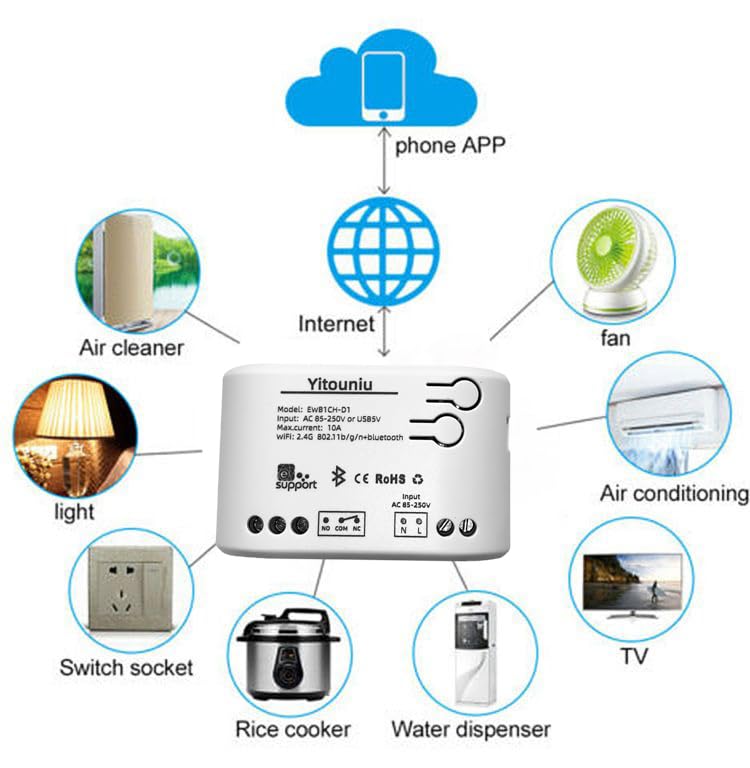
Image 5.1: Diagram illustrating the connectivity of the Yitouniu EWeLink Smart WiFi Switch Relay to various household appliances like lights, fans, and air conditioners, all controlled via a phone app and the internet.
5.2 Колдонмону жүктөп алуу жана жупташтыруу
- жүктөп алыңыз eWeLink Apple App Store же Google Play дүкөнүнөн колдонмо.
- Каттоо эсебин жана кирүү.
- Power on the Smart WiFi Switch Relay.
- Open the eWeLink app, tap the '+' icon to add a device.
- Follow the on-screen instructions to connect the device to your 2.4GHz WiFi network.

Image 5.2: Screenshots of the eWeLink app interface, showing controls for a garage door (ON/OFF) and a scheduling function for setting specific times.
6. Иштөө режимдери
The device supports three operating modes: self-locking, interlocking, and inching (micromotion). These modes can typically be configured within the eWeLink app or via physical buttons on the device, depending on the specific model variant.
- Өзүн-өзү кулпулоо режими: Each channel operates independently. Pressing the button (or app control) turns the relay ON, pressing it again turns it OFF.
- Блокировкалоо режими: When one channel is turned ON, all other channels are automatically turned OFF. This is useful for applications where only one device should be active at a time.
- Inching (Micromotion) Mode: The relay turns ON for a set duration (e.g., 0.5 seconds to 1 hour) and then automatically turns OFF. This is suitable for momentary actions like garage door openers or pulse controls.
7. Колдонмону башкаруу жана үн менен башкаруу
7.1 eWeLink App Features
The eWeLink app provides comprehensive control over your Smart WiFi Switch Relay:
- Алыстан күйгүзүү/өчүрүү: Control connected devices from anywhere with an internet connection.
- Убакыт функциялары: Set schedules, countdowns, or recurring timers for automatic on/off operations.
- Көз карандысыз көзөмөл: Each of the two channels can be controlled independently.
- Түзмөктү бөлүшүү: Share control of your devices with family members.
- Топтук көзөмөл: Бир эле учурда башкаруу үчүн бир нече акылдуу түзмөктөрдү топторго бөлүңүз.

Image 7.1: A user remotely controlling home lighting via the eWeLink mobile application, demonstrating the convenience of app-based control.

Image 7.2: Illustration of the eWeLink app's group control and sharing functions, allowing multiple users to manage devices across different rooms.

Image 7.3: The timing function interface within the eWeLink app, enabling users to set specific on/off times for connected appliances.
7.2 Үн менен башкаруунун интеграциясы
The Yitouniu Smart WiFi Switch Relay is compatible with popular voice assistants, including Amazon Alexa and Google Home/Nest. To enable voice control:
- Ensure your Smart WiFi Switch Relay is successfully paired with the eWeLink app.
- Alexa же Google Home колдонмосун ачыңыз.
- "Көндүмдөр" же "Google менен иштейт" бөлүмүнө өтүңүз.
- Издөө and enable the 'eWeLink Smart Home' skill/service.
- Суралганда eWeLink аккаунтуңузду байланыштырыңыз.
- Discover devices. Your Smart WiFi Switch Relay should now be controllable via voice commands.
Exampле буйруктар:
- – Alexa, бөлмөнүн жарыгын күйгүз.
- "Эй, Google, желдеткичти өчүр."

Image 7.4: A user interacting with voice assistants like Amazon Alexa and Google Home to control smart devices, highlighting the voice control capability of the relay.
8. Техникалык тейлөө
The Yitouniu Smart WiFi Switch Relay requires minimal maintenance. Follow these guidelines:
- Тазалоо: Wipe the device with a dry, soft cloth. Do not use liquid cleaners or solvents.
- Туташуу текшерүү: Periodically inspect wiring connections to ensure they remain secure.
- Программалык камсыздоонун жаңыртуулары: Keep the eWeLink app updated to receive the latest firmware for the device, which may include performance improvements and new features.
9. Кыйынчылыктарды
- Түзмөк WiFiга туташпай жатат:
- WiFi тармагыңыз 2.4 ГГц экенин текшериңиз. Түзмөк 5 ГГц тармактарды колдобойт.
- Колдонмого киргизилген WiFi сырсөзү туура экенин текшериңиз.
- Түзмөктү Wi-Fi роутериңизге жакыныраак жылдырыңыз.
- Аппаратты жана роутерди өчүрүп күйгүзүңүз.
- Device offline in app:
- Verify your home internet connection is active.
- Аппараттын кубаты бар-жогун текшериңиз.
- Аппаратты кайра иштетиңиз.
- Үн менен башкаруу иштебей жатат:
- Confirm the eWeLink skill/service is enabled and linked in your Alexa or Google Home app.
- Ensure the device is named clearly in the eWeLink app and discovered by your voice assistant.
- Интернет байланышыңызды текшериңиз.
- Device not responding to RF remote:
- Ensure the RF remote is paired with the switch. Refer to the RF pairing instructions (if applicable to your specific remote).
- Check the battery in the RF remote.
10. Кутуда эмне бар
Продукциянын таңгагын ачканда, сиз төмөнкү нерселерди табышыңыз керек:
- 1 x Yitouniu Wifi 2-Channel Relay Switch
- 1 х Инструкция (бул документ)
11. Кепилдик жана колдоо
This product comes with a standard manufacturer's warranty. For specific warranty terms, conditions, and duration, please refer to the documentation included with your purchase or contact Yitouniu customer support. For technical assistance or further inquiries, please visit the official Yitouniu webсайтка же кардарларды тейлөө каналдарына кайрылыңыз.