
BUNGPUNG BP-HDC-MC02
BUNGPUNG 8K@60Hz HDMI eARC Audio Extractor Adapter User Manual
Model: BP-HDC-MC02
Brand: BUNGPUNG
1. Продукт бүтүп калдыview
The BUNGPUNG 8K@60Hz HDMI eARC Audio Extractor Adapter (Model: BP-HDC-MC02) is designed to extract audio signals from an HDMI source or a TV with ARC/eARC functionality. This allows the audio to be outputted to an AV receiver or amplifier, providing enhanced sound experiences while maintaining high-quality video passthrough.
This adapter supports video resolutions up to 8K@60Hz (4:2:0 12bit) and 4K@120Hz (4:4:4 12bit), with backward compatibility for lower resolutions. It is compatible with HDMI 2.1, HDCP 2.3, and HDR, supporting deep color (30/36/48 bit). The device ensures high performance with no noticeable lag or loss in image and sound quality.

Сүрөт: алдыңкы view of the BUNGPUNG 8K@60Hz HDMI eARC Audio Extractor Adapter, showcasinанын компакттуу дизайны жана этикеткасы.
2. Негизги өзгөчөлүктөрү
- HDMI eARC Audio Extraction: Extracts audio from HDMI sources or eARC/ARC enabled TVs to an AV receiver.
- Жогорку чечим колдоо: Supports 8K@60Hz (4:2:0 12bit) and 4K@120Hz (4:4:4 12bit) video resolutions.
- Advanced Compatibility: Fully compatible with HDMI 2.1, HDCP 2.3, and HDR. Supports deep color (30/36/48 bit).
- Кеңири түзмөк шайкештиги: Works with Blu-ray players, DVDs, HD players, gaming consoles (PS3/4 Pro, Xbox), PCs, streaming devices (Fire TV, Apple TV, Chromecast, Roku), and outputs to Full HD TVs, monitors, projectors, speakers, amplifiers, and soundbars.
- Туруктуу курулуш: Features a robust metal body for rapid heat absorption and dissipation, reducing EMI/RFI noise interference.
- Plug-and-Play: Компакт өлчөмү жана жеңил орнотуу.
- Туруктуу энергия менен камсыздоо: Independent power supply ensures stable operation.
3. Пакеттин мазмуну
Пакетте бардык буюмдар бар экенин текшериңиз:
- 1 x BUNGPUNG 8K@60Hz HDMI eARC Audio Extractor Adapter (Model: BP-HDC-MC02)
- 1 x DC 5V Power адаптери
- 1 х Колдонуучунун колдонмосу (бул документ)
4. Продукциянын схемасы жана компоненттери
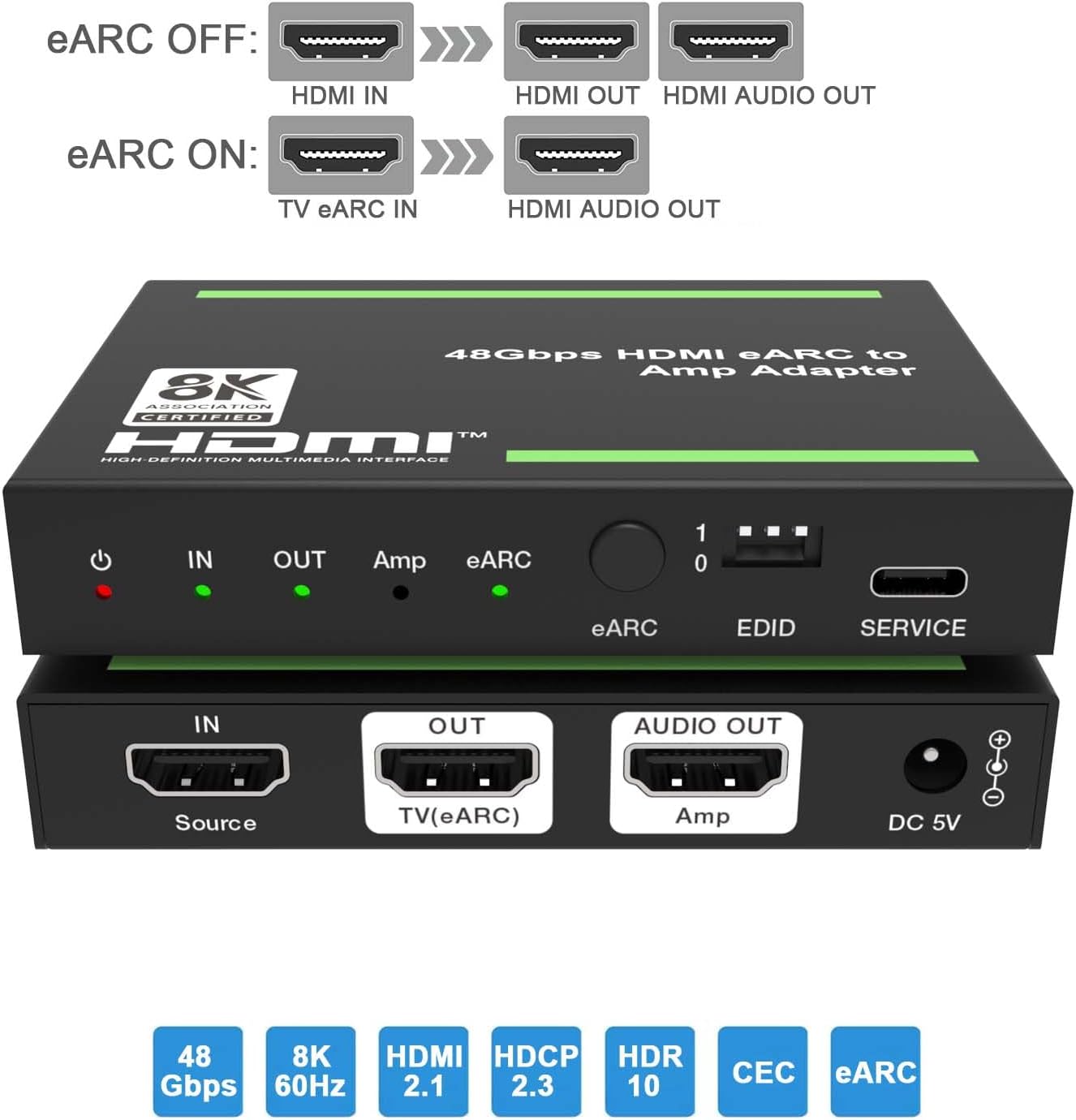
Сүрөт: үстү жана асты views of the adapter, highlighting the input/output ports and control elements.
Алдыңкы панелдин башкаруу элементтери жана көрсөткүчтөрү:
- Power LED: Red indicator, illuminates when the device is powered on.
- IN LED: Green indicator, illuminates when an input signal is detected.
- OUT LED: Green indicator, illuminates when the HDMI OUT port is connected to a TV.
- Amp LED: Green indicator, illuminates when the AUDIO OUT port is connected to an ampөмүрлүү.
- eARC LED: Flashes when ARC/eARC function is enabled and CEC communication is working. Off when ARC/eARC is disabled.
- eARC баскычы: Press to enable or disable the eARC function.
- EDID DIP которуу: Used to set the EDID mode (see Section 6 for details).
- КЫЗМАТ порту: For firmware updates and debugging.
Арткы панелдин порттору:
- IN (Source): HDMI input port for connecting source devices (e.g., Blu-ray player, gaming console, PC).
- OUT (TV(eARC)): HDMI output port for connecting to a TV or display. This port also functions as an ARC/eARC audio channel when the eARC function is enabled.
- AUDIO OUT (Amp): HDMI audio output port for connecting to an amplifier же AV кабылдагыч.
- DC 5V: Power input port for the included 5V DC power adapter.
5. Орнотуу нускамалары
Follow these steps to set up your HDMI eARC Audio Extractor Adapter:
- Түзмөктү туташтыруу: Connect an HDMI cable from your source device (e.g., Blu-ray player, game console, PC) to the IN (Source) port on the adapter.
- Дисплей түзмөгүн туташтырыңыз: HDMI кабелин түзмөктөн туташтырыңыз OUT (TV(eARC)) port on the adapter to the HDMI input of your TV or display.
- Connect Audio Receiver: HDMI кабелин түзмөктөн туташтырыңыз AUDIO OUT (Amp) port on the adapter to an HDMI input on your AV receiver or ampөмүрлүү.
- Туташуу кубаты: Кошумча 5V DC кубат адаптерин туташтырыңыз DC 5V port on the adapter, then plug the adapter into a power outlet. The Power LED will illuminate.
- Configure eARC (Optional): If you wish to extract audio from your TV's eARC/ARC channel to your AV receiver, ensure your TV's eARC/ARC function is enabled. Then, press the eARC Button on the adapter to enable eARC mode. The eARC LED will flash.
- Set EDID (Optional): тууралаңыз EDID DIP которуу according to your audio and video requirements. Refer to Section 6 for detailed EDID settings.

Image: Diagram illustrating typical connection scenarios for the HDMI eARC Audio Extractor, showing connections from a Blu-ray player to the adapter, then to a TV and a 7.1 channel audio ampөмүрлүү.
Connection Scenarios:

Image: Diagram showing eARC OFF mode, where HDMI IN provides video to HDMI OUT and audio to HDMI AUDIO OUT.

Image: Diagram showing eARC ON mode, where TV eARC IN provides audio to HDMI AUDIO OUT.
6. Иштөө нускамалары
LED көрсөткүчтөрү:
| Жок. | аты | Function Description |
|---|---|---|
| 1 | Power LED | Түзмөк күйгүзүлгөндө, кызыл LED күйөт. |
| 2 | LED | Киргизүү сигналы аныкталганда, жашыл LED күйөт. |
| 3 | LED ЧЫГЫП | OUT порту сыналгыга туташтырылганда, жашыл LED күйөт. |
| 4 | Amp LED | AUDIO OUT порту а ampкөтөргүч, жашыл LED күйгүзүлөт. |
| 5 | eARC LED | Күйүк: ARC/eARC функциясы күйгүзүлдү. БШК байланышы жана ARC/eARC туура иштеп жатат. Жаркылдоо: ARC/eARC функциясы күйгүзүлдү. БШК байланышы жана ARC/eARC туура иштебей жатат. Өчүк: ARC/eARC функциясы өчүрүлгөн. |
eARC Button Operation:
басыңыз eARC баскычы on the front panel to toggle the eARC function on or off. When eARC is enabled, the adapter can extract audio from the TV's eARC/ARC channel and send it to the connected AV receiver via the AUDIO OUT port.
7. EDID башкаруу
The EDID (Extended Display Identification Data) DIP switch allows you to manually configure the audio and video capabilities reported by the adapter to the source device. This can be useful for resolving compatibility issues or forcing specific audio formats.

Image: Detailed diagram explaining the function of each LED indicator and the settings for the EDID DIP switch.
EDID DIP Switch Settings:
| DIP Switch Setting (1-0) | Description |
|---|---|
| [DIP]=111 | Copy OUT port sink video and audio EDID (Default) |
| [DIP]=110 | Copy AUDIO OUT port sink video and audio EDID |
| [DIP]=101 | FRL12G_8K_HDR, 2.0CH |
| [DIP]=100 | FRL12G_8K_HDR, 5.1CH |
| [DIP]=011 | FRL12G_8K_HDR, 7.1CH |
| [DIP]=010 | FRL10G_8K_HDR, 2.0CH |
| [DIP]=001 | FRL10G_8K_HDR, 5.1CH |
| [DIP]=000 | FRL10G_8K_HDR, 7.1CH |
Эскертүү: "FRL" refers to Fixed Rate Link, a signaling method used in HDMI 2.1 for higher bandwidths. "12G" and "10G" indicate the data rate per lane (12 Gbps or 10 Gbps). "HDR" indicates High Dynamic Range support. "CH" indicates audio channels.
8. Техникалык тейлөө
To ensure the longevity and optimal performance of your adapter, follow these maintenance guidelines:
- Түзмөктү салкын, кургак жерде, күн нуру түз тийген жерден, жогорку температурадан жана нымдуулуктан алыс сактаңыз.
- Аппаратты сууга же башка суюктуктарга тийгизүүдөн сактаңыз.
- Аппаратты жумшак, кургак чүпүрөк менен тазалаңыз. Абразивдүү тазалагычтарды же эриткичтерди колдонбоңуз.
- Ашыкча ысып кетүүнүн алдын алуу үчүн аппараттын айланасында туура желдетүүнү камсыз кылыңыз.
- Disconnect power when the device is not in use for extended periods.
9. Кыйынчылыктарды
If you encounter issues with your HDMI eARC Audio Extractor Adapter, please refer to the following common problems and solutions:
| Көйгөй | Мүмкүн болгон себеп / Чечим |
|---|---|
| No video output on TV/display. |
|
| No audio output from AV receiver/ampөмүрлүү. |
|
| Үн бурмаланган же үзгүлтүктүү. |
|
| eARC function not working or eARC LED is flashing. |
|
10. Техникалык шарттар
| Өзгөчөлүк | Деталь |
|---|---|
| Модель номери | BP-HDC-MC02 |
| HDMI версиясы | HDMI 2.1 |
| HDCP Нускасы | HDCP 2.3 |
| Max Resolution Support | 8K@60Hz (4:2:0 12bit), 4K@120Hz (4:4:4 12bit) |
| Color Depth Support | 30 бит, 36 бит, 48 бит |
| HDR колдоо | Ооба |
| eARC/ARC Support | Ооба |
| БШКнын колдоосу | Ооба |
| Продукциянын өлчөмдөрү (L x W x Y) | 3.94 x 2.76 x 0.79 дюйм (95 x 68 x 18 мм) |
| Элемент Салмагы | 0.007 унция (болжол менен 0.2 грамм) |
| Электр камсыздоо | DC 5V |
| Шайкеш түзмөктөр | Amplifier, Speaker, Blu-ray player, DVD, HD player, Amazon Fire TV, Apple TV, PS3/4 Pro, Xbox, PC/Laptop, HD camera, Chromecast, Fire Stick, Roku, HDDVR, Full HD TV, monitor, projector, soundbars. |
11. Кепилдик жана колдоо
This BUNGPUNG product is covered by a one-year warranty from the date of purchase. This warranty covers manufacturing defects and initial defects.
If you have any questions regarding product compatibility, setup, operation, or encounter any initial defects, please do not hesitate to contact BUNGPUNG customer support. Please refer to the product packaging or the seller's information on the purchase platform for specific contact details.
Ask a question about this manual
Ask about setup, troubleshooting, compatibility, parts, safety, or missing instructions. Manuals+ will review the question and use this page’s manual context to help answer it.