
1. Киришүү
This manual provides essential instructions for the safe and effective operation, setup, and maintenance of your Longer RAY5 20W Laser Engraver Machine. The RAY5 20W is a high-precision laser engraving and cutting tool designed for various materials, featuring a 20W laser module, a 3.5-inch touch screen, and multiple connectivity options. This bundle includes an Air Assist Kit to enhance cutting and engraving performance.
Please read this manual thoroughly before operating the machine to ensure proper usage and to prevent damage or injury.
2. Коопсуздук маалыматы
Operating a laser engraver involves inherent risks. Adhere to all safety precautions to prevent accidents and ensure personal safety.
- Көздү коргоо: Always wear certified laser safety goggles when the machine is operating. Never look directly at the laser beam or its reflection.
- Вентиляция: Operate the machine in a well-ventilated area or use an appropriate fume extraction system. Laser engraving and cutting can produce smoke, fumes, and potentially harmful particles.
- Өрт коркунучу: Keep a fire extinguisher nearby. Do not leave the machine unattended during operation, especially when cutting flammable materials. Ensure the work area is clear of combustible materials.
- Материалдык коопсуздук: Only engrave or cut materials approved for laser processing. Avoid materials that produce toxic fumes or catch fire easily (e.g., PVC, certain plastics).
- Балдар жана үй жаныбарлары: Балдарды жана үй жаныбарларын иштеп жаткан машинадан алыс кармаңыз.
- Шашылыш токтотуу: Авариялык токтотуу баскычынын жайгашкан жери жана иштеши менен таанышыңыз.
- Электр камсыздоо: Берилген кубат адаптерин гана колдонуңуз жана анын жерге туташкан розеткага туташтырылганын текшериңиз.
3. Пакеттин мазмуну
Сиздин пакетте бардык компоненттер бар экенин текшериңиз:
- Longer RAY5 20W Laser Engraver Machine (main frame, laser module)
- Air Assist Kit (air pump, air nozzle, tubing, connectors)
- Кубаттуу адаптер жана кабель
- USB кабели
- TF картасы
- Лазердик коргоочу көз айнек
- Колдонуучунун Колдонмосу (бул документ)
- Чогултуу үчүн негизги куралдар топтому
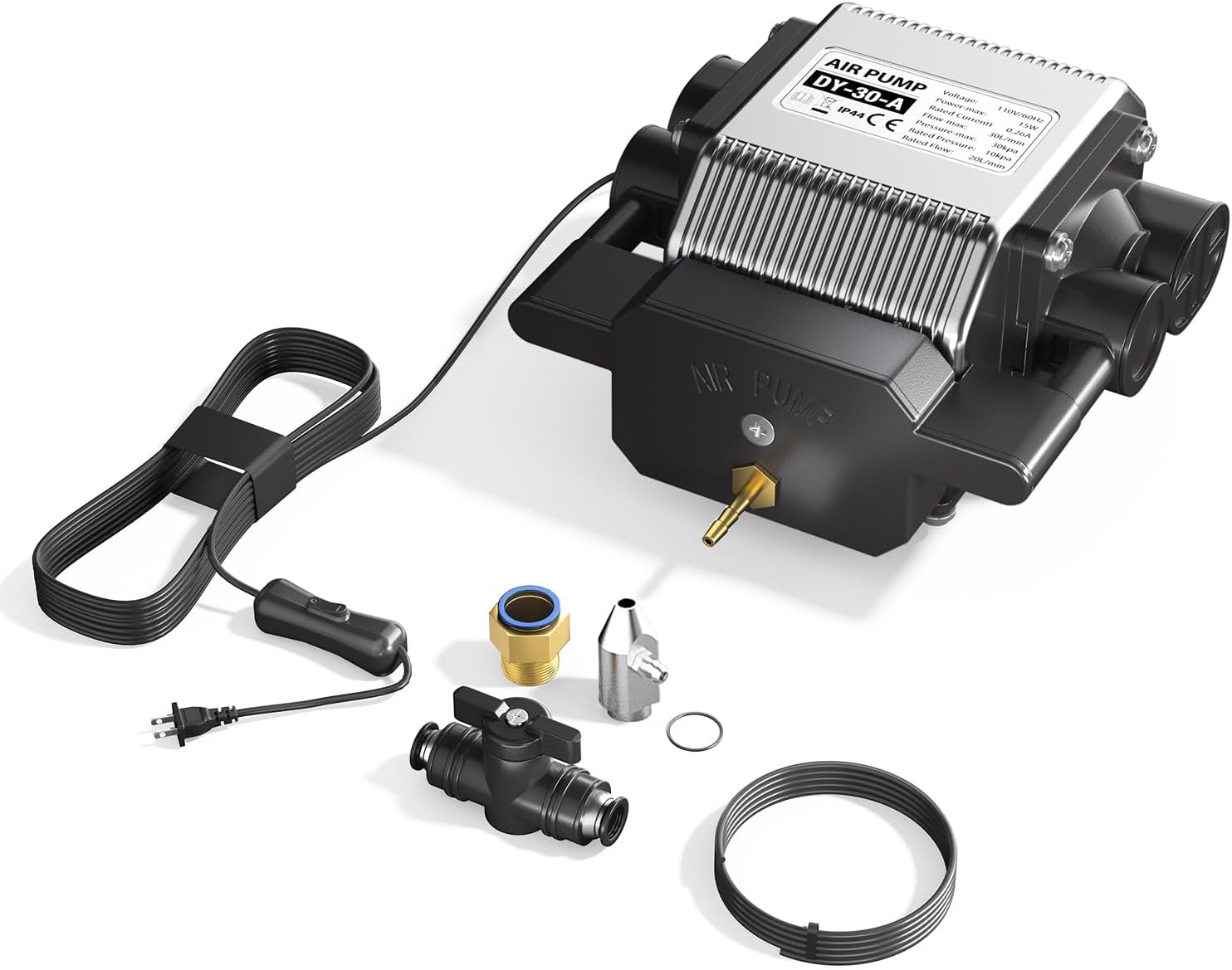
Image: Air Assist Kit components, including the air pump, tubing, and various connectors.
4. Орнотуу жана чогултуу
Follow these general steps for setting up your laser engraver. Refer to the separate assembly guide for detailed instructions on frame construction.
- Рамка монтажы: Assemble the main frame components according to the dedicated assembly guide. Ensure all screws are tightened securely.
- Лазердик модулду орнотуу: Mount the 20W laser module onto the gantry. Connect the laser module cable to the control board.
- Air Assist Kit Installation:
- Attach the air nozzle to the laser module.
- Connect the air tubing from the air nozzle to the air pump.
- Position the air pump in a stable location near the engraver.
- Кабелдик байланыштар: Connect the power adapter to the machine and a grounded power outlet. Connect the USB cable to your computer if using a wired connection.
- Программалык камсыздоону орнотуу: Install the recommended engraving software (LaserGRBL or LightBurn) on your computer. Drivers may be required for USB connection.

Сүрөт: Жакын план view of the laser module, highlighting the attachment point for the air assist nozzle.
5. Иштөө нускамалары
5.1 Күйгүзүү жана өчүрүү
- Күйгүзүү: Connect the power cable and press the power button on the machine. The touch screen will illuminate.
- Өчүрүү: Press and hold the power button or use the software interface to shut down the machine safely. Disconnect power only after the machine has fully powered down.
5.2 Байланыш режимдери
The RAY5 20W supports four connection modes:
- USB туташуу: Connect the machine to your computer via the provided USB cable.
- TF картасы: Load G-code files directly onto a TF card and insert it into the machine's slot for offline operation.
- WiFi туташуусу: Connect the machine to your local Wi-Fi network for wireless control via a computer or mobile device.
- APP көзөмөлү: Use the dedicated mobile application for remote control and monitoring.
5.3 Material Preparation and Focusing
- Secure Material: Place your material on the work bed and secure it to prevent movement during operation.
- Лазерди фокустоо: Adjust the laser module's height until the laser spot is at its smallest and most intense point on the material surface. This ensures optimal engraving and cutting quality.
5.4 Гравюра/кесүү ишин баштоо
- Дизайнды даярдоо: Create or load your design in LaserGRBL or LightBurn.
- Параметр орнотуулары: Adjust engraving/cutting parameters such as laser power, speed, and passes based on the material type and desired outcome. The RAY5 20W offers high precision and speeds up to 10000mm/min.
- Enable Air Assist: If cutting or engraving materials that produce significant smoke or require cleaner edges, turn on the Air Assist pump. Adjust airflow as needed (10-30L/min).
- Жумушту баштоо: Initiate the job from the software or directly from the 3.5-inch touch screen if using a TF card. Monitor the process closely.
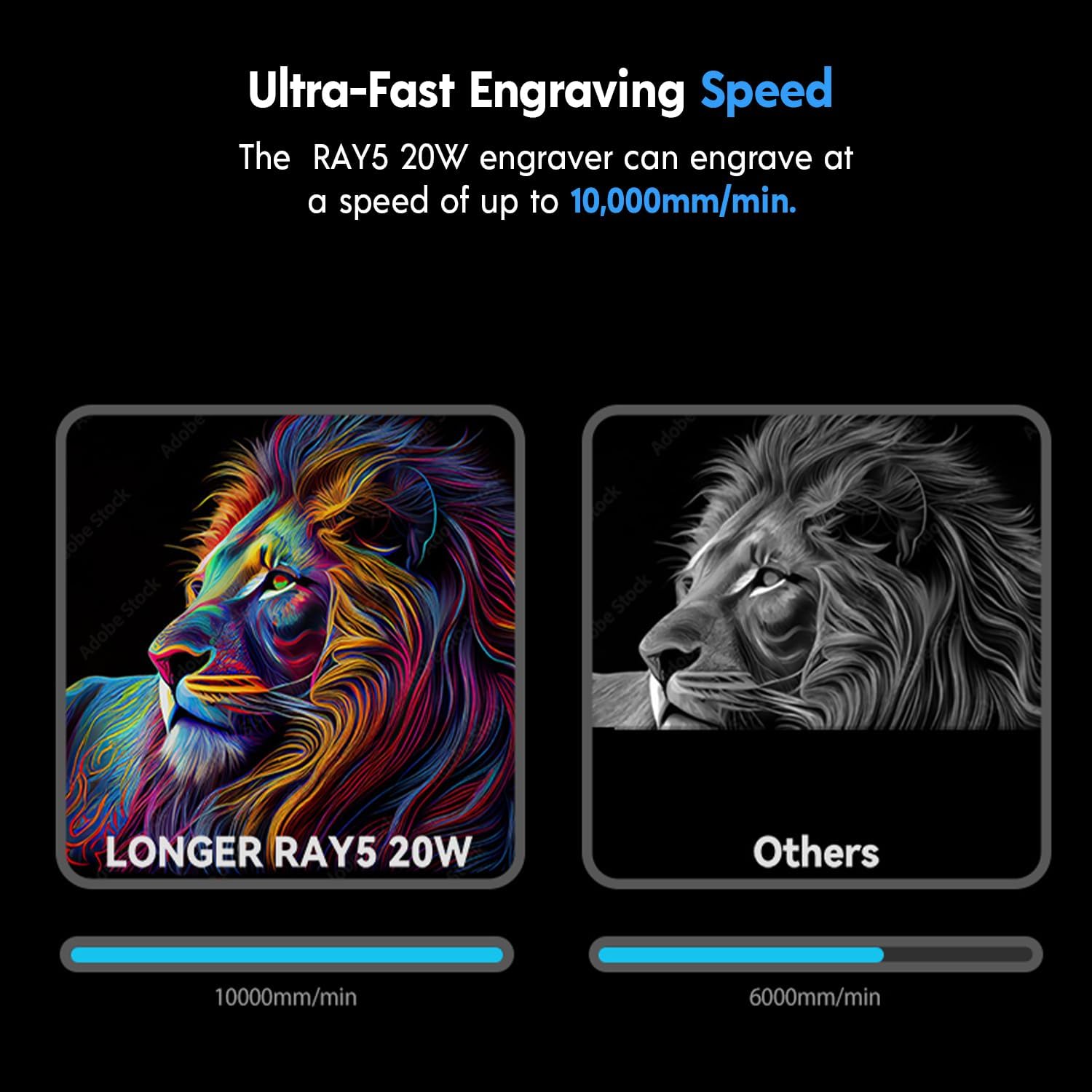
Image: The RAY5 20W laser engraver can achieve engraving speeds of up to 10,000mm/min.

Image: Comparison demonstrating the improved cutting and engraving quality with the Air Assist Kit, resulting in less yellowing and cleaner edges.

Сүрөт: Мисamples showcasing the machine's capability for rare color engraving on different materials.
6. Техникалык тейлөө
Үзгүлтүксүз техникалык тейлөө оптималдуу иштөөнү камсыз кылат жана лазердик гравёруңуздун иштөө мөөнөтүн узартат.
- Clean Laser Lens: Periodically clean the laser lens with a lint-free cloth and isopropyl alcohol to remove dust and debris. A dirty lens can reduce laser power and engraving quality.
- Таза иш аянты: Keep the work bed and surrounding area clean from debris and residue.
- Inspect Belts and Rails: Check the tension of the timing belts and ensure the linear rails are clean and free of obstructions. Lubricate rails if necessary according to manufacturer guidelines.
- Air Pump Filter: If your air pump has a filter, clean or replace it as recommended to maintain optimal airflow.
7. Кыйынчылыктарды
Жалпы маселелерди чечүү үчүн бул бөлүмдү караңыз:
| Көйгөй | Мүмкүн себеп | Чечим |
|---|---|---|
| Лазер иштебейт же алсыз чыгаруу | Dirty lens, incorrect focus, low power setting, loose cable. | Clean the laser lens. Re-focus the laser. Increase laser power in software. Check all cable connections. |
| Гравировка/кесүү сапаты начар | Incorrect speed/power settings, material not flat, dirty lens, no air assist. | Adjust speed and power settings. Ensure material is flat and secured. Clean laser lens. Activate Air Assist for cutting. |
| Machine not connecting to computer/APP | Incorrect cable, driver issue, wrong WiFi settings. | Ensure correct USB cable is used. Reinstall drivers. Verify WiFi credentials and network connection. |
| Air Assist not working | Air pump not powered, tubing disconnected, clogged nozzle. | Check air pump power. Ensure tubing is securely connected. Clean the air nozzle. |
8. Техникалык шарттар
- Модел: Longer RAY5 20W
- Лазердик күч: 20 Вт (Оптикалык чыгаруу)
- Лазердик Spot өлчөмү: 0.08 x 0.1mm (Compressed Beam)
- Maximum Engraving Speed: 10000 мм/мин чейин
- Байланыш: USB, TF Card, WiFi, APP
- Сенсордук экран: 3.5 дюймдук түстүү сенсордук экран
- Шайкеш программалык камсыздоо: LaserGRBL, LightBurn
- Cutting Capability (with Air Assist):
- Wood: Up to 25mm
- Acrylic: Up to 35mm
- Stainless Steel: Up to 0.05mm (0.002")
- Оюлуучу материалдар: Wood, Acrylic, Metal (coloring), Glass, Leather, Paper, Plastics, etc.
- Air Assist Kit: Adjustable Airflow 10-30L/min

Image: The RAY5 20W laser module features 0.01mm height accuracy and demonstrates cutting capabilities for various materials like pine, acrylic, and stainless steel.

Image: The RAY5 20W engraver is equipped with a powerful 32-bit chipset for smooth operation.
9. Кепилдик жана колдоо
For warranty information, technical support, or service inquiries, please refer to the official Longer website or contact Longer customer service directly. Keep your purchase receipt as proof of purchase.
Официалдуу Webсайт: www.longer3d.com