
1. Киришүү
This manual provides detailed instructions for the installation, operation, and maintenance of the Yitouniu EWeLink 4CH Smart WiFi 85-250V Switch Controller, Model EWB4CH-D1. This device allows remote control of up to four electrical appliances via the eWeLink mobile application, Bluetooth, or RF remote control, and supports voice control through compatible smart assistants like Amazon Alexa and Google Assistant.
Сураныч, туура иштешин жана коопсуздугун камсыз кылуу үчүн орнотуу жана колдонуудан мурун бул колдонмону кылдат окуп чыгыңыз.
2. Продукт бүтүп калдыview жана өзгөчөлүктөрү
The EWB4CH-D1 is a versatile 4-channel smart switch controller designed for various applications, including smart home automation, access control, and DIY projects. It offers multiple control methods and operating modes for enhanced flexibility.
Негизги өзгөчөлүктөрү:
- 4 каналдуу башкаруу: Independently control up to four electrical devices.
- Көптөгөн башкаруу ыкмалары:
- eWeLink App (iOS/Android) for remote control.
- Bluetooth connectivity for local control and pairing.
- RF 433MHz remote control support.
- Manual buttons on the device.
- Үн менен башкаруу: Handsfree иштөө үчүн Amazon Alexa жана Google Assistant менен шайкеш келет.
- Flexible Operating Modes: Supports Point (Momentary), Self-Locking (Toggle), and Interlocking modes.
- График жана таймерлер: Set timed schedules for connected devices via the eWeLink app.
- Түзмөктү бөлүшүү: Share control of the device with multiple users through the eWeLink app.
- Wide Voltage киргизүү: AC 85-250V and Micro USB 5V input options.
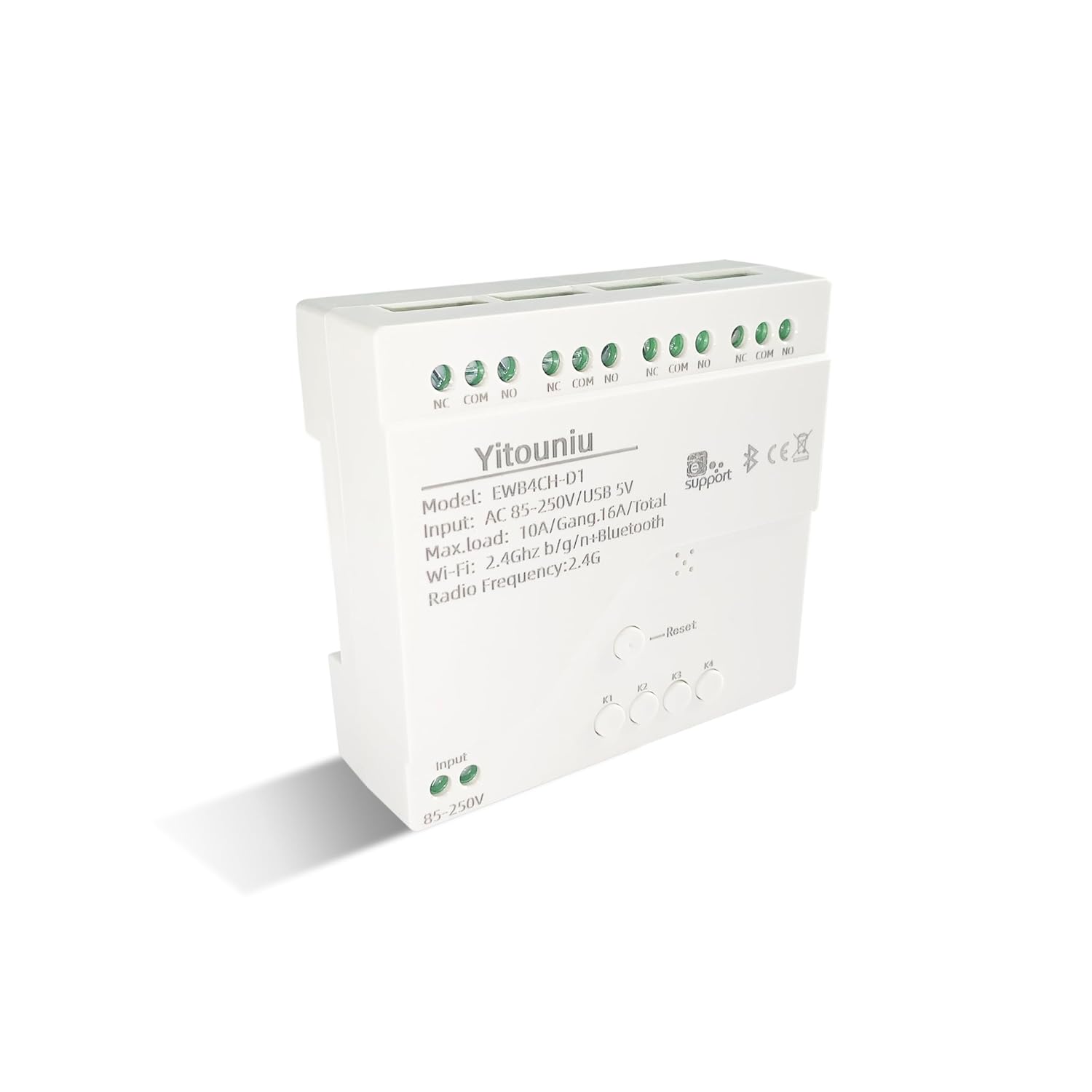
Сүрөт 1: Алдыңкы view of the Yitouniu EWB4CH-D1 Smart Switch Controller, showing input terminals, control buttons, and model information.

Image 2: The Yitouniu EWB4CH-D1 Smart Switch Controller alongside its internal circuit board, illustrating the components and relay switches.
3. Кутуда эмне бар
Пакетти ачканда, бардык компоненттер бар экенин текшериңиз:
- 1x Yitouniu EWeLink 4CH Smart WiFi Switch Controller (Model EWB4CH-D1)
- 1x Instruction Manual (бул документ)
4. Техникалык шарттар
| Параметр | Нарк |
|---|---|
| Модел | EWB4CH-D1 |
| Киргизүү көлөмүtage | AC 85-250V, Micro USB 5V |
| Maximum Current (per gang) | 10A |
| Maximum Load (total) | 16A / 3500W (for 4 gangs) |
| Зымсыз стандарт | Wi-Fi 2.4GHz b/g/n + Bluetooth |
| Иштөө температурасы | -20°Cден 70°Cге чейин |
| Материал | Жалынга каршы ABS |
| Продукциянын өлчөмдөрү (L x W x Y) | 3.15 x 2.95 x 0.98 дюйм (80 x 75 x 25 мм) |
| Салмагы | 3.84 унция (109 г) |
| Иштөө режими | ON-OFF-ON |
| Байланыш түрү | Normally Open (NO), Common (COM), Normally Closed (NC) |
| Туташтыргыч түрү | Бургас терминалы |
| Актуатор түрү | App, RF Remote, Manual Button |
5. Орнотуу
5.1 Коопсуздук чаралары
ЭСКЕРТҮҮ: Орнотуу жогорку вольтту камтыйтtage. Ensure power is disconnected at the circuit breaker before performing any wiring. If you are unsure about electrical wiring, consult a qualified electrician. Improper installation can lead to electric shock, fire, or property damage.
5.2 Электр өткөргүч схемасы
The device features screw terminals for input power and four independent relay outputs. Each output has Normally Open (NO), Common (COM), and Normally Closed (NC) contacts.
- Киргизүү күчү: Connect AC 85-250V to the 'Input 85-250V' terminals. Alternatively, for low-voltage applications or testing, connect a 5V Micro USB power supply to the Micro USB port.
- Load Connections (Channels K1-K4): Each channel (K1, K2, K3, K4) has three terminals:
- NC (Нормалдуу жабык): Connected to COM when the relay is OFF.
- COM (жалпы): Реле үчүн жалпы терминал.
- ЖОК (Негизде ачык): Connected to COM when the relay is ON.
Connect your appliance's power line to the COM terminal and the control line to either NO or NC, depending on whether you want the appliance to be ON or OFF when the relay is activated.

Сүрөт 3: Жогорку view of the Yitouniu EWB4CH-D1 controller, clearly showing the input terminals and the NC, COM, NO terminals for each of the four channels.
5.3 eWeLink App Installation and Device Pairing
- eWeLink колдонмосун жүктөп алыңыз: Издөө "eWeLink" in the Apple App Store (iOS) or Google Play Store (Android) and install it.
- Катталуу/Кирүү: Колдонмону ачып, жаңы каттоо эсебин түзүңүз же учурдагы каттоо эсеби менен кириңиз.
- Жупташтыруу режимине кирүү: Power on the EWB4CH-D1 controller. Press and hold the 'Reset' button on the device for approximately 5-7 seconds until the Wi-Fi indicator LED flashes rapidly.
- Колдонмого түзмөк кошуу: In the eWeLink app, tap the '+' icon (usually in the bottom center or top right) to add a new device. Select 'Quick Pairing' or 'Bluetooth Pairing' if available.
- Wi-Fi'га туташуу: Follow the on-screen instructions to connect the device to your 2.4GHz Wi-Fi network. Enter your Wi-Fi password when prompted. (5GHz Wi-Fi networks are not supported).
- Түзмөгүңүздү атаңыз: Once successfully paired, give your device a descriptive name (e.g., "Living Room Lights Controller").
6. Иштөө режимдери
The EWB4CH-D1 supports three distinct operating modes, configurable within the eWeLink app:
- Point (Momentary) Mode: When activated, the relay turns ON for a set duration (0.5 seconds to 1 hour) and then automatically turns OFF. This mode is suitable for applications like garage door openers or momentary button presses.
- Self-Locking (Toggle) Mode: Each channel operates independently. When activated, the relay turns ON and stays ON until it is manually turned OFF. This is ideal for controlling lights or other devices that need to remain in a specific state.
- Блокировкалоо режими: In this mode, only one channel can be ON at a time. When one channel is activated, any other currently active channel will automatically turn OFF. This is useful for controlling motors with forward/reverse functions or blinds.
To change the operating mode, access the device settings within the eWeLink app.
7. Колдонмону башкаруу жана үн менен башкаруу
7.1 eWeLink тиркемесин башкаруу
After successful pairing, you can control each of the four channels independently from anywhere using the eWeLink app. The app provides real-time status updates for each channel.
- Алыстан күйгүзүү/өчүрүү: Tap the respective channel button in the app to turn devices on or off.
- Пландаштыруу: Set up single, repeating, or countdown timers for automated control.
- Сахналар: Create custom scenes to control multiple devices with a single tap or based on specific conditions.
- Түзмөктү бөлүшүү: Share control of your device with family members or other users by inviting them through the app.

Image 4: Illustration showing how one mobile phone can control multiple smart switches, and how a single smart switch can be controlled by multiple mobile phones.

Image 5: Screenshot of the eWeLink app interface highlighting the 'Share Device' option, allowing users to grant control access to others.
7.2 Үн менен башкаруунун интеграциясы
The EWB4CH-D1 is compatible with Amazon Alexa and Google Assistant. To enable voice control:
- Link eWeLink Account: In your Alexa or Google Home app, search for the "eWeLink Smart Home" skill/service and link it to your eWeLink account.
- Түзмөктөрдү табуу: Once linked, ask your smart assistant to "Discover devices" or manually initiate device discovery in the app.
- Үн буйруктары: You can now use voice commands to control your connected appliances.
Example Commands:
- "Alexa, [Түзмөктүн аталышын] күйгүз"
- "Окей Google, [Түзмөктүн аталышын] өчүр"

Image 6: Depiction of smart speakers (Amazon Echo, Google Home) used for voice control, with example commands for turning on/off lights.

Image 7: Illustration of using voice commands with Alexa or Google Assistant to control a garage door, demonstrating hands-free operation.
8. Техникалык тейлөө
To ensure optimal performance and longevity of your EWB4CH-D1 controller:
- Тазалоо: Disconnect power before cleaning. Use a dry, soft cloth to wipe the device. Do not use liquid cleaners or solvents.
- Программалык камсыздоонун жаңыртуулары: eWeLink колдонмосун мезгил-мезгили менен микропрограмманын жаңыртууларын текшерип туруңуз. Микропрограмманы жаңыртып туруу эң акыркы функцияларды жана коопсуздук жаңыртууларын камсыздайт.
- Экологиялык шарттар: Аппаратты экстремалдык температурага, жогорку нымдуулукка же тике күн нуруна тийгизүүдөн сактаңыз.
9. Кыйынчылыктарды
If you encounter issues with your EWB4CH-D1 controller, refer to the following common problems and solutions:
- Түзмөк жупташкан жок:
- Wi-Fi тармагыңыз 2.4 ГГц экенин текшериңиз. 5 ГГц тармактары колдоого алынбайт.
- Wi-Fi сырсөзүнүн туура экенин текшериңиз.
- Make sure the device is in pairing mode (Wi-Fi LED flashing rapidly). If not, press and hold the 'Reset' button.
- Түзмөктү Wi-Fi роутериңизге жакыныраак жылдырыңыз.
- Device offline in app:
- Интернет байланышыңызды текшериңиз.
- Түзмөк күйгүзүлгөнүн текшериңиз.
- Түзмөктү өчүрүү жана кайра туташтыруу менен кайра күйгүзүңүз.
- Check if your router settings have changed or if there's Wi-Fi interference.
- Үн менен башкаруу иштебей жатат:
- Confirm that your eWeLink account is correctly linked to your Alexa or Google Home app.
- Ensure the device is discovered by your smart assistant.
- Use the exact device name configured in the eWeLink app for voice commands.
- RF remote control not responding:
- Ensure the RF remote is paired with the controller (refer to specific RF pairing instructions if provided with your remote).
- Check the battery in the RF remote.
10. Коопсуздук маалыматы
Сураныч, төмөнкү коопсуздук эрежелерин сактаңыз:
- Түзмөктү бөлүктөргө бөлүүгө же өзгөртүүгө аракет кылбаңыз. Бул кепилдикти жокко чыгарып, коопсуздук коркунучтарын жаратышы мүмкүн.
- Ensure proper wiring according to local electrical codes and this manual.
- Do not exceed the maximum current and load ratings of the device (10A per gang, 16A/3500W total).
- Түзмөктү суудан, нымдуулуктан жана тез күйүүчү материалдардан алыс кармаңыз.
- Бул аппарат имараттын ичинде гана колдонууга арналган.
- Балдар жетпеген жерде сактаңыз.
11. Кепилдик жана колдоо
For warranty information and technical support, please refer to the seller's policy or contact the manufacturer directly. Typically, support can be accessed through the eWeLink app's 'FAQ & Feedback' section or the official eWeLink webсайт.