
Introduction
This manual provides detailed instructions for the ELISWEEN Wireless Controller, Model RM. This controller is designed for use with Nintendo Switch, Switch Lite, and Switch OLED consoles, offering enhanced gaming features and ergonomic design.
Key features include programmable back buttons, adjustable turbo function, dual vibration motors, and a 6-axis gyro sensor for precise motion control.
Пакеттин мазмуну
- ELISWEEN Wireless Controller (Model RM)
- USB-C заряддоо кабели
- User Manual
Controller Layout
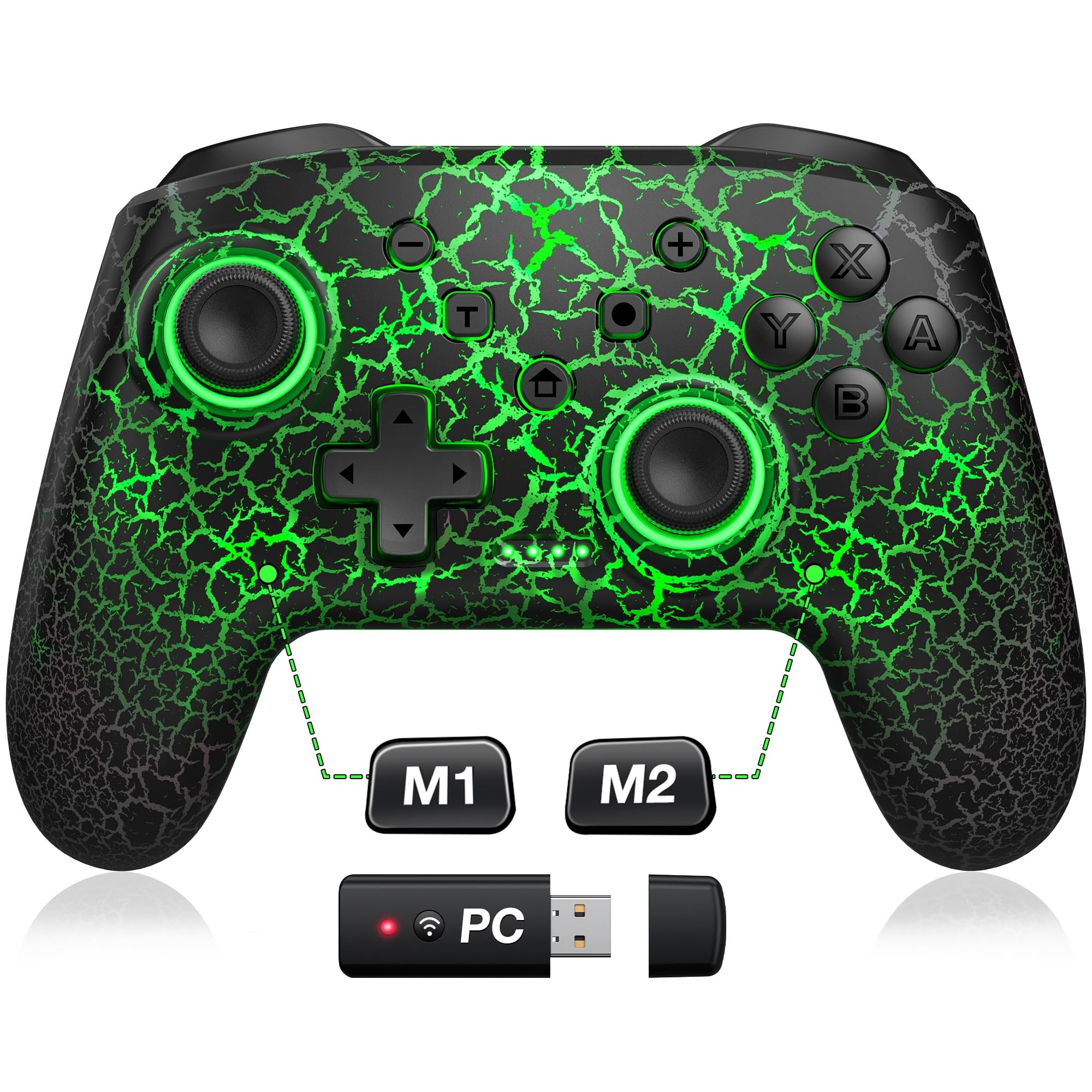
Фронт view of the ELISWEEN Wireless Controller, highlighting the main buttons and joysticks.
The controller features standard Nintendo Switch button layout including A, B, X, Y buttons, D-pad, Left and Right joysticks, L/R and ZL/ZR shoulder buttons, and various system buttons (Home, +, -, Capture, T for Turbo, and a button for LED control).
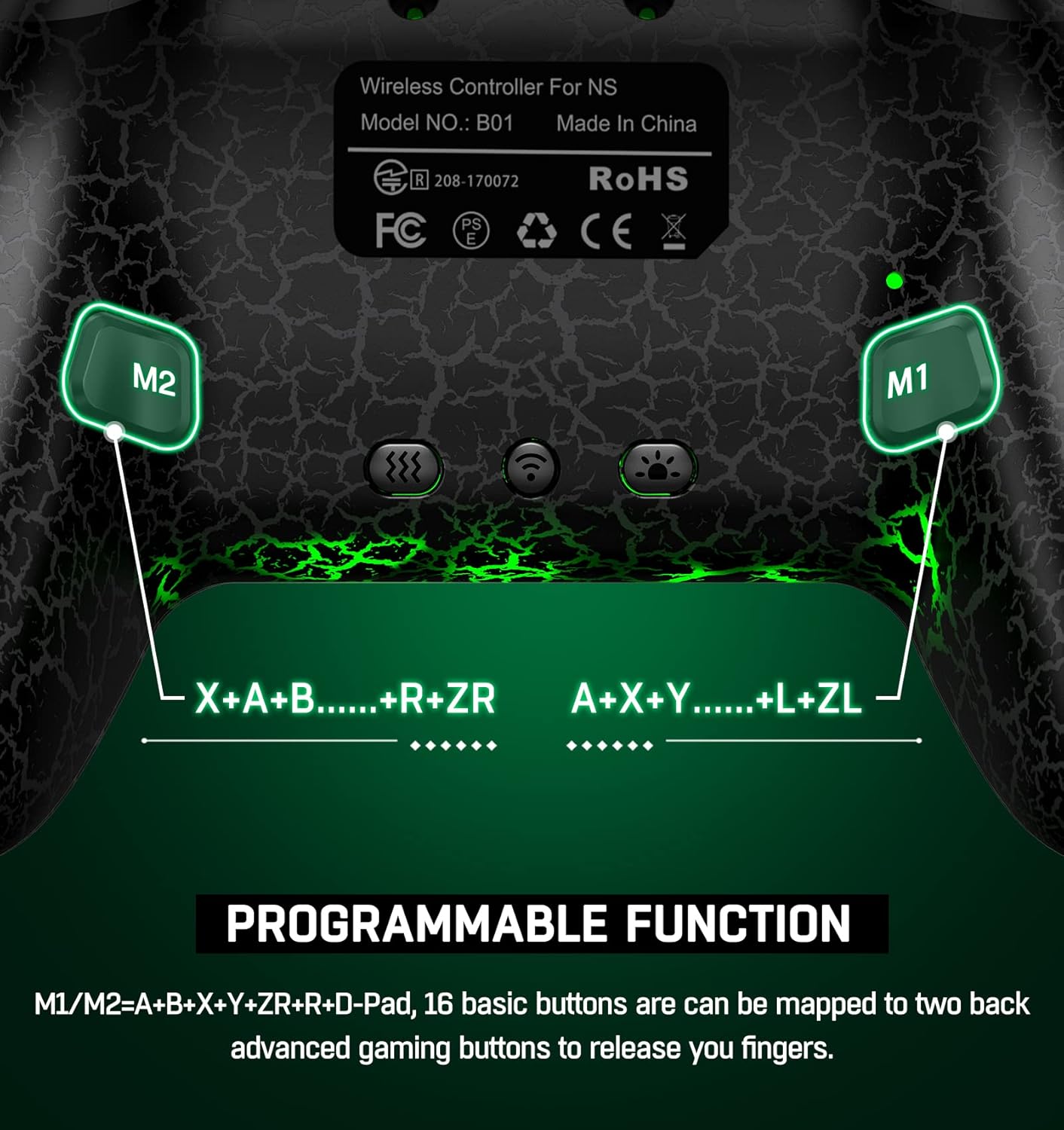
Арткы view of the controller, showing the M1 and M2 programmable back buttons.
Additionally, there are two programmable back buttons, M1 and M2, located on the underside of the controller for custom assignments.
Орнотуу жана туташуу
Initial Pairing (First Time Use)
- Nintendo Switch консолуңуздун күйгүзүлгөнүн текшериңиз.
- HOME Менюсунан тандаңыз Контроллер > Катуу/Тартипти өзгөртүү.
- On the ELISWEEN controller, press and hold the Y + ҮЙ buttons simultaneously for 3-5 seconds until the LED indicators begin to flash rapidly.
- Once the controller is successfully paired, the player LED(s) on the controller will light up solid.
Кайра туташуу
After initial pairing, simply press the ҮЙ button on the controller to wake up your Nintendo Switch console and automatically reconnect. (Note: Wake-up function does not support Switch 2.)
Иштөө нускамалары
Programmable Back Buttons (M1/M2)
The M1 and M2 buttons on the back can be programmed for single or multi-key functions.
The controller features two programmable back buttons, M1 and M2. These buttons can be assigned to single or multiple key inputs (A, B, Y, L, ZL, R, ZR, D-pad) to enhance gameplay comfort and efficiency.
- Single Programming: басып, кармап туруңуз Программа баскычы (usually a small button near M1/M2) and the desired M button (M1 or M2). Then press the single button you wish to map (e.g., 'A'). Release all buttons. The M button is now programmed.
- Multi-Programming: басып, кармап туруңуз Программа баскычы and the desired M button (M1 or M2). Then press the sequence of buttons you wish to map (e.g., 'A' then 'B' then 'Y'). Release all buttons. The M button is now programmed to the sequence.
- To clear a programmed button, repeat the programming steps without pressing any input buttons after selecting the M button.
Турбо функциясы
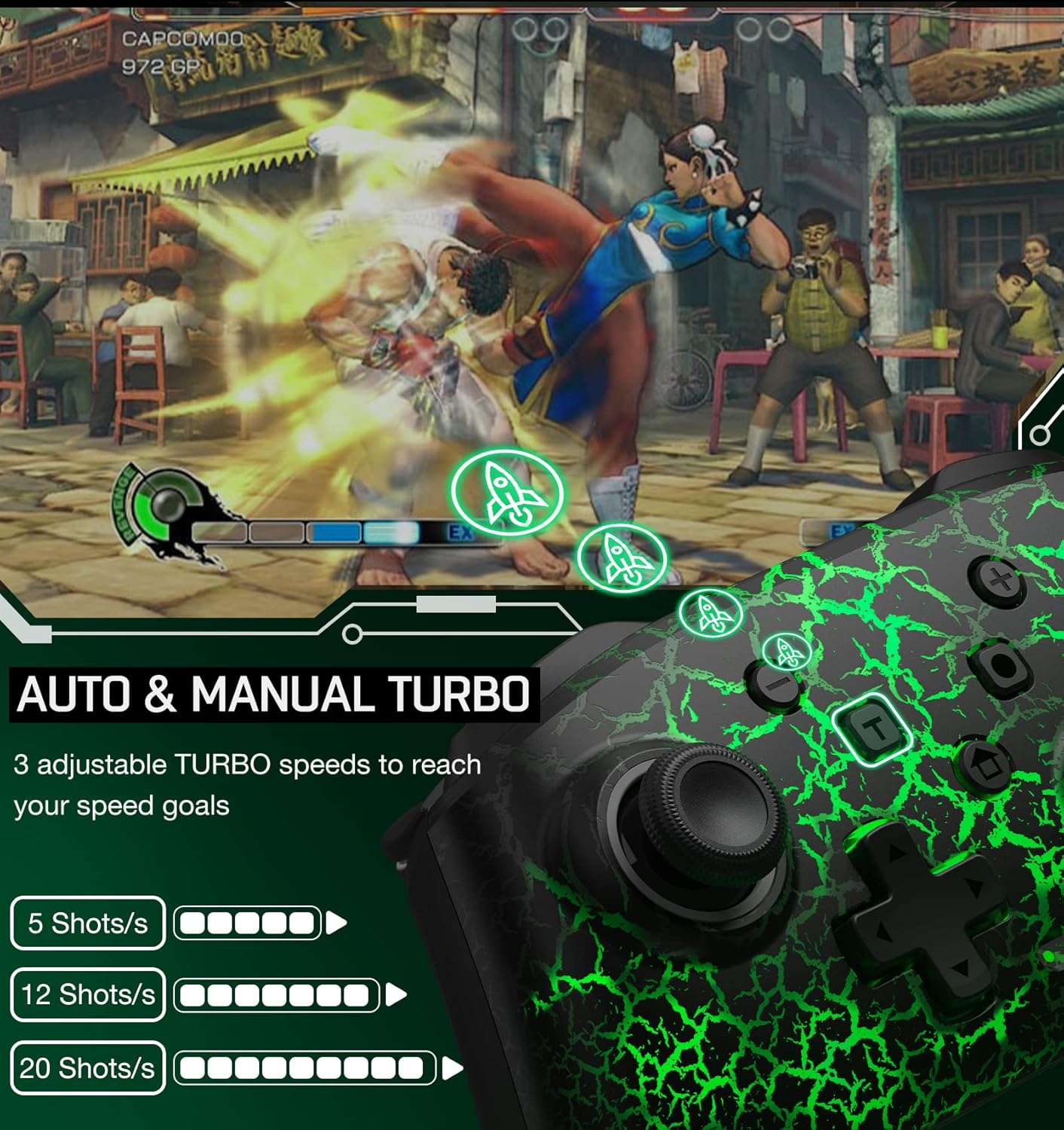
Illustration of the Auto & Manual Turbo function with three adjustable speeds: 5, 12, or 20 shots per second.
The controller supports both auto and manual turbo modes with three adjustable speeds: 5 shots/s, 12 shots/s, or 20 shots/s. Any of the A/B/X/Y/L/ZL/R/ZR buttons can be set to turbo.
- Кол менен турбо: басып, кармап туруңуз T (Turbo) button, then press the button you want to set for turbo (e.g., 'A'). Now, holding down 'A' will activate turbo.
- Auto Turbo: басып, кармап туруңуз T (Turbo) button, then press the button you want to set for turbo (e.g., 'A') a second time. Now, 'A' will continuously activate turbo without needing to be held down.
- Турбо ылдамдыгын жөндөө: While in turbo mode, press the T (Turbo) button жана Up/Down D-pad to cycle through the three speed settings.
- Турбону тазалоо: басып, кармап туруңуз T (Turbo) button, then press the turbo-enabled button a third time to disable turbo for that button. To clear all turbo settings, press and hold the T (Turbo) button 5 секундга.
Vibration Function & Gyro Sensor

Visual representation of the 4-level vibration intensity and the 6-axis gyro sensor for motion control.
The controller features dual vibration motors with 3-level adjustable intensity (weak, medium, strong) for immersive feedback. It also includes a 6-axis gyro sensor for precise motion control in compatible games.
- Титирөөнү тууралоо: басыңыз Вибрацияны жөндөө ачкычы (refer to controller diagram for location, often a small button on the back or a combination with the T button) to cycle through vibration intensities.
- The 6-axis gyro sensor is automatically active for games that support motion controls.
Скриншот Function
The controller includes a dedicated screenshot button (often labeled with a camera icon) to capture in-game moments. Some models may support continuous screenshot functionality.
Заряддоо жана батареянын иштөө мөөнөтү

Information on the controller's battery capacity (1000mAh), charge time (3 hours), and play time (up to 16 hours).
The controller is equipped with a 600mAh rechargeable battery (some models may feature 1000mAh). A full charge typically takes 2-3 hours and provides approximately 10-15 hours of continuous gameplay.
- Connect the controller to a USB power source using the provided USB-C charging cable.
- The LED indicators will show charging status and turn off or change color when fully charged.
- The controller features an automatic shutdown function: if there is no operation for more than 5 minutes, the controller will enter sleep mode to conserve battery.
Шайкештик

The controller is compatible with multiple devices, including Nintendo Switch, PC, iOS, and Android.
This wireless controller is compatible with Nintendo Switch, Switch Lite, and Switch OLED consoles. It may also support other platforms such as PC, iOS, and Android devices, depending on the specific model and firmware.
Техникалык шарттар
| Өзгөчөлүк | Деталь |
|---|---|
| Бренд аты | ЭЛИСВИН |
| Модель аты | RM |
| Шайкеш түзмөктөр | Nintendo Switch |
| Controller Type | Gamepad |
| Байланыш технологиясы | Зымсыз |
| Кошумча функциялар | Ergonomic, Programmable Buttons, Turbo Function, Gyro Sensor, Vibration |
| Power Source | Батарея менен иштейт |
| Батарея сыйымдуулугу | 600 mAh (approx. 10-15 hours play time) |
| Заряддоо убактысы | 2-3 саат |
| Түс | Black Light Receiver |
Техникалык тейлөө
- Башкаргычты кургак, жумшак чүпүрөк менен сүртүп, таза кармаңыз.
- Контроллерди экстремалдык температурага, нымдуулукка же тике күн нуруна кабылуудан сактаңыз.
- Do not attempt to disassemble or modify the controller, as this may void the warranty and cause damage.
- Кокусунан бузулуп калбашы үчүн, контроллерди колдонбогон учурда коопсуз жерде сактаңыз.
Проблемаларды чечүү
Контроллер туташпай жатат
- Контроллер жетиштүү заряддалганын текшериңиз.
- Verify that the console is in the "Change Grip/Order" screen during initial pairing.
- Try restarting both the controller and the Nintendo Switch console.
- Башка зымсыз аппараттар тоскоолдук жаратпагандыгын текшериңиз.
Баскычтар жооп бербейт
- Check if the controller is properly connected to the console.
- Reset the controller by pressing a small reset button (if available, often a pinhole on the back) or by holding the HOME button for an extended period.
- Ensure the game you are playing supports the controller's functions.
Vibration or Gyro Not Working
- Confirm that the game supports vibration and motion controls.
- Check the controller's settings on the Nintendo Switch to ensure these features are enabled.
- Ensure the vibration intensity is not set to 'None'.
Кепилдик жана колдоо
ELISWEEN provides technical support for this wireless controller. If you encounter any technical problems or have questions, please contact customer service. We aim to reply within 24 hours to provide assistance.
For specific warranty details, please refer to the product packaging or contact the seller directly. The product is fulfilled by Amazon and sold by ELISWEEN.