
nuphy Halo96V2
NuPhy Halo96 V2 Wireless Mechanical Keyboard User Manual
Орнотуу, иштетүү жана тейлөө боюнча комплекстүү колдонмо.
Introduction
This user manual provides detailed instructions for setting up, operating, and maintaining your NuPhy Halo96 V2 Wireless Mechanical Keyboard. Please read this manual thoroughly to ensure optimal performance and longevity of your device.

Figure 1: NuPhy Halo96 V2 Wireless Mechanical Keyboard. This image shows the full keyboard from a top-down perspective, highlighting its 96% layout and keycap colors.
Жайгашуу
Пакеттин мазмуну
- NuPhy Halo96 V2 Mechanical Keyboard
- USB-C - USB-A кабели
- 2.4GHz USB кабылдагычы
- Баскыч капкагын тарткыч
- Switch Puller
- Additional Keycaps (for Mac/Windows layouts)
- Колдонуучунун Колдонмосу (бул документ)
Баштапкы заряддоо
Before first use, it is recommended to fully charge the keyboard. Connect the provided USB-C cable to the keyboard's USB-C port and the other end to a powered USB-A port on your computer or a wall adapter. The keyboard features a 4000mAh battery.
Туташуу параметрлери
The Halo96 V2 offers three modes of connection: Bluetooth 5.0, 2.4GHz wireless, and USB-C wired.

Figure 2: Connectivity options for the NuPhy Halo96 V2. This image illustrates the three primary connection methods: USB-C wired, Bluetooth, and 2.4GHz wireless, along with icons for each.
2.4GHz зымсыз туташуу
- 2.4 ГГц USB кабыл алгычын табыңыз.
- Кабыл алгычты компьютериңиздеги жеткиликтүү USB-A портуна сайыңыз.
- On the keyboard, switch the mode selector to 2.4GHz. The keyboard will automatically connect.
Bluetooth 5.0 туташуу
- On the keyboard, switch the mode selector to Bluetooth.
- Басып кармап туруңуз fn+1 (or 2, 3, 4) for 3 seconds until the indicator light flashes rapidly, indicating pairing mode.
- On your device (computer, tablet, smartphone), go to Bluetooth settings and select "NuPhy Halo96 V2" from the list of available devices.
- Once connected, the indicator light will become solid. The keyboard can store up to 4 Bluetooth profiles.
USB-C зымдуу туташуу
- Берилген USB-C кабелин клавиатуранын USB-C портуна туташтырыңыз.
- Connect the USB-A end of the cable to your computer's USB-A port.
- On the keyboard, switch the mode selector to USB-C. The keyboard will function immediately.
Операциялык системаны которуу
The keyboard supports both macOS and Windows/Linux/Android/iOS systems. Use the dedicated switch on the side of the keyboard to toggle between Mac and PC modes for optimized key mappings and shortcuts.

3-сүрөт: Каптал view of the NuPhy Halo96 V2 keyboard. This image displays the side profile of the keyboard, including the USB-C port, mode switches, and the semi-transparent bottom case.
Операция
QMK/VIA Customization
The NuPhy Halo96 V2 supports QMK/VIA firmware, allowing for extensive customization of key mappings, macros, and lighting effects. Download the VIA software from the official QMK/VIA website to access these features.

Figure 4: QMK/VIA customization interface for Halo96 V2. This image demonstrates how users can remap keys and customize functions.
RGB Backlighting and Halolight
The keyboard features per-key RGB backlighting and a unique "Halolight" RGB strip around the base. Both can be customized for color, brightness, and animation effects. The semi-transparent bottom case enhances the Halolight's visual impact.
- Колдонуу Fn + [баскыч] combinations to cycle through preset lighting effects and colors.
- Adjust brightness and speed of effects using dedicated function keys.
- For advanced customization, use the QMK/VIA software.

Figure 5: Keyboard demonstrating SignalRGB support. This image highlights the vibrant RGB lighting capabilities of the keyboard, including the Halolight strip, and mentions compatibility with SignalRGB for broader lighting control.
Ыкчам алмаштыруучу которгучтар
The Halo96 V2 features hot-swappable switch sockets, allowing you to change mechanical switches without soldering. This enables users to customize the typing feel and sound to their preference.
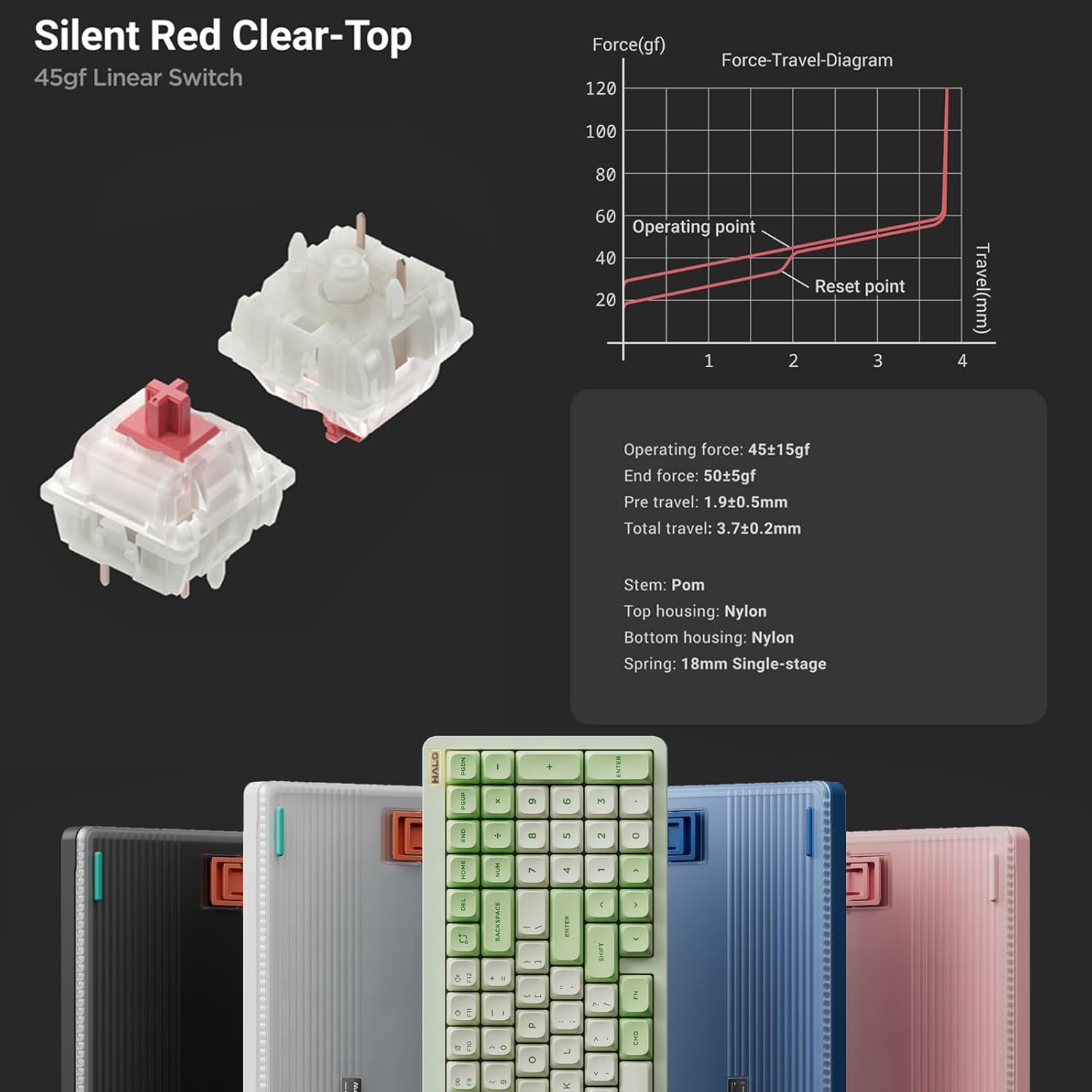
6-сүрөт: Детальдуу view of Silent Red Clear-Top switches. This image provides a close-up of the mechanical switches, including their force-travel diagram and specifications, emphasizing the hot-swappable feature.
Өчүргүчтү алмаштыруу үчүн:
- Берилген баскычтоп капкагын тартуучу каражатты колдонуп, баскычтоптун капкагын акырын алып салыңыз.
- Которгучту этияттык менен кармап, түз өйдө тартуу үчүн которгучту тартуучу каражатты колдонуңуз.
- Жаңы өчүргүчтүн төөнөгүчтөрүн платадагы тешиктер менен тегиздеп, ал ордуна чыкылдаган үн чыкканча бекем басыңыз. Төөнөгүчтөрдүн ийилбегенин текшериңиз.
- Баскыч капкагын алмаштырыңыз.
Негизги өзгөчөлүктөрү бүттүview
- Жакшыртылган жарыктандыруу: Semi-transparent bottom case and double-shot moulding for superior RGB light transmission.
- Improved Acoustics: Gasket mount style replaces top mount for better sound and feel.
- Көп түзмөк байланышы: Seamlessly switch between up to 4 devices via Bluetooth 5.0, 2.4GHz, or USB-C wired modes.
- Full Customization: QMK/VIA support for endless key mapping, macro creation, and light customization.
- Кеңири шайкештик: Supports macOS, Windows, Linux, Android, and iOS operating systems.
- Төмөн күтүү: Achieves a 1000Hz polling rate in both wired and 2.4GHz modes for responsive performance.
- Mac-Specific Functions: Dedicated switch for Mac system, providing access to Mac-specific function keys like Do Not Disturb and Spotlight.
- Батареянын узак иштөө мөөнөтү: Built-in 4000mAh battery for extended wireless use.
- Компакт жайгашуусу: 96% layout with 99 keys, saving desktop space while retaining essential arrow keys and number pad.

Figure 7: Collage of NuPhy Halo96 V2 features. This image visually summarizes several key aspects including Halolight 2.0, 1000Hz polling rate, QMK/VIA support, PCB Gasket Mount, LED Homing Bars, Hot-Swappable switches, Sidelight, and South-Facing Backlight.
Техникалык тейлөө
Баскычтопту тазалоо
- Баскычтопту өчүрүп, аны бардык түзмөктөрдөн ажыратыңыз.
- Баскыч капкактарынын ортосундагы чаңды жана калдыктарды тазалоо үчүн кысылган аба банкасын колдонуңуз.
- For stubborn dirt, carefully remove keycaps using the keycap puller and clean the switch area.
- Баскычтоптун капкактарын жана клавиатуранын бетин жумшак, түксүз чүпүрөк менен бир аз сүртүңүзampсуу же жумшак тазалоочу эритме менен эритиңиз. Күчтүү химиялык заттардан алыс болуңуз.
- Ensure the keyboard is completely dry before reconnecting or turning it on.
Батареяга кам көрүү
- Батареяны бат-баттан толук кубаттап калуудан алыс болуңуз.
- Charge the keyboard regularly, especially if not in use for extended periods.
- Колдонбогондо клавиатураны салкын, кургак жерде сактаңыз.
Проблемаларды чечүү
Байланыш маселелери
- Keyboard not connecting via 2.4GHz:
- Ensure the keyboard is in 2.4GHz mode.
- USB ресиверди башка USB портуна сайып көрүңүз.
- Баскычтоп кубатталганын текшериңиз.
- Bluetooth жупташуусунда ката кетти:
- Ensure the keyboard is in Bluetooth mode and in pairing state (flashing indicator).
- Remove "NuPhy Halo96 V2" from your device's Bluetooth list and try pairing again.
- Try a different Bluetooth channel (Fn+1, Fn+2, etc.).
- Түзмөгүңүздүн Bluetooth функциясы күйгүзүлгөнүн жана табыла турганын текшериңиз.
- Зымдуу байланыш иштебей жатат:
- Ensure the keyboard is in USB-C mode.
- Компьютериңиздеги башка USB-C кабелин же USB портун колдонуп көрүңүз.
Жарыктандыруу маселелери
- Жарыктар күйбөйт:
- Батареянын деңгээлин текшериңиз.
- Ensure backlighting is enabled via keyboard shortcuts or VIA software.
- Туруксуз жарыктандыруу:
- Perform a factory reset (refer to QMK/VIA documentation for your specific firmware version).
- Update keyboard firmware via NuPhy's official webсайт.
Key Functionality Issues
- Ачкычтар жооп бербейт:
- Которгучтун розеткага туура орнотулганын текшериңиз. Которгучту алып салып, кайра киргизиңиз.
- Мүмкүн болсо, башка которгуч менен текшериңиз.
- Check key mappings in VIA software for accidental reassignments.
- Incorrect key output (e.g., Greek letters):
- This may indicate a firmware issue. Check NuPhy's official website for the latest firmware updates and installation instructions.
- Заводдук абалга кайтарууну аткарыңыз.
Техникалык шарттар
| Модель аты | Halo96 V2 |
| Бренд | NuPhy |
| Макет | 96% (99 ачкыч) |
| Байланыш | Bluetooth 5.0, 2.4 ГГц зымсыз, USB-C зымдуу |
| Добуш берүү көрсөткүчү | 1000Hz (Wired & 2.4GHz) |
| Батарея сыйымдуулугу | 4000mAh |
| Которуу түрү | Hot-Swappable Mechanical Switches (e.g., Silent Red Clear-Top 45gf Linear) |
| Арткы жарыктандыруу | RGB (Per-key & Halolight) |
| Микропрограмманы колдоо | QMK/VIA |
| Шайкеш OS | macOS, Windows, Linux, Android, iOS |
| Продукциянын өлчөмдөрү | 125.2 x 44.88 x 7.28 дюйм |
| Элемент Салмагы | 1.74 фунт |

Figure 8: Technical drawing showing the dimensions and weight of the NuPhy Halo96 V2. This image provides precise measurements and weight specifications for the keyboard.
Кепилдик жана колдоо
For warranty information and technical support, please refer to the official NuPhy webсайтка же түздөн-түз кардарларды тейлөөгө кайрылыңыз. Сатып алуу квитанциясын кепилдик дооматтары үчүн сатып алуунун далили катары сактаңыз.
Visit the official NuPhy Store: NuPhy Store on Amazon