
Twotrees T-TTS-20
Twotrees TTC450 80W CNC Router Machine User Manual
Бренд: Twotrees
Модел: T-TTS-20
1. Киришүү
Thank you for choosing the Twotrees TTC450 80W CNC Router Machine. This manual provides essential information for the safe and efficient operation, assembly, and maintenance of your new CNC machine. The TTC450 is a robust 3-axis CNC router designed for precision engraving and cutting a wide range of materials, offering a generous working area of 460 x 460 x 80 mm. Its all-aluminum construction ensures stability and durability, making it suitable for various creative and professional projects.

Figure 1.1: The Twotrees TTC450 CNC Router Machine, showcasing its robust design and 80W spindle, capable of intricate wood carving.
2. Коопсуздук нускамалары
Operating a CNC machine requires strict adherence to safety protocols to prevent injury and damage. Please read and understand all safety warnings before operating the TTC450.
- Жеке коргонуу каражаттары (ЖКК): Always wear safety glasses to protect your eyes from flying debris. Consider hearing protection, especially during prolonged operation.
- Иш чөйрөсү: Ensure your workspace is clean, well-lit, and free of obstructions. Keep children and pets away from the machine during operation.
- Шашылыш токтотуу: Familiarize yourself with the location and function of the emergency stop button. In case of any malfunction or emergency, immediately press this button to halt all machine operations.
- Material Securing: Ар дайым коопсуз clamp your workpiece to the workbed to prevent movement during engraving or cutting, which can cause damage to the machine or material.
- Электр энергиясын өчүрүү: Disconnect the machine from the power supply before performing any maintenance, cleaning, or tool changes.
- Куралдар: Use only sharp, appropriate tooling for the material being processed. Dull or incorrect tools can lead to poor results and potential hazards.
- Вентиляция: Адекваттуу вентиляцияны камсыз кылыңыз, өзгөчө чаң же түтүн чыгарган материалдар менен иштөөдө.

Сүрөт 2.1: Деталь view highlighting the red emergency stop button and the LED offline controller for safe and convenient operation.
3. Пакеттин мазмуну жана компоненттери
Upon unpacking, verify that all components listed below are present and undamaged.
3.1. Пакеттин мазмуну
- 1 x Twotrees TTC450 Engraving Machine (partially pre-assembled)
- Кубаттуу адаптер
- USB кабели
- Шашылыш токтотуу баскычы
- LED Offline Controller
- Коопсуздук көз айнек
- ER11 Collet Set
- Assorted Engraving Bits/End Mills
- Clamps for Workpiece Securing
- Assembly Tools and Fasteners

Figure 3.1: The TTC450 machine along with its essential accessories, including various cutting tools and safety equipment.
3.2. Key Components Overview
- 80W Spindle: The primary cutting/engraving tool, providing 80W of power for various materials.
- All-Aluminum Structure: Ensures high rigidity, stability, and precision during operation.
- Dual Limit Switches (Three Axes): Provides enhanced safety and precise homing capabilities.
- Y-Axis Dualscrew Drive & Z-Axis Optical Axis Drive: Delivers improved stability and precision compared to traditional V-slot drives.
- LED Offline Controller: Allows for direct control and operation without a computer connection.
- Chain Design: Manages cable routing neatly and safely.
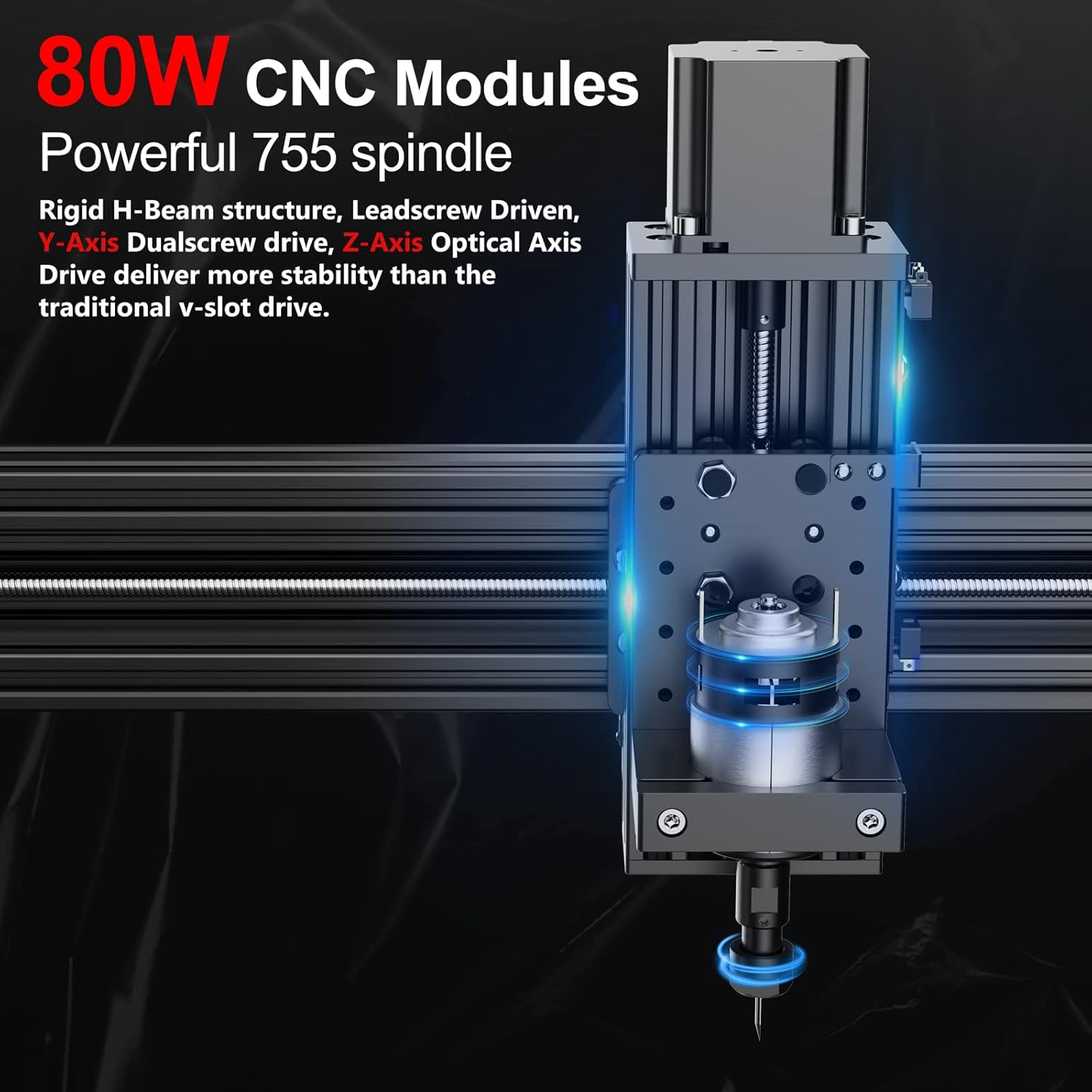
3.2-сүрөт: Детальдуу view of the powerful 80W CNC spindle module, highlighting its robust construction and precise drive mechanisms.
4. Орнотуу жана чогултуу
The Twotrees TTC450 is designed for quick and easy assembly, with most main parts pre-assembled at the factory. Full assembly typically takes between 15 to 30 minutes.
4.1. Таңгактан чыгаруу жана текшерүү
- Бардык компоненттерди таңгактан кылдаттык менен алып салыңыз.
- Refer to the "Package Contents" list in Section 3.1 to ensure all parts are present.
- Inspect all components for any signs of shipping damage. Contact customer support immediately if any damage is found.
4.2. Чогултуу кадамдары
The base of the machine comes pre-assembled. Follow these general steps for final assembly:
- Гантрини бекитүү: Secure the gantry (the horizontal beam with the spindle carriage) to the pre-assembled base. Ensure all screws are tightened securely.
- Кабелдерди туташтыруу: All cables are clearly marked. Connect them to their corresponding ports on the control board and motors. Refer to the provided wiring diagram if necessary.
- Install Emergency Stop Button: Mount the emergency stop button in its designated location and connect its wiring.
- Position LED Offline Controller: Place the LED offline controller in its holder or desired position.
- Кубат туташуу: Кубат адаптерин машинага, андан кийин ылайыктуу розеткага туташтырыңыз.

Figure 4.1: Visual representation of the TTC450's modular design, highlighting its up to 70% pre-assembly for hassle-free setup.
5. Иштөө нускамалары
The TTC450 CNC machine is compatible with GRBL software and supports various operating systems, offering flexibility in your workflow.
5.1. Программалык камсыздоо жана байланыш
- Шайкеш программалык камсыздоо: GRBL software (e.g., Candle, Easel, Carveco).
- Системанын шайкештиги: Windows XP/7/8/10, Mac OS, iOS, Android.
- Байланыш: Supports USB connection, WiFi connection (via ESP32 chip), and offline engraving using the LED controller.
- Колдоого алынган File Форматтары: JPG, PNG, DXF, DWG, STL, PRT.

Figure 5.1: The TTC450 offers broad compatibility with popular operating systems and engraving file formats, ensuring seamless integration into your workflow.
5.2. Материалдык шайкештик
The TTC450 is capable of engraving and cutting a wide variety of materials, including but not limited to:
- Wood (solid wood, MDF)
- Acrylic / Plexiglass
- Тери
- Нейлон
- PCB (басма схемасы)
- Carbon Fiber Board
- PVC
- чайыр
- Soft Metals (e.g., Aluminum, Brass, Stainless Steel)

Figure 5.2: The TTC450's versatility is demonstrated by its ability to work with a diverse range of materials, from wood and acrylic to various metals.
5.3. Spindle and Extension Modules
The TTC450 comes equipped with an 80W spindle, providing ample power for most engraving and cutting tasks. The machine is designed to be highly versatile and supports various extension modules to expand its capabilities.
- Шпинделдин күчү: 80W, 8000 RPM.
- Supported Extension Modules (not included):
- Higher power spindles (e.g., 500W spindle)
- Laser modules for laser engraving/cutting
- CNC Rotary (4th Axis Module) for cylindrical engraving
- CNC Dust Collector for cleaner operation

Figure 5.3: The TTC450's spindle can be upgraded, and the machine supports various extension modules to enhance its functionality.

Figure 5.4: The optional 4th Axis Rotary Module allows for engraving and cutting on cylindrical objects, expanding creative possibilities.
6. Техникалык тейлөө
Regular maintenance ensures the longevity and optimal performance of your Twotrees TTC450 CNC machine.
- Тазалоо: After each use, clean the work area and machine components to remove dust, debris, and material residue. Use a soft brush or compressed air. Avoid using harsh chemicals that could damage the machine's finish or electronic components.
- Майлоо: Periodically apply a small amount of lubricant to the lead screws and linear rails to ensure smooth movement of the axes. Consult the detailed manual for specific lubrication points and recommended lubricants.
- Инструментти текшерүү: Regularly inspect your engraving bits and end mills for wear or damage. Replace dull or chipped tools to maintain cut quality and prevent strain on the spindle motor.
- Кабелдик башкаруу: Ensure all cables are properly routed and secured, especially within the chain design, to prevent snagging or damage.
- Программалык камсыздоонун жаңыртуулары: Check the official Twotrees website periodically for any firmware updates for the control board.
7. Кыйынчылыктарды
Бул бөлүм сиз кабылышы мүмкүн болгон жалпы көйгөйлөрдү чечет жана көйгөйлөрдү чечүүнүн негизги кадамдарын камсыз кылат.
| Көйгөй | Мүмкүн себеп | Чечим |
|---|---|---|
| Машина иштебейт. | Power cable not connected; power switch off; faulty power adapter. | Ensure power cable is securely plugged in. Check if the power switch is in the 'ON' position. Test the power adapter if possible. |
| Spindle not rotating. | Spindle cable loose; spindle speed set to zero; emergency stop engaged. | Check spindle cable connection. Verify spindle speed setting in software/controller. Disengage emergency stop. |
| Machine not moving (axes). | Motor cables loose; limit switch triggered; software connection issue. | Check all motor cable connections. Ensure no limit switch is activated. Re-establish software connection. |
| Poor engraving/cutting quality. | Dull tool; incorrect feed rate/spindle speed; workpiece not secure. | Replace the tool. Adjust feed rate and spindle speed according to material. Securely clamp жумуш бөлүгү. |
For more complex issues or if the problem persists, please refer to the comprehensive online resources or contact Twotrees customer support.
8. Техникалык шарттар
| Өзгөчөлүк | Спецификация |
|---|---|
| Өндүрүүчү | Twotrees |
| Модель номери | T-TTS-20 |
| Working Area (X, Y, Z) | 460 x 460 x 80 мм (18.1 x 18.1 x 3.14 дюйм) |
| Шпиндель күчү | 80 Вт |
| Шпиндель ылдамдыгы | 8000 RPM |
| Гравюранын тактыгы | 0.01 мм |
| Frame Material | All-Aluminum |
| Башкаруу кеңеши | ESP32 (supports WiFi) |
| Power Type | AC |
| Пакеттин өлчөмдөрү | 72 x 32 x 28 см |
| Продукт Салмагы | 19 кг |
| Батареялар камтылган | Жок |
| Батареялар талап кылынат | Жок |

8.1-сүрөт: Өлчөмдүүview of the TTC450, illustrating its large working area and overall machine size.
9. Кепилдик жана колдоо
Twotrees is committed to providing high-quality products and excellent customer service.
- Кепилдик маалыматы: Please refer to the product packaging or the official Twotrees webдеталдуу кепилдик шарттары жана шарттары үчүн сайт.
- Кардарларды колдоо: If you encounter any problems or have questions regarding your TTC450 CNC machine, please do not hesitate to contact our customer support team. We aim to respond to all inquiries within 24 hours.
- Байланыш ыкмасы: For support, please send an email to the address provided on your purchase receipt or the official Twotrees support page.
Ask a question about this manual
Ask about setup, troubleshooting, compatibility, parts, safety, or missing instructions. Manuals+ will review the question and use this page’s manual context to help answer it.