
1. Киришүү
This manual provides detailed instructions for the installation, operation, and maintenance of your Radioddity CB-900 PRO CB Radio. Please read this manual thoroughly before using the device to ensure proper function and safety. The Radioddity CB-900 PRO is a versatile mobile CB radio designed for clear communication with features such as AM/FM dual mode, advanced noise reduction, ASQ, VOX, PA system support, and SWR high alert.
2. Кутуда эмне бар
Carefully unpack your Radioddity CB-900 PRO and verify that all items listed below are present:
- 1 x CB-900 PRO CB Radio Unit
- 1 ырдыбандарды Наушник х
- 1 х Монтаждык кашаа
- 1 x Микрофон илгич
- 1 x туруктуу токтун кубат кабели
- 2 x Adhesive Case Protectors
- 4 x Adjusting Screws
- Өзүн-өзү таптоо бұрагы
- Screws for Bracket
- Төшөктөр

Figure 2.1: Included components of the Radioddity CB-900 PRO CB Radio.
3. Продукт бүтүп калдыview
The Radioddity CB-900 PRO features an intuitive control panel and a clear display for easy operation.

Figure 3.1: Front panel of the Radioddity CB-900 PRO CB Radio.
3.1. Башкаруу элементтери жана туташтыргычтар
- Volume/Squelch (VOL-SQ) Knob: Controls power ON/OFF, volume level, and squelch adjustment.
- NBI/ANL/NR Switch: Toggles Noise Blanker, Automatic Noise Limiter, and Noise Reduction features.
- VOX/SET Button: Activates Voice Operated Exchange (VOX) and accesses menu settings.
- MIC GAIN баскычы: Adjusts microphone sensitivity.
- RF GAIN Knob: Adjusts receiver sensitivity.
- CB/PA/WX Switch: Selects between CB radio mode, Public Address (PA) mode, and Weather (WX) channel mode.
- AM/FM Switch: Арасында тандайт AmpЛитуддук модуляция (AM) жана Жыштыктык модуляция (FM) режимдери.
- CH9/NOR Switch: Toggles between Instant Emergency Channel 9 and normal channel operation.
- Talk Back Knob: Adjusts the volume of the talk-back feature.
- Channel Selector Knob (PUSH MENU): Rotates to change channels and pushes to access the menu.
- RX/TX Indicator: Illuminates green for reception (RX) and red for transmission (TX).

Figure 3.2: Detachable microphone with UP/DOWN/PF buttons.
3.2. Санарип дисплей
The digital display provides information on the current channel, frequency, signal strength (S-meter), transmit power (TX PWR), and SWR levels. It can be configured to show different display types (Classic, S-Meter, Bar Graph) and SWR/RF modes via the menu.
3.3. Продукциянын өлчөмдөрү

Figure 3.3: Radioddity CB-900 PRO dimensions.
4. Орнотуу жана орнотуу
4.1. Mounting the Radio
Use the provided mounting bracket and screws to securely install the CB-900 PRO in your vehicle. Ensure the location allows for easy access to controls and clear visibility of the display, while not obstructing your view же унааны иштетүү.
4.2. Power Connection
The CB-900 PRO supports both 12V and 24V DC power systems, making it compatible with a wide range of vehicles, from cars to trucks. Connect the DC power cable to your vehicle's power source, ensuring correct polarity (red to positive, black to negative). Improper connection can damage the radio.
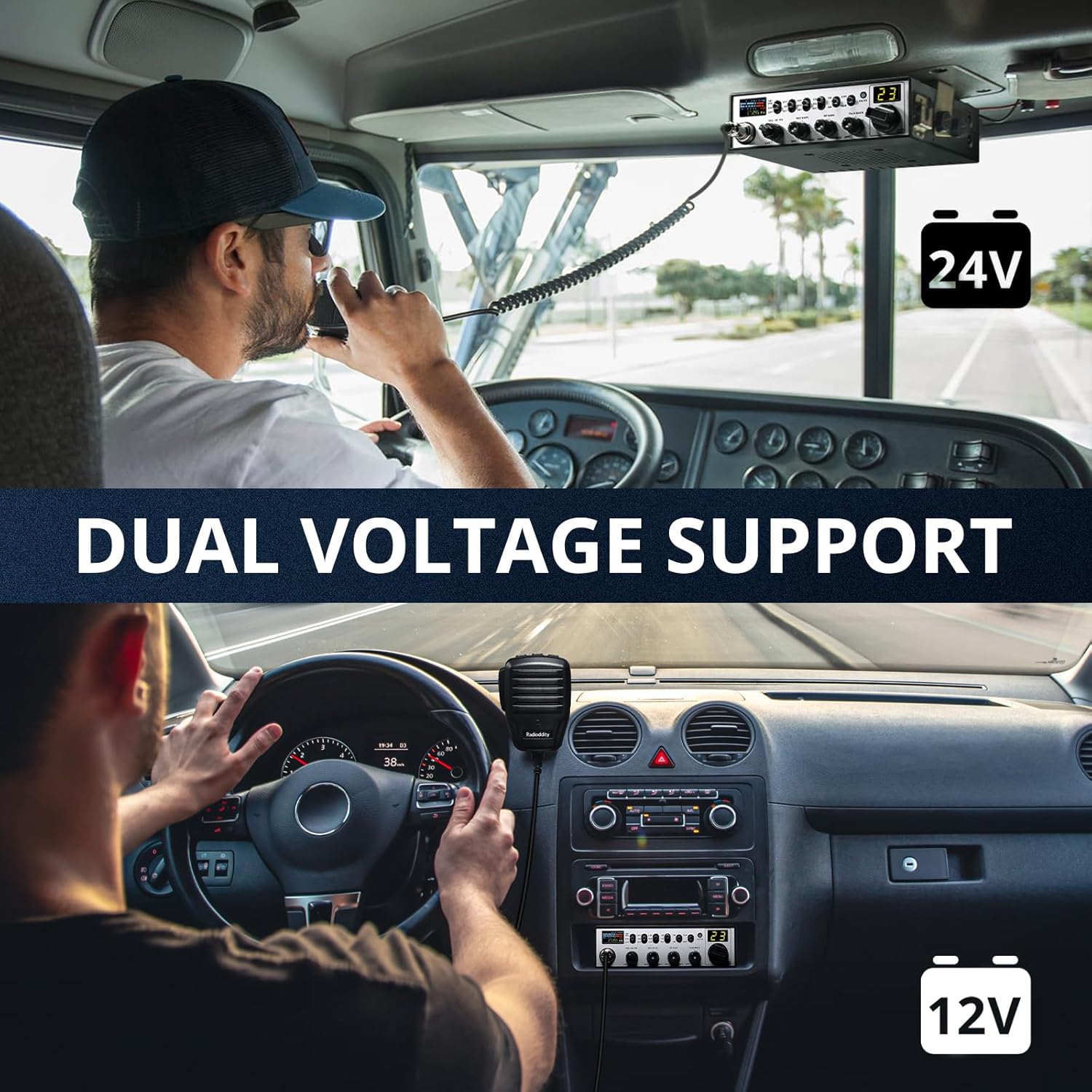
4.1-сүрөт: Кош көлөмtage support for 12V and 24V systems.
4.3. Антенна туташтыруу
Connect a suitable CB antenna to the antenna connector on the rear of the radio. For optimal performance and to prevent damage to the radio, it is crucial to tune your antenna for the lowest possible SWR (Standing Wave Ratio). Refer to the antenna manufacturer's instructions for tuning procedures.
4.4. Микрофонду туташтыруу
Plug the detachable microphone into the front microphone jack. Ensure it clicks securely into place.
5. Иштөө нускамалары
5.1. Күйгүзүү/өчүрүү жана Көлөмү
айлантыңыз ҮЛ-Ч knob clockwise to power on the radio. Continue rotating to adjust the listening volume. Rotate counter-clockwise until it clicks to power off.
5.2. Squelch Adjustment (SQ)
The squelch control eliminates background noise when no signal is being received. Rotate the ҮЛ-Ч knob counter-clockwise until you hear static, then slowly rotate clockwise until the static disappears. This sets the squelch to an optimal level.
5.3. Канал тандоо
айлантыңыз Канал тандоо баскычы to change between the 40 available CB channels. The current channel number will be displayed on the screen.
5.4. AM/FM режимин тандоо
басыңыз AM/FM switch to toggle between Amplitude Modulation (AM) and Frequency Modulation (FM) modes. AM is generally used for longer distances and noisy environments, while FM provides clearer communication over shorter distances.
5.5. Noise Reduction Features (NBI/ANL/NR)
колдонуу NBI/ANL/NR switch to activate various noise reduction functions:
- NBI (Noise Blanker): Reduces pulse-type noise.
- ANL (Автоматтык ызы-чууну чектөөчү): Reduces ignition interference and other electrical noises.
- NR (Шууну азайтуу): Advanced digital noise reduction for clearer audio.
5.6. VOX (Үн менен башкарылуучу алмашуу) функциясы
The VOX function allows for hands-free transmission. Press the VOX/SET button to activate VOX. You can adjust the VOX level in the menu settings to suit your speaking volume and environment.

Figure 5.1: Using the VOX hands-free function.
5.7. PA (Public Address) System
The CB-900 PRO supports a Public Address (PA) system. Connect an external PA speaker to the radio's PA output jack. Switch to PA колдонуу режими CB/PA/WX switch to use the radio as a PA system.

Figure 5.2: Radioddity CB-900 PRO supporting PA mode for clear communication.
5.8. NOAA Weather Channels (WX)
которуштуруу WX колдонуу режими CB/PA/WX switch to access NOAA weather channels. The radio can also provide weather alerts, which can be configured in the menu.
5.9. Instant Emergency Channel 9
басыңыз CH9/NOR switch to instantly switch to Channel 9, the universal emergency channel for CB radio. Press it again to return to normal channel operation.
5.10. Menu Settings and Advanced Features
басып, кармап туруңуз Channel Selector Knob (PUSH MENU) to enter the menu. Rotate the knob to navigate through options and press to select. Options include:
- Ачкыч сигналы: Turn button press sounds ON or OFF.
- Роджер Бип: Turn the end-of-transmission tone ON or OFF, and select from various tones.
- тунарды: Adjust display brightness (Bright or Dim).
- Дисплей түрү: Choose between Classic, S-Meter, or Bar Graph for the main display.
- Дисплей режими: Select between SWR or RF power display.
- Микрофон түрү: Select microphone type (e.g., Electret).
- Скандоо түрү: Choose between Squelch-based or Time-based scanning.
- Эхо: Turn echo effect ON or OFF, and adjust Echo Volume and Echo Delay.
- WX Alert: Turn NOAA Weather Alerts ON or OFF.
- Time Out Timer (TOT): Set the maximum transmission time (e.g., 3 minutes) to prevent accidental long transmissions.
- SWR Warning: Set the SWR threshold for warnings (e.g., 2:1 or 3:1).
- PA-RX Path: Configure the PA receive path.
- ASQ (Automatic Squelch): Turn automatic squelch ON or OFF.
- WX Squelch: Turn squelch for weather channels ON or OFF.
5.11. Скандоо функциясы
To activate the scan function, hold the UP or DOWN button on the microphone. The radio will automatically scan through channels until a signal is detected. This feature is particularly useful for monitoring multiple channels without manual adjustment.
5.12. Продукт бүтүп калдыview Video
Видео 5.1: Детальдууview of the Radioddity CB-900 PRO CB Radio's features and controls, demonstrating various settings and functions.
6. Техникалык тейлөө
To ensure the longevity and optimal performance of your Radioddity CB-900 PRO, follow these maintenance guidelines:
- Тазалоо: Use a soft, dry cloth to clean the radio's exterior. Avoid abrasive cleaners or solvents.
- Байланыштары: Бардык кабелдик байланыштарды (кубат, антенна, микрофон) бекем жана коррозияга учурабагандыгын текшерүү үчүн мезгил-мезгили менен текшерип туруңуз.
- Антеннаны жөндөө: Regularly check and re-tune your antenna's SWR, especially after moving the radio or antenna, to prevent damage to the radio's final ampөмүрлүү.
- Сактагыч: Узак мөөнөткө пайдаланылбаганда, радиону түз күн нурунан жана өтө температурадан алыс салкын, кургак жерде сактаңыз.
7. Кыйынчылыктарды
If you encounter issues with your CB-900 PRO, refer to the following common problems and solutions:
| Көйгөй | Мүмкүн себеп | Чечим |
|---|---|---|
| Күч жок | Электр туташуусу бошоп калган, сактагыч күйүп кеткен, унаанын кубат көйгөйү. | Check power cable connections, inspect and replace fuse if necessary, verify vehicle's power source. |
| Кабыл алуу/өткөрүү жок | Antenna not connected, high SWR, incorrect mode selected, squelch set too high. | Ensure antenna is connected, check SWR, verify AM/FM mode, lower squelch level. |
| Начар аудио сапаты | Microphone gain incorrect, noise reduction settings, antenna issues. | Adjust MIC GAIN and RF GAIN, experiment with NBI/ANL/NR settings, check antenna connection and SWR. |
| SWR High Alert | Poorly tuned antenna, damaged antenna or cable. | Tune antenna for lower SWR, inspect antenna and cable for damage. |
8. Техникалык шарттар
| Өзгөчөлүк | Спецификация |
|---|---|
| Бренд | Radioioddity |
| Модель номери | CB-900 PRO |
| Каналдардын саны | 40 |
| Жыштык диапазону | CB |
| Сүйлөшүү диапазону максималдуу | 10 миля |
| Тtage | 13.8 Volts (Compatible with 12V & 24V systems) |
| Сууга туруктуулук деңгээли | Сууга чыдамдуу |
| Ызы-чуу деңгээли | 30 децибел |
| Температура диапазону | -20℃ to +50℃ Degrees Celsius |
| Connectivity Protocol | CB |
| Өзгөчөлүктөр | 12V & 24V Voltage Compatibility, AM & FM Mode, RX & TX Noise Reduction, Voice Operated Transmission (VOX), NOAA Weather, ASQ, Instant Emergency Channel 9, PA System Support, SWR High Alert |
9. Кепилдик жана колдоо
9.1. Кепилдик маалыматы
The Radioddity CB-900 PRO comes with an 18 айлык кепилдик сатып алынган күндөн тартып. Бул кепилдик кадимки колдонуудагы өндүрүштүк кемчиликтерди жана бузулууларды камтыйт. Кепилдик дооматтары үчүн сатып алганыңызды тастыктаган документти сактап коюңуз. Кепилдик туура эмес колдонуудан, кырсыктардан, уруксатсыз өзгөртүүлөрдөн же туура эмес орнотуудан келип чыккан зыянды камтыбайт.
9.2. Кардарларды колдоо кызматы
For technical assistance, troubleshooting, or warranty inquiries, please contact Radioddity customer support through their official website or the retailer where you purchased the product. You can find more information and contact details on the Radioddity Store on Amazon.