
1. Продукт бүтүп калдыview
The Nikon Z6III Mirrorless Camera is designed for professionals in photography and filmmaking. It features a 24.5MP partially-stacked CMOS sensor and the EXPEED 7 image processor, delivering high-quality stills and internal 6K60 and 4K120 video recording. The camera offers precise autofocus, a bright 5.76M-dot electronic viewfinder, and a durable, weather-sealed magnesium alloy body.

1.1-сүрөт: Фронт view of the Nikon Z6III Mirrorless Camera, showcasing the Z-mount and the partially-stacked CMOS sensor.
2. Кутуда эмне бар
Your Nikon Z6III Mirrorless Camera bundle includes the following items:
- Nikon Z6III Mirrorless Camera Body
- Nikon NIKKOR Z MC 105mm f/2.8 VR S Macro Lens
- Nikon EN-EL15c Rechargeable Lithium-Ion Battery
- 64 ГБ эстутум картасы
- USB-A - USB-C кабели
- HDMI кабели
- Hand Strap
- Линза капкагын сактагыч
- Тазалоо комплекти
- Memory Card Wallet
- USB Card Reader (SD/microSD)
- Video Tripod 72-Inch
- Ийкемдүү Vlogging Tripod
- Photo, Video, & Art Suite Deluxe Software
- 62mm Filter Kit
- Саякат сумкасы
- Wireless Shutter Release - Universal
3. Баштапкы орнотуу
3.1. Батареяны заряддоо
Before first use, fully charge the Nikon EN-EL15c Lithium-Ion Battery using the provided USB-A to USB-C cable and a compatible USB power adapter (not always included, check packaging). The charging indicator on the camera or charger will show the charging status.
3.2. Эстутум карталарын салуу
The Z6III supports SD and SDXC memory cards. Open the memory card slot cover, insert the 64GB memory card until it clicks into place. Ensure the card is inserted correctly to avoid damage.

3.1-сүрөт: Memory card slots on the Nikon Z6III, showing insertion of SD cards.
3.3. Объективди бекитүү
Align the mounting mark on the NIKKOR Z MC 105mm f/2.8 VR S Macro Lens with the mounting mark on the camera body. Rotate the lens clockwise until it clicks into place. To remove, press the lens release button and rotate counter-clockwise.
4. Камераны иштетүү
4.1. Күйгүзүү/өчүрүү
Камераны күйгүзүү үчүн, жапкыч баскычынын айланасында жайгашкан кубат которгучун "КҮЙҮК" абалына буруңуз. Өчүрүү үчүн аны "ӨЧҮК" абалына буруңуз.

4.1-сүрөт: Жогорку view of the Nikon Z6III, highlighting the power switch and mode dial.
4.2. Sensor and Image Processing
The Z6III features a 24.5MP partially-stacked CMOS sensor, which allows for faster data readout, reduced rolling shutter, and improved noise performance. Coupled with the EXPEED 7 image processor, it ensures rapid performance for both stills and video.
4.3. Autofocus and Continuous Shooting
The camera utilizes an enhanced 493-point phase-detection AF system covering the full sensor area for fast and accurate focusing. It supports continuous shooting at up to 20 fps in raw, 60 fps in full-frame JPEG, and 120 fps in DX crop mode with full AF/AE. The Pre-Release Capture function records frames up to 120 fps just before the shutter is fully pressed.
The autofocus system can detect 9 subject types and offers reliable performance even in backlit scenes, detecting human faces in silhouettes. It also features small face detection for video tracking.
4.4. Video Recording Capabilities
The Z6III supports internal 6K60 and 4K120 video recording with full pixel readout. It offers 12-bit N-RAW and ProRes RAW formats for maximum post-production flexibility, along with ProRes and H.265 10-bit recording for professional color grading. Full HD/240p in 10-bit H.265 allows for dramatic 10x slow-motion effects.
Видео 4.1: Расмий продукт видео showcasing the Nikon Z6III's advanced features, including sensor technology, autofocus, and video capabilities. This video highlights the camera's performance in various shooting scenarios.
4.5. Электрондук Viewfinder (EVF) and LCD
The camera features a bright 5.76M-dot electronic viewfinder, offering a clear and sharp view of details, even in bright outdoor conditions (4000 cd/m²). It also includes a four-axis tilting touchscreen LCD for flexible shooting angles.

4.2-сүрөт: Арткы view of the Nikon Z6III, showing the tilting touchscreen LCD and control layout.
4.6. Portrait Shooting Features
The Z6III includes Rich Tone Portrait Picture Control for radiant and beautiful rendering of skin textures. Skin softening features smoothen skin while keeping hair and eyes sharp. Combined with NIKKOR Z prime lenses, these features enhance portrait photography.
4.7. Durability and Weather Sealing
The robust magnesium alloy body is cold-resistant down to -10°C/14°F and offers excellent dust- and drip-resistant performance, making it suitable for challenging outdoor environments.
4.8. Байланыш жана сүрөттү өткөрүү
The camera features Wi-Fi connectivity for direct and automatic image transfer to cloud storage services via Nikon Imaging Cloud. It also includes USB-C and HDMI ports for versatile connectivity.
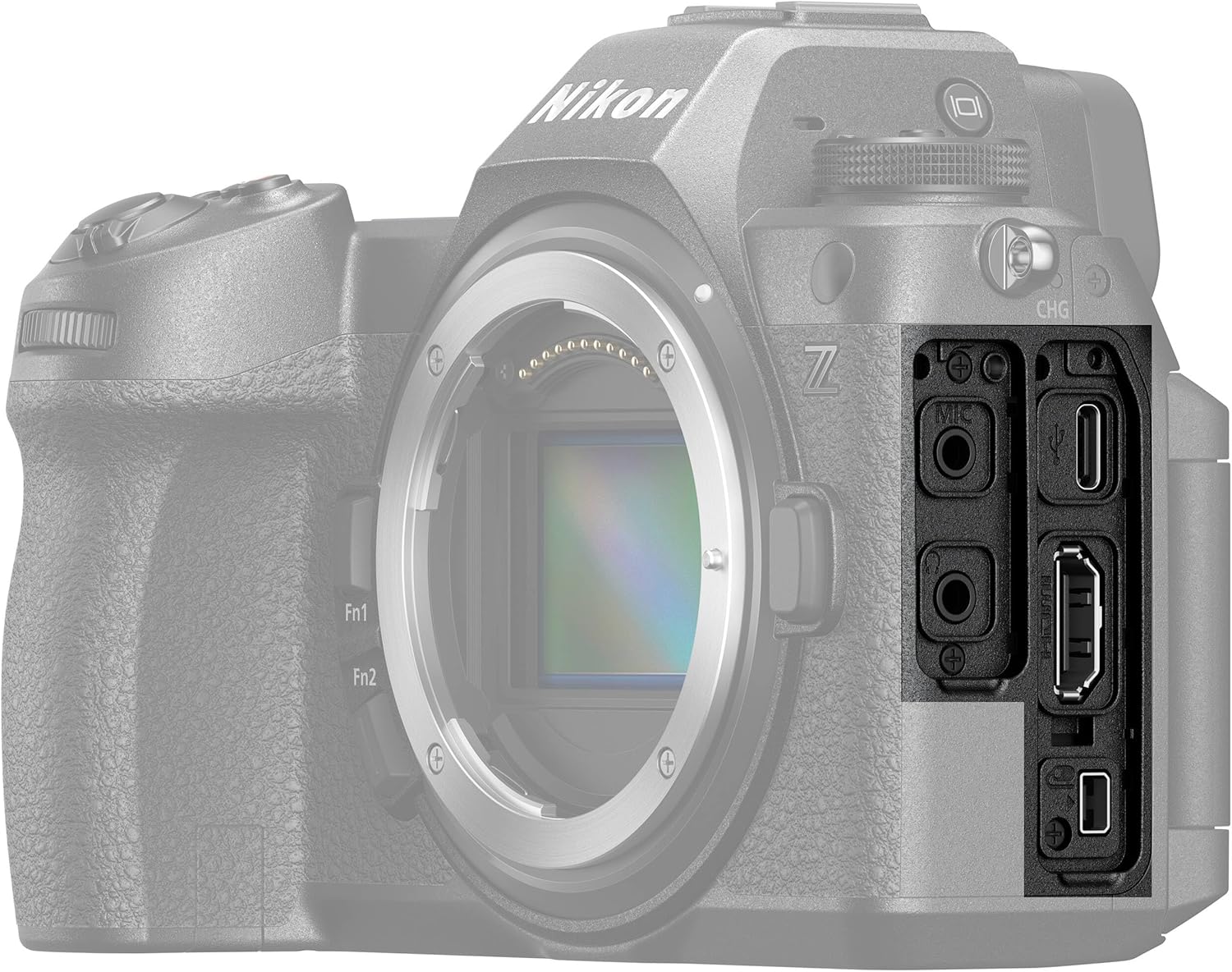
4.3-сүрөт: Side view of the Nikon Z6III, showing the various input/output ports.
4.9. Сүрөттү турукташтыруу
The Z6III incorporates sensor-shift image stabilization. It also features Electronic VR for handheld video shooting and 8.0-stop in-camera VR (when using specific lenses like the NIKKOR Z 24-120mm f/4 S) to expand shooting opportunities in low-light conditions.
5. Техникалык тейлөө
To ensure the longevity and optimal performance of your Nikon Z6III camera, follow these maintenance guidelines:
- Камеранын корпусун тазалоо: Камеранын корпусун сүртүү үчүн жумшак, кургак чүпүрөктү колдонуңуз. өжөр кир үчүн, бир аз гampкездемени суу же атайын камера тазалоочу эритме менен сүртүңүз.
- Линзаны тазалоо: Use a lens brush to remove dust, then gently wipe with a microfiber lens cloth. For smudges, use a lens cleaning solution. Avoid touching the lens glass directly.
- Сенсор тазалоо: If dust spots appear on images, the sensor may need cleaning. This is a delicate procedure; it is recommended to have it performed by a professional Nikon service center.
- Батареяга кам көрүү: Store batteries in a cool, dry place. Do not expose them to extreme temperatures. Fully charge batteries before extended storage and recharge every six months to maintain battery health.
- Сактагыч: When not in use, store the camera in a dry, dust-free environment, preferably in a camera bag or case. Remove the battery if storing for long periods.
6. Кыйынчылыктарды
If you encounter issues with your Nikon Z6III, refer to the following common troubleshooting tips:
- Камера күйбөй жатат:
- Батарея толук заряддалганын жана туура салынганын текшериңиз.
- Батарея контакттары таза экенин текшериңиз.
- Сүрөттөр бүдөмүк:
- Линзанын туура бекитилгенин жана таза экенин текшериңиз.
- Check autofocus settings and ensure the camera is focusing on the intended subject.
- Increase shutter speed in low light or use image stabilization.
- Эстутум картасынын катасы:
- Эстутум картасын кайра салыңыз.
- Башка, шайкеш келген эстутум картасын колдонуп көрүңүз.
- Эстутум картасын форматтаңыз (эскертүү: бул бардык маалыматтарды өчүрөт).
- Video Recording Issues:
- Ensure sufficient memory card speed and capacity for the selected video format.
- Check video settings (resolution, frame rate).
- Connectivity Problems (Wi-Fi/USB):
- Камераны да, туташкан түзмөктү да өчүрүп күйгүзүңүз.
- Ensure Wi-Fi settings are correctly configured on both devices.
- Башка USB кабелин же портту колдонуп көрүңүз.
For more complex issues, consult the full user manual available on the Nikon support webсайтына кириңиз же Nikon кардарларды колдоо кызматына кайрылыңыз.
7. Техникалык шарттар
| Өзгөчөлүк | Спецификация |
|---|---|
| Модель аты | Nikon Z6III |
| Натыйжалуу дагы эле чечим | 24.5 депутат |
| Сенсор түрү | BSI CMOS (Partially-Stacked) |
| Сүрөт процессору | EXPEED 7 |
| Автофокус чекиттери | 493-point Phase Detection |
| Үзгүлтүксүз атуу | Up to 120 FPS (DX crop), 60 FPS (full-frame JPEG), 20 FPS (RAW) |
| Video Resolution | 6K60, 4K120, 2160p |
| Видео тартуу форматы | N-RAW, ProRes RAW, MP4 |
| Image Stabilization | Sensor-shift (5-axis), Electronic VR |
| Электрондук Viewтапкыч (EVF) | 5.76M-dot, 4000 cd/m² brightness |
| Screen Size | 3.2 Inches (Tilting Touchscreen LCD) |
| Шайкеш орнотуулар | Nikon Z |
| Эстутум сактоо сыйымдуулугу | 64 ГБ (кошулган) |
| Байланыш технологиясы | Wi-Fi, USB-C, HDMI |
| Сууга туруктуулук деңгээли | Water Resistant (Dust- and Drip-resistant) |
| Элемент Салмагы | 7.9 фунт (болжол менен) |
| Модель номери | 1890-AG2 |
| UPC | 703670501791 |
8. Кепилдик жана колдоо
8.1. Кепилдик маалыматы
The Nikon Z6III Mirrorless Camera comes with a 90-day limited warranty. Please retain your proof of purchase for warranty claims. For detailed terms and conditions, refer to the warranty card included in your product packaging or visit the official Nikon webсайт.
8.2. Кардарларды колдоо кызматы
For technical assistance, troubleshooting, or service inquiries, please contact Nikon customer support through their official website or the contact information provided in your product documentation. Online resources, including FAQs and software downloads, are also available on the Nikon support portal.