
Introduction
Thank you for choosing the Tibuta K7 Kids Tablet. This device is designed to provide a safe and engaging digital experience for children, featuring parental controls, educational content, and entertainment options. This manual will guide you through the initial setup, operation, and maintenance to ensure optimal performance and longevity of your tablet.
Кутуда эмне бар
Пакетте бардык буюмдар бар экенин текшериңиз:
- Tibuta K7 Kids Tablet
- Drop-proof Silicone Protective Case
- Type-C кабели
- Заряддагыч
- Колдонуучунун колдонмосу

Image: Contents of the Tibuta K7 Kids Tablet package. This image displays the tablet, its protective case, a USB-C charging cable, a power adapter, and the user manual, illustrating all items included with the product.
Продукт бүттүview
The Tibuta K7 Kids Tablet features a 7-inch HD display, a durable silicone protective case, and an Android 12 Go operating system. It is equipped with dual cameras and supports Wi-Fi connectivity.

Сүрөт: алдыңкы жана арткы view of the Tibuta K7 Kids Tablet. The tablet is shown in a pink protective case with a handle and kickstand, displaying a colorful children's cartoon on its screen.
Планшет компоненттери

Image: Diagram of the Tibuta K7 Kids Tablet's external features. This illustration points out the front camera, 3.5mm headphone port, TF card slot, USB 2.0 OTG port, rear camera, volume buttons, power ON/OFF/Reset button, and speaker.
- Алдыңкы камера: Видео чалуулар жана селфи үчүн.
- 3.5 мм гарнитура порту: Наушниктерди туташтыруу үчүн.
- TF карта уячасы: For expanding storage with a microSD card (up to 128GB).
- USB 2.0 OTG Port (Type-C): Заряддоо жана маалыматтарды өткөрүү үчүн.
- Арткы камера: Сүрөт жана видео тартуу үчүн.
- Үн баскычтары: Аудионун үнүн тууралоо.
- Power ON/OFF/Reset Button: Powers the tablet on/off or performs a reset.
- Баяндамачы: Аудио чыгаруу үчүн.
Орнотуу колдонмосу
1. Баштапкы заряддоо
Before first use, fully charge the tablet. Connect the provided Type-C cable to the tablet's USB port and the charger to a power outlet. The charging indicator will show the charging status.
2. Күйгүзүү / Өчүрүү
- Күйгүзүү үчүн: Экран күйгүчө кубат баскычын басып, кармап туруңуз.
- Өчүрүү үчүн: Кубат баскычын басып, кармап туруңуз, андан кийин параметрлерден "Өчүрүү" дегенди тандаңыз.
- Кайра баштоо үчүн: Кубат баскычын басып, кармап туруңуз, андан кийин параметрлерден "Кайра баштоо" тандаңыз.
3. Wi-Fi туташуусу
- барыңыз Орнотуулар > Тармак жана интернет > Wi-Fi.
- Wi-Fi которуштуруу On.
- Тизмеден каалаган Wi-Fi тармагын тандаңыз.
- Эгер суралса, тармак сырсөзүн киргизиңиз, андан кийин таптаңыз Туташуу.
4. Kidoz Parental Control App Setup
The tablet comes pre-installed with the Kidoz parental control application. This app allows you to manage content, screen time, and access for your child.
- ишке киргизүү Kidoz колдонмону башкы экрандан алыңыз.
- Follow the on-screen instructions to create a parent account and set up child profiles.
- Configure settings such as screen time limits, content filtering, and application access.

Image: Parents setting up the Kidoz parental control app on the Tibuta K7 Kids Tablet. The image illustrates a family interacting with the tablet, highlighting features like screen time limits and content filtering.
Иштөө нускамалары
Навигация
- Сенсордук экран: Tap, swipe, and pinch to navigate the interface.
- Башкы экран: Көп колдонулган тиркемелерге жана виджеттерге кирүү.
- Эскертмелер: Экрандын өйдө жагынан төмөн карай сүрүңүз view эскертмелер жана тез орнотуулар.
Using Kidoz and Applications
The Kidoz app provides a child-friendly interface and access to pre-approved content. Parents can manage available applications and content through the parental control settings.
- Колдонмолорго кирүү: Within the Kidoz environment, children can access approved games, educational apps, and media.
- Downloading New Apps: Parents can download additional applications from the Google Play Store, which can then be added to the child's approved list within Kidoz.
- Мазмунду чыпкалоо: Kidoz allows for filtering of inappropriate content, ensuring a safe browsing and viewтажрыйбасы.
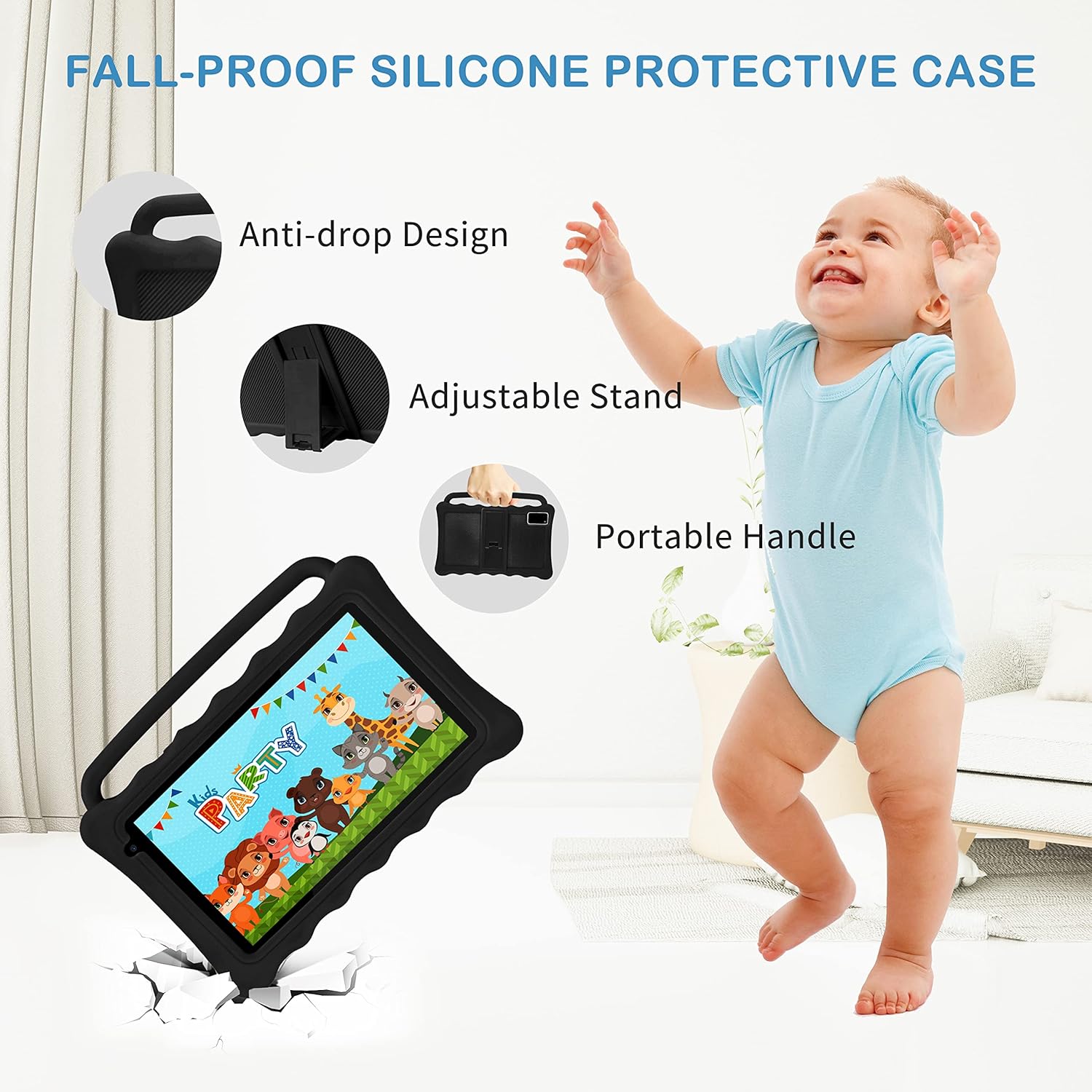
Image: The Tibuta K7 Kids Tablet showcasing its multi-functional capabilities for children. This image highlights pre-installed applications like ABCMouse, YouTube, Netflix, Google Play, and various games, books, and art tools.
Көздү коргоо режими
The 7-inch LCD screen is equipped with Low Blue Light technology to protect children's eyes. Activate the reading mode in settings to reduce screen flicker and harmful blue light, providing a more comfortable viewтажрыйбасы.

Image: Two children using the Tibuta K7 Kids Tablet, demonstrating the eye protection feature. The image emphasizes the 1024x600 HD screen and its low blue light technology for comfortable viewing.
Камераны колдонуу
The tablet features a 2MP front camera and a 5MP rear camera for capturing photos and videos.
- ачыңыз Камера колдонмо.
- Сүрөткө тартуу же видео жазууну баштоо/токтоо үчүн жапкычты таптаңыз.
- Switch between front and rear cameras using the camera icon on the screen.

Image: Children smiling and looking into the Tibuta K7 Kids Tablet camera. This image highlights the tablet's dual cameras (2MP front, 5MP rear) for capturing fun moments.
Техникалык тейлөө
Планшетти тазалоо
- Планшеттин экранын жана корпусун тазалоо үчүн жумшак, түксүз чүпүрөктү колдонуңуз.
- өжөр тактар үчүн, бир аз гampчүпүрөккө суу же электроника үчүн арналган экран тазалагыч.
- Катуу химиялык заттарды, абразивдүү тазалагычтарды же аэрозолдук спрейлерди колдонуудан алыс болуңуз.
Батареяга кам көрүү
- Charge the tablet regularly, but avoid leaving it fully charged or fully depleted for extended periods.
- Use only the provided charger and cable to prevent damage to the battery.
- Avoid exposing the tablet to extreme temperatures, as this can affect battery life.
Коргоочу кап
The silicone protective case is designed to safeguard the tablet from drops and impacts. Ensure the tablet is properly seated within the case at all times. The adjustable stand and portable handle enhance usability and portability.

Image: The Tibuta K7 Kids Tablet in a red protective case. This image highlights the anti-drop design, adjustable stand, and portable handle of the silicone case, demonstrating its protective and ergonomic features.
Проблемаларды чечүү
- Планшет күйбөйт:
- Ensure the tablet is fully charged. Connect it to the charger and wait a few minutes before attempting to power it on again. If unresponsive, press and hold the Power button for 10-15 seconds to force a restart.
- Экран жооп бербей жатат:
- Restart the tablet. If the issue persists, ensure the screen is clean and free of debris. If the problem continues, a factory reset might be necessary (data will be lost).
- Wi-Fi туташуу көйгөйлөрү:
- Check if Wi-Fi is enabled in settings. Restart your Wi-Fi router. Forget the network on the tablet and reconnect. Ensure you are within range of the Wi-Fi signal.
- Kidoz app not working correctly:
- Ensure the Kidoz app is updated to the latest version. Clear the app's cache and data in Орнотуулар > Колдонмолор > Kidoz > Сактагыч. If problems persist, reinstall the app or contact Kidoz support.
- Tablet runs slowly or freezes:
- Close unnecessary background applications. Clear cache for frequently used apps. Consider uninstalling unused apps to free up storage. If the issue is severe, a factory reset may resolve it.
Техникалык шарттар
| Өзгөчөлүк | Деталь |
|---|---|
| Бренд | Тибута |
| Модель аты | K7 |
| Операция системасы | Android 12 Go |
| Процессор бренди | Allwinner |
| Screen Size | 7 дюйм |
| Screen Resolution | 1024 x 600 пиксель |
| RAM | 2 ГБ |
| Сактоо сыйымдуулугу | 32 ГБ (Micro SD аркылуу 128 ГБ чейин кеңейтүүгө болот) |
| Байланыш | Wi-Fi (802.11g), Bluetooth |
| Камералар | Алдыңкы: 2 МП, Арткы: 5 МП |
| Батареянын иштөө мөөнөтү | Over 5 hours (usage dependent) |
| Түс | Rose (as per product listing, other colors may vary) |