
1. Киришүү
This manual provides essential instructions for the safe and efficient use of your GT POWER 200W AC/DC Adapter, Model 475. This adapter is designed to provide power to compatible portable power stations, such as the Anker Powerhouse II 400 and Anker 533. Please read this manual thoroughly before using the product and retain it for future reference.
2. Коопсуздук нускамалары
WARNING: Failure to follow these safety instructions may result in fire, electric shock, or other injury.
- Үй ичинде гана колдонуу: This adapter is designed for indoor use in dry locations. Do not expose it to rain, moisture, or extreme temperatures.
- Proper Voltage: Киргизүү көлөмүн камсыз кылыңызtage (AC 100-240V) matches your local power supply.
- Вентиляция: Do not cover the adapter or place it in an enclosed space during operation. Ensure adequate ventilation to prevent overheating.
- Кабелдин бүтүндүгү: Regularly inspect the power cord and adapter for any damage. Do not use if the cord is frayed or the adapter casing жарылып жатат.
- Кубатты өчүрүү: Always unplug the adapter from the power outlet before cleaning or when not in use for extended periods.
- Демонтаждоо жок: Do not attempt to open or repair the adapter. It contains no user-serviceable parts. Unauthorized disassembly voids the warranty and poses a safety risk.
- Балдар жана үй жаныбарлары: Keep the adapter and its cables out of reach of children and pets.
- Шайкештик: Use this adapter only with compatible devices as specified. Using it with incompatible devices may cause damage or malfunction.
- Коргоо өзгөчөлүктөрү: Бул адаптерге Over VoltagТүзмөгүңүздү коргоо үчүн e Protection (OVP), Over Current Protection (OCP) жана Кыска туташуудан коргоо (SCP).
ЭСКЕРТҮҮ: ЭЛЕКТР ТОГУНУН ТОКУГУ КОРКУНУЧУ. АЧПА.
3. Пакеттин мазмуну
Пакетиңизде бардык буюмдар бар экенин текшериңиз:
- GT POWER 200W AC/DC Adapter (Model 475)
- AC киргизүү кубаты шнуры
4. Продукт бүтүп калдыview
The GT POWER 200W AC/DC Adapter is a robust power supply designed for efficient charging of your portable power station.

4.1-сүрөт: Фронт view of the GT POWER 200W AC/DC Adapter, showing the model number (H-200-24), input (AC 100-240V, 1.8A, 50-60Hz), and output (DC 24V, 8A) specifications, along with safety certifications and a "Risk of Electric Shock" warning.

4.2-сүрөт: Жогорку view of the GT POWER 200W AC/DC Adapter, highlighting the LED indicator light which shows the operational status of the adapter.

4.3-сүрөт: Close-up of the DC output barrel connector, which connects to the portable power station.
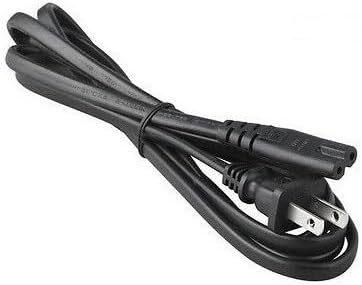
4.4-сүрөт: The AC input power cord, featuring a standard US plug for connecting the adapter to a wall outlet.
Негизги компоненттер:
- Adapter Unit: The main body containing the power conversion circuitry.
- AC киргизүү порту: Where the AC power cord connects to the adapter.
- DC Output Cable with Barrel Connector: Permanently attached cable that delivers power to your device.
- LED көрсөткүчү: Illuminates when the adapter is receiving power and operating correctly.
- AC кубат кабели: Connects the adapter to a wall outlet.
5. Орнотуу нускамалары
Follow these steps to set up your GT POWER AC/DC Adapter:
- Таңылганын ачуу: Carefully remove the adapter and AC power cord from the packaging.
- Connect AC Cord: Insert the female end of the AC power cord firmly into the AC input port on the adapter unit.
- Электр станциясына туташуу: Plug the DC barrel connector from the adapter's output cable into the DC input port of your compatible portable power station (e.g., Anker Powerhouse II 400/533). Ensure a secure connection.
- Дубал розеткасына туташуу: Plug the male end of the AC power cord into a standard wall outlet (AC 100-240V).
- Күчтү текшерүү: The LED indicator on the adapter should illuminate, indicating that it is receiving power and ready to charge.
Эскертүү: Always connect the adapter to the device first, then to the wall outlet, and disconnect from the wall outlet first, then from the device.
6. Иштөө нускамалары
Once set up, the adapter operates automatically:
- When connected to a power outlet and a compatible power station, the adapter will begin supplying power for charging.
- The LED indicator will remain lit during operation.
- The adapter features an "Automatic Off" special feature, which implies it will cease charging or power delivery once the connected device is fully charged or if an overload/fault condition is detected. Refer to your power station's manual for specific charging indicators.
- To stop operation, first unplug the AC power cord from the wall outlet, then disconnect the DC barrel connector from your power station.
7. Техникалык тейлөө
Тийиштүү техникалык тейлөө адаптериңиздин узак мөөнөттүү жана коопсуз иштешин камсыз кылат:
- Тазалоо: Тазалоодон мурун адаптерди бардык кубат булактарынан ажыратыңыз. Сыртын сүртүү үчүн жумшак, кургак чүпүрөктү колдонуңуз. Суюк тазалагычтарды же эриткичтерди колдонбоңуз.
- Сактагыч: When not in use, store the adapter in a cool, dry place, away from direct sunlight and moisture. Coil the cables loosely to prevent damage.
- Текшерүү: Periodically inspect the adapter casing, cables, and connectors for any signs of wear, cuts, or damage. If damage is found, discontinue use immediately and replace the adapter.
8. Кыйынчылыктарды
Эгерде сиз адаптериңиз менен көйгөйлөргө туш болсоңуз, төмөнкү кеңири таралган көйгөйлөрдү жана чечимдерди караңыз:
| Көйгөй | Мүмкүн себеп | Чечим |
|---|---|---|
| Adapter LED is off, no power output. |
|
|
| Электр станциясы кубатталбай жатат. |
|
|
| Адаптер өтө ысык сезилет. |
|
|
Бул чечимдерди колдонуп көргөндөн кийин көйгөй чечилбесе, кардарларды колдоо менен байланышыңыз.
9. Техникалык шарттар
| Модель номери | 475 (H-200-24) |
| Киргизүү көлөмүtage | AC 100-240V, 1.8A, 50-60Hz |
| Output Voltage | DC 24V |
| Output Current | 8A |
| Ватtage | 200 Вт |
| Туташтыргыч түрү | Barrel Connector |
| Коргоо өзгөчөлүктөрү | OVP (Ашыкча томtage Коргоо), OCP (Ашыкча ток коргоо), SCP (Кыска туташуулардан коргоо) |
| Өзгөчө өзгөчөлүк | Автоматтык Өчүк |
| Шайкеш түзмөктөр | Anker Powerhouse II 400, Anker 533 Portable Power Stations (and other devices requiring 24V, 8A DC input with compatible barrel connector) |
| Өлчөмдөрү (болжол менен) | 7 x 5 x 3 дюйм (Пакеттин өлчөмдөрү) |
| Салмагы (болжол менен) | 14 унция |
10. Кардарларды колдоо жана кепилдик
For technical assistance, warranty information, or to report any issues with your GT POWER 200W AC/DC Adapter, please contact your retailer or the manufacturer directly.
Колдоо кызматына кайрылганда продуктуңуздун моделинин номери (475) жана сатып алуу маалыматы даяр болсун.
Warranty details are typically provided at the point of purchase or on the manufacturer's official webсайт.