
1. Киришүү
This manual provides comprehensive instructions for the AKASO Brave 4 Pro Action Camera and its Magnetic Neck Mount Holder. Please read this manual carefully before using the product to ensure proper operation and to maximize your experience. Keep this manual for future reference.
2. Кутуда эмне бар
The AKASO Brave 4 Pro Action Camera and Magnetic Neck Mount Holder kit includes the following items:
- AKASO Brave 4 Pro аракет камерасы
- Magnetic Neck Mount Holder
- 64GB microSDXC Canvas Memory Card
- USB кош заряддагыч
- 2 rechargeable 1350mAh batteries
- Remote control wristband
- Other accessories kit (compatible with various cameras, including GoPro)
Note: An external microphone is not included and must be purchased separately if required. The remote wristband is not waterproof.
3. Продукт бүтүп калдыview
3.1 AKASO Brave 4 Pro Action Camera
The AKASO Brave 4 Pro is a high-performance action camera designed for capturing dynamic footage in various environments. Key features include:
- Dual-Display Design: Features an innovative dual-color screen, allowing for framing and monitoring from both the front and back. The vivid front screen is suitable for selfies, while the 2-inch back touch screen provides intuitive control.
- Жогорку чечилиштеги тартуу: Records video at up to 4K30FPS and captures still photos at 20MP resolution.
- Electronic Image Stabilization (EIS) 2.0: Equipped with a 6-axis gyroscope to detect and compensate for motion changes, ensuring stable video footage even during movement or impact.
- Суу өткөрбөйт жөндөмдүүлүгү: With the included waterproof case, the camera is submersible up to 131 feet (40 meters), suitable for underwater activities.

Image: The AKASO Brave 4 Pro's intuitive touch screen interface.

Image: The AKASO Brave 4 Pro camera shown underwater, highlighting its 131ft (40m) waterproof capability with the case.

Image: A visual representation of the image stabilization feature, showing a clear image of a cyclist with EIS enabled.
3.2 Magnetic Neck Mount Holder
The Magnetic Neck Mount Holder provides a convenient and comfortable way to wear your action camera for hands-free recording. Its design focuses on comfort and ease of use.
- Эргономикалык дизайн: Streamlined shape made from soft silicone material for comfortable wear over extended periods.
- Туруктуу курулуш: Features a durable stainless steel core that allows bending to any angle for flexible positioning.
- Магниттик тиркеме: Strong magnetic attraction ensures fast and secure assembly of the camera.
- 90° айлануу: Allows easy switching between landscape and portrait orientations for diverse shooting perspectives.
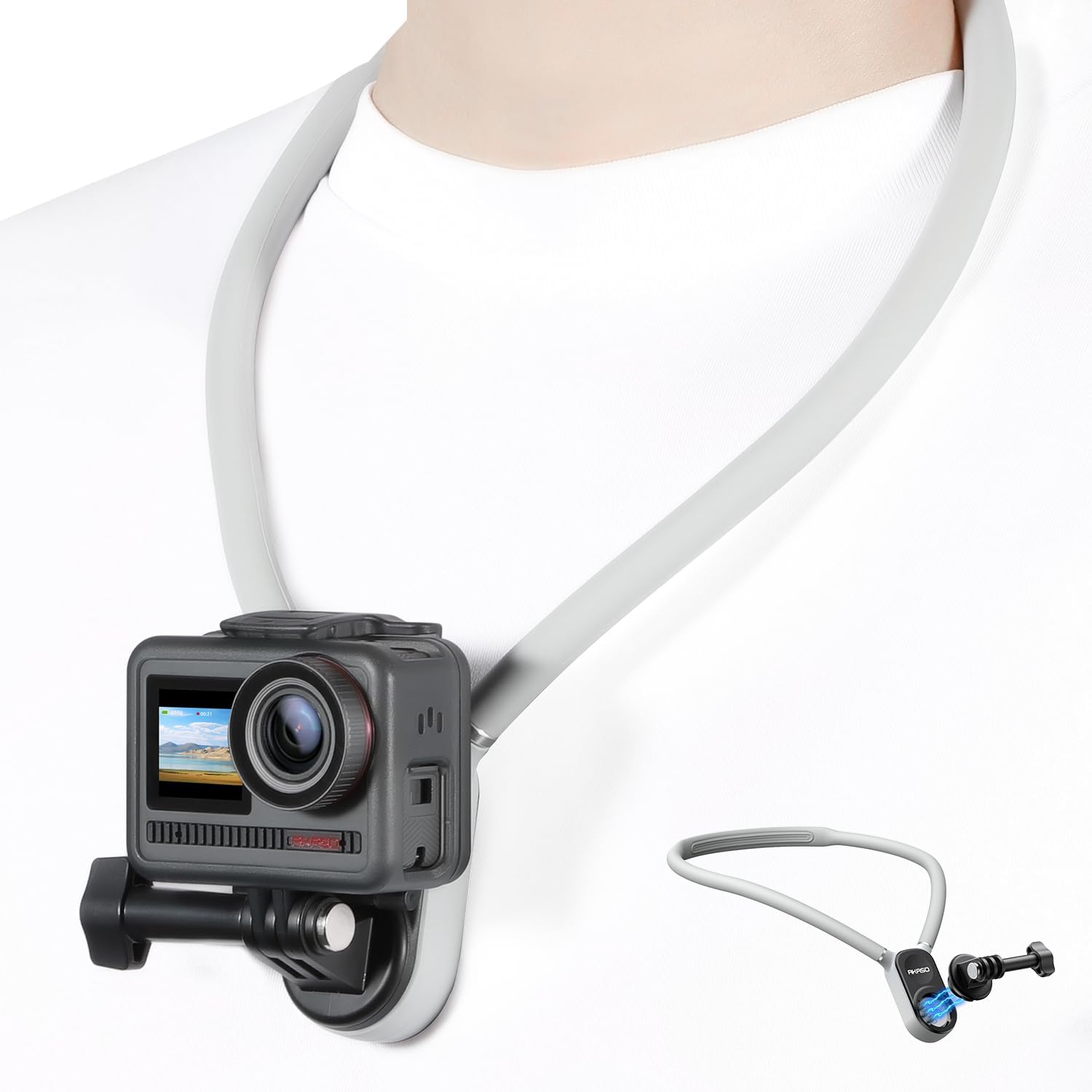
Image: A person wearing the AKASO Magnetic Neck Mount Holder with an action camera attached, demonstrating hands-free use.

Image: A comparison showing the ergonomic design of the AKASO neck mount (silicon) versus a less comfortable plastic alternative.
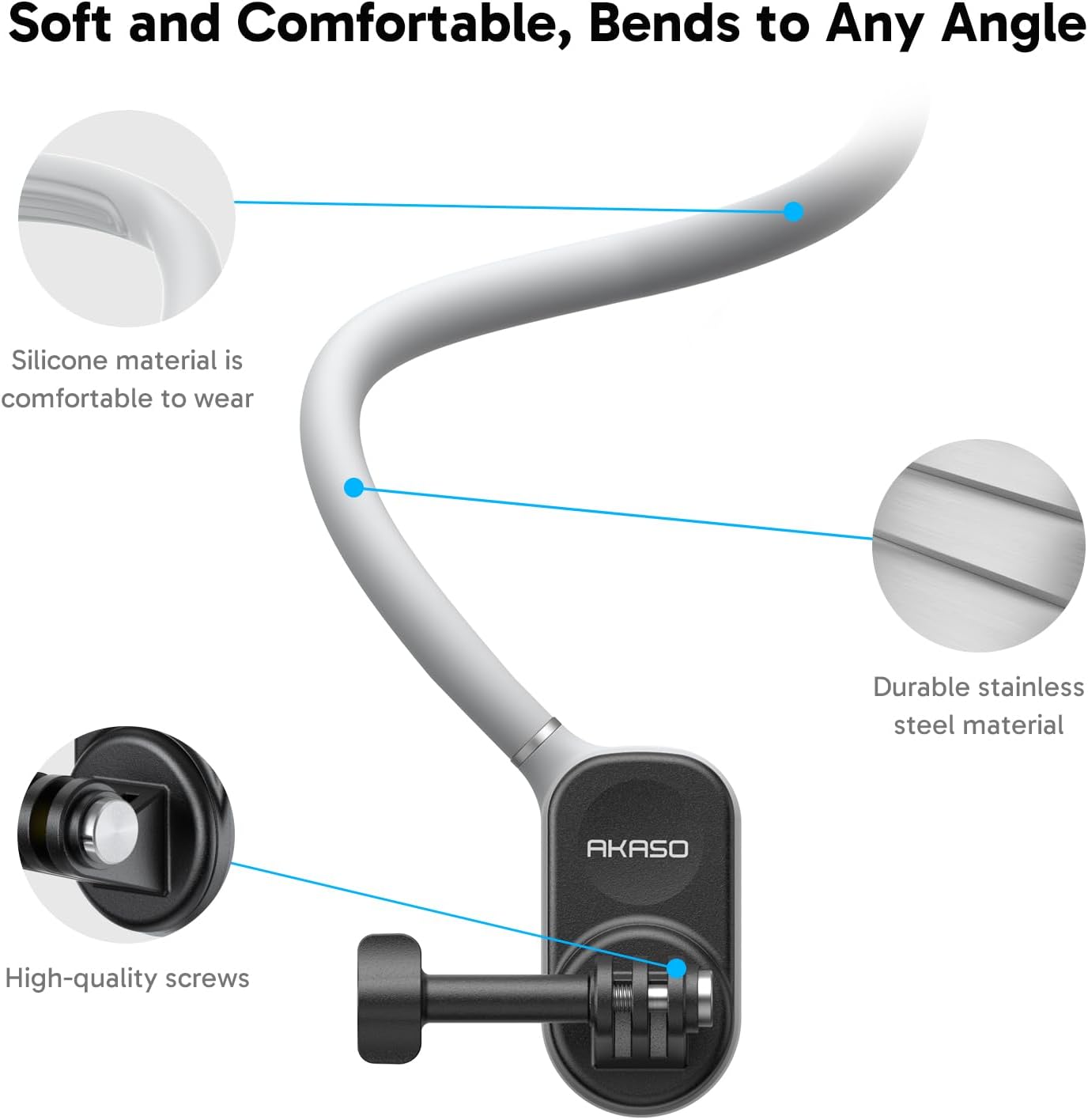
Сүрөт: Жакын план view detailing the soft silicone material, durable stainless steel core, and high-quality screws of the neck mount.
4. Орнотуу
4.1 Camera Preparation
- Батареяларды заряддоо: Use the provided USB Dual Charger to fully charge both 1350mAh batteries. Each battery provides up to 90 minutes of recording time.
- Эстутум картасын салыңыз: Insert the 64GB microSDXC Canvas Memory Card into the camera's memory card slot. Ensure the card is inserted correctly.
- Батареяны орнотуу: Open the battery compartment and insert a charged battery. Close the compartment securely.
4.2 Attaching Camera to Neck Mount
- Prepare the Neck Mount: To open the neck mount, press the buttons on the side to unlock the magnetic connection.
- Камераны тиркөө: Secure your AKASO Brave 4 Pro Action Camera to the mount using the standard action camera screw attachment. Ensure it is tightened firmly.
- Close Neck Mount: Bring the two ends of the neck mount together. The strong magnetic attraction will snap them into place, securing the camera.

Image: Visual guide demonstrating how to press buttons to unlock, attach the camera, and use the magnetic attraction for fast assembly and 90° rotation.
5. Operating the AKASO Brave 4 Pro Action Camera
- Күйгүзүү/өчүрүү: Камераны күйгүзүү же өчүрүү үчүн кубат баскычын басып, кармап туруңуз.
- Которуу режими: Use the mode button or the touch screen to navigate between video recording, photo capture, and other settings.
- Жаздыруу/Жапкыч: Press the shutter button to start/stop video recording or to take a photo.
- Dual Screen Usage: Utilize the front screen for framing selfies or vlogs, and the rear touch screen for general operation and detailed settings.
- Сүрөттү турукташтыруу: Ensure EIS 2.0 is enabled in the camera settings for smoother footage, especially during active use.
- Суу өткөрбөйт колдонуу: When using the camera underwater, ensure it is securely enclosed within the waterproof case. Verify all seals are clean and properly closed before submersion.
- Алыстан башкаруу: The included remote control wristband can be used to remotely operate the camera for convenience. Refer to the remote control's specific instructions for pairing and functions.

Сүрөт: Мисamples of diverse shooting scenarios, including cooking photography, travel vlogging, family time recording, and outdoor activities, demonstrating the camera's versatility.
6. Operating the Magnetic Neck Mount Holder
- Wearing the Mount: Place the neck mount around your neck. Adjust its position for comfort and optimal camera angle. The flexible design allows for custom shaping.
- Камеранын бурчун тууралоо: The camera can be rotated 90 degrees on the mount to switch between landscape and portrait video modes without removing the camera. Gently rotate the camera to the desired orientation.
- Removing the Camera: To remove the camera, press the side buttons on the neck mount to release the magnetic connection, then detach the camera from its screw mount.
7. Техникалык тейлөө
- Камераны тазалоо: Use a soft, lint-free cloth to clean the camera lens and screens. For stubborn dirt, a slightly damp чүпүрөктү, андан кийин кургак чүпүрөктү колдонсо болот.
- Суу өткөрбөй турган корпуска кам көрүү: After underwater use, rinse the waterproof case with fresh water and allow it to air dry. Inspect the seals regularly for any debris or damage.
- Neck Mount Care: Wipe the silicone neck mount with a damp cloth to remove any dirt or sweat. Avoid harsh chemicals.
- Сактагыч: Store the camera and accessories in a cool, dry place away from direct sunlight and extreme temperatures. Remove batteries if storing for extended periods.
8. Кыйынчылыктарды
- Камера күйбөй жатат: Батарея толук заряддалганын жана туура салынганын текшериңиз. Башка заряддалган батареяны колдонуп көрүңүз.
- Жаздыруу маселелери: Check if the memory card is properly inserted and has sufficient free space. Ensure the card is of a compatible type (Micro SDXC, U1 or above).
- Туруксуз Footage: Verify that Electronic Image Stabilization (EIS) 2.0 is enabled in the camera settings.
- Алыстан башкаруу иштебейт: Алыстан башкаруу пультунун батареясын текшериңиз. Ал камера менен туура жупташтырылганын текшериңиз.
- Магниттик монтаж кармабайт: Ensure the magnetic surfaces are clean and free of obstructions. Verify the camera is securely attached to the screw mount.
9. Техникалык шарттар
| Өзгөчөлүк | Деталь |
|---|---|
| Бренд | AKASO |
| Модель аты | Brave 4 Pro |
| Видео тартуунун резолюциясы | 4K |
| Сүрөттүн резолюциясы | 20MP |
| Image Stabilization | Electronic Image Stabilization (EIS) 2.0 with 6-axis gyroscope |
| Сууга туруктуулук деңгээли | Waterproof up to 131ft (40m) with case |
| Screen Size | 2 Inches (rear touch screen), Front display also available |
| Flash эс тутум түрү | Micro SDXC (U1 or above recommended) |
| Колдоого алынган аудио формат | AAC, MP3 |
| File Формат | MP4 (Видео), JPEG (Сүрөт) |
| Линзанын түрү | Wide Angle |
| Фокус түрү | Автофокус |
| Батареялар | 2 x 1350mAh rechargeable batteries (included) |
| Камтылган медиа | 64GB microSDXC Canvas Memory Card, USB Dual Charger, remote control wristband |
| Шайкеш түзмөктөр | Смартфон, Жеке компьютер |
10. Кепилдик жана колдоо
AKASO products are designed and manufactured to the highest quality standards. For warranty information, technical support, or customer service inquiries, please visit the official AKASO website or contact AKASO customer support directly. Please retain your proof of purchase for warranty claims.
Official AKASO Store: AKASO Store on Amazon