
1. Продукт бүтүп калдыview

Image: The LEVN Wireless Headset HS019, a black on-ear headset with a microphone boom, designed for professional communication.
The LEVN Wireless Headset HS019 is designed for clear communication and productivity in professional and personal environments. It features advanced AI Noise Cancelling technology, Bluetooth 5.2 connectivity, and a versatile charging base with integrated USB ports. Enjoy extended usage with its long-lasting battery and flexible connection options.
2. Кутуда эмне бар
Сураныч, пакеттин мазмунун текшерип, бардык буюмдар бар экенин текшериңиз:
- LEVN Wireless Headset
- Заряддоо базасы
- USB Dongle
- User Manual
- USB-C Cable
3. Орнотуу
3.1 Гарнитураны заряддоо
Before first use, fully charge your LEVN Wireless Headset. You can charge it using the included USB-C cable or by placing it on the multifunction charging base.
- USB-C кабелин колдонуу: Connect the USB-C cable to the headset's charging port and to a USB power source (e.g., computer, wall adapter).
- Using Charging Base: Place the headset onto the charging base. Ensure the charging contacts align. The base also provides storage for the USB dongle.

Image: LEVN Wireless Headset placed on its multifunction charging base, which also features four USB ports for additional device connectivity. The base provides a convenient charging and storage solution.
The charging base includes four USB ports for flexible data transfer and connecting peripheral devices like mobile hard drives or USB flash drives, helping to keep your workspace organized.
3.2 Зымсыз туташуу
The headset offers two wireless connection methods: via the 2.4G USB dongle or Bluetooth 5.2.

Image: Illustration showing the two wireless connection methods for the LEVN Wireless Headset: a USB dongle for a stable 2.4G connection and Bluetooth 5.2 for broader compatibility.
3.2.1 Using the 2.4G USB Dongle
- Insert the USB dongle into an available USB port on your computer or device.
- Гарнитураны күйгүзүңүз. Ал автоматтык түрдө донгл менен жупташышы керек.
- Once connected, the indicator light on the dongle will show a steady blue, and the headset will confirm connection.
- Ensure the LEVN Headset is selected as the audio input and output device in your computer's sound settings.
The USB dongle provides a secure, stable connection with low latency and an impressive wireless range of up to 15 meters (49 feet).
3.2.2 Using Bluetooth 5.2
- Гарнитурадагы кубаттуулук.
- Put the headset into pairing mode (refer to the headset's specific button combination for pairing, usually holding the power button for a few seconds until the indicator light flashes).
- On your device (smartphone, tablet, computer), go to Bluetooth settings and search for new devices.
- Select "LEVN HS019" (or similar name) from the list of available devices to pair.
- Once connected, the headset's indicator light will show a steady blue, and you will hear a confirmation tone.
4. Иштөө нускамалары
4.1 Күйгүзүү/өчүрүү
- Күйгүзүү: Индикатор жарыгы күйгүчө кубат баскычын болжол менен 3 секунд басып туруңуз.
- Өчүрүү: Күйгүзүү баскычын болжол менен 3 секунд басып, индикатор өчкөнчө кармап туруңуз.
4.2 Чалууларды башкаруу
- Чалууга жооп берүү/аяктоо: Көп функциялуу баскычты бир жолу басыңыз.
- Чакырууну четке кагуу: Көп функциялуу баскычты 2 секунд басып туруңуз.
- Үнүн жогорулатуу/төмөндөтүү: Use the physical volume rocker buttons located on the headset.
- Микрофондун үнүн басуу/ачуу: Press the dedicated Mute button on the microphone boom or earcup. This provides instant call privacy.
4.3 Жасалма интеллект менен ызы-чууну жокко чыгаруу
The LEVN HS019 features AI Noise Cancellation, which eliminates up to 99.9% of background noise, ensuring your voice remains clear during calls and online meetings. This feature is automatically active to optimize your audio experience.
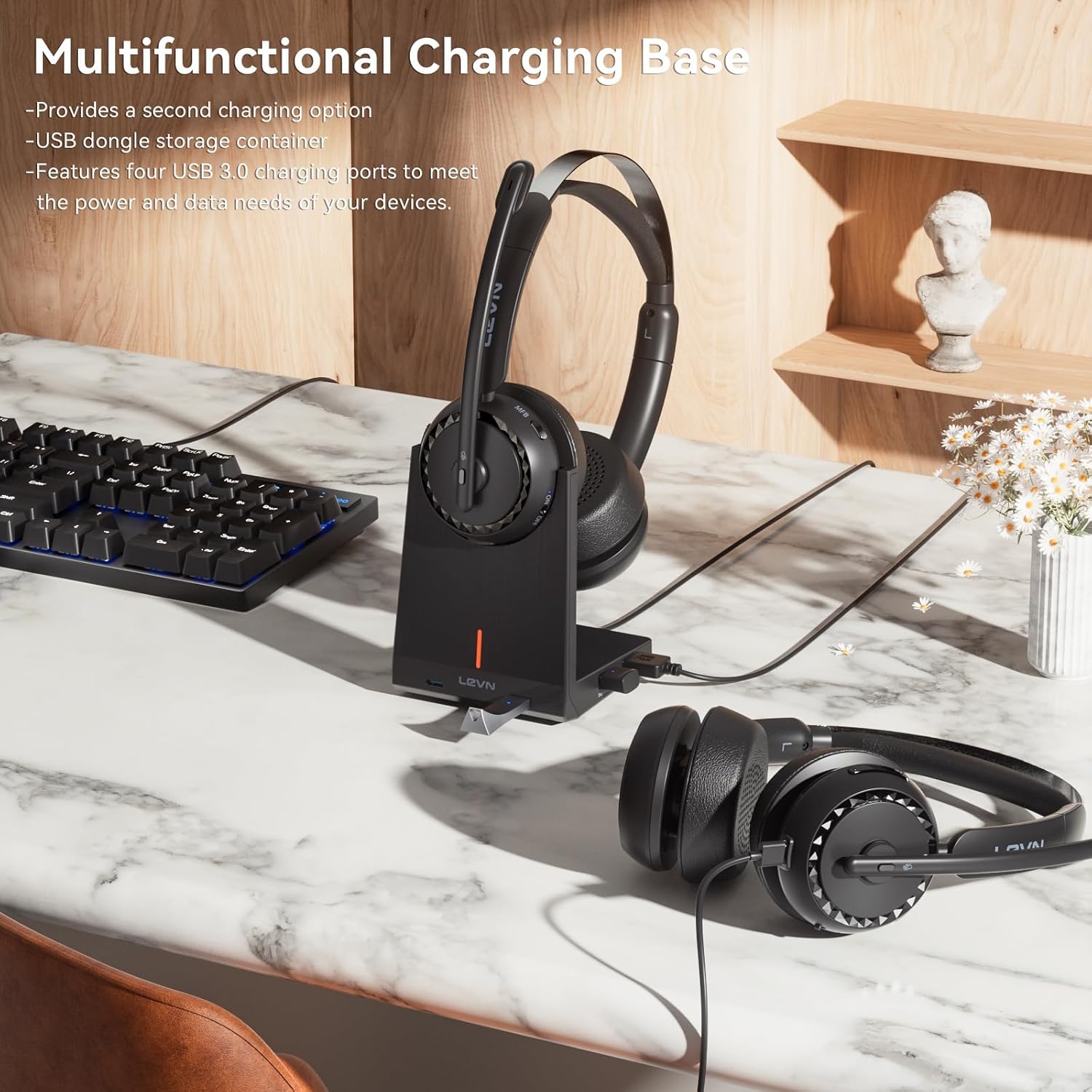
Image: A person wearing the LEVN Wireless Headset in an office environment, demonstrating the AI Noise Cancellation feature. Visual representation shows background noise being filtered out, resulting in clear voice transmission.
4.4 Батареянын иштөө мөөнөтү
The headset is equipped with a high-capacity battery, providing up to 65 hours of continuous playback on a single charge. This ensures extended use for long work sessions or entertainment without frequent recharging.

Image: A LEVN Wireless Headset positioned above a clock face indicating "65h", surrounded by batteries, symbolizing its ultra-long battery life of 65 hours.
5. Техникалык тейлөө
- Тазалоо: Use a soft, dry cloth to clean the headset and charging base. Avoid using harsh chemicals or abrasive materials.
- Сактагыч: When not in use, store the headset in a cool, dry place, preferably on its charging base to keep it charged and protected.
- Батареяга кам көрүү: Батареянын иштөө мөөнөтүн узартуу үчүн, гарнитуранын зарядын тез-тез толук түгөтпөңүз. Аны үзгүлтүксүз кубаттап туруңуз.
- Комфорт: The headset is designed for comfort with plush materials. Adjust the headband and earcups for a secure yet comfortable fit during extended use.

Image: The LEVN Wireless Headset resting on a soft, cloud-like surface, illustrating its comfortable design and feather-light feel for all-day wear.
6. Кыйынчылыктарды
If you encounter issues with your LEVN Wireless Headset, please refer to the following common solutions:
- Үн жок/микрофон иштебейт:
- Гарнитура күйгүзүлгөнүн жана толук заряддалганын текшериңиз.
- Verify the headset is correctly paired via Bluetooth or the USB dongle.
- Check your computer's sound settings to ensure the LEVN Headset is selected as the default input and output device.
- If using the USB dongle, try unplugging and re-inserting it. Restarting your computer may also resolve the issue.
- Ensure the microphone is not muted using the physical mute button.
- Connection Drops/Unstable Connection:
- Зымсыз байланыштын 15 метрлик диапазонунда экениңизди текшериңиз.
- Башка зымсыз түзмөктөрдүн (мисалы, Wi-Fi роутерлери, башка Bluetooth түзмөктөрү) кийлигишүүсүн азайтыңыз.
- Try re-pairing the headset with your device or re-inserting the USB dongle.
- Гарнитура кубатталбай жатат:
- Ensure the USB-C cable is securely connected to both the headset/charging base and the power source.
- If using the charging base, ensure the headset is correctly seated and the charging contacts are clean.
- Башка USB-C кабелин же кубат адаптерин колдонуп көрүңүз.
7. Техникалык шарттар
| Өзгөчөлүк | Деталь |
|---|---|
| Бренд | ЛЕВН |
| Модель номери | HS019 |
| Модель аты | LE-HS016 V3 |
| Байланыш технологиясы | Wireless (Bluetooth 5.2, 2.4G USB Dongle) |
| Bluetooth диапазону | 15 метрге чейин (49 фут) |
| Noise Control | AI ызы-чууну жокко чыгаруу |
| Кулак жайгаштыруу | On Ear |
| Батареянын иштөө мөөнөтү | 65 саатка чейин (ойнотуу) |
| Charging Ports on Base | 4 USB порту |
| Башкаруу түрү | Call Control (Buttons) |
| Жыштык диапазону | 20 Гцден 20,000 Гцге чейин |
| Материал | Plastic, Stainless Steel, Leather |
| Салмагы | 120 грамм |
8. Кепилдик жана колдоо
LEVN products are designed for reliability and performance. For warranty information, technical support, or customer service inquiries, please refer to the official LEVN website or contact their customer support directly. The contact details are typically provided in the packaging or on the manufacturer's webсайт.
Кепилдик дооматтары үчүн сатып алганыңыздын далилин сактап коюңуз.