Introduction
This manual provides essential instructions for the Generic Replacement Remote Control designed for the Vimgo P10 Portable Mini Projector. As a replacement unit, its primary function is to provide core control over your projector. While it aims to replicate the functionality of the original remote, some advanced or specific features may vary. Please refer to your projector's original manual for detailed information on its full capabilities.
This remote operates using infrared (IR) technology, requiring a direct line of sight to the projector's IR receiver for proper function.
Продукт бүттүview
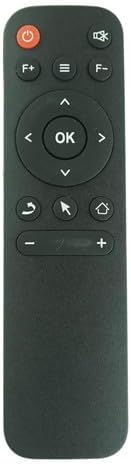
Сүрөт 1: Алдыңкы view алыстан башкаруу пультунун.
The remote control features a sleek black design with clearly labeled buttons for easy navigation and control of your Vimgo P10 Portable Mini Projector. Key buttons include Power, Volume Up/Down, Navigation Pad with OK button, Menu, Home, Back, and a cursor/mouse function button.
Жайгашуу
Батарея орнотуу
Алыстан башкаруу пультун иштеши үчүн эки (2) AAA батарейкасы (кошулмага кирбейт) керектелет.
- Пульттун артындагы батарея бөлүкчөсүнүн капкагын табыңыз.
- Gently slide the cover downwards or press the latch (if present) and lift to remove it.
- Оң (+) жана терс (-) терминалдары бөлүмдүн ичиндеги белгилер менен туура дал келишин камсыз кылып, эки AAA батарейкасын салыңыз.
- Батарея бөлүкчөсүнүн капкагын бекем чыккыча ордуна жылдырыңыз.

Figure 2: Battery compartment.
Ensure correct battery polarity for proper function.
Иштөө нускамалары
Point the remote control directly at the IR receiver on your Vimgo P10 Portable Mini Projector. Obstructions between the remote and the projector will prevent proper operation.
- Кубат баскычы (⏻): Проекторду күйгүзүү же өчүрүү үчүн басыңыз.
- Volume Buttons (F+, F-): Adjust the audio volume of the projector.
- Navigation Pad (▲ ▼ ◀ ▶): Use these arrow buttons to navigate through menus and options on the projector screen.
- OK баскычы: Тандоолорду ырастайт же меню пунктун киргизет.
- Меню баскычы (≡): Accesses the projector's main menu or settings.
- Үй баскычы (⌂): Returns to the projector's home screen or main interface.
- Арткы баскыч (↩): Мурунку экранга же менюга кайтат.
- Mouse/Cursor Button (⇱): Activates or deactivates the on-screen mouse cursor for easier navigation in certain applications.
- Volume Control (+ -): Adjusts the volume. (Note: Some remotes may have dual volume controls, use the one that works for your projector).
Техникалык тейлөө
- Тазалоо: Пультту жумшак, кургак чүпүрөк менен сүртүңүз. Абразивдүү тазалагычтарды же эриткичтерди колдонбоңуз.
- Батареяны алмаштыруу: Пульттун реакциясы жайлап калса же иштебей калса, батареяларды алмаштырыңыз. Эки батареяны тең бир убакта жаңысына алмаштырыңыз.
- Сактагыч: Эгер пульт узак убакыт бою колдонулбаса, агып кетпеши жана мүмкүн болуучу бузулууларды болтурбоо үчүн батарейкаларды алып салыңыз. Салкын, кургак жерде сактаңыз.
Проблемаларды чечүү
| Көйгөй | Мүмкүн себеп | Чечим |
|---|---|---|
| Алыстан жооп бербей жатат | Dead or incorrectly installed batteries; Obstruction between remote and projector; Remote out of range; Projector's IR receiver blocked or faulty. | Replace batteries, ensuring correct polarity. Remove any obstructions. Ensure you are within effective range (typically 15-20 feet) and have a clear line of sight. Check projector's IR receiver. |
| Кээ бир функциялар иштебейт | This is a replacement remote; Specific functions may not be fully compatible with all projector models. | Verify the remote's compatibility with your specific projector model. Refer to your projector's original manual for its remote control specifications. This replacement remote is designed for core functions. |
| Баскычтар жабышчаак же жооп бербейт | Dirt or debris under buttons; Wear and tear. | Clean the remote surface. If the issue persists, the remote may need replacement. |
Техникалык шарттар
- Модел: P10 Алыстан башкаруу
- Шайкештик: Specifically designed for Vimgo P10 Portable Mini Projector (IR Replacement)
- Кубат булагы: 2 x AAA Батареялар (киргизилген эмес)
- Түсү: Кара
- Өндүрүүчү: Easytry
Кепилдик жана колдоо
As a replacement product, warranty terms may vary. Please refer to the purchase documentation or contact the seller (Easytry123) directly for information regarding warranty coverage and support for this specific remote control.
For any operational questions or issues not covered in this manual, it is recommended to first consult the original user manual of your Vimgo P10 Portable Mini Projector, as this replacement remote is designed to work with its existing functionalities.


