
1. Продукт бүтүп калдыview
The Sony Alpha ZV-E10 II is an APS-C interchangeable lens mirrorless camera designed for content creators. It features a 26-megapixel APS-C back-illuminated Exmor R™ CMOS image sensor, offering high resolution and intricate detail. The camera supports a wide selection of E-mount lenses, including the versatile E PZ 16-50mm F3.5-5.6 OSS II zoom lens included in this kit. Advanced audio capabilities, Creative Looks, and a Cinematic Vlog setting enhance creative expression. Its intuitive touch operation and flip-out vari-angle LCD with rotating UI facilitate both horizontal and vertical video shooting.
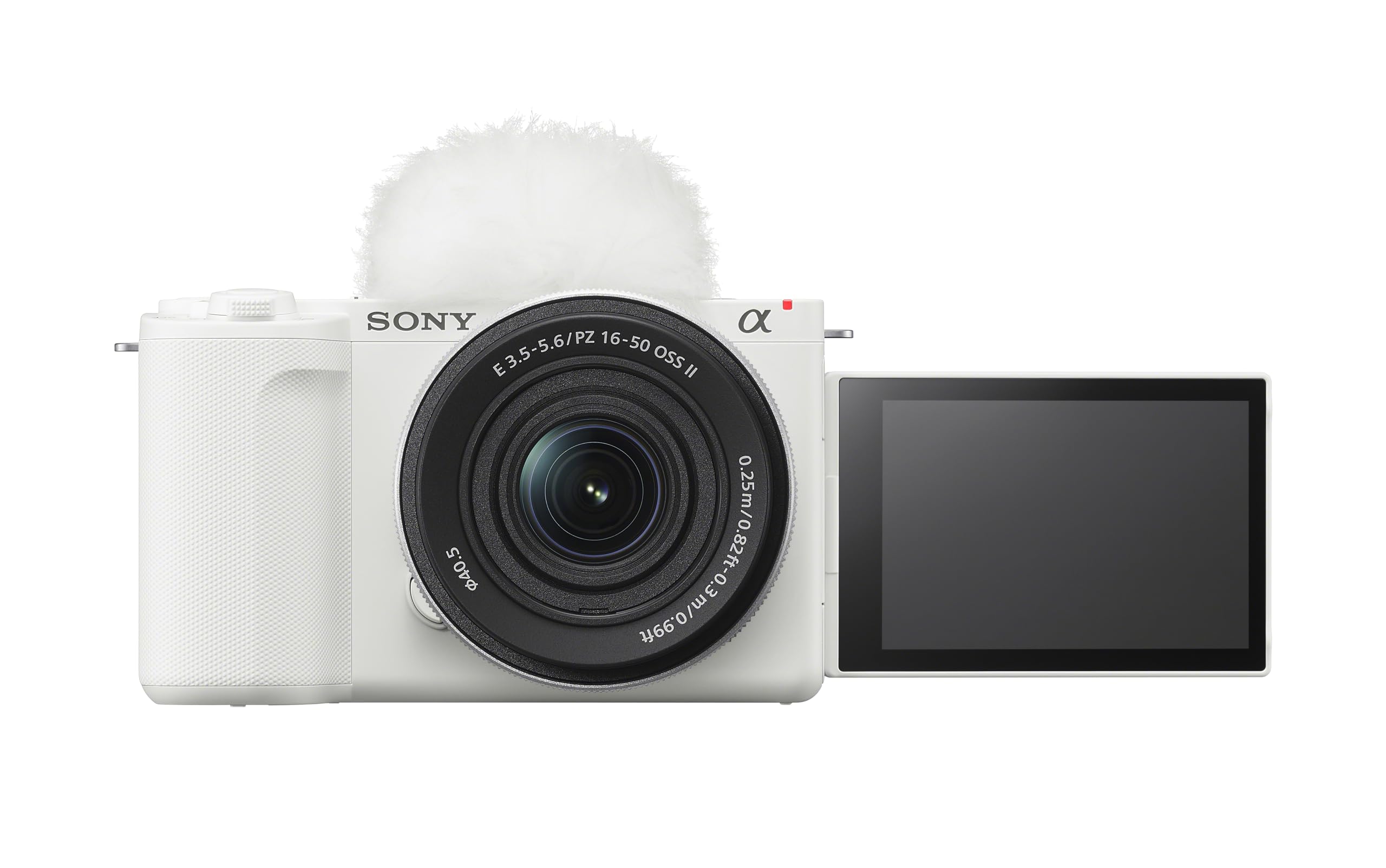
2. Баштапкы орнотуу
2.1 Пакеттен чыгаруу
Бардык компоненттерди таңгактан кылдаттык менен алып салыңыз. Төмөнкү нерселердин бар экенин текшериңиз:
- Камера корпусу
- E PZ 16-50mm F3.5-5.6 OSS II Lens
- Дене капкагы
- Заряддалуучу батарея
- Wind Screen
2.2 Батареяны орнотуу жана заряддоо
Insert the supplied rechargeable battery into the battery compartment located at the bottom of the camera. Ensure it clicks into place. Connect the camera to a power source using the provided USB cable for charging. The charging indicator will illuminate during charging and turn off when complete.

2.3 Эстутум картасын салуу
Open the memory card slot cover, typically located near the battery compartment. Insert a compatible SD card (UHS-II recommended for optimal performance) with the contacts facing the correct direction until it locks into place. Close the cover securely.
2.4 Объективди бекитүү
Align the white index mark on the lens with the white index mark on the camera body. Mount the lens by rotating it clockwise until it locks into position. To remove, press the lens release button and rotate counter-clockwise.

3. Иштөө нускамалары
3.1 Күйгүзүү/өчүрүү
Камераны күйгүзүү үчүн, жогорку пластинада жайгашкан КҮЙГҮЗҮҮ/ӨЧҮРҮҮ которгучун жылдырыңыз. Өчүрүү үчүн которгучту кайра ӨЧҮРҮҮ абалына жылдырыңыз.

3.2 Сүрөт тартуунун негизги режимдери
The ZV-E10 II offers various shooting modes accessible via the mode dial or on-screen menu. Common modes include:
- Акылдуу Авто: Камера автоматтык түрдө көрүнүштү аныктайт жана оптималдуу орнотууларды колдонот.
- Программанын автоматтык режими (P): Камера диафрагманы жана жапкыч ылдамдыгын орнотот, ал эми сиз башка жөндөөлөрдү башкарасыз.
- Диафрагма артыкчылыктуулугу (A): Сиз апертураны орнотосуз, ал эми камера жабуунун ылдамдыгын орнотот.
- Жабык приоритети (S): Сиз жабуунун ылдамдыгын, ал эми камера диафрагманы орнотот.
- Кол менен (M): Сиз диафрагманы жана жабуунун ылдамдыгын көзөмөлдөйсүз.
3.3 Видео жаздыруу
Press the dedicated MOVIE button to start and stop video recording. The camera supports 4K video at up to 60 fps and Full HD at up to 120 fps for slow-motion effects. The articulating touch LCD can be flipped out and rotated for easy self-recording or unique angles.

3.4 Автофокус системасы
The ZV-E10 II features Real-time Eye AF and Real-time Tracking for precise subject focus. It recognizes human, animal, and bird eyes, maintaining sharp focus even when subjects move. Utilize the touchscreen to select focus points or track subjects.

3.5 Чыгармачылык өзгөчөлүктөрү
Explore the Creative Look function with 10 presets for expressive moods. The My Image Style function allows adjustments to background bokeh, brightness, and color tone directly on the touch screen in Intelligent Auto or Scene Selection modes. The camera also includes a dedicated button for Background Defocus mode.

4. Кароо жана тейлөө
4.1 Камераны жана линзаны тазалоо
Use a soft, lint-free cloth to clean the camera body. For the lens, use a lens brush to remove dust, followed by a lens cleaning solution and a microfiber cloth. Avoid touching the lens surface directly with your fingers. Never use harsh chemicals or abrasive materials.
4.2 Батареяга кам көрүү
Store batteries in a cool, dry place. Avoid fully discharging the battery frequently, as this can reduce its lifespan. If storing the camera for an extended period, remove the battery.
4.3 Сактоо
When not in use, store the camera in a dry, dust-free environment, preferably in a camera bag or case. Attach the body cap and lens cap to protect the sensor and lens elements.
5. Кыйынчылыктарды
This section addresses common issues you might encounter with your Sony Alpha ZV-E10 II camera.
| Көйгөй | Мүмкүн себеп | Чечим |
|---|---|---|
| Камера күйбөйт | Батарея түгөнүп калган же туура эмес салынган. | Батареяны толук заряддаңыз. Батарея туура салынганын текшериңиз. |
| Сүрөттөр бүдөмүк | Туура эмес фокус, камеранын солкулдашы же кир линза. | Check focus settings. Use a faster shutter speed or image stabilization. Clean the lens. |
| Camera overheats and shuts down | Prolonged 4K video recording or use in high ambient temperatures. | Allow the camera to cool down. Reduce recording duration or resolution. Use in a cooler environment. |
| Эстутум картасынын катасы | Карта толгон, бузулган же шайкеш келбейт. | Керексиз жок кылуу fileже жаңы картаны колдонуңуз. Картаны форматтаңыз (бул бардык маалыматтарды өчүрөт). Картанын шайкеш келерин текшериңиз. |
6. Техникалык шарттар
| Өзгөчөлүк | Спецификация |
|---|---|
| Модель аты | Alpha ZV-E10 II |
| Сенсор түрү | APS-C Exmor R™ CMOS |
| Натыйжалуу дагы эле чечим | 26 депутат |
| Video Resolution | Up to 2160p (4K 60fps) |
| Линза орнотуу | Sony E-mount |
| Объектив топтому | E PZ 16-50mm F3.5-5.6 OSS II |
| Image Stabilization | Digital, Optical (with OSS lens) |
| Автофокус технологиясы | AI-assisted Subject Recognition, Real-time Eye AF (Human/Animal/Bird), Real-time AF Tracking |
| Дисплей түрү | 3-inch Articulating Touch LCD |
| Байланыш | Micro HDMI, USB, Wi-Fi, Bluetooth |
| Үзгүлтүксүз атуу | 11 FPS чейин |
| Элемент Салмагы | 14.07 Ounces (Body Only) |
7. Кепилдик жана Кардарларды колдоо
7.1 Кепилдик маалыматы
This Sony Alpha ZV-E10 II camera comes with a 1 жылдык өндүрүүчүнүн кепилдиги. Please retain your proof of purchase for warranty claims. The warranty covers defects in materials and workmanship under normal use. It does not cover damage caused by misuse, accidents, unauthorized modifications, or natural disasters.
7.2 Кардарларды колдоо
For technical assistance, troubleshooting beyond this manual, or warranty service, please contact Sony customer support. You can find contact information on the official Sony website or through the documentation included with your product. Have your model number (ZV-E10 II) and serial number ready when contacting support.
Additional resources, including software updates and detailed guides, may be available on the official Sony support webсайт.