
1. Киришүү
Thank you for choosing the Hama DR2002BT Digital Radio. This device offers a comprehensive audio experience with FM, DAB/DAB+ digital radio reception, and Bluetooth connectivity. Its user-friendly design, featuring large buttons and a clear 4.3-inch TFT color display, makes it suitable for all users. This manual will guide you through the setup, operation, and maintenance of your new digital radio.
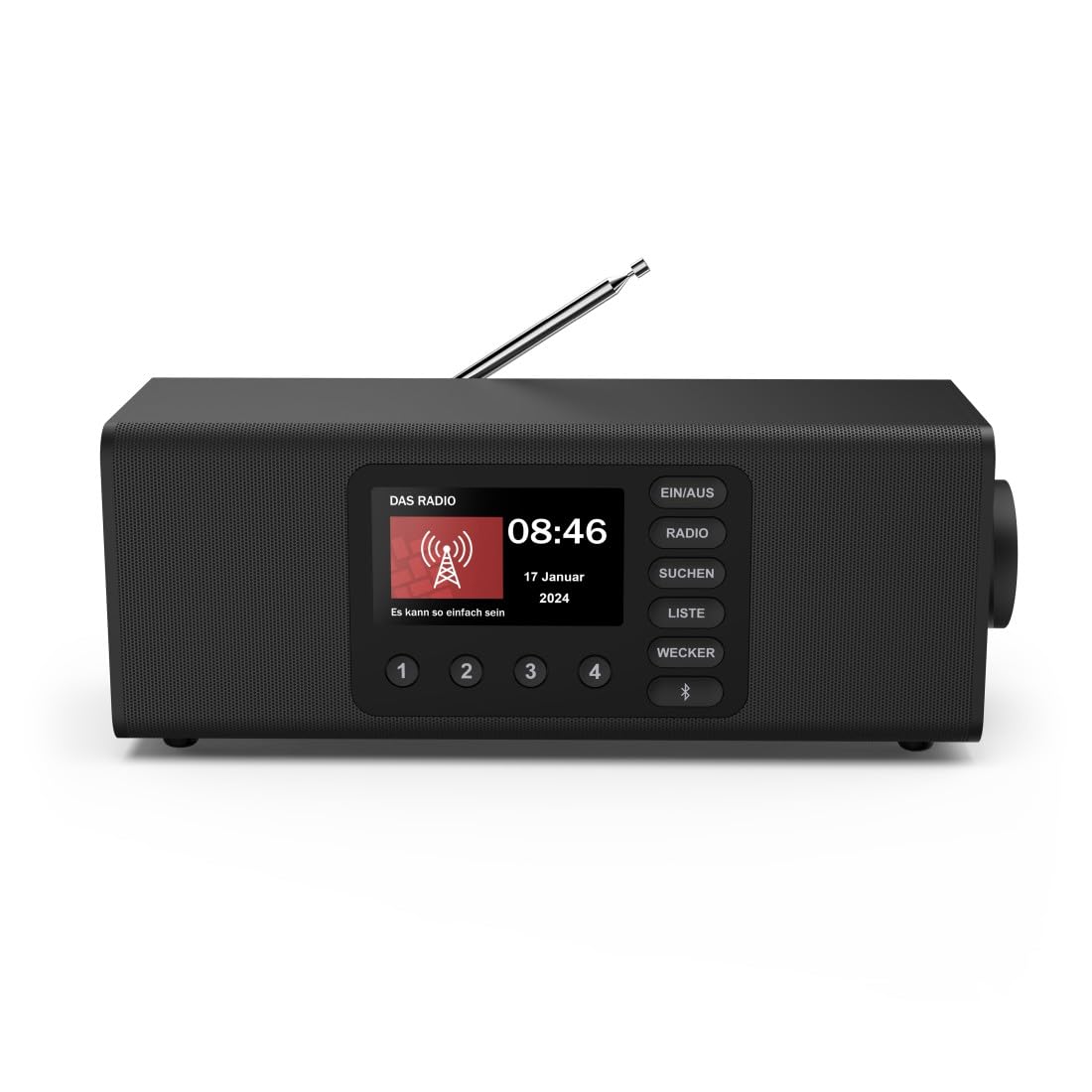
Сүрөт: алдыңкы view Хама DR2002BT санариптик радиосунун, шоуasing анын дисплей жана башкаруу баскычтары.
2. Коопсуздук маалыматы
Сураныч, аппаратты колдонуудан мурун бул коопсуздук нускамаларын кылдат окуп чыгыңыз. Бул колдонмону келечекте маалымат алуу үчүн сактаңыз.
- Түзмөктү нымдуулукка, жамгыр же өтө жогорку температурага дуушар кылбаңыз.
- Аппаратты жылуулук булактарынын жанына же тике күн нуруна коюудан алыс болуңуз.
- Аппаратты ачпаңыз casinг. Оңдоо иштери квалификациялуу кызматкерлер тарабынан гана жүргүзүлүшү керек.
- Берилген кубат адаптерин гана колдонуңуз.
- Аппараттын айланасында туура желдетүүнү камсыз кылыңыз.
3. Пакеттин мазмуну
Таңгактан чыгарганда бардык буюмдар бар экенин текшериңиз:
- Хама DR2002BT санариптик радиосу
- Кубаттуу адаптер
- User Manual
4. Продукт бүтүп калдыview
4.1 Алдыңкы панелди башкаруу жана дисплей

Image: Front panel of the radio highlighting the display and control buttons, with icons for Bluetooth, DAB+, and Alarm functions.
The front panel features a 4.3-inch TFT color display, large control buttons, and a rotary knob for easy navigation and selection. Key buttons include:
- EIN/AUS (ON/OFF): Аппаратты күйгүзөт же өчүрөт.
- РАДИО: Switches between FM and DAB/DAB+ modes.
- SUCHEN (SEARCH): Initiates station scanning.
- LISTE (LIST): Accesses the list of available stations.
- WECKER (ALARM): Ойготкучтун жөндөөлөрүн конфигурациялайт.
- Bluetooth баскычы: Bluetooth жупташтыруу режимин иштетет.
- Алдын ала коюлган баскычтар (1-4): Сакталган сүйүктүү станцияларга тез жетүү.
- Rotary Knob (LAUTSTÄRKE/NAVIGIEREN): Controls volume and navigates menus.
4.2 Арткы панелдин туташуулары
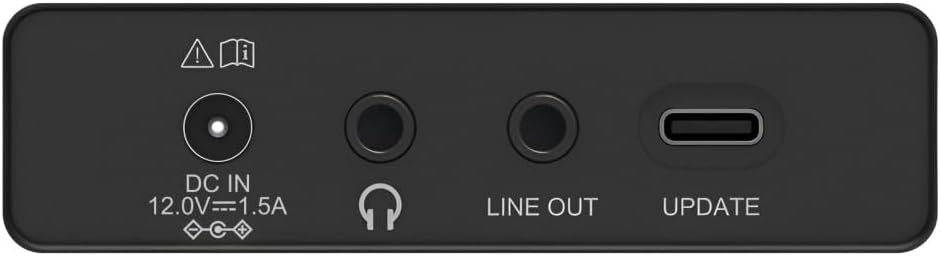
Image: Close-up of the rear panel showing the DC IN, Headphone, Line Out, and UPDATE (USB-C) ports.
Арткы панель маанилүү туташуу параметрлерин камсыз кылат:
- DC IN 12.0V --- 1.5A: Power input for the external adapter.
- Наушник уячасы (3.5 мм): Жеке угуу үчүн.
- LINE OUT: Тышкы туташуу үчүн аудио чыгышы ampкөтөргүчтөр же спикерлер.
- UPDATE (USB-C): Микропрограмма жаңыртуулары үчүн.
- Телескопиялык антенна: For FM and DAB/DAB+ reception.

Сүрөт: Арткы view of the Hama DR2002BT Digital Radio with its telescopic antenna extended for optimal signal reception.
5. Орнотуу
5.1 Кубат туташтыруу
- Берилген кубат адаптерин туташтырыңыз DC IN радионун артындагы порт.
- Күч адаптерин ылайыктуу розеткага сайыңыз.
- Радио автоматтык түрдө күйөт же күтүү режимине өтөт.
5.2 Антеннаны жайгаштыруу
For optimal FM and DAB/DAB+ reception, fully extend the telescopic antenna. Position the radio near a window if reception is poor.
5.3 Баштапкы орнотуу (биринчи колдонуу)
Upon first power-on, the radio may guide you through an initial setup process, including language selection and an automatic DAB station scan. Follow the on-screen prompts.
6. Иштөө нускамалары
6.1 Күйгүзүү/өчүрүү
басыңыз EIN/AUS радиону күйгүзүү же өчүрүү үчүн баскыч.
6.2 DAB/DAB+ радио режими
- басыңыз РАДИО DAB режимин тандоо үчүн баскыч.
- If this is the first time in DAB mode or if you want to rescan, press SUCHEN to perform a full scan for available stations.
- Use the rotary knob to navigate through the station list. Press the knob to select a station.
- үчүн view the station list, press the ТИЗМЕ баскычы.
6.3 FM радио режими
- басыңыз РАДИО FM режимин тандоо үчүн баскыч.
- Басыңыз SUCHEN кийинки жеткиликтүү FM станциясын автоматтык түрдө издөө үчүн.
- Alternatively, use the rotary knob to manually tune to a frequency.
6.4 Алдын ала орнотууларды сактоо жана кайра чакырып алуу
The radio allows you to store up to 4 favorite stations using the dedicated preset buttons (1-4).
- Каалаган станцияга (DAB же FM) тууралаңыз.
- Press and hold one of the preset buttons (1-4) until the display confirms the station has been saved.
- To recall a preset station, simply press the corresponding preset button (1-4).
6.5 Bluetooth операциясы

Сүрөт: алдыңкы view of the radio with Bluetooth and stereo speaker icons, indicating its wireless audio streaming capability.
The Hama DR2002BT can stream audio from your smartphone, tablet, or laptop via Bluetooth 5.0.
- Press the Bluetooth button on the front panel to enter Bluetooth pairing mode. The display will show a pairing indicator.
- On your external device (smartphone, tablet), enable Bluetooth and search for available devices.
- Select "Hama DR2002BT" from the list of devices to pair.
- Once paired, you can play audio from your device, and it will be output through the radio's speakers.
6.6 Ойготкуч саат функциясы

Image: A person waking up with the Hama DR2002BT Digital Radio placed on a bedside table, illustrating its alarm clock functionality.
The radio features two independent alarm settings.
- басыңыз ВЕКЕР ойготкуч жөндөөлөрүнө кирүү үчүн баскычты басыңыз.
- Use the rotary knob to select Alarm 1 or Alarm 2.
- Configure the alarm time, source (buzzer or radio station), and repetition (once, daily, weekdays, weekends, or specific days).
- Press the rotary knob to confirm each setting.
- To quickly activate/deactivate an alarm, press the ВЕКЕР button and use the rotary knob to toggle the alarm status.

Image: A person interacting with the Hama DR2002BT Digital Radio, demonstrating its ease of use for setting functions like alarms or tuning stations.
7. Техникалык тейлөө
To ensure the longevity and optimal performance of your Hama DR2002BT Digital Radio, follow these maintenance guidelines:
- Тазалоо: Радионун сыртын тазалоо үчүн жумшак, кургак, түксүз чүпүрөктү колдонуңуз. Абразивдүү тазалагычтарды, момдорду же эриткичтерди колдонбоңуз.
- Чаң: Regularly dust the device to prevent accumulation in vents and ports.
- Сактагыч: Эгерде радиону узак убакытка сактап жатсаңыз, аны электр тармагынан сууруп, салкын, кургак жерде сактаңыз.
- Антенна: Телескопиялык антеннаны ийилип же сындырып албаш үчүн этияттык менен кармаңыз.
8. Кыйынчылыктарды
Радиоңузда көйгөйлөргө туш болсоңуз, төмөнкү жалпы көйгөйлөрдү жана аларды чечүү жолдорун караңыз:
| Көйгөй | Мүмкүн себеп | Чечим |
|---|---|---|
| Күч жок | Кубат адаптери туташтырылган эмес; Розетка бузук | Check power adapter connection; Try a different power outlet. |
| Радио кабыл алуу начар (DAB/FM) | Antenna not extended; Weak signal area; Interference | Fully extend the telescopic antenna; Reposition the radio (e.g., near a window); Perform a new station scan. |
| Bluetooth жупташтыруу ишке ашпай калды | Bluetooth not enabled on external device; Radio not in pairing mode; Device too far | Ensure Bluetooth is on and visible on your device; Press the Bluetooth button on the radio; Move devices closer (within 10m). |
| Үн жок | Үнү өтө төмөн; Үнсүз режим иштетилген; Туура эмес булак тандалып алынган | Increase volume using the rotary knob; Check if mute is active; Ensure the correct mode (DAB, FM, Bluetooth) is selected. |
| Ойготкуч угулбайт | Alarm not activated; Incorrect alarm time/day set | Verify alarm is enabled in settings; Check alarm time and repetition settings. |
9. Техникалык шарттар

Image: Diagram showing the dimensions of the Hama DR2002BT Digital Radio: 35 cm (width), 12.5 cm (depth), and 13 cm (height).
| Өзгөчөлүк | Деталь |
|---|---|
| Модель номери | DR2002BT (00054298) |
| Кабыл алуу | DAB, DAB+, FM |
| Bluetooth версиясы | 5.0 |
| Чыгуу күчү (RMS) | 10 W (Stereo) |
| Дисплей | 4.3" TFT түстүү дисплей |
| Байланыштар | 3.5mm Jack (Headphone), USB-C (Update), Line Out, DC IN |
| Электр камсыздоо | Тышкы адаптер |
| Өлчөмдөрү (W x D x H) | 35 x 12.5 x 13 см |
| Салмагы | 1788 грамм |
| Материал | Пластик |
| Түс | Кара |
| Кошумча функциялар | Alarm Function (2 alarms), Direct Selection Keys |
10. Кепилдик жана колдоо
Hama GmbH & Co KG provides a warranty for this product. Please refer to the warranty card included in your package or visit the official Hama webдеталдуу кепилдик шарттары жана шарттары үчүн сайт.
For technical support, troubleshooting assistance, or spare parts, please contact Hama customer service or visit their website. The availability of spare parts in the EU is guaranteed for 7 years.
- Өндүрүүчү: Hama GmbH & Co KG
- Келип чыккан өлкө: Германия
- ЕБ запастык бөлүктөрүнүн болушу: 7 жыл