
Deeper Network DPR-M01
Deeper Connect Mini Set VPN Gigabit Router User Manual
Model: DPR-M01 | Brand: Deeper Network
1. Киришүү
The Deeper Connect Mini is a state-of-the-art decentralized VPN (dVPN) Gigabit Router designed to provide enhanced online privacy, security, and freedom. It integrates advanced features such as a lifetime free dVPN, universal ad blocking, and enterprise-class cybersecurity, all while maintaining high network speeds. This manual provides essential information for setting up, operating, and maintaining your Deeper Connect Mini.
2. Кутуда эмне бар
Пакетиңизде бардык буюмдар бар экенин текшериңиз:
- Deeper Connect Mini Device
- Кубаттуу адаптер
- Ethernet кабели
- Wi-Fi Adapter (if included in your specific set)
- Ташуу сумкасы
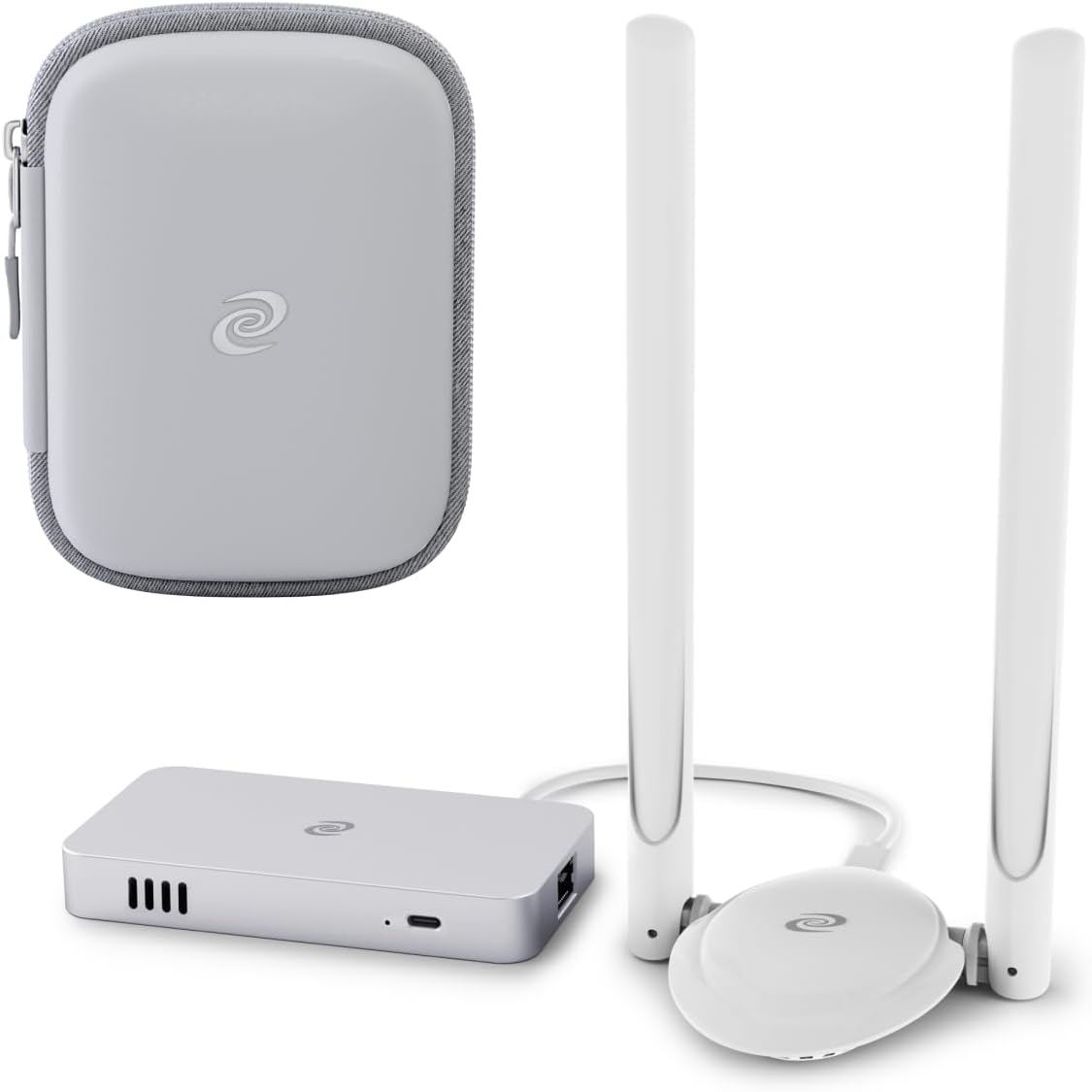
Image: The Deeper Connect Mini device, its two antennas, and the included grey carrying bag.
3. Продукт бүтүп калдыview
The Deeper Connect Mini is a compact yet powerful device designed for seamless integration into your home or office network. It features a 4-Core CPU and 2GB memory, enabling 1Gbps speeds for secure and private internet access.
3.1 Негизги өзгөчөлүктөрү
- Decentralized VPN (dVPN): Provides a lifetime free dVPN service, offering enhanced privacy and bypassing censorship without compromising speed.
- Universal Ad Blocker: Blocks pop-up ads, banner ads, and even YouTube ads across all devices connected to the network.
- Enterprise-Class Cybersecurity: Features a 7-layer firewall with anti-tracking and intrusion prevention capabilities.
- APP-Relocator: Intelligently switches to fast tunnels for optimized streaming experiences globally.
- Geo-Unblocking: Overcomes geo-restrictions for unrestricted global access using DPN technology.

Image: The Deeper Connect Mini effectively blocks various types of ads, including those on streaming platforms like YouTube and Hulu.

Сүрөт: бүттүview of privacy features including decentralized IPs, tracker prevention, hacker scanning prevention, phishing website blocking, and geo-unblocking capabilities.
4. Орнотуу колдонмосу
Follow these steps to set up your Deeper Connect Mini:
- Туташуу кубаты: Plug the power adapter into the Deeper Connect Mini's Power Adapter port and then into a power outlet.
- Connect to Modem/Router: Connect one end of an Ethernet cable to your existing modem or router's LAN port and the other end to the Deeper Connect Mini's Modem Network Port.
- Connect to Your Device/Router: Connect another Ethernet cable from the Deeper Connect Mini's Router Network Port to your computer or to the WAN port of your existing Wi-Fi router.
- Connect Wi-Fi Adapter (Optional): If using a Wi-Fi adapter, plug it into the designated Wi-Fi Adapter Port on the Deeper Connect Mini.
- Күйгүзүү: The device will power on automatically once connected to power. Wait for the indicator lights to stabilize.
- Кирүү орнотуу интерфейси: ачуу а web browser on a device connected to the Deeper Connect Mini network and navigate to the default setup address (usually 11.22.33.44 or a similar IP provided in the quick start guide). Follow the on-screen instructions to complete the initial configuration.

Image: Port layout of the Deeper Connect Mini, indicating connections for power, Wi-Fi adapter, and network cables.
5. Operating Your Deeper Connect Mini
Once set up, the Deeper Connect Mini operates largely in the background, providing continuous protection and enhanced internet access. You can manage its features through its web интерфейс же атайын мобилдик тиркеме.
5.1 Decentralized VPN (dVPN)
The dVPN feature is active by default, routing your internet traffic through a global network of Deeper Connect devices. This decentralization enhances privacy and makes it difficult for third parties to track your online activities. You can customize dVPN settings, such as routing preferences, through the device's management interface.
5.2 Ad Blocking
The universal ad blocker automatically filters out unwanted advertisements, including pop-ups, banner ads, and video ads on platforms like YouTube. This feature improves browsing speed and reduces data consumption. No configuration is typically required for basic ad blocking functionality.
5.3 Geo-Unblocking and APP-Relocator
The Deeper Connect Mini's DPN technology allows you to bypass geo-restrictions, enabling access to content and services that might be unavailable in your region. The APP-Relocator feature intelligently optimizes connections for streaming services, ensuring smooth and uninterrupted viewтажрыйбаларды.

Image: The Deeper Connect Mini supports multiple devices simultaneously, offering 1Gbps speed and 4K video streaming capabilities.
6. Техникалык тейлөө
To ensure optimal performance and longevity of your Deeper Connect Mini, consider the following maintenance tips:
- Жайгашкан жери: Түзмөктү жакшы желдетилген жерге, күн нуру, жылуулук булактары жана нымдуулук тийбеген жерге коюңуз.
- Тазалоо: Чаңды кетирүү үчүн түзмөктү жумшак, кургак чүпүрөк менен акырын сүртүңүз. Суюк тазалоочу каражаттарды же абразивдүү материалдарды колдонбоңуз.
- Программалык камсыздоонун жаңыртуулары: Regularly check for and install firmware updates through the device's web интерфейс. Жаңыртуулар көбүнчө өндүрүмдүүлүктү жакшыртууларды, коопсуздук патчтарын жана жаңы функцияларды камтыйт.
- Кабелдик байланыштар: Periodically check that all Ethernet and power cables are securely connected.
7. Кыйынчылыктарды
If you encounter issues with your Deeper Connect Mini, try the following troubleshooting steps:
- Интернет байланышы жок:
- Check if the power adapter is securely connected and the device is powered on.
- Verify that Ethernet cables are correctly plugged into the Modem Network Port and Router Network Port.
- Restart your modem/router and the Deeper Connect Mini.
- Ensure your internet service provider (ISP) connection is active.
- Жай Интернет ылдамдыгы:
- Ensure your ISP plan supports the speeds you expect.
- Check for any ongoing large downloads or multiple devices consuming bandwidth.
- Temporarily disable the dVPN feature in the device's interface to see if speeds improve.
- Ad Blocker Not Working:
- Ensure the ad blocking feature is enabled in the device's settings.
- Браузериңиздин кэшин жана кукилерин тазалаңыз.
- Кээ бир websites use advanced ad delivery methods that may occasionally bypass the blocker.
- Кирүү мүмкүн эмес Web Интерфейс:
- Ensure your device is connected to the Deeper Connect Mini's network.
- Verify the correct IP address for the interface (e.g., 11.22.33.44).
- Башкасын байкап көрүңүз web браузер.
If problems persist, refer to the official Deeper Network support resources or contact customer service.
8. Техникалык шарттар
| Өзгөчөлүк | Спецификация |
|---|---|
| Модель аты | Deeper Connect Mini |
| Элемент моделинин номери | DPR-M01 |
| Бренд | Deeper Network |
| Байланыш технологиясы | Ethernet |
| Операция системасы | Менчик операциялык система |
| Порттардын саны | 1 (Ethernet, plus dedicated power and Wi-Fi adapter ports) |
| Шайкеш түзмөктөр | Personal Computer, Routers, Modems |
| Сунушталган Колдонуулар | Бизнес, Үй |
| Өзгөчө өзгөчөлүк | WPS, dVPN, Ad Blocking, Cybersecurity |
| Камтылган компоненттер | Bag, Ad Blocking Functionality |
| Башкаруу ыкмасы | Колдонмо / Web Интерфейс |
9. Кепилдик жана колдоо
The Deeper Connect Mini comes with a manufacturer's warranty. Please refer to the warranty card included in your product packaging or visit the official Deeper Network webдеталдуу кепилдик шарттары жана шарттары үчүн сайт.
For technical support, frequently asked questions (FAQs), and additional resources, please visit the Deeper Network support portal or contact their customer service team. Contact information can typically be found on the official webсайтында же продуктунун тез баштоо колдонмосунда.
Тектеш документтер - DPR-M01
 |
Тереңирээк тармак: Коопсуз бөлүшүлгөн тармак жана кийинки муундагы иштин далилдөөчү консенсус ак документи Киберкоопсуздукту, тармакты бөлүшүүнү жана блокчейн технологиясын Deeper Connect жана NPoW консенсус механизми сыяктуу өнүмдөр менен айкалыштырган борбордон ажыратылган интернет чечими болгон Deeper Networkтун техникалык деталдарын жана көрүнүштөрүн изилдеңиз. |
 |
Deeper Connect Wi-Fi адаптери DCWA02: Колдонуучунун колдонмосу жана спецификациялары Deeper Network тарабынан Deeper Connect Wi-Fi адаптери DCWA02 үчүн комплекстүү колдонмо, орнотууларды, техникалык мүнөздөмөлөрдү жана FCC ылайык келүүсүн камтыйт. |
 |
Deeper Connect Air Quick Start Guide: Орнотуу жана иштетүү Deeper Connect Air менен тез баштаңыз. Бул колдонмо FCC жана ISED шайкештик маалыматы менен бирге зымсыз реле режиминде орнотуу, туташуу жана иштетүү боюнча кадам-кадам нускамаларды берет. |
 |
Тереңирээк тармак: Коопсуз бөлүшүлгөн тармак жана кийинки муундагы иштин далилдөөчү консенсус тармагы Ак китеп Бул ак документте Deeper Network долбоору анын коопсуз бөлүшүлгөн тармагына, борбордон ажыратылган консенсус механизмдерине жана Deeper Connect түзмөгүнө багытталган. Бул техникалык негиздерди, AtomOS, NPoW жана коопсуз, жеке жана адилеттүү интернет үчүн чечимдерди камтыйт. |
 |
Тереңирээк тармак: Коопсуз бөлүшүлгөн тармак жана кийинки муундагы иштин далилдөөчү консенсус ак документи Бул ак кагаз Deeper Network, коопсуз, жеке жана борбордон ажыратылган интернетти түзүүгө багытталган долбоордун чоо-жайы. Ал Deeper Connect түзмөгүн, AtomOS операциялык тутумун, NPoW консенсус механизмин жана колдонуучу башкарган онлайн келечекке болгон көз карашты камтыйт. |
 |
Deeper Network: Борбордон ажыратылган VPN, Киберкоопсуздук жана Web3 Чечимдер Deeper Network'тун инновациялык чечимдерин, анын ичинде Deeper Connect Mini жана Air аппараттык VPN'дерин, AtomOS программалык камсыздоосун жана алардын ролун изилдеңиз. Web3, киберкоопсуздук жана глобалдык интернетке кирүү. Алардын миссиясы, өнүмдөрү жана артыкчылыктары жөнүндө билип алыңыз. |
Ask a question about this manual
Ask about setup, troubleshooting, compatibility, parts, safety, or missing instructions. Manuals+ will review the question and use this page’s manual context to help answer it.