
1. Киришүү
This manual provides essential instructions for the safe and efficient operation, installation, and maintenance of your AFYEEV 11 kW EV Charging Station. Please read this manual thoroughly before using the product and retain it for future reference.
2. Коопсуздук маалыматы
Кубаттоочу станцияга жана унааңызга жаракат алуунун же бузулуунун алдын алуу үчүн ар дайым төмөнкү коопсуздук чараларын сактаңыз:
- Ensure the charging station is connected to a properly grounded CEE 3-phase socket.
- Заряддоо станциясын ачууга, демонтаждоого же өзгөртүүгө аракет кылбаңыз.
- Keep the charging station away from flammable materials, liquids, and gases.
- Do not use the charging station if the cable or connector is damaged.
- In case of emergency, use the emergency stop switch immediately.
- The charger includes multiple protection functions: overcurrent protection, earth protection, lightning protection, overvoltage protection, under-frequency protection, overheating protection, and earthing warning.
- The unit is IP65 rated for dust and water resistance, suitable for outdoor use in various weather conditions (-30°C to 50°C).
3. Пакеттин мазмуну
Пакетте бардык буюмдар бар экенин текшериңиз:
- 1 x EV Charging Station
- 1 x Cable Holder
- 2 x RFID карталары
- 1 x Dishcloth (for cleaning)
4. Орнотуу
4.1 Физикалык орнотуу
The AFYEEV 11 kW EV Charging Station is designed for simple plug-and-play operation, requiring no complex wiring. It connects directly to an existing CEE 3-phase socket.
- Select a suitable location for the charging station, ensuring it is within reach of your vehicle and a CEE 3-phase socket. The unit is IP65 rated, making it suitable for both indoor and outdoor environments.
- Mount the charging station securely to a wall or suitable support structure using appropriate fasteners (not included).
- Plug the charging station's CEE 3-phase plug into the existing CEE 3-phase socket.
- Install the provided cable holder to manage the charging cable when not in use.

Сүрөт: The AFYEEV EV Charging Station is designed for safe outdoor use, featuring an IP65 rating for dust and water resistance, and operating effectively in temperatures from -30°C to +50°C.
4.2 Колдонмону орнотуу жана туташуу
The charging station can be controlled via a smart application. The recommended application is the Tuya Smart App.
- Download the Tuya Smart App from your device's app store (iOS or Android) or scan the QR code provided on the product packaging or in the image below. Tuya Smart колдонмосун жүктөп алыңыз
- Каттоо же өз эсебиңизге кирүү.
- Смартфонуңуздун Bluetooth жана Wi-Fi иштетилгенин текшериңиз.
- Follow the in-app instructions to add your EV charging station. The app will guide you through connecting via Bluetooth or Wi-Fi.
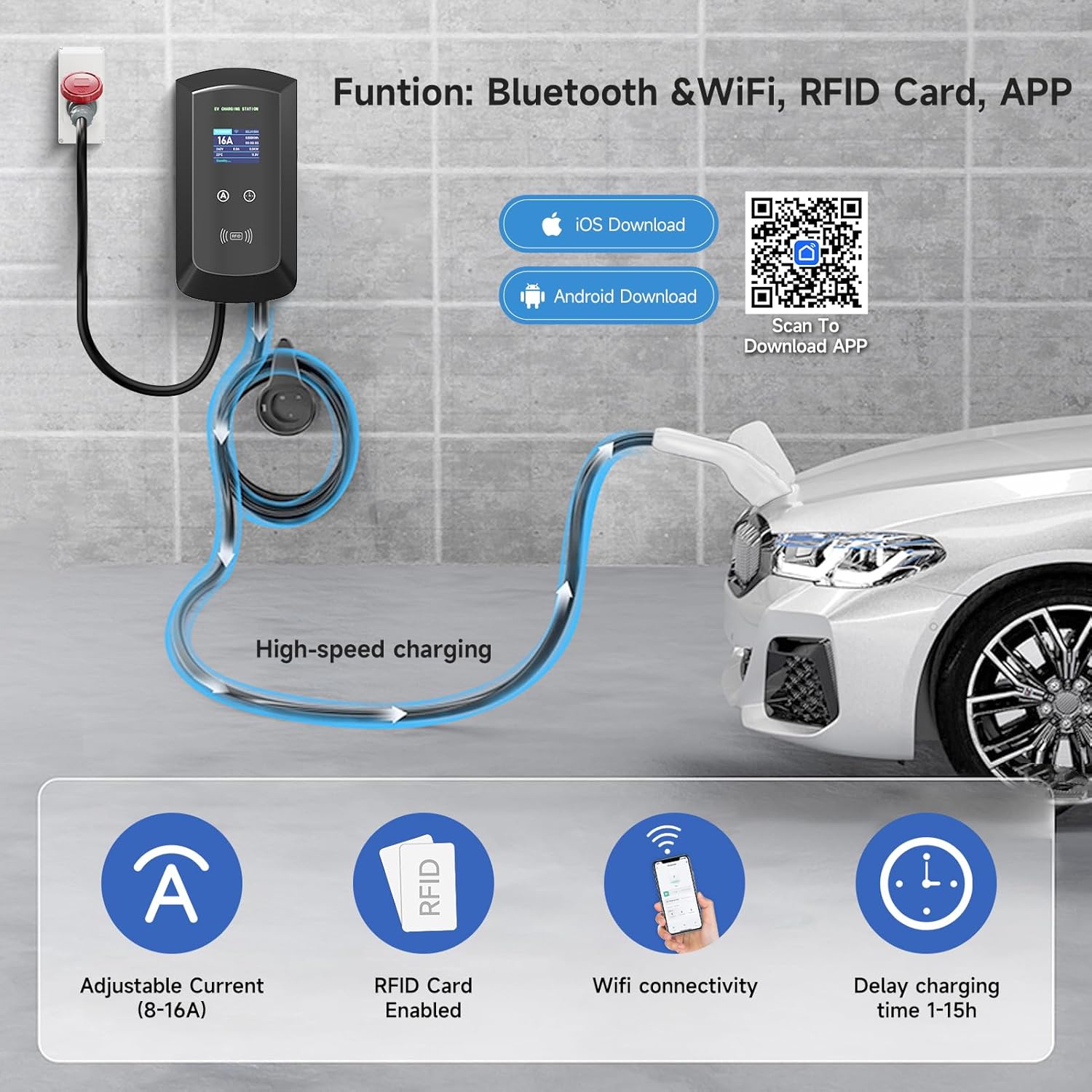
Сүрөт: The charging station offers smart control via Bluetooth and Wi-Fi using the Tuya Smart App, allowing for adjustable current, RFID card enablement, and delayed charging time settings.
4.3 RFID картасын орнотуу
The included RFID cards provide an alternative method to start and stop charging, enhancing security and convenience.
- The RFID cards are pre-configured for use with your charging station.
- To initiate charging, simply swipe an authorized RFID card over the designated RFID reader area on the charging station.
- To stop charging, swipe the card again.
5. Иштөө нускамалары
5.1 Starting and Stopping a Charge
You can start and stop charging using either the RFID card or the smart application.
- Connect the Vehicle: Plug the charging cable into your electric vehicle's charging port.
- Start Charging (RFID): Swipe an authorized RFID card over the RFID reader on the charging station. The display will indicate that charging has begun.
- Start Charging (App): Open the Tuya Smart App, select your charging station, and initiate charging through the app interface.
- Stop Charging (RFID): Swipe the authorized RFID card over the reader again.
- Stop Charging (App): Use the app interface to stop the charging session.
- Disconnect the Vehicle: Once charging is complete or stopped, safely disconnect the charging cable from your vehicle.
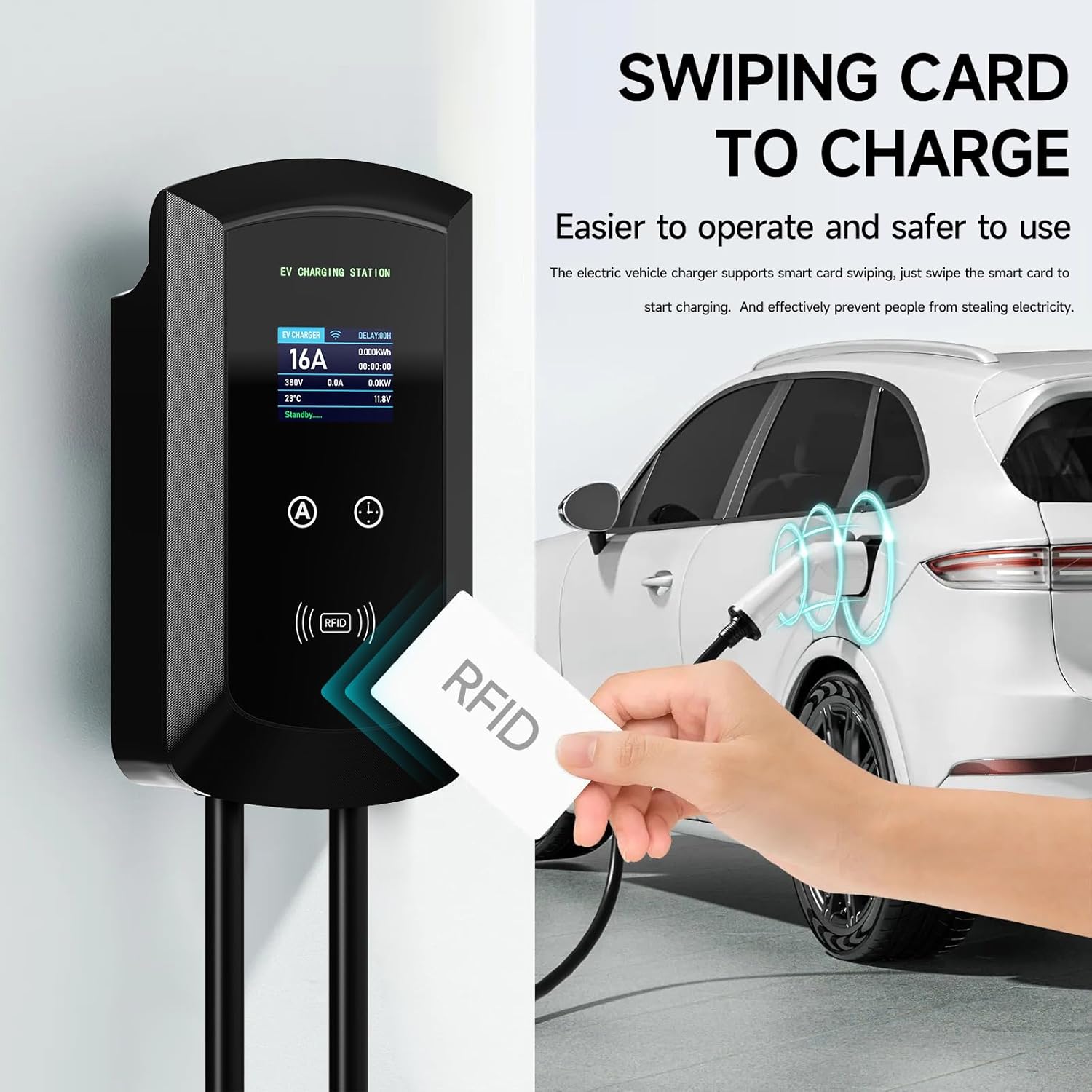
Сүрөт: Charging can be easily initiated by swiping an RFID card over the designated area on the EV charging station, providing a secure and straightforward method to start and stop charging.
5.2 Кубаттоо тогун жөндөө
The charging current can be adjusted between 8A and 16A to suit your vehicle's requirements or available power supply. This can be done manually or via the app.
- Кол менен тууралоо: Use the physical buttons on the charging station to cycle through available current settings (8A, 10A, 13A, 16A). The station has a memory function for the last selected current.
- Колдонмону тууралоо: Within the Tuya Smart App, navigate to the charging settings to select your desired current (8A-16A).
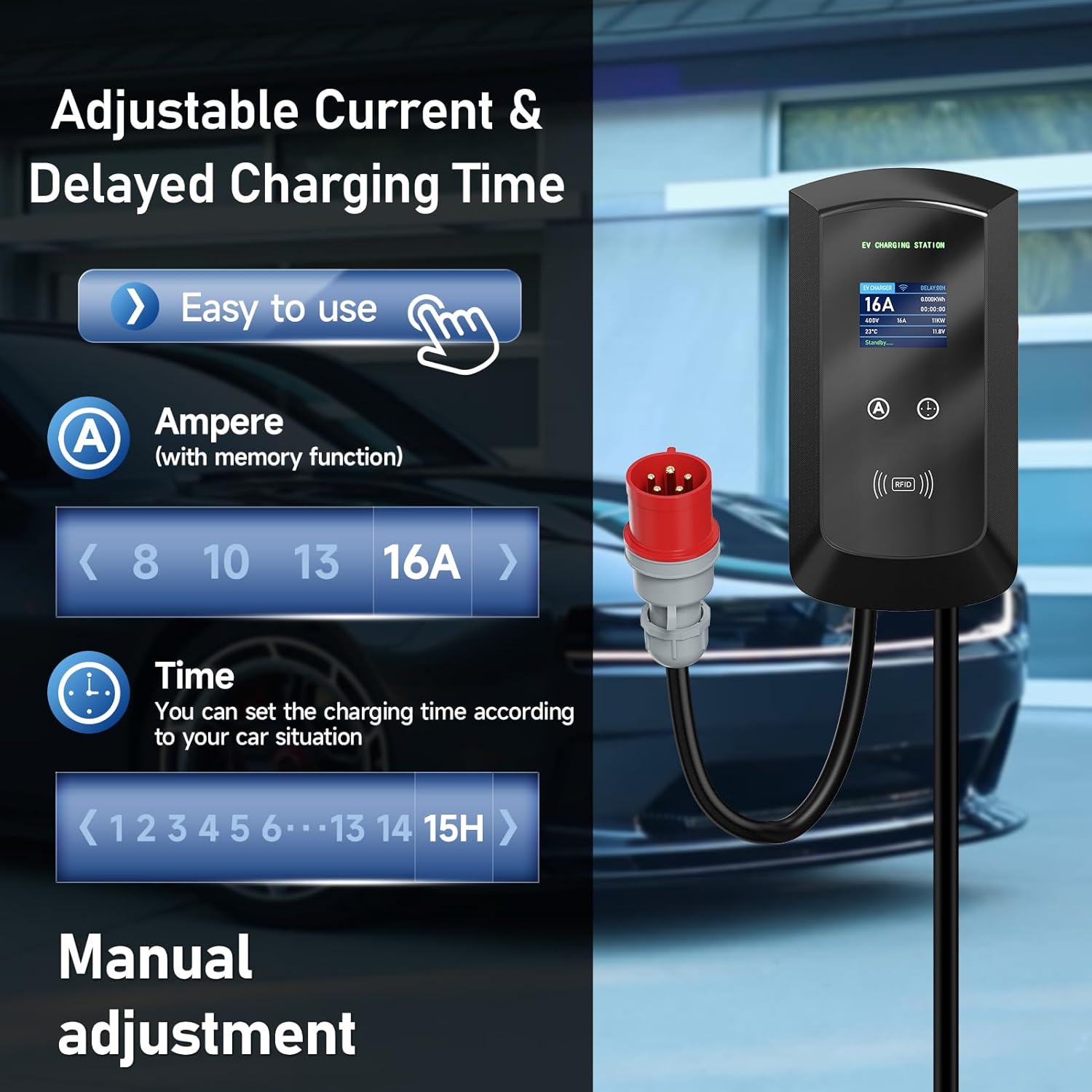
Сүрөт: The charging station allows for easy manual adjustment of the charging current (8A-16A) and setting delayed charging times (1-15 hours) directly from the unit.
5.3 Пландаштырылган заряддоо
Utilize the smart app to schedule charging sessions during off-peak hours to save on electricity costs.
- Open the Tuya Smart App and select your charging station.
- Access the "Scheduled Charging" or "Time Setting" feature.
- Set your desired start and end times for the charging session.
- Confirm the schedule. The charging station will automatically begin and end charging according to your settings.

Сүрөт: The smart app enables scheduled charging, allowing users to set specific times for charging, such as during off-peak hours, to optimize electricity costs.
5.4 Кубаттоо абалын көзөмөлдөө
The large screen display on the charging station provides real-time information about the charging process.
- Учурдагы (A): Displays the active charging current.
- Тtage (V): Чыныгы убактагы томду көрсөтөтtage.
- Күч (кВт): Indicates the current charging power.
- Энергия (кВт/саат): Tracks the total energy delivered during the session.
- Температура (°C): Displays the internal temperature of the unit.
- Статусу: Shows the current operational status (e.g., "Standby", "Charging").
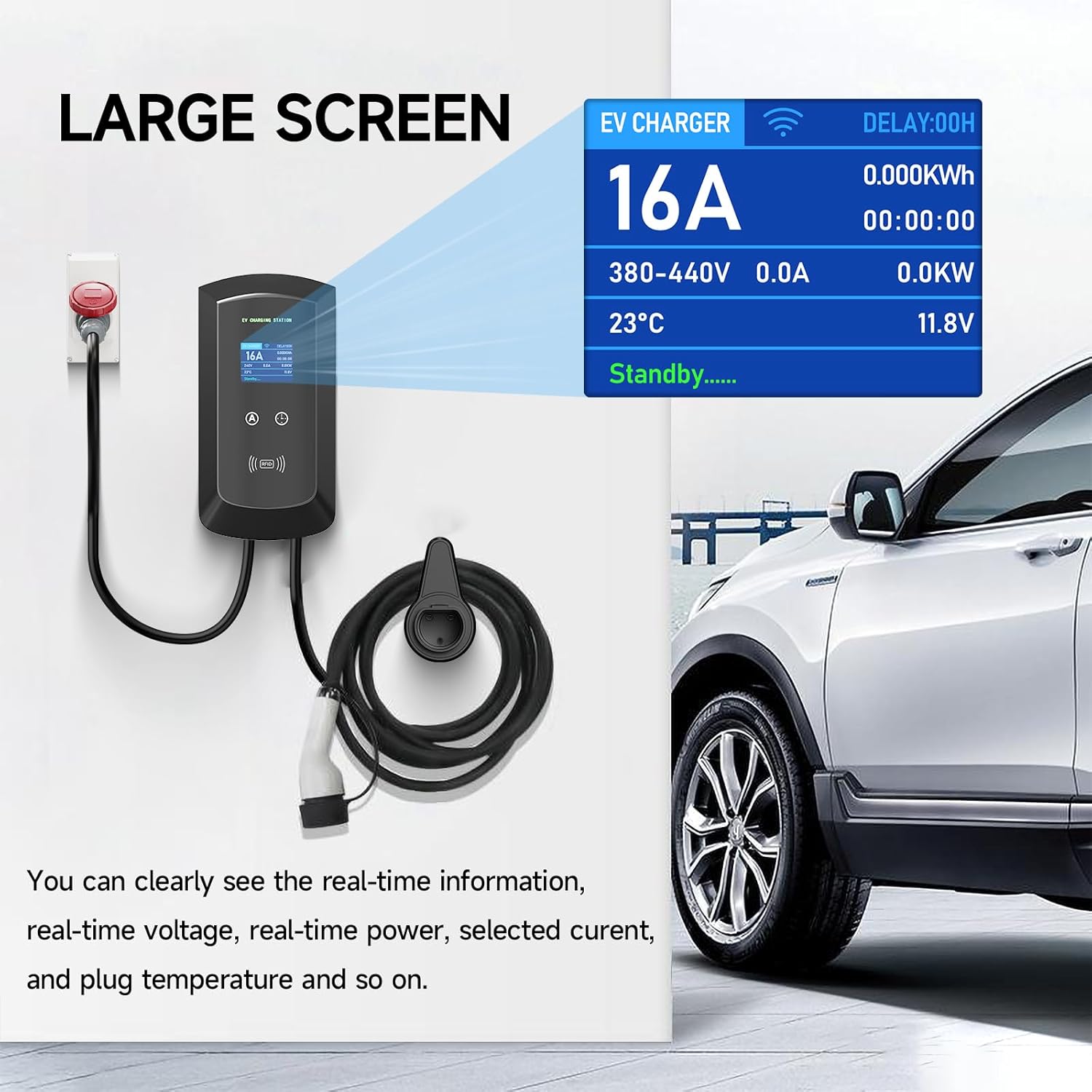
Сүрөт: The large screen on the EV charger provides clear, real-time information including current, voltage, power, temperature, and charging status, ensuring users can easily monitor the charging process.
6. Техникалык тейлөө
Үзгүлтүксүз техникалык тейлөө сиздин кубаттоочу станцияңыздын узак мөөнөттүү жана коопсуз иштешин камсыз кылат.
- Тазалоо: жумшак колдонуу, damp cloth (like the provided dishcloth) to clean the exterior of the charging station. Do not use abrasive cleaners or solvents. Ensure the unit is powered off before cleaning.
- Кабелдик текшерүү: Periodically inspect the charging cable and connector for any signs of wear, damage, or fraying. If any damage is found, discontinue use immediately and contact support.
- Экологиялык шарттар: While the unit is IP65 rated, avoid prolonged exposure to extreme weather conditions if possible. Ensure proper ventilation around the unit.
7. Кыйынчылыктарды
If you encounter issues with your charging station, refer to the following common troubleshooting steps:
- Кубат жок:
- Check if the CEE 3-phase socket has power.
- Ensure the charging station's plug is fully inserted.
- Check your circuit breaker for tripped circuits.
- Заряддоо башталбай жатат:
- Ensure the charging cable is securely connected to both the station and the vehicle.
- Verify that the RFID card is authorized and swiped correctly.
- Check the app for any error messages or scheduled charging conflicts.
- Унааңыз акыны кабыл алууга даяр экенин текшериңиз.
- Колдонмонун туташуу маселелери:
- Телефонуңуздун Bluetooth жана Wi-Fi күйүк экенин текшериңиз.
- Check if the charging station is within Wi-Fi or Bluetooth range.
- Колдонмону жана/же телефонуңузду өчүрүп күйгүзүңүз.
- If Wi-Fi connection fails, try reconnecting through the app's device management section.
- Дисплейдеги ката билдирүүсү:
- Note down the error code or message.
- Refer to the app for more detailed explanations or contact customer support with the error information.
Бул кадамдарды жасагандан кийин көйгөй чечилбесе, кардарларды колдоо кызматына кайрылыңыз.
8. Техникалык шарттар
| Өзгөчөлүк | Деталь |
|---|---|
| Бренд | AFYEEV |
| Модель номери | 11kW-8-16A-CEEBIGUA-001 |
| Максималдуу кубаттуулук | 11 кВт |
| Максималдуу ток | 16 А |
| Жөнгө салынуучу ток | 8A, 10A, 13A, 16A |
| Туташтыргыч түрү | CEE 3-phase plug (input), Type 2 (output) |
| Кабелдин узундугу | 5m |
| Кирүү коргоо (IP) рейтинги | IP65 (чаң жана суу өткөрбөйт) |
| Иштөө температурасы | -30°Cден 50°Cге чейин |
| Байланыш | Wi-Fi, Bluetooth, RFID Card |
| Коопсуздук өзгөчөлүктөрү | Overcurrent, Earth, Lightning, Overvoltage, Under-frequency, Overheating Protection, Emergency Stop Switch |
| Стандарттык шайкештик | IEC 62196-2 (European Standard) |
9. Кепилдик жана колдоо
For warranty information, technical support, or service inquiries, please contact AFYEEV customer service through the retailer where you purchased the product or visit the official AFYEEV webсайт.
Please have your model number (11kW-8-16A-CEEBIGUA-001) and purchase date available when contacting support.