
Introduction
This manual provides detailed instructions for the installation, operation, and maintenance of your SEGOTEP KL-360 II AIO Liquid CPU Cooler. Please read this manual thoroughly before installation and use to ensure proper function and longevity of your product. This cooler is designed to provide efficient thermal management for high-performance desktop CPUs, featuring a 360mm radiator, ARGB fans, and an integrated LCD display on the pump head.
Продукт бүттүview жана компоненттер
The SEGOTEP KL-360 II is an all-in-one liquid CPU cooler engineered for superior thermal performance and aesthetic customization. Key components include:
- 360mm Radiator: High-surface area radiator for effective heat dissipation.
- 3x 120mm ARGB Fans: Provides strong airflow and customizable lighting effects.
- Pump Head with 2.1-inch LCD Screen: Features a 480x480 resolution display (323 PPI) for real-time monitoring and custom content. Includes a 70mm PWM fan for VRM cooling.
- Integrated 4-core ARM Processing Chip: Manages LCD display and cooler functions.
- FDB (Fluid Dynamic Bearing) Fans: Ensures quiet operation and extended lifespan.
- Hidden Temperature-Controlled Water Pump: Designed for efficient and quiet coolant circulation.
- 3-in-1 Lock-free Fan Design: Simplifies fan installation.
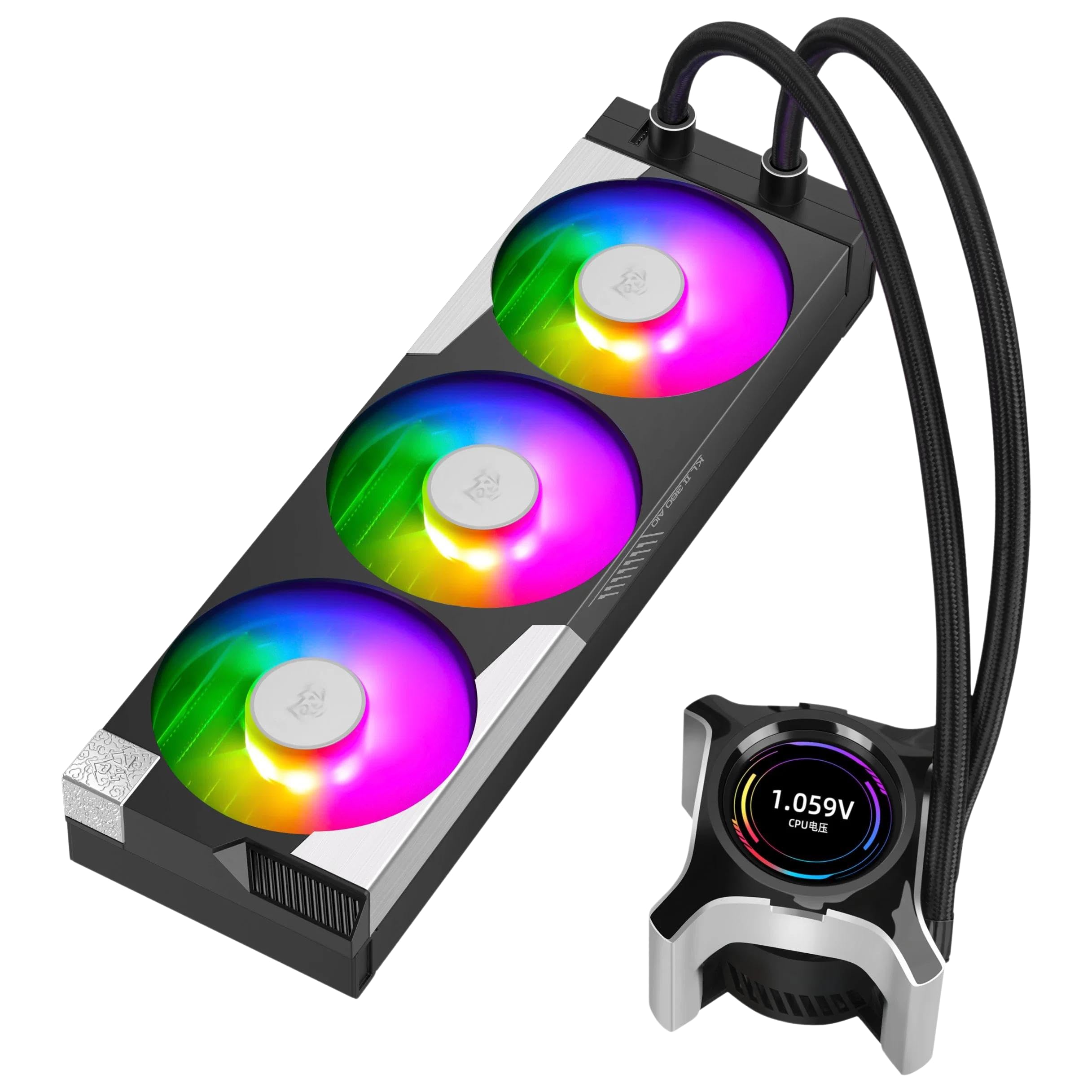
Figure 1: SEGOTEP KL-360 II AIO Liquid CPU Cooler. This image shows the complete cooler assembly, including the radiator with three ARGB fans and the pump head featuring an integrated LCD screen.
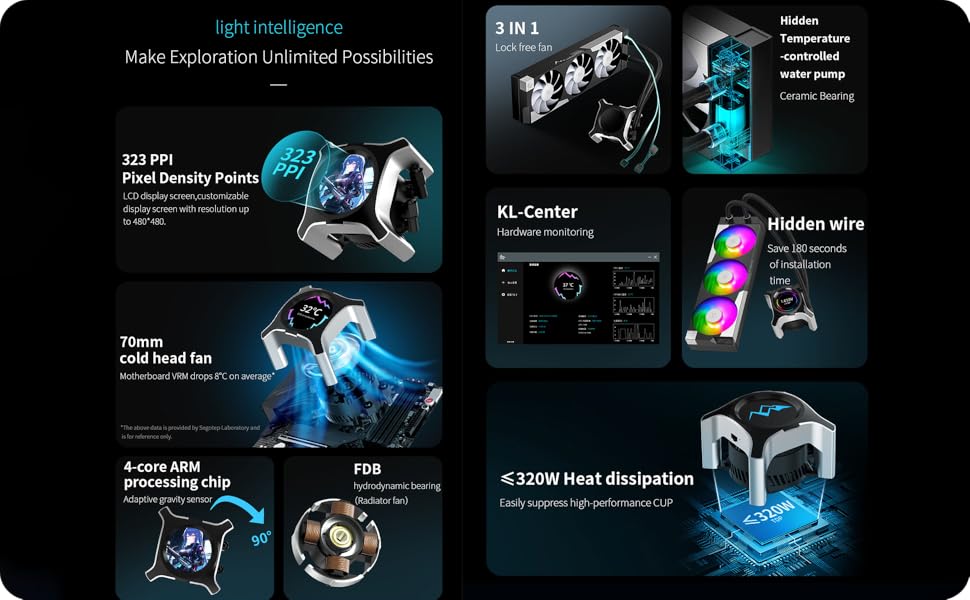
Figure 2: Feature Breakdown. This diagram highlights the 323 PPI LCD, 70mm cold head fan, 4-core ARM chip, FDB bearing, 3-in-1 lock-free fan design, hidden water pump, KL-Center software, and heat dissipation capabilities.
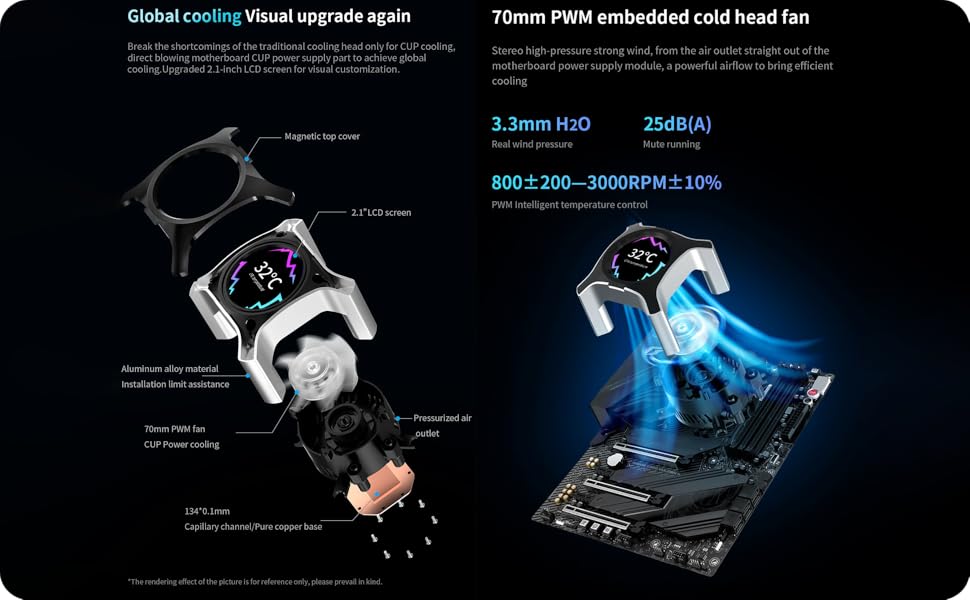
Figure 3: Pump Head Design and Global Cooling. An exploded view of the pump head details its components, including the magnetic top cover, 2.1-inch LCD screen, aluminum alloy material, 70mm PWM fan, pressurized air outlet, and pure copper base. It also illustrates the concept of global cooling for motherboard VRMs.
Орнотуу жана орнотуу
Орнотууну баштоодон мурун, тутумуңуздун өчүрүлгөнүн жана кубат булагынан ажыратылганын текшериңиз. Белгилүү CPU розеткалары жөнүндө маалымат алуу үчүн энелик платаңыздын колдонмосунан караңыз.
Пакеттин мазмуну:

Figure 4: Package Contents. This image displays the radiator with fans, pump head, various mounting brackets for different CPU sockets (LGA 1700/1200, AM5/AM4), screws, and cables included in the box.
Жалпы орнотуу кадамдары:
- CPU розеткасын даярдоо: Install the appropriate backplate and mounting standoffs for your CPU socket (LGA 1700/1200 or AM5/AM4).
- Радиатор тоосу: Secure the 360mm radiator to an available fan mounting location in your PC case (typically top or front). Ensure adequate airflow. The 3-in-1 lock-free fan design simplifies fan attachment to the radiator.
- Насос башын орнотуу: Apply thermal paste to the CPU IHS (Integrated Heat Spreader) if not pre-applied on the cooler's cold plate. Position the pump head over the CPU and secure it with the provided mounting screws and brackets. Ensure even pressure.
- Кабелдерди туташтыруу:
- Connect the pump's PWM cable to the CPU_FAN or AIO_PUMP header on your motherboard.
- Connect the fan cables to available fan headers on your motherboard or a fan controller.
- Connect the ARGB cables from the fans and pump head to a compatible 5V ARGB header on your motherboard or an ARGB controller.
- Connect the USB cable from the pump head to an internal USB 2.0 header on your motherboard for LCD screen functionality and software control.
- Кабелдик башкаруу: Туура аба агымын жана таза түзүлүштү камсыз кылуу үчүн бардык кабелдерди тыкан өткөрүңүз.
For detailed, step-by-step visual guides, refer to the manufacturer's official installation video (if available) or the comprehensive guide on the SEGOTEP webсайт.
Иштөө нускамалары
Баштапкы күйгүзүү:
After installation, power on your system. The fans and pump should begin operating, and the ARGB lighting should illuminate. The LCD screen on the pump head will display default information or a boot animation.
KL-Center Software:
To unlock the full potential of your KL-360 II cooler, including LCD customization and hardware monitoring, download and install the KL-Center software from the official SEGOTEP webсайт (www.segotep.com/Service-Support-Download). Программа сизге мүмкүнчүлүк берет:
- Monitor CPU temperature, frequency, voltagд, жана электр энергиясын керектөө.
- Monitor fan and pump speeds.
- Customize the content displayed on the 2.1-inch LCD screen (supports JPG, PNG, GIF, and MP4 video files up to 4GB, 480x480 resolution).
- Adjust ARGB lighting effects for fans and pump head.
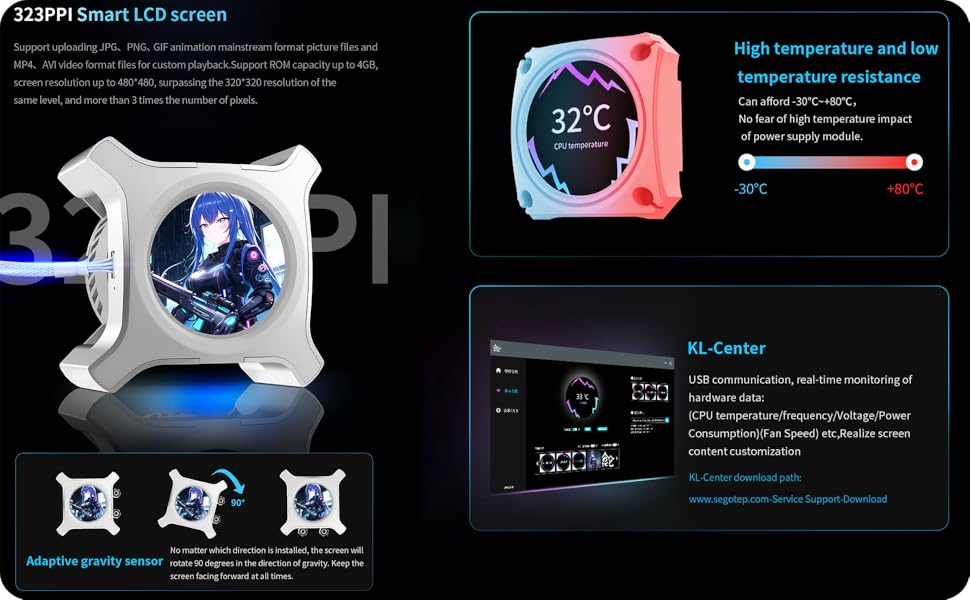
Figure 5: LCD Screen and KL-Center. This image details the 323 PPI LCD screen's capabilities, including support for various media formats and an adaptive gravity sensor. It also shows a screenshot of the KL-Center software interface for hardware monitoring and customization.
Adaptive Gravity Sensor:
The pump head features an adaptive gravity sensor that automatically rotates the LCD screen display by 90 degrees to ensure the content is always oriented correctly, regardless of the pump head's installation direction.
Техникалык тейлөө
Regular maintenance helps ensure optimal performance and extends the lifespan of your AIO cooler.
- Чаңды тазалоо: Кысылган аба же жумшак щетка менен радиатордун сүзгүчтөрүнүн жана желдеткичтеринин чаңын мезгил-мезгили менен тазалап туруңуз. Тазалоо учурунда желдеткичтер айланбагандыгын текшериңиз.
- Түтүктөрдү текшерүү: Inspect the coolant tubes for any signs of kinks, leaks, or damage.
- Pump Head Cleaning: Gently wipe the pump head and LCD screen with a soft, dry cloth.
- Программалык камсыздоо жаңыртуулары: Keep the KL-Center software updated to the latest version for improved features and bug fixes.
Абайлаңыз: Do not attempt to open the pump or radiator, as this will void the warranty and may cause damage or coolant leaks. The liquid cooling system is sealed and does not require refilling.
Проблемаларды чечүү
| Маселе | Мүмкүн себеп | Чечим |
|---|---|---|
| CPU ысып кетиши |
|
|
| LCD Screen Not Displaying / Blank |
|
|
| ARGB жарыктандыруу иштебейт |
|
|
| Муздаткычтан адаттан тыш ызы-чуу |
|
|
Техникалык шарттар
| Өзгөчөлүк | Деталь |
|---|---|
| Модел | KL-360 II |
| Муздатуу ыкмасы | Суюктук (Баары бир жерде) |
| Радиатордун өлчөмү | 360мм |
| Fan Size | 3x 120мм ARGB күйөрмандары |
| Pump Head Fan | 70 мм PWM желдеткич |
| LCD экран | 2.1-inch, 480x480 resolution, 323 PPI |
| CPU Socket колдоосу | Intel LGA 1700/1200, AMD AM5/AM4 |
| TDP (жылуулук долбоорлоо күчү) | 320 Вт чейин |
| Ызы-чуу деңгээли | 32 децибел (максимум) |
| Maximum Rotational Speed (Pump) | 6000 RPM |
| Аба агымынын сыйымдуулугу (вентиляторлор) | Мүнөтүнө 78 куб фут (CFM) |
| Кубат туташтыргычынын түрү | 3-Pin (Pump), PWM (Fans) |
| Материал | Plastic, Copper (Cold Plate) |
| Продукциянын өлчөмдөрү | 9"L x 17"W x 18.3"H |
| Элемент Салмагы | 6.25 фунт |
Кепилдик жана колдоо
The SEGOTEP KL-360 II AIO Liquid CPU Cooler is manufactured by NextGenOEM. For warranty claims, technical support, or further assistance, please contact NextGenOEM directly through their official webпродукт сатылып алынган сайт же сатуучу.
Please retain your proof of purchase for warranty validation. Warranty terms and conditions may vary by region and retailer.
Өндүрүүчү: NextGenOEM
Официалдуу Webсайт: www.segotep.com (for software downloads and product information)