
1. Киришүү
Сатып алганыңыз үчүн рахматasing the Xiaomi Cordless Vacuum Cleaner G20 Lite. This manual provides essential information for the safe and efficient use, maintenance, and troubleshooting of your new vacuum cleaner. Please read this manual thoroughly before first use and keep it for future reference.
2. Коопсуздук нускамалары
To reduce the risk of fire, electric shock, or injury, always follow basic safety precautions when using your vacuum cleaner:
- Шайманды колдонуудан мурун бардык нускамаларды окуп чыгыңыз.
- Сыртта же нымдуу беттерде колдонбоңуз.
- оюнчук катары колдонууга жол бербеңиз. Балдар тарабынан же алардын жанында колдонулганда кылдат көңүл буруу зарыл.
- Бул колдонмодо сүрөттөлгөндөй гана колдонуңуз. Өндүрүүчү сунуштаган тиркемелерди гана колдонуңуз.
- Бузулган шнур же сайгыч менен колдонбоңуз. Эгерде шайман керектелип иштебесе, кулап, бузулуп, сыртта калып же сууга түшүп кетсе, аны тейлөө борборуна кайтарыңыз.
- Тартпаңыз же шнур менен көтөрүп жүрбөңүз, шнурду тутка катары колдонбоңуз, шнурга эшикти жаппаңыз же шнурду курч четтеринен же бурчтарынан тартпаңыз. Шайманды шнурдун үстүнөн иштетпеңиз. Шнурды ысытылган беттерден алыс кармаңыз.
- шнурду тартып сууруп албаңыз. Электр розеткасынан сууруп алуу үчүн шнурдан эмес, сайгычтан кармаңыз.
- Штепсель же шайманды нымдуу кол менен кармабаңыз.
- Тешиктерге эч кандай нерсени салбаңыз. Бөгөттөлгөн ачуу менен колдонбоңуз; чаңдан, түктөн, чачтан жана аба агымын азайта турган нерселерден алыс болуңуз.
- Чачты, кенен кийимдерди, манжаларды жана дененин бардык бөлүктөрүн тешиктерден жана кыймылдуу бөлүктөрдөн алыс кармаңыз.
- Тамеки, ширеңке, ысык күл сыяктуу күйүп жаткан же чылым чеккен нерселерди албаңыз.
- Бензин сыяктуу күйүүчү же күйүүчү суюктуктарды алуу үчүн колдонбоңуз же алар болушу мүмкүн болгон жерлерде колдонбоңуз.
- Хлор агартуучу, аммиак же дренажды тазалагыч сыяктуу уулуу заттарды албаңыз.
- Чаң чөйчөктөрү жана/же чыпкалары жок колдонбоңуз.
- Электр розеткасынан ажыратуудан мурун бардык башкаруу элементтерин өчүрүңүз.
- Тепкичтерде тазалоодо өзгөчө этият болуңуз.
- Шайманды үйдүн ичинде сактаңыз.
- Аппаратты сыртта заряддабаңыз.
- Өндүрүүчү көрсөткөн кубаттагычты гана колдонуңуз.
3. Продукт бүтүп калдыview
The Xiaomi Cordless Vacuum Cleaner G20 Lite is designed for efficient cleaning with its powerful suction and versatile attachments. Key features include:
- Maximum 18,000Pa suction power for thorough cleaning.
- Integrated white LED light on the brush head to illuminate dark areas.
- Өркүндөтүлгөн 5-секtage powerful filter system to prevent secondary pollution.
- Large capacity 2200mAh battery providing up to 45 minutes of runtime.
- One-touch dust disposal for easy and hygienic emptying.
- 2-way brush nozzle and extension rod for versatile cleaning.
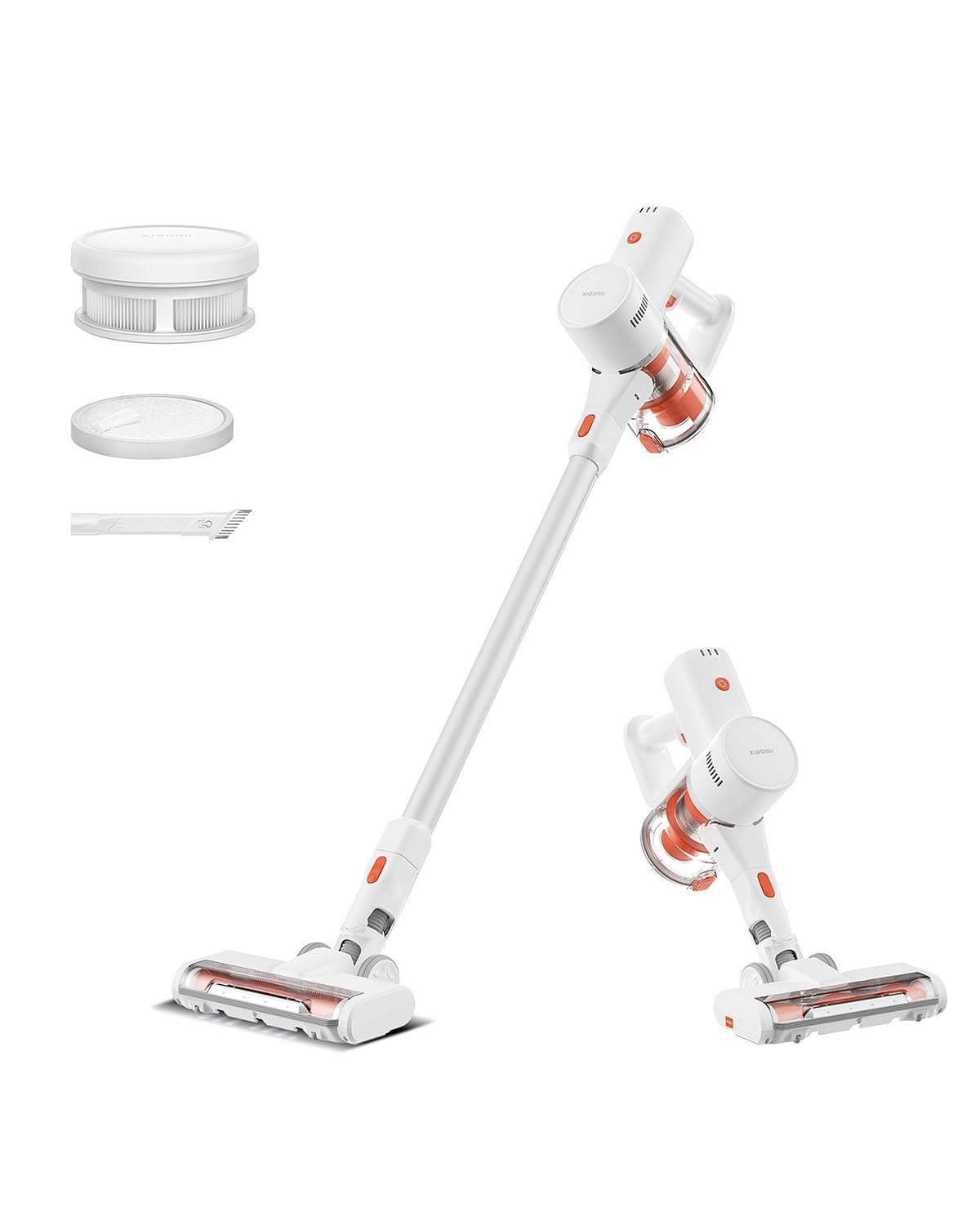
Image: Xiaomi Cordless Vacuum Cleaner G20 Lite, showing the full product assembly.

Image: Illustration of the vacuum cleaner's internal motor, highlighting its 18,000Pa suction power.
Сүрөт: Тунук view of the vacuum cleaner's handle, showing the internal large-capacity battery cells.
4. Орнотуу
Чаң соргучуңузду чогултуу үчүн бул кадамдарды аткарыңыз:
- Компоненттерди таңгактан чыгаруу: Carefully remove all parts from the packaging. Ensure all accessories (main unit, extension rod, motorized brush head, 2-way brush nozzle, crevice nozzle, adapter) are present.
- Attach Extension Rod: Connect the extension rod to the main unit until it clicks into place.
- Щетка башын тиркөө: Connect the desired brush head (motorized brush or 2-way brush nozzle) to the other end of the extension rod. For handheld use, attach the 2-way brush nozzle or crevice nozzle directly to the main unit.
- Батареяны заряддоо: Before first use, fully charge the vacuum cleaner. Connect the adapter to the charging port on the main unit and plug it into a power outlet. The power indicator lights will show the charging status.

Image: The vacuum cleaner being stored on a wall-mounted charging dock, illustrating convenient storage and charging.
5. Иштөө нускамалары
Your Xiaomi Cordless Vacuum Cleaner G20 Lite offers versatile cleaning options:
Power On/Off and Suction Modes
Press the power button to turn the vacuum on. Press the mode button to cycle through different suction power levels (Standard, Turbo). The power indicator lights will show the current mode and battery level.
Video: A short demonstration of turning the vacuum cleaner on and cycling through its suction modes using the power and mode buttons.
Тиркемелерди колдонуу
Select the appropriate brush head for your cleaning task:
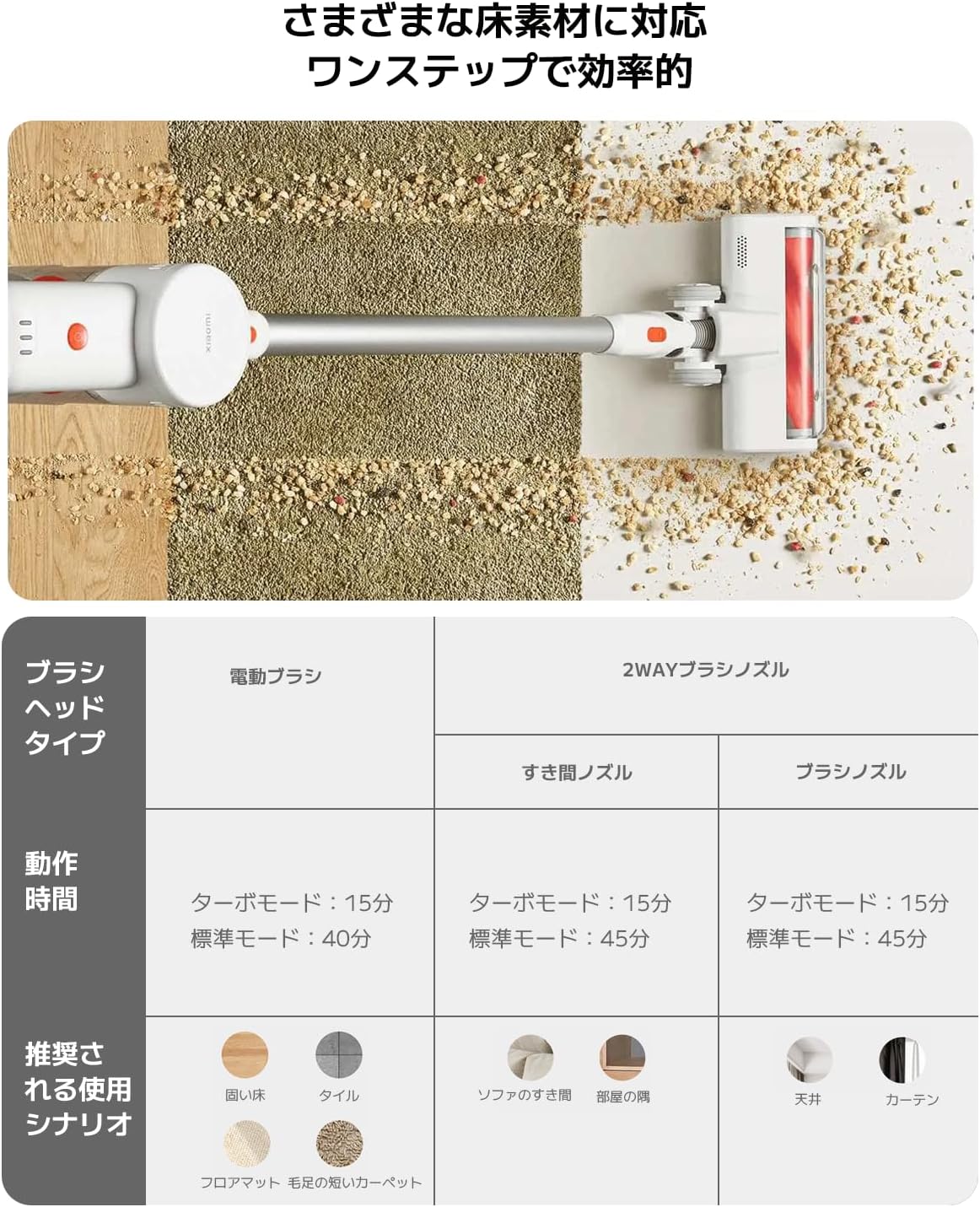
| Brush Head Type | Operating Time (Standard/Turbo) | Recommended Use Scenario |
|---|---|---|
| Моторлонгон щетка | 40 мин / 15 мин | Hard Floor, Tile, Floor Mat, Short Pile Carpet |
| 2-Way Brush Nozzle (Crevice) | 45 мин / 15 мин | Sofa Crevices, Room Corners |
| 2-Way Brush Nozzle (Brush) | 45 мин / 15 мин | Ceiling, Curtains |

Image: Close-up of the vacuum cleaner's motorized brush head, showing the integrated white LED lights illuminating the floor.

Image: A person using the vacuum cleaner with the extension rod to clean high areas, and with a specialized nozzle for narrow gaps and desk surfaces.
6. Техникалык тейлөө
Үзгүлтүксүз тейлөө оптималдуу иштешин камсыз кылат жана чаң соргучуңуздун иштөө мөөнөтүн узартат.
Таштанды кутусун бошотуу
The vacuum cleaner features a one-touch dust disposal system. Simply press the release button on the dustbin to open the bottom flap and empty collected debris directly into a trash can. Empty the dustbin regularly to maintain suction power.

Image: A hand demonstrating the one-touch dust disposal mechanism, showing debris falling from the dustbin. Also visible is the power indicator light on the handle.
Фильтрлерди тазалоо
5-сtage powerful filter system requires periodic cleaning. Refer to the diagram below for filter components. Remove the dustbin and separate the filter components. Tap off loose dirt and rinse washable parts under running water. Ensure all filter components are completely dry before reassembling them into the vacuum cleaner.

Сүрөт: жарылды view of the vacuum cleaner's main unit, illustrating the components of the 5-stage filter system.
Cleaning Brush Heads
Periodically check brush heads for tangled hair or debris. Use scissors to cut away any tangled hair and remove any obstructions to ensure smooth operation.
7. Кыйынчылыктарды
Чаң соргучуңузда көйгөйлөргө туш болсоңуз, төмөнкү жалпы көйгөйлөрдү жана чечимдерди караңыз:
- Кубат жок:
- Батарея заряддалганын текшериңиз. Зарыл болсо кайра заряддаңыз.
- Кубат баскычы бекем басылганын текшериңиз.
- Төмөн сордуруу күчү:
- Таштанды челегин бошотуңуз.
- Clean the filters. Ensure they are dry before reinstallation.
- Check for blockages in the brush head, extension rod, or main unit.
- Щетканын башы айланбайт:
- Check for tangled hair or debris obstructing the brush roll.
- Ensure the brush head is correctly attached.
- адаттан тыш ызы-чуу:
- Check for any foreign objects caught in the brush head or suction path.
- Бардык бөлүктөр коопсуз жыйналганын текшериңиз.
Эгер көйгөй чечилбесе, кардарларды колдоо менен байланышыңыз.
8. Техникалык шарттар
| Спецификация | Деталь |
|---|---|
| Бренд | Xiaomi |
| Модель номери | BHR8232US |
| Продукт түрү | Stick Cleaner |
| Өзгөчөлүктөрү | Зымсыз |
| Чыпка түрү | HEPA чыпкасы |
| Сунушталган колдонуу | Carpet, Hard Floors, Sofa, Curtains, Beds, Tiles, Blankets |
| Power Source | Battery Powered (Charges via power cord) |
| Кубаттуулугу | 0.55 литр |
| Түс | Ак |
| Portable | Ооба |
| Ички/тышкы колдонуу | Indoor |
| Operating Voltage | 21.6 вольт |
| Батарея сыйымдуулугу | 215 Ватт-саат (2200 мАч) |
| Controller Type | Кол менен башкаруу |
| Байланыш | Bluetooth (for potential smart features) |
| Камтылган компоненттер | Accessory kit, Adapter |
| Келип чыккан өлкө | Кытай |
| Продукт Салмагы | 2.4 килограмм |
| Элементтин өлчөмдөрү (L x W x Y) | 66.2 см х 32 см х 13.2 см |
9. Кепилдик жана колдоо
Xiaomi products are designed with quality and reliability in mind. For warranty information and customer support, please refer to the details below:
Кепилдик маалымат
This product comes with a standard manufacturer's warranty. Please retain your proof of purchase for warranty claims. For specific warranty terms and conditions, refer to the documentation included with your product or visit the official Xiaomi webсайт.
Кардарларды колдоо
For technical assistance, troubleshooting, or service inquiries, please contact the Xiaomi Customer Service Center:
- Телефон: 0120-767-378 (Reception hours: 9:00 - 18:00, excluding year-end and New Year holidays)
- Электрондук почта: service.jp@support.mi.com
Xiaomi Service Center (Akihabara Store)
For in-person support or repairs, you may visit our service center:
- Дарек: 4-6-7 Kanda Sakumacho, Chiyoda-ku, Tokyo
- Иш убактысы: 10:00 - 19:00
- Жабык: Шаршемби
- Last Reception: 18:00