
Introduction
The ROCAM Loud Vibrating Alarm Clock with Bed Shaker is designed to provide a reliable and effective wake-up solution for all users, especially heavy sleepers, the hearing impaired, and deaf individuals. This alarm clock offers multiple wake-up modes, including a loud alarm, a powerful bed shaker, and a combination of both. With dual alarm settings, adjustable volume and display brightness, and a convenient USB charging port, it integrates seamlessly into your daily routine to ensure you wake up on time.
Жайгашуу
1. Power Connection
Connect the alarm clock to an AC power outlet using the provided power adapter. The clock is designed for outlet power only and is not battery-operated for primary function.

Image: The alarm clock requires AC power for operation. It also features a USB port for charging external devices.
2. Батареянын камдык көчүрмөсү (милдеттүү эмес)
Кубат учурунда камдык сактоо үчүн utages, insert 2 AAA batteries (not included) into the battery compartment located on the back of the unit. These batteries will preserve time and alarm settings but will not power the display or alarm functions.

Image: The battery backup feature ensures your settings are saved during power interruptions.
3. Bed Shaker Connection and Placement
Plug the bed shaker cable into the designated port on the back of the alarm clock. For optimal vibration, place the bed shaker under your pillow or under the fitted sheet of your mattress.

Image: Proper placement of the bed shaker maximizes its effectiveness for waking heavy sleepers.
Иштөө нускамалары
1. Убакыт жана дата орнотуу
- басыңыз TIME убакыт орнотуу режимине өтүү үчүн баскыч.
- колдонуу + or - саатты тууралоо үчүн баскычтарды басыңыз, анан басыңыз TIME ырастоо үчүн кайра басыңыз жана мүнөттөргө жылдырыңыз.
- Repeat for minutes, then press TIME to set the year, month, and day.
- Басыңыз TIME орнотуу режиминен чыгуу үчүн акыркы жолу.
2. Кош сигналдарды орнотуу
The clock supports two independent alarms (AL1 and AL2) with flexible scheduling.

Image: Set two separate alarms with options for everyday, weekday, or weekend wake-up.
- басыңыз AL1 or AL2 Орноткуңуз келген ойготкучту тандоо үчүн баскычты басыңыз.
- колдонуу + or - ойготкучтун убактысын тууралоо үчүн баскычтарды басыңыз.
- Press the respective alarm button (AL1 or AL2) repeatedly to cycle through alarm modes: 7-day (Mon-Sun), 5-day (Mon-Fri), or 2-day (Sat-Sun).
- Ойготкучту иштетүү же өчүрүү үчүн басыңыз AL1 or AL2 button until the alarm icon appears or disappears on the display.
3. Wake-Up Modes
Choose from three distinct wake-up modes:
- Ringing Alarm Only: Стандарттык үн сигнализациясы.
- Керебет чайкагыч гана: Silent vibration for discreet waking.
- Combo Mode: Both audible alarm and bed shaker activate simultaneously.

Image: Select your preferred wake-up method from three available modes.
4. Adjusting Volume and Vibration
The alarm clock features 5 adjustable volume levels (up to 116dB) and 3 vibration levels for the bed shaker.

Image: Customize the alarm's loudness and bed shaker intensity to suit your needs.
- басыңыз ТОМ button to cycle through the 5 volume levels.
- басыңыз VIB button to cycle through the 3 vibration levels.
5. Тындырма функциясы
Сигнал чыкканда чоң баскычты басыңыз SNOOZE/OK/- button on top of the clock to activate a 9-minute snooze. The alarm will sound again after 9 minutes.
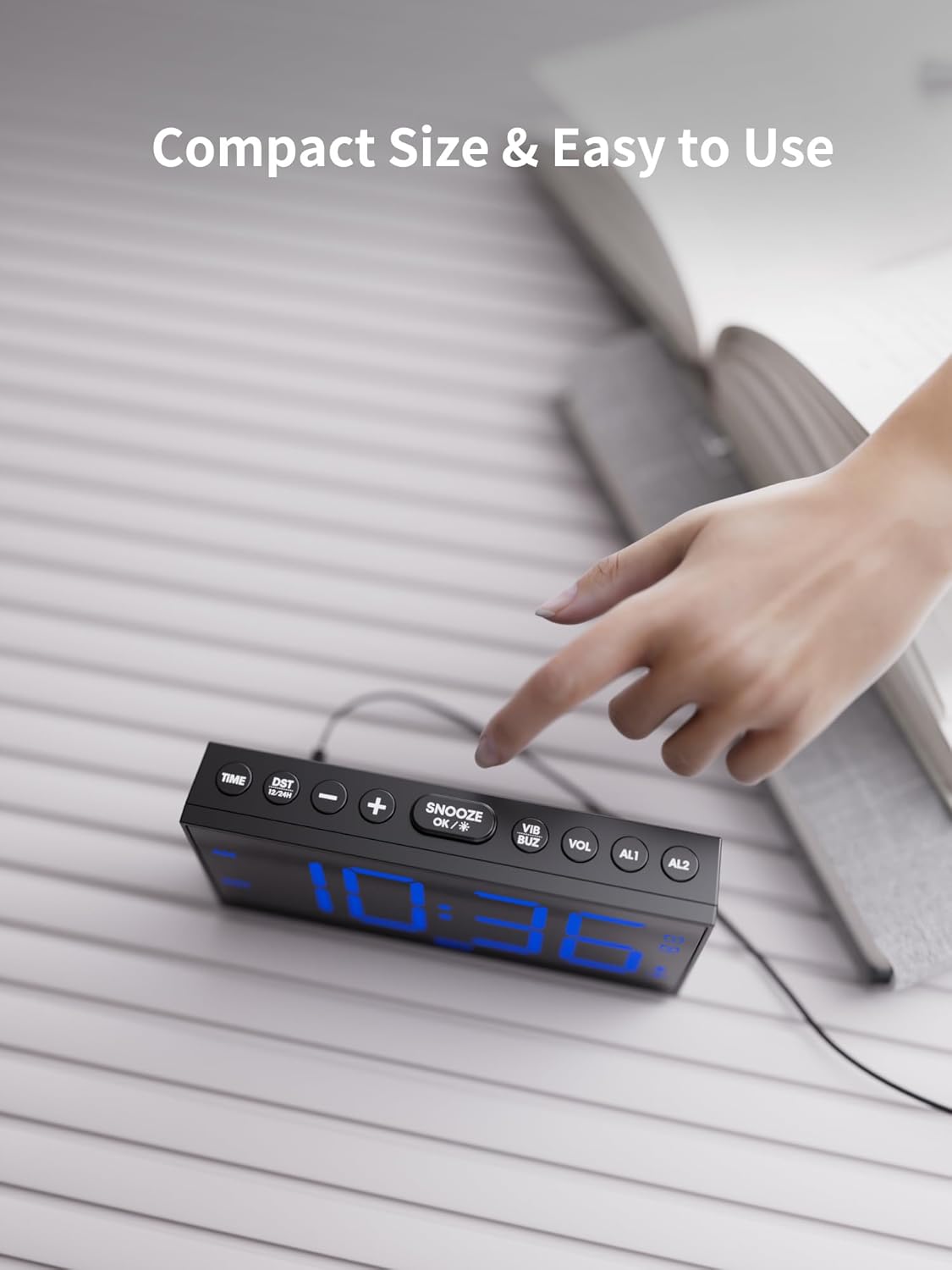
Image: The easily accessible snooze button provides an extra 9 minutes of rest.
6. Жарыкты көрсөтүү
The 7.5-inch LED display features 5 levels of adjustable brightness.

Image: Adjust the display brightness to your comfort level for day or night viewing.
- басыңыз DIM 5 жарыктык деңгээлин алмаштыруу үчүн баскычты басыңыз.
7. Time Format and DST
Switch between 12-hour and 24-hour time formats, and enable/disable Daylight Saving Time (DST).
- басыңыз 12/24 сааттык DST 12 сааттык жана 24 сааттык форматтардын ортосунда которулуу үчүн баскыч.
- басып, кармап туруңуз 12/24 сааттык DST button to activate or deactivate DST.
8. USB кубаттоочу порт
The alarm clock includes two USB ports for charging your phone or tablet.

Image: Conveniently charge your mobile devices directly from the alarm clock.
Техникалык тейлөө
- Clean the alarm clock and bed shaker with a soft, dry cloth. Do not use liquid cleaners or abrasive materials.
- Keep the device away from water, high temperatures, and direct sunlight.
- Агрегаттын айланасын туура желдетүүнү камсыз кылыңыз.
Проблемаларды чечүү
| Көйгөй | Мүмкүн себеп | Чечим |
|---|---|---|
| Сигнализация үн чыгарбайт/дирилдебейт. | Alarm not activated, incorrect mode, or volume/vibration too low. | Ensure alarm is ON (icon displayed). Check wake-up mode settings. Increase volume/vibration level. |
| Дисплей бош. | No power, or brightness set to lowest level. | Check AC power connection. Press DIM жарыктыгын жогорулатуу үчүн баскыч. |
| Электр кубаты өчүрүлгөндөн кийин убакыт/жөндөөлөр баштапкы абалга келтирилетtage. | Резервдик батареялар орнотулган эмес же түгөнгөн. | 2 AAA резервдик батарейкасын орнотуңуз же алмаштырыңыз. |
| USB кубаттоо иштебей жатат. | Device not properly connected, or cable issue. | Ensure USB cable is securely connected to both the clock and your device. Try a different USB cable. |
Техникалык шарттар
- Бренд: ROCAM
- Модел: CR1001EM-PRO
- Дисплей түрү: Digital LED
- Продукциянын өлчөмдөрү: 6.81"W x 3.43"H
- Кубат булагы: Электр зымдары
- Камдык батареялар: 2 x AAA (киргизилген эмес)
- Материал: Пластик
- Элемент Салмагы: 14.4 унция
- Өзгөчөлүктөр: Adjustable Brightness, Adjustable Volume, USB Charging Port, Large Display, Loud Alarm, Bed Shaker
Кепилдик жана колдоо
ROCAM is committed to providing high-performance, reliable products and excellent customer service. We offer comprehensive support for your alarm clock:

Image: ROCAM's commitment to customer satisfaction and product support.
- 24 Hours Quick Response: For any inquiries or issues, expect a prompt response via email.
- 30-Day No-Reason Return Policy: Enjoy peace of mind with our flexible return policy.
- 18-Month Replacement or Partial Refund: We stand by the quality of our products.
- Өмүр бою колдоо: Receive ongoing support and satisfactory solutions for the lifespan of your product.
For assistance, please contact ROCAM customer support through the contact information provided with your product packaging or visit the official ROCAM store online.