
Introduction
This manual provides detailed instructions for the proper use and care of your Casio G-Shock GW-9500MEC-1JF MUDMAN watch. Please read this manual thoroughly to ensure optimal performance and longevity of your timepiece. Keep this manual for future reference.
Продукт бүттүview
The Casio G-Shock GW-9500MEC-1JF MUDMAN is a robust digital watch designed for outdoor enthusiasts, featuring a durable resin construction and advanced sensor capabilities. It includes a digital display, multiple timekeeping modes, and environmental sensors.
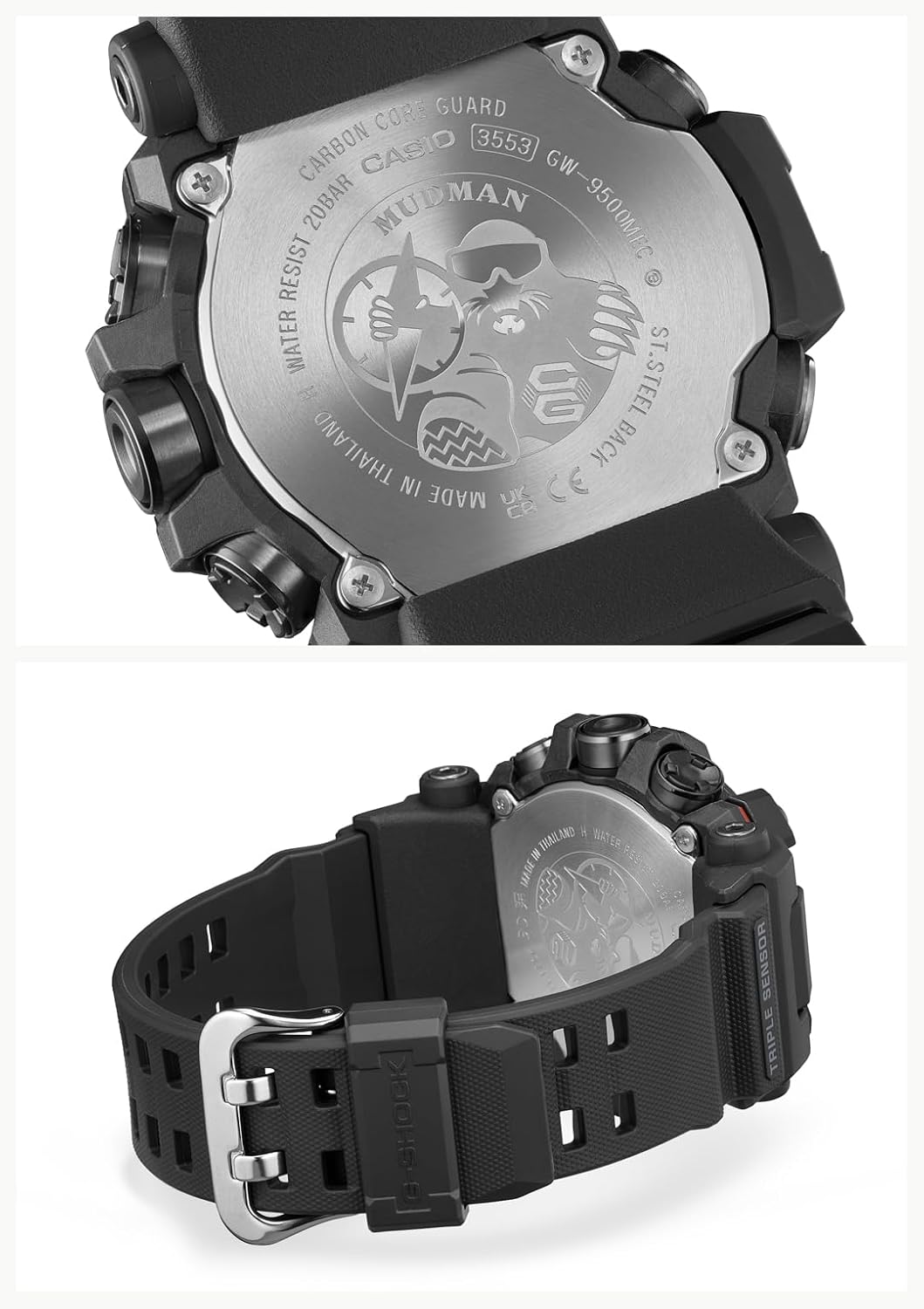
Сүрөт: Арткы view of the Casio G-Shock GW-9500MEC-1JF MUDMAN watch, highlighting the stainless steel backplate with engraved details including the model number GW-9500MEC and 20 BAR water resistance.
Баштапкы орнотуу
Upon first use or after a battery change, perform the following steps to set up your watch:
- Үй шаарын жөндөө: In Timekeeping Mode, hold down the ADJUST button (usually top-left) until the city code starts flashing. Use the COMPASS (top-right) and ALTIMETER (bottom-right) buttons to select your desired home city.
- Убакыт жана дата орнотуу: After setting the home city, press the MODE button (bottom-left) to cycle through settings like DST (Daylight Saving Time), 12/24-hour format, seconds, hour, minute, year, month, and day. Use the COMPASS and ALTIMETER buttons to adjust values. Press ADJUST to exit.
- Atomic Time Signal Reception (Multi-Band 6): This watch is equipped with Multi-Band 6 technology for automatic time calibration. Ensure your home city is correctly set. The watch will attempt to receive the time calibration signal automatically overnight. For manual reception, refer to the detailed instructions in the full Casio module manual. Note that signal reception can be affected by location, weather, and electromagnetic interference.
- Батареянын деңгээлин текшерүү: The watch is powered by a Lithium Ion battery (included). Check the battery indicator on the display to ensure sufficient charge. If the battery level is low, expose the watch to light for charging.
Саатты иштетүү
Your MUDMAN watch features various modes and sensor functions. Use the MODE button (bottom-left) to navigate between them.
Убакытты сактоо режими
This is the default mode, displaying the current time, day of the week, and date. Press the LIGHT button (top-right, usually) to illuminate the display in low light conditions.
Sensor Functions (ABC)
The watch is equipped with a Triple Sensor for Altimeter, Barometer/Thermometer, and Compass readings.

Image: The watch display in various modes. Top left shows Timekeeping (SU 30, 10:58). Top right shows Compass (WNW, 283°). Bottom left shows Altimeter (1228 meters). Bottom right shows Barometer/Thermometer (1013 hPa, 24.5°C). A separate image shows the timekeeping display with the backlight activated.
- Компас режими: Press the COMPASS button (top-right) to enter Compass Mode. The watch will display the current direction (e.g., N, NE, E) and a bearing in degrees. Hold the watch level for accurate readings.
- Altimeter Mode: Press the ALTIMETER button (bottom-right) to enter Altimeter Mode. The watch measures relative altitude based on atmospheric pressure. Calibrate the altimeter regularly using a known altitude reference point for best accuracy.
- Barometer/Thermometer Mode: From Altimeter Mode, press the MODE button to switch to Barometer/Thermometer Mode. It displays atmospheric pressure and temperature. For accurate temperature readings, remove the watch from your wrist for at least 20-30 minutes to avoid body heat interference.
- Sunrise and Sunset Time Display: This feature displays the sunrise and sunset times for your current home city. Access this function via the MODE button or a dedicated button, depending on the specific module.
Башка режимдер
- Дүйнөлүк убакыт: Displays the current time in various major cities around the world.
- Секундомер: Өткөрүлгөн убакытты, бөлүнгөн убакытты жана эки бүтүрүүнү өлчөйт.
- Таймер: A countdown timer function.
- Ойготкучтар: Күнүмдүк ойготкучтарды коюу.
Техникалык тейлөө
Proper maintenance ensures the longevity and reliability of your G-Shock watch.
- Тазалоо: Wipe the watch regularly with a soft, dry cloth. For stubborn dirt, use a soft brush and mild soap solution, then rinse thoroughly with fresh water and dry. Avoid using chemical cleaners.
- Суу каршылык: Your watch is water resistant to 200 meters (20 BAR). This means it is suitable for swimming, showering, and snorkeling. Do not operate buttons underwater. After exposure to saltwater, rinse the watch thoroughly with fresh water.
- Температуранын таасири: Avoid exposing the watch to extreme temperatures, both hot and cold, for extended periods.
- Resin Components: The resin band and case are durable but can degrade over time with exposure to strong chemicals, solvents, or prolonged direct sunlight.
- Батарея: The watch uses a rechargeable Lithium Ion battery. If the battery indicator shows low charge, expose the watch to bright light (natural sunlight is best) to recharge it. Avoid leaving the watch in dark places for extended periods.

Сүрөт: каптал view of the Casio G-Shock GW-9500MEC-1JF MUDMAN watch, illustrating the robust resin band and the secure buckle clasp. This view also shows the 'TRIPLE SENSOR' marking on the side of the case.
Проблемаларды чечүү
| Көйгөй | Мүмкүн себеп | Чечим |
|---|---|---|
| Туура эмес убакыт/дата | Home city not set correctly, manual adjustment error, or failed atomic time signal reception. | Verify home city setting. Manually adjust time/date. Ensure watch is in a location conducive to signal reception (e.g., near a window at night). |
| Inaccurate Sensor Readings (Altimeter, Barometer, Compass) | Lack of calibration, external interference, or body heat affecting temperature sensor. | Calibrate altimeter with a known altitude. Remove watch from wrist for 20-30 minutes for accurate temperature. Ensure no strong magnetic fields near the watch for compass. |
| Дисплей бош же күңүрт | Батарея заряды аз. | Expose the watch to bright light for several hours to recharge the battery. |
| Баскычтар жооп бербейт | Dirt or debris lodged in buttons, or watch is in a frozen state. | Rinse buttons under fresh water. If unresponsive, try a full reset (refer to the full Casio module manual for specific reset procedures, as this may vary). |
Техникалык шарттар
| Өзгөчөлүк | Деталь |
|---|---|
| Модель номери | GW-9500MEC-1JF |
| Бренд | G-Shock (Casio) |
| Дисплей түрү | Санарип |
| Кыймыл түрү | Кварц |
| Power Source | Battery Powered (Lithium Ion, rechargeable) |
| Иштин материалы | чайыр |
| Топтун материалы | чайыр |
| Кристалл түрү | Минералдык айнек |
| Суу каршылык | 200 метр (20 БАР) |
| Иштин диаметри | 52.7 миллиметр |
| Case Thickness | 14.8 миллиметр |
| Элемент Салмагы | 88 грамм |
| Өзгөчөлүктөр | Sunrise and sunset time display, Triple Sensor (Altimeter, Barometer, Compass), Multi-Band 6 Atomic Timekeeping. |
Кепилдик жана колдоо
Your Casio G-Shock GW-9500MEC-1JF MUDMAN watch comes with a Чектелген Кепилдик. For specific terms and conditions, please refer to the warranty card included with your purchase or visit the official Casio webсайт.
For technical support, repairs, or further inquiries, please contact Casio customer service. Contact information can typically be found on the official Casio webсайтында же саатыңыз менен берилген документтерде.