
SONICAKE QME-200
SONICAKE Matribox II Pro User Manual
Multi Effects Guitar Pedal with Expression
Introduction
The SONICAKE Matribox II Pro is an advanced multi-effects guitar pedal designed for guitarists, bassists, and acoustic players seeking a comprehensive and versatile tone solution. Featuring new hardware and digital modeling technology, it accurately reproduces a wide range of sounds with high fidelity. This unit includes over 240 built-in guitar/bass/acoustic amp and effect models, an expression pedal, FX loop, MIDI capabilities, and a stereo OTG USB audio interface. This manual provides detailed instructions for setting up, operating, and maintaining your Matribox II Pro.

The SONICAKE Matribox II Pro, a versatile multi-effects guitar pedal.
Жайгашуу
Пакеттин мазмуну
- SONICAKE Matribox II Pro Unit
- Кубаттуу адаптер
- USB кабели
- Колдонуучунун Колдонмосу (бул документ)
Педальды туташтыруу
Before powering on, ensure all connections are secure. The Matribox II Pro offers a variety of input and output options for different setups.

Деталдаштырылган view of the rear panel connections, including inputs for expression pedals, FX loop, XLR outputs, and USB.
- Гитара киргизүү: Connect your guitar to the 1/4" INPUT jack.
- чыгаруу үчүн Ampкөтөргүч/PA: Use the 1/4" OUTPUT (L/MONO, R) jacks to connect to your amplifier or PA system. For balanced connections, use the XLR OUT (L/MONO, R) jacks.
- FX цикли: Connect external effects pedals using the SEND and RETURN jacks for an integrated signal chain.
- Expression Pedal/Footswitch: The EXP/FS INPUT allows for an external expression pedal or footswitch for additional control.
- MIDI: Connect MIDI devices via the MIDI IN and OUT ports for advanced control and synchronization.
- USB: The USB port allows connection to a computer for audio interface functions and software editing.
- Күч: Connect the included DC 9V power adapter to the POWER jack.
Күйгүзүлүүдө
Once all connections are made, plug the power adapter into a wall outlet. The unit will power on automatically. The 4.3" color touchscreen will illuminate, displaying the main interface.
Operating the Matribox II Pro
Сенсордук экран интерфейси
The Matribox II Pro features a high-resolution 4.3" color touchscreen for intuitive navigation and parameter adjustment. Tap, swipe, and drag to control effects, change presets, and access various functions.

The 4.3-inch color touchscreen provides clear visual feedback and easy control over settings.
Effect Matrix and Signal Chain
The unit allows for up to 12 movable effect modules, offering over 200 high-quality effects. You can customize your signal chain by dragging and dropping effect blocks on the touchscreen to create unique tones.

Visual representation of the effect matrix, showing various effect modules that can be arranged in the signal chain.
Presets and Performance Features
The Matribox II Pro comes with 240 presets and includes built-in features like a tuner, drum machine with 100 rhythms, and a 90-second looper. These features are designed to enhance your practice and live performance experience.
Official product video demonstrating the SONICAKE Matribox II Pro's features, including its user interface, effects, and performance capabilities.
Бут алмаштыргычтар жана экспрессиялык педаль
The unit features multiple footswitches for hands-free control during live performances. The integrated expression pedal can be assigned to control various effect parameters or overall volume, providing dynamic real-time adjustments.

A user's foot on the expression pedal, demonstrating its use for dynamic control.
USB Audio Interface and Software
The Matribox II Pro functions as a USB audio interface, allowing direct connection to computers (Mac/Windows) and iOS/Android mobile devices (via OTG function) for recording and re-amping. Free PC/Mac software is available for sound editing, firmware upgrades, and managing presets and third-party IRs.
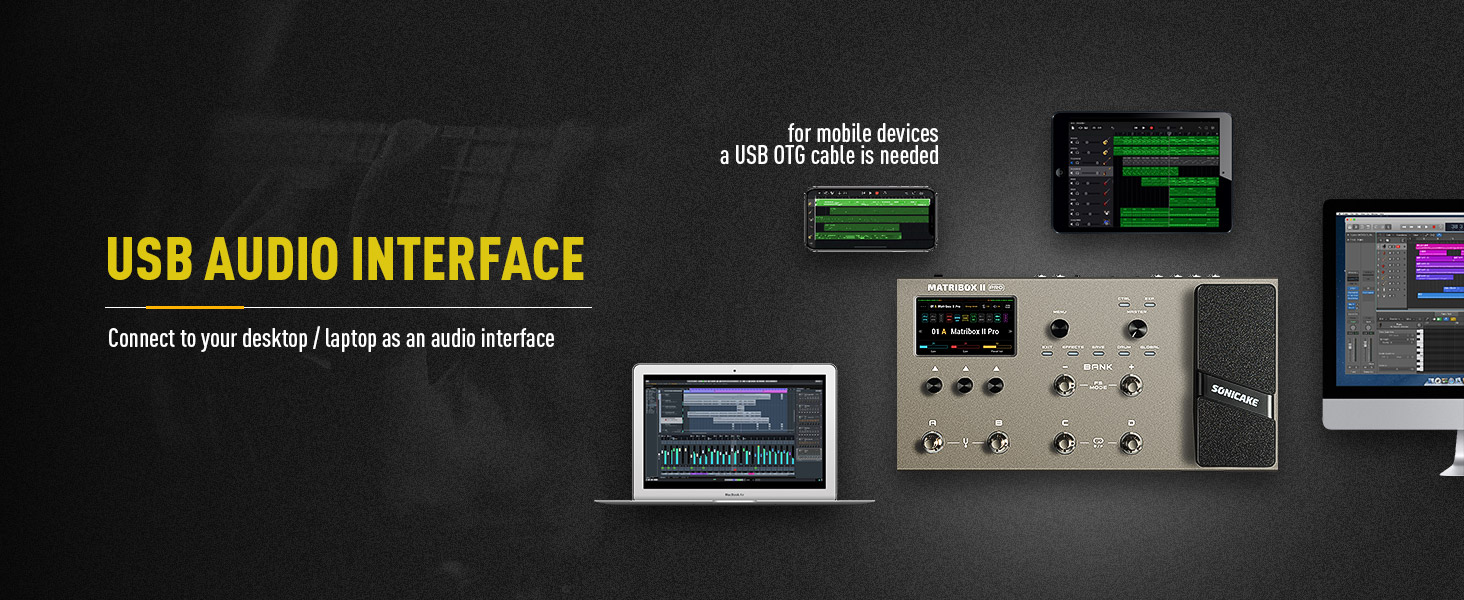
The Matribox II Pro connected to a computer, showcasing the compatible software for detailed sound editing and management.
Спецификациялар жана өзгөчөлүктөр
Негизги өзгөчөлүктөрү:
- New hardware and digital modeling technology for high fidelity and clarity.
- 240+ Built-in Guitar/Bass/Acoustic legacy amp and effect models, including 63 amplifier and over 93 effect pedal simulations.
- Stereo effects loop and expression pedal, footswitch input and XLR out.
- USB Audio Interface with Stereo Audio Streaming, supporting OTG function for direct connection to iOS/Android Mobile Devices.
- Free Mac/Windows Software for Sound Editing and Presets Managing.
Техникалык мүнөздөмөлөрү:
| Спецификация | Нарк |
|---|---|
| Элемент Салмагы | 5.5 фунт (2.5 килограмм) |
| Продукциянын өлчөмдөрү | 10.94 x 16.93 x 4.17 дюйм |
| Элемент моделинин номери | QME-200 |
| Түс аты | Matribox II Pro |
| Аппараттык интерфейс | USB |
| Сигнал форматы | Санарип |
| Power Source | DC Power Supply |
| Тtage | 9 вольт |
| Стиль | Multi Effects, Acoustic, Bass, Looper, Expression |

Diagram showing the physical dimensions of the Matribox II Pro unit.
Техникалык тейлөө
To ensure the longevity and optimal performance of your Matribox II Pro, follow these maintenance guidelines:
- Тазалоо: Use a soft, dry cloth to clean the unit. Avoid abrasive cleaners, waxes, or solvents.
- Сактагыч: Аппаратты күн нурунан жана экстремалдык температурадан алыс салкын, кургак жерде сактаңыз.
- Колдонуу: Handle the pedal with care. Avoid dropping or subjecting it to strong impacts.
- Электр камсыздоо: Бузуп алуунун алдын алуу үчүн ар дайым түпнуска же шайкеш келген кубат адаптерин колдонуңуз.
Проблемаларды чечүү
If you encounter any issues with your Matribox II Pro, refer to the following common troubleshooting tips:
- Кубат жок: Ensure the power adapter is securely connected to both the unit and a working power outlet. Verify the power outlet is active.
- Үн жок: Check all audio cables (input, output, FX loop) for secure connections. Ensure your guitar, amplifier, and other connected devices are working correctly. Verify the volume levels on the Matribox II Pro and your ampөмүрлүү.
- Бурмаланган үн: Check input gain levels on the Matribox II Pro and your amplifier to avoid clipping. Ensure no damaged cables are being used.
- Программалык камсыздоого туташуу маселелери: Ensure the USB cable is properly connected. Try restarting both the Matribox II Pro and your computer. Install the latest drivers if necessary.
- Күтүлбөгөн жүрүм-турум: Perform a factory reset if the unit behaves unexpectedly (refer to the full digital manual for specific steps). Ensure firmware is up to date.
Кепилдик жана колдоо
For warranty information and technical support, please refer to the official SONICAKE webсайтка же түздөн-түз кардарларды тейлөөгө кайрылыңыз. Кепилдик дооматтар үчүн сатып алганыңыздын далилин сактаңыз.
Онлайн ресурстар:
- зыярат кылыңыз SONICAKE Store on Amazon продукт маалымат жана жаңыртуу үчүн.
Ask a question about this manual
Ask about setup, troubleshooting, compatibility, parts, safety, or missing instructions. Manuals+ will review the question and use this page’s manual context to help answer it.