
Introduction
This manual provides detailed instructions for the installation, operation, and maintenance of your darkFlash DB330M Micro-ATX PC Case. Please read this manual thoroughly before beginning assembly to ensure proper setup and safe usage. The DB330M case features a 270° panoramic tempered glass panel, pre-installed PWM ARGB fans, and a high-speed I/O panel.
Коопсуздук маалыматы
- Компьютердин корпусунун ичиндеги кандайдыр бир компоненттерди орнотуудан же тейлөөдөн мурун, ар дайым кубат булагын розеткадан сууруп коюңуз.
- Handle tempered glass panels with care to prevent breakage. Avoid impacts or sharp objects.
- Сезимтал компоненттерге электростатикалык разряддын (ЭСЗ) зыян келтирбеши үчүн антистатикалык кол кап кийиңиз же антистатикалык билек боосун колдонуңуз.
- Майда тетиктерди жана бурамаларды балдардан алыс кармаңыз.
- Ашыкча ысып кетүүнүн алдын алуу үчүн PC корпусунун айланасында туура желдетүүнү камсыз кылыңыз.
Пакеттин мазмуну
Пакетте бардык буюмдар бар экенин текшериңиз:
- darkFlash DB330M Micro-ATX PC Case
- 3 x Pre-installed PWM ARGB Fans
- Accessory Box (screws, cable ties, etc.)
- Колдонуучунун Колдонмосу (бул документ)
Over Over Featuresview
- 270° Panoramic Tempered Glass: Provides an expansive view ички компоненттердин жана RGB жарыктандыруунун.
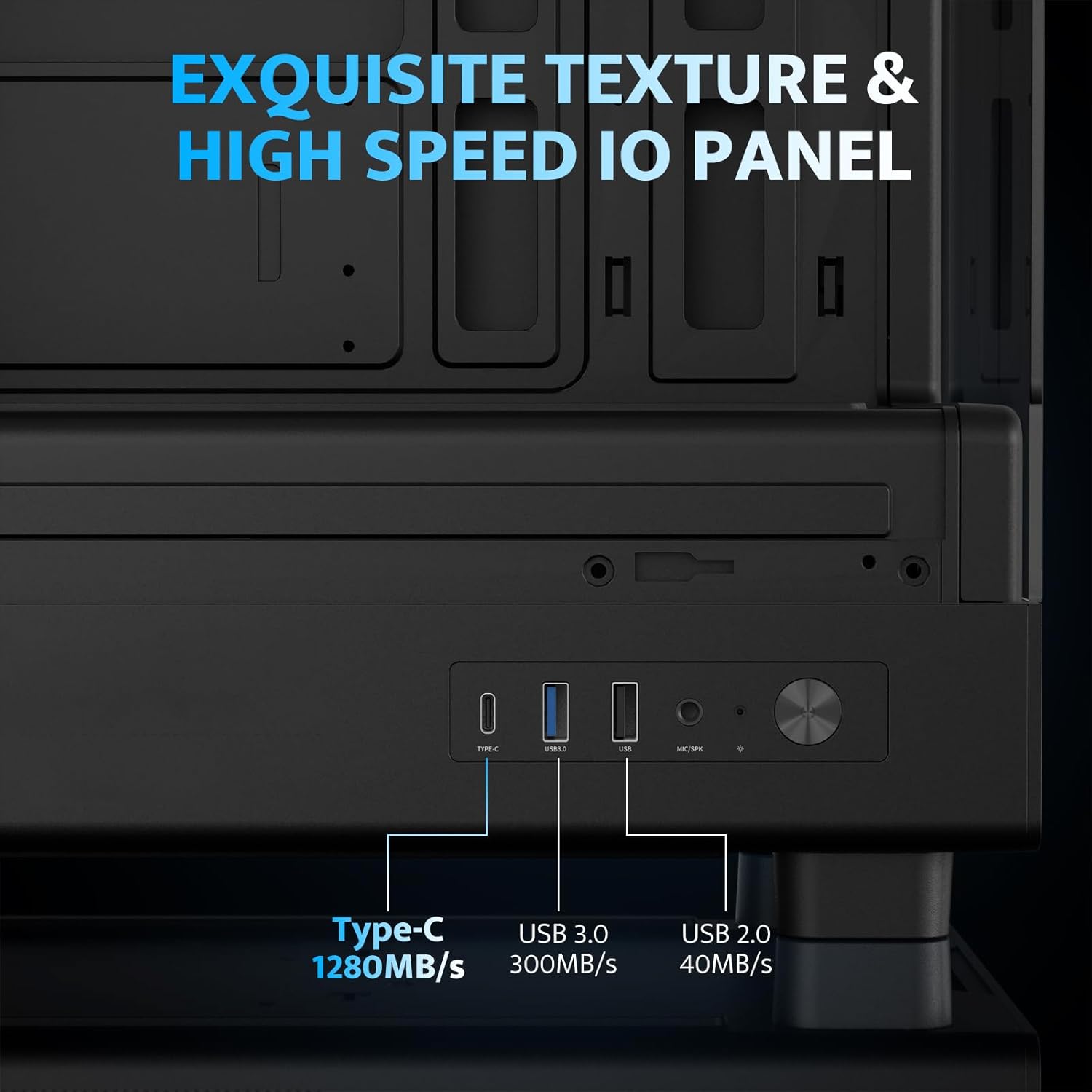
- High-Speed I/O Panel: Includes USB 3.0 and Type-C ports for fast data transfer.
- Vertical Airflow Cooling: Optimized design with pre-installed fans for efficient heat dissipation.
- Магниттик чаң чыпкалары: Located on top and bottom to keep components clean.
- Оңой орнотуу: User-friendly design for hassle-free assembly and maintenance.
Техникалык шарттар
| Өзгөчөлүк | Спецификация |
|---|---|
| Модель аты | DB330M PC CASE |
| Өлчөмдөрү (LxWxH) | 8.58"D x 13.11"W x 15.75"H (218мм x 333мм x 400мм) |
| Motherboard шайкештиги | Micro ATX, ITX |
| Иштин түрү | Миди мунарасы |
| Материал | Пластик, чыңалган айнек |
| Алдын ала орнотулган күйөрмандар | 3 x 120 мм PWM ARGB желдеткичтери |
| CPU муздаткычтын максималдуу бийиктиги | 180мм |
| Максималдуу GPU тазалоо | 305мм |
| Радиатор колдоо (жогорку) | 240 мм чейин |
| Кубат менен камсыздоону орнотуу түрү | Bottom Mount (Max 140mm PSU length) |
| I/O порттору | 1 x USB 3.0, 1 x Type-C, Audio In/Out |
Орнотуу жана орнотуу
1. Accessing the Interior (Quick Release Design)
The darkFlash DB330M features a quick-release design for easy access to internal components. The tempered glass panels can be removed by gently pulling them away from the chassis. The top panel also detaches for fan/radiator installation.

2. Motherboard орнотуу
Install your Micro-ATX or ITX motherboard into the designated area. Ensure standoffs are correctly aligned and secured. The case supports CPU coolers up to 180mm in height and GPUs up to 305mm in length.

3. Fan and Cooling System Installation
The case comes with three pre-installed 120mm PWM ARGB fans. Two fans are located at the top, and one at the rear. Additional fan mounts are available at the bottom (up to 2 x 120mm) for enhanced airflow. The case supports a 240mm AIO radiator on the top panel.
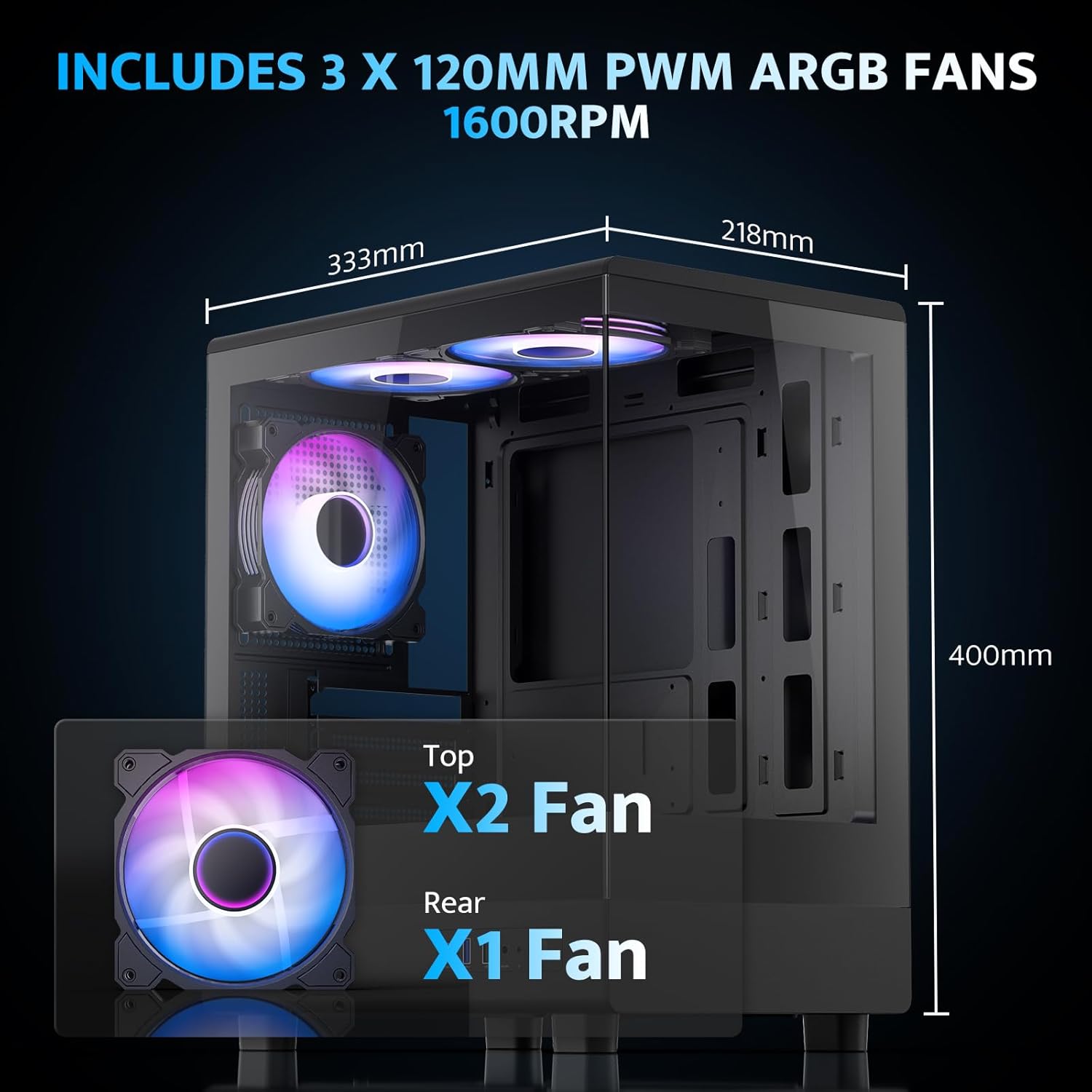
The pre-installed fans are PWM ARGB type, offering speed adjustment and rich lighting modes with motherboard synchronization. Note: An RGB hub controller is not included.

4. Power Supply and Storage Installation
Install your power supply unit (PSU) in the bottom mount. The case supports PSUs up to 140mm in length. Utilize the standard hard drive cage for storage devices.
5. Connecting Front I/O Panel
Connect the front I/O panel cables to your motherboard. The panel includes a Type-C port, USB 3.0 port, and USB 2.0 port for various connectivity needs.
6. Кабелдик башкаруу
Utilize the cable routing options and tie-downs behind the motherboard tray to ensure clean cable management. This improves airflow and aesthetics.
Иштөө нускамалары
1. Күйгүзүү
After all components are securely installed and connected, plug in the power cable to your PSU and press the power button on the front I/O panel to start your system.
2. ARGB Fan Control
The pre-installed ARGB fans can be controlled via compatible motherboard software (if connected to an ARGB header) to customize lighting effects and fan speeds. Refer to your motherboard manual for specific software instructions.
3. Airflow Configuration
The DB330M is designed with optimized airflow channels. The pre-installed fans facilitate vertical airflow, with the fan above the PSU directing air towards the graphics card. Ensure no obstructions block the airflow paths.


Техникалык тейлөө
1. Чаң чыпкасын тазалоо
Regularly clean the magnetic dust filters located on the top and bottom of the case. Gently remove the filters and clean them with compressed air or a soft brush. Reattach them securely after cleaning.
2. Жалпы тазалоо
Use a soft, dry cloth to wipe down the exterior of the case. For tempered glass panels, use a glass cleaner and a microfiber cloth. Avoid abrasive cleaners or solvents.
Проблемаларды чечүү
- PC Not Powering On:
- Ensure the power supply is properly connected to the wall and the PSU switch is in the 'ON' position.
- Verify all power cables from the PSU are securely connected to the motherboard and components.
- Алдыңкы панелдин кубат которгучунун энелик платага туташуусун текшериңиз.
- Желдеткичтер айланбай жатат/RGB иштебей жатат:
- Желдеткичтин электр кабелдери энелик платага же желдеткич контроллерине туташканын ырастаңыз.
- Ensure ARGB cables are connected to a compatible ARGB header on the motherboard or an ARGB controller.
- Check motherboard software settings for fan speed and RGB control.
- USB порттору иштебейт:
- Verify the front panel USB 3.0 and Type-C cables are correctly plugged into the corresponding headers on your motherboard.
- Ensure motherboard drivers are up to date.
Кепилдик жана колдоо
darkFlash provides a 1 жылдык кепилдик for this computer case. For technical support, warranty claims, or further assistance, please contact darkFlash customer service through their official webсайтына же продукт сатып алынган сатуучуга кайрылыңыз. Кепилдикти жарактуулук мөөнөтү үчүн сатып алгандыгыңызды тастыктаган документти сактап коюңуз.
Official darkFlash Webсайт: www.darkflash.com