
Introduction
This manual provides detailed instructions for the installation, operation, and maintenance of your Vanxse 4.3 Inch TFT LCD Car Mirror Monitor and Rear View Reverse Backup Camera System. Please read this manual thoroughly before use to ensure proper functionality and safety.
- Унаа арткы View Камера: 100% waterproof high-definition car rear view camera with night vision. Suitable for most 12V vehicles.
- 4.3" TFT LCD Mirror Monitor: High-quality 4.3" LCD Mirror Monitor helps prevent accidents when reversing by providing clear visibility.
- High Image Definition and Night Vision: Delicate design, stable performance, sharp images, and excellent color effect. Features 8 individual infrared (IR) LEDs for sharp images in low light conditions, especially at night.
- IP68 суу өткөрбөйт дизайн: This backup camera has been rigorously tested to be waterproof even in heavy rain or vehicle cleaning, and is also shockproof.
Пакеттин мазмуну
Төмөндө тизмеленген нерселердин баары пакетиңизге камтылганын текшериңиз:
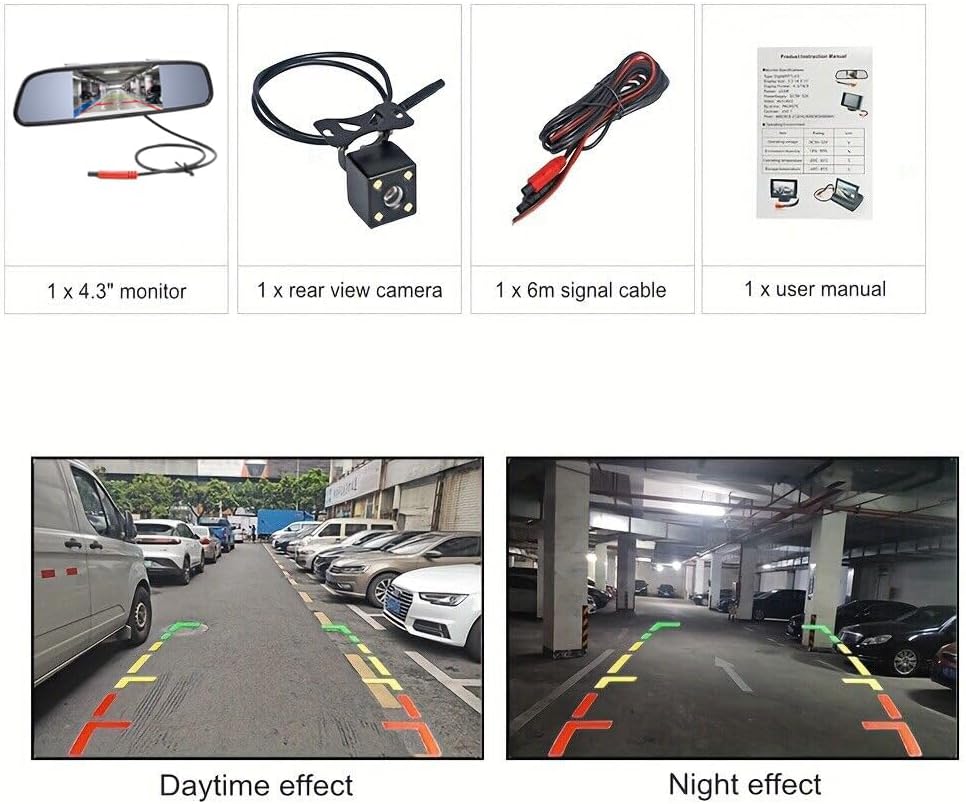
- 1 x 4.3" TFT LCD Mirror Monitor
- 1 x Арткы унаа View Камера
- 1 x Monitor Power Cable
- 1 x Video Cable (6 meters)
- 1 x Камера кубат кабели
- 1 x User Manual

Image: All components included in the Vanxse 4.3 Inch TFT LCD Car Mirror Monitor and Rear View Reverse Backup Camera System package.
Орнотуу жана орнотуу
Follow these steps to properly install your Vanxse backup camera system:
- Мониторду орнотуу: The 4.3-inch TFT LCD mirror monitor is designed to clip over your existing rearview mirror. Ensure it is securely attached.
- Камераны орнотуу: The camera can be mounted near the license plate. It features an IP68 waterproof design and 8 IR LEDs for night vision.
- Мониторго кубат туташтырыңыз: Connect the monitor power cable to a 12V power source in your vehicle.
- Кубатты камерага туташтыруу: Connect the camera power cable. For automatic activation when reversing, connect the camera's power wire to your vehicle's reverse light circuit.
- Видео кабелин туташтыруу: Use the 6-meter video cable to connect the camera to the monitor. Ensure all connections are secure.

Сүрөт: деталдуу view of the 4.3-inch mirror monitor and the rear view camera with its mounting bracket and cables.
Video: This video demonstrates the installation process of the Vanxse 4.3 Inch Car Mirror Monitor Backup Camera Kit, showing how to connect the components and mount them in a vehicle.
Video: This video provides an unboxing and connection guide for a similar 4.3 inch reversing system, illustrating how to assemble the monitor and camera components.
Иштөө нускамалары
Once installed, the system operates as follows:
- Автоматтык иштетүү: When the vehicle is shifted into reverse gear, the monitor will automatically display the rear view камерадан.
- Кол менен активдештирүү: If not wired to the reverse light, the monitor can be manually turned on/off via its power button.
- Дисплей орнотууларын тууралоо: Use the buttons on the monitor to adjust brightness, contrast, saturation, and tint for optimal viewing.
- Паркинг линиялары: The system may feature adjustable parking lines to assist with accurate parking. These can typically be toggled on or off through the monitor's menu.

Image: The Vanxse 4.3-inch mirror monitor showing a clear rear view with colored parking guidelines.
Video: This video demonstrates the operation of a similar 4.3 inch reversing system, including menu navigation for brightness, contrast, saturation, language, and toggling parking lines on/off, as well as real-world daytime and nighttime views.
Video: This video shows the 4.3 Inch TFT LCD Car Monitor in action, providing a clear rear view during driving and parking maneuvers in various conditions.
Техникалык тейлөө
To ensure the longevity and optimal performance of your system:
- Тазалоо: Камеранын линзасын жана монитор экранын дайыма жумшак, гamp кездеме. Абразивдүү тазалагычтардан алыс болуңуз.
- Суу өткөрбөйт дизайн: The camera is IP68 waterproof, allowing it to withstand heavy rain and car washes. However, avoid directing high-pressure water jets directly at the camera for extended periods.
- Температура каршылык: The system is designed to operate in a wide range of temperatures.
Сүрөт: арткы view camera highlighting its IP68 waterproof rating and resistance to extreme temperatures (-20°C to 80°C), suitable for various weather conditions and car washes.
Проблемаларды чечүү
Эгер кандайдыр бир көйгөйгө туш болсоңуз, төмөнкү жалпы көйгөйлөрдү жана чечимдерди караңыз:
- Монитордо сүрөт жок:
- Check all power connections to both the monitor and camera. Ensure they are securely connected to a 12V power source.
- Verify the video cable is properly connected between the camera and monitor.
- Ensure the vehicle is in reverse gear (if wired for automatic activation).
- Жаркылдаган же бурмаланган сүрөт:
- Check for loose connections in the video cable.
- Ensure the power supply is stable and free from interference.
- Түнкү көрүү начар:
- Ensure the camera lens is clean and free from dirt or obstructions.
- Verify the IR LEDs on the camera are functioning.
Техникалык шарттар
| Бренд | Vanxse |
| Модель номери | VS-M4301 |
| Screen Size | 4.3 дюйм |
| Дисплей технологиясы | LCD |
| Продукциянын өлчөмдөрү | 4.3"L x 0.1"W x 3"H |
| Элемент Салмагы | 3.2 унция |
| Тtage | 12 вольт |
| Оптикалык сенсор технологиясы | Инфракызыл |
| Орнотуу түрү | Lip Mount |
| Шайкеш түзмөктөр | Car/Truck/Bus/Trailer/SUV/RV/Van all vehicles |
Кепилдик жана колдоо
Your Vanxse product is designed for reliability and performance. If you encounter any problems or have questions regarding your product, please do not hesitate to contact us. We are committed to providing satisfactory solutions to our customers.
For support, please refer to the contact information provided with your purchase or visit the official Vanxse webсайт.