
Phomemo LT12
Phomemo LT12 Label Maker Machine User Manual
Модели: LT12
Introduction
This user manual provides comprehensive instructions for the Phomemo LT12 Label Maker Machine. It covers setup, operation, maintenance, and troubleshooting to ensure optimal performance and longevity of your device. Please read this manual thoroughly before using the label maker.
Видео 1: Бүттүview of the Phomemo LT12 Portable Label Maker.
Кутуда эмне бар
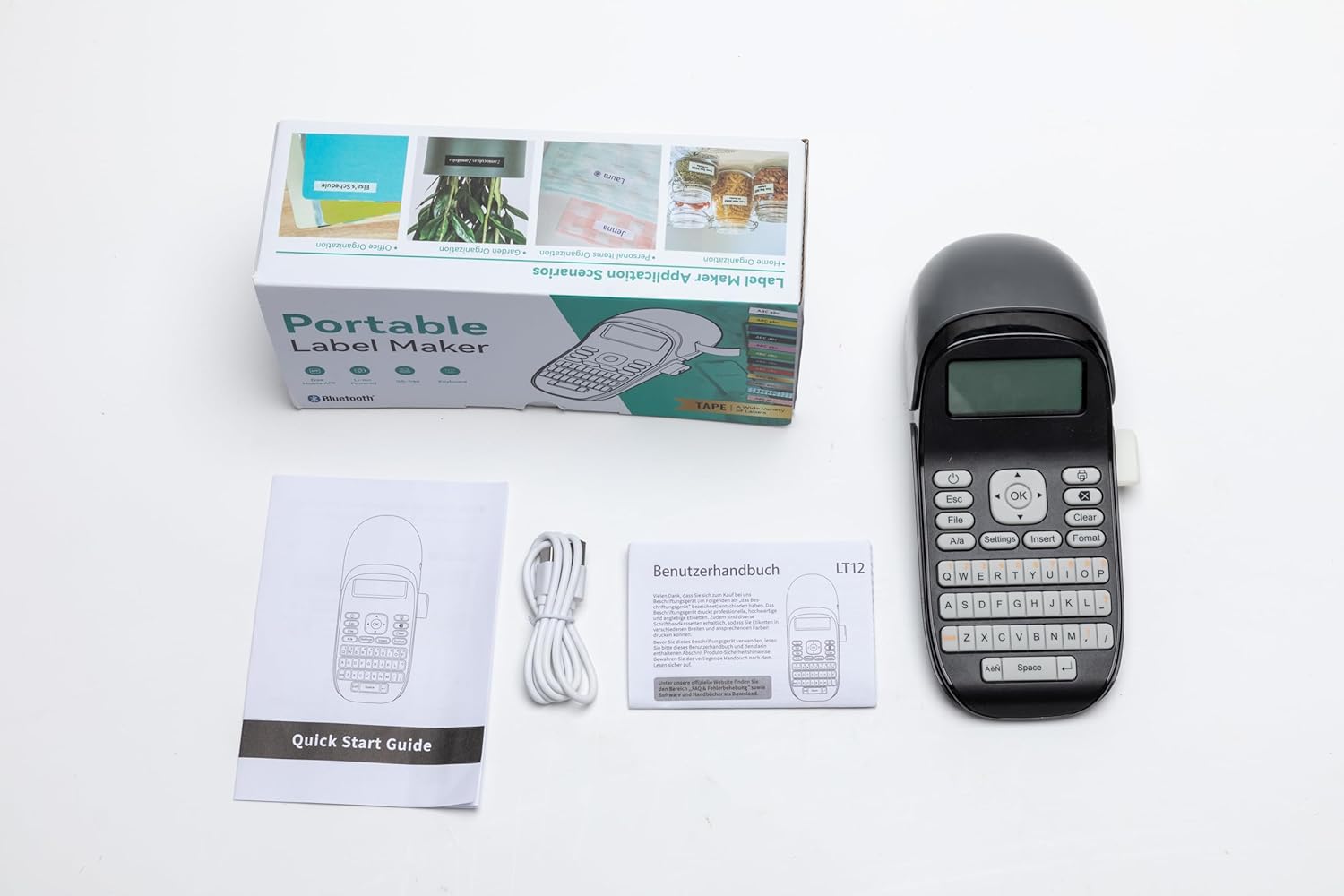
Upon unboxing your Phomemo LT12 Label Maker, please verify that all the following items are included:
- 1 x Phomemo LT12 Label Maker
- 1 x Black on white label tape (12mm*4m)
- 1 x Type-C заряддоо кабели
- 1 x Ыкчам колдонмо

Figure 1: Product Packing List
Жайгашуу
1. Түзмөк бүттүview
Familiarize yourself with the key components of your Phomemo LT12 Label Maker:
- LCD экран: Displays text, settings, and status.
- QWERTY клавиатурасы: For direct text input.
- Label Exit: Басылган этикеткалар пайда болгон жерде.
- Кесүүчү: Manual cutter for labels.
- USB порт: Аппаратты заряддоо үчүн.
- Кубат баскычы: Аппаратты күйгүзүү/өчүрүү үчүн.

Figure 2: Phomemo LT12 Label Maker Front View
Figure 3: Phomemo LT12 Label Maker Key Components
2. Аппаратты заряддоо
The Phomemo LT12 Label Maker is equipped with a 1200mAh high-capacity lithium battery. To charge the device, connect the provided Type-C charging cable to the USB port on the side of the label maker and plug the other end into a compatible USB power adapter (not included). The device can be used while charging.
3. Inserting the Tape Cassette
Follow these steps to properly install a label tape cassette:
- Open the tape cassette compartment cover located at the top of the device.
- Pull out a section of the label tape (approximately 1 inch or 3 cm) through the paper outlet of the cassette.
- Insert the tape cassette into the compartment, ensuring it clicks firmly into place.
- Close the tape cassette compartment cover.

Figure 4: Inserting the Label Tape Cassette
Video 2: How to install the label tape in the Phomemo LT12 Label Maker.
Операция
1. Printing from the Device (QWERTY Keyboard)
The LT12 features a full QWERTY keyboard for direct label creation:
- басыңыз Күч button until the display lights up.
- Type your desired text using the QWERTY keyboard. You can adjust font size, style, and add symbols using the function keys.
- басыңыз Басып чыгаруу button to initiate printing.
- Once the label is printed, press the Кесүүчү button on the side to cut the label.
- Tear off the backing paper from the back of the label along the easy-tear line and attach it to a dry, flat object.
Video 3: How to print directly from the Phomemo LT12 Label Maker using its keyboard.
2. Printing from Your Mobile Device (Bluetooth)
For advanced customization and ease of use, connect your LT12 to your smartphone or tablet via Bluetooth using the "Print Master" application:
- Download the "Print Master" app from your phone's app store (available for Android and iOS).
- Turn on the Bluetooth function on your LT12 Label Maker (Settings -> Bluetooth -> ON).
- Open the "Print Master" app and follow the auto-connect guidelines to search for and connect to your LT12 device.
- Once connected, you can design your labels within the app, utilizing various fonts, symbols, borders, and even images.
- Press the print icon in the app to send the label design to your LT12 for printing.
5-сүрөт: Bluetooth туташуу кадамдары
Video 4: How to print from your mobile device using the Phomemo LT12 Label Maker.
3. Customizing Labels
The Phomemo LT12 offers extensive customization options:
- Шрифт параметрлери: Choose from 3 font sizes, 4 font decorations, and over 160 fonts via the app.
- Symbols & Borders: Access 791+ symbols and 287+ border/underline styles.
- Көп тилдүү колдоо: Supports 14 national languages.
- Tape Versatility: Compatible with 12mm thermal paper and thermal transfer supplies, including solid color, pattern, silk, and fabric iron-on labels. Labels are waterproof, oil-proof, scratch-proof, sun-proof, and resistant to high and low temperatures.

Figure 6: Multi-functional Editing Options

Figure 7: Label Application Examples
Figure 8: Multi-functional Label Properties

Figure 9: Indoor and Outdoor Label Usage

Figure 10: LCD Backlight for Eye Care

11-сүрөт: Көчмө дизайн
Техникалык тейлөө
1. Тазалоо жана кам көрүү
To ensure the longevity and optimal performance of your label maker, follow these cleaning and care guidelines:
- Regularly wipe the exterior of the device with a soft, dry cloth.
- Абразивдүү тазалагычтарды же эриткичтерди колдонбоңуз.
- Keep the label maker away from excessive dust, moisture, and extreme temperatures.
- Ensure the print head and cutter area are free from adhesive residue or paper dust. Use a cotton swab lightly dampened with rubbing alcohol if necessary, but ensure the device is off and completely dry before use.
2. Батареянын иштөө мөөнөтү
The 1200mAh lithium battery provides long-lasting use. For best battery health, avoid completely draining the battery frequently. If the device will not be used for an extended period, it is recommended to charge it periodically to maintain battery capacity.
Проблемаларды чечүү
If you encounter issues with your Phomemo LT12 Label Maker, refer to the following common problems and solutions:
| Көйгөй | Мүмкүн себеп | Чечим |
|---|---|---|
| Түзмөк күйбөй жатат. | Батареянын аздыгы; Кубат баскычы туура басылган жок. | Charge the device; Press and hold the Power button firmly. |
| Label not printing or print is faint. | Tape cassette incorrectly installed; Tape run out; Print head dirty. | Reinstall tape cassette; Replace tape; Clean the print head. |
| Bluetooth байланышы ишке ашпай калды. | Bluetooth off on device/phone; App permissions; Device too far. | Ensure Bluetooth is on for both devices; Grant app permissions; Move devices closer. |
| Labels are jammed. | Incorrect tape installation; Debris in cutter. | Open compartment, remove tape, clear jam, reinstall tape; Clean cutter. |
Техникалык шарттар
| Өзгөчөлүк | Деталь |
|---|---|
| Модель аты | LT12 |
| Бренд | Phomemo |
| Байланыш технологиясы | Bluetooth |
| Басма технологиясы | Thermal and Thermal Transfer |
| Шайкеш түзмөктөр | Смартфондор, Планшеттер (iOS, Android) |
| Макс басып чыгаруу ылдамдыгы монохромдуу | 60 промилле |
| Максималдуу кара жана ак басып чыгаруу чечими | 203 DPI |
| Принтер медиасынын максималдуу өлчөмү | 12mm label width |
| Продукциянын өлчөмдөрү | 6.7D x 10W x 22.2H см |
| Элемент Салмагы | 298 г |
| Батарея | 1200mAh Литий Полимер (кошулган) |
| Заряддоо порту | Type-C |
Кепилдик жана колдоо
Кепилдик маалымат
Please refer to the warranty card included with your product for specific warranty terms and conditions. Keep your purchase receipt as proof of purchase for warranty claims.
Кардарларды колдоо
For further assistance, technical support, or inquiries about replacement parts and accessories, please visit the official Phomemo store or contact their customer service directly. You can find contact information on the Phomemo website or within the "Print Master" application.
Расмий Phomemo дүкөнү: Phomemo Amazon Store
Ask a question about this manual
Ask about setup, troubleshooting, compatibility, parts, safety, or missing instructions. Manuals+ will review the question and use this page’s manual context to help answer it.