
1. Киришүү
Thank you for choosing the VIFLYKOO EM3390TF Wireless Weather Station. This device provides comprehensive weather information, including indoor and outdoor temperature and humidity, a 5-day weather forecast, moon phases, and atmospheric pressure. With Wi-Fi connectivity and a dedicated app, you can monitor conditions remotely and access additional features. Please read this manual carefully to ensure proper setup and operation.
2. Продукт бүтүп калдыview
The VIFLYKOO EM3390TF Weather Station consists of a main display unit and a wireless outdoor sensor. The main unit features a color display and various control buttons, while the outdoor sensor transmits environmental data wirelessly.
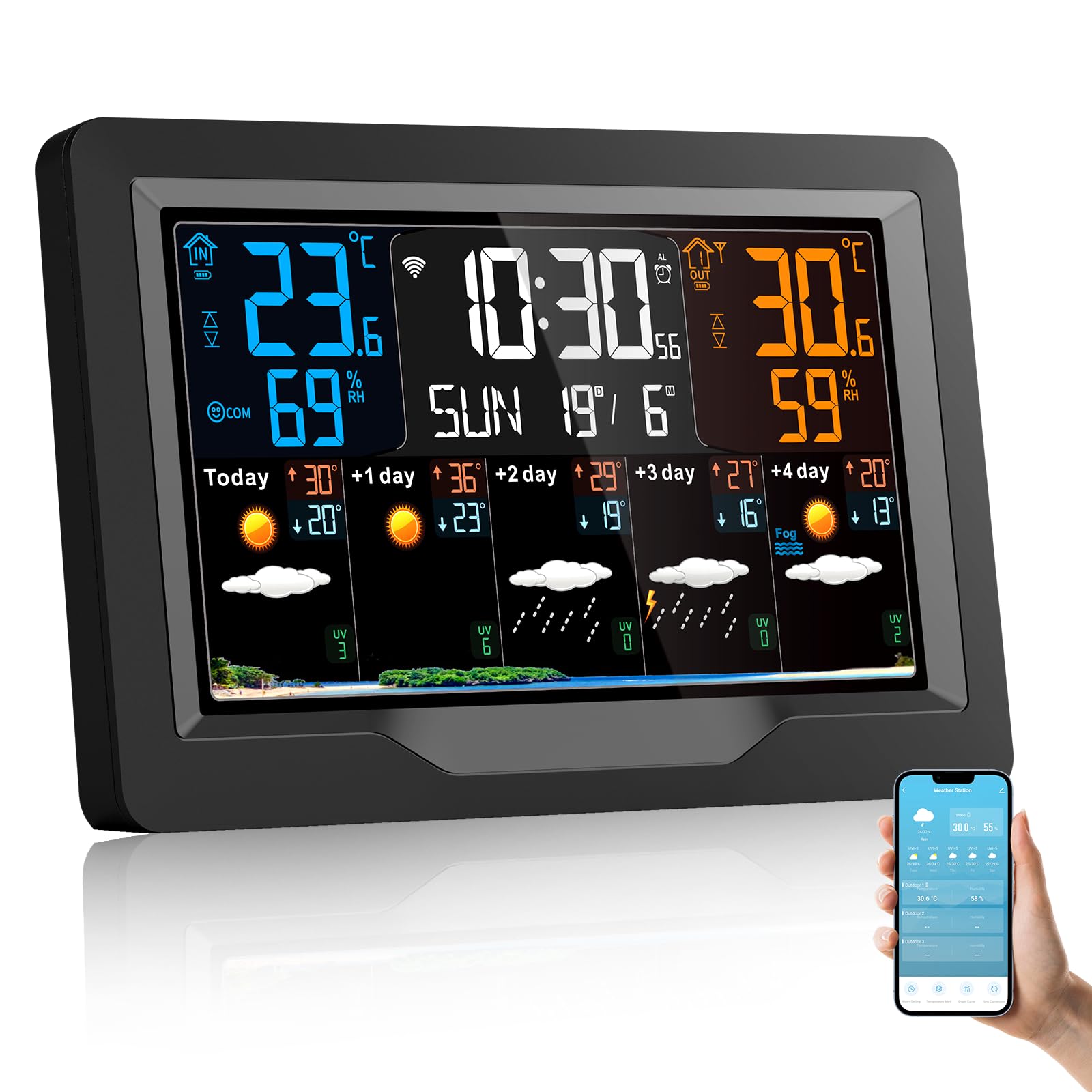
Image: VIFLYKOO EM3390TF Wireless Weather Station main unit and outdoor sensor.

Image: Detailed diagram of the VIFLYKOO EM3390TF Weather Station display and physical components. Labels include: A1: Time, A2: Indoor temperature, A3: Week for today, A4: Indoor humidity, A5: Remote wireless channel, A6: Outdoor temperature, A7: Calendar, A8: Outdoor humidity, A9: Predicted maximum temperature today and in the next 1-4 days, A10: Predicted minimum temperature today and in the next 1-4 days, A11: Weather forecast for today and the next 1-4 days, A12: UV index. B7: Hanging hole, B8: Support frame, B9: Battery compartment, B10: USB charging socket, B11: DC-POWER input jack.
3. Өзгөчөлүктөрү
- Multiple Data Displays: Shows indoor/outdoor temperature and humidity, time, date, sunrise/sunset times, moon phase, atmospheric pressure, comfort level, and mold risk.
- 5-Day Weather Forecast: Provides a predictive weather forecast for the upcoming days.
- Wi-Fi туташуусу жана колдонмону көзөмөлдөө: Connects to your 2.4 GHz Wi-Fi network for app control and automatic time synchronization.
- Көп каналдуу колдоо: Capable of receiving data from up to three outdoor sensors (one sensor included).
- Жөнгө салынуучу экран жарыктыгы: Four levels of screen brightness for optimal viewар кандай жарык шарттарында.
- Ойготкуч саат тындыруу менен: Features three sets of alarms with a five-minute snooze function.
- Температура эскертүүлөрү: Customizable alerts for temperature changes.
- USB кубаттоо порту: The main unit includes a USB socket for charging external devices.
- Кубат параметрлери: Can be powered by DC adapter or 2 AA batteries (for backup).
4. Орнотуу
4.1 Пакеттен чыгаруу
Carefully remove all components from the packaging. Ensure you have the main weather station unit, one wireless outdoor sensor, a power adapter, and this instruction manual.
4.2 Негизги блокту электр менен камсыздоо
- Connect the provided power adapter to the DC-POWER input jack (B11) on the back of the main unit.
- Plug the adapter into a standard electrical outlet. The display will light up.
- For backup power, open the battery compartment (B9) and insert 2 AA batteries (not included), observing polarity.
4.3 Installing Outdoor Sensor Batteries
- Сырткы сенсордун арткы жагындагы батарея бөлүмүн ачыңыз.
- Туура полярдуулукту камсыз кылуу үчүн 2 AA батарейкасын (кошулмага кирбейт) салыңыз.
- Батарея отсегин бекем жабыңыз.
4.4 Сенсорду жупташтыруу
The outdoor sensor should automatically pair with the main unit upon powering both devices. If the outdoor temperature/humidity is not displayed, press the 'CH' button on the main unit to cycle through channels or the 'RESET' button on the outdoor sensor to re-initiate pairing.
4.5 Wi-Fi туташуусу жана колдонмону орнотуу

Image: Weather station display and smartphone app interface.
- Download the companion app (e.g., Smart Life or Tuya Smart) from your smartphone's app store.
- Каттоо же өз эсебиңизге кирүү.
- Follow the in-app instructions to add a new device. This typically involves putting the weather station into pairing mode (refer to the device's specific button combination, often holding a Wi-Fi button for several seconds).
- Жупташтыруу процессинде смартфонуңуз 2.4 ГГц Wi-Fi тармагына туташып турганын текшериңиз.
- Once connected, the weather station will synchronize time and date automatically, and you can view data and control settings via the app.
5. Иштөө нускамалары
5.1 Дисплейview
Refer to the detailed diagram in Section 2 for a complete breakdown of the display elements (A1-A12).
5.2 Экран жарыктыгын жөндөө

Image: Weather station display showing different brightness levels.
Press the light/snooze button on the top of the unit to cycle through the four brightness levels: High, Medium, Low, and Off.
5.3 Убакытты жана датаны орнотуу
If connected to Wi-Fi, the time and date will synchronize automatically. If manual adjustment is needed, refer to the specific buttons on your device (usually 'MODE' or 'SET' buttons) and follow the on-screen prompts.
5.4 Ойготкуч жана тындыруу функциясы

Image: Weather station with alarm and snooze function.
To set an alarm, press the 'ALARM' button and use the adjustment buttons to set the desired time. To activate the snooze function when an alarm sounds, touch the top of the weather station. The snooze time is five minutes. Press any other button to turn off the alarm.
5.5 Бирдикти конвертациялоо (°C/°F)
Press the '°C/°F' button (if available) or a designated button as per your device's specific controls to switch between Celsius and Fahrenheit temperature units.
5.6 Viewing Multiple Channels

Image: Weather station supporting up to 3 channels for outdoor sensors.
If you have multiple outdoor sensors, press the 'CH' button on the main unit to cycle through the data from each connected sensor (CH1, CH2, CH3).
6. Техникалык тейлөө
6.1 Тазалоо
Негизги блокту жана тышкы сенсорду жумшак менен сүртүңүз, damp cloth. Do not use abrasive cleaners or solvents. Ensure no moisture enters the device openings.
6.2 Батареяны алмаштыруу
Replace batteries in the outdoor sensor when the low battery indicator appears on the main unit's display. For the main unit, replace backup batteries periodically or if the unit loses settings during a power outage.
6.3 Сенсордун жайгашуусу
Place the outdoor sensor in a shaded, dry location, protected from direct sunlight and rain, to ensure accurate readings. Avoid placing it near heat sources or reflective surfaces. The maximum transmission distance is approximately 60m/196ft in open air.
7. Кыйынчылыктарды
- Сырттагы температура/нымдуулук көрсөткүчү жок:
Ensure batteries are correctly installed in the outdoor sensor. Press the 'RESET' button on the outdoor sensor. Press the 'CH' button on the main unit to re-scan for sensors. Ensure the sensor is within range (max 60m/196ft) and not obstructed by thick walls or metal objects. - Wi-Fi туташуу көйгөйлөрү:
Verify your Wi-Fi network is 2.4 GHz. Ensure the weather station is in pairing mode. Restart your router and the weather station. Check app instructions for specific troubleshooting steps. - Туура эмес окуулар:
Ensure the outdoor sensor is placed in a suitable location, away from direct sunlight, rain, and heat sources. Compare readings with other reliable thermometers if possible. - Дисплей бүдөмүк же өчүк:
Check power adapter connection. Adjust screen brightness using the light/snooze button. Replace backup batteries if using them.
8. Техникалык шарттар
| Бренд | VIFLYKOO |
| Модель номери | EM3390TF |
| Продукциянын өлчөмдөрү | 3 x 20.5 x 13 см; 540 г |
| Байланыш технологиясы | Wi-Fi (2.4 GHz) |
| Power Source | Corded Electric, Battery Powered (2 AA for main unit backup, 2 AA for sensor) |
| Температуранын тактыгы | 1 °C |
| Өзгөчөлүктөр | Alarm, Wireless, Large Display, Adjustable Brightness, Pre-calibrated |
| Камтылган компоненттер | Instruction manual, Transmitter (outdoor sensor), Power cord |
| Сунушталган Колдонуулар | Library, Office, Home, Laboratory, Garden, Restaurant |
9. Кепилдик жана колдоо
For warranty information or technical support, please refer to the contact details provided with your purchase or visit the official VIFLYKOO webсайт. Сатып алганыңыздын далили катары сатып алуу дүмүрчөгүңүздү сактаңыз.