
1. Киришүү
This manual provides instructions for the Miracase Magnetic Full-Body Case designed specifically for the iPhone 16 Plus. This case offers comprehensive protection for your device, including a built-in screen protector, camera lens protection, and MagSafe compatibility.
2. Шайкештик
This Miracase Full-Body Case is exclusively designed for the iPhone 16 Plus (6.7 inch). Ensure your device model matches for proper fit and functionality.

This image illustrates the compatibility of the Miracase case with the iPhone 16 Plus (6.7 inch), showing that it is not designed for iPhone 16 (6.1 inch), iPhone 16 Pro (6.3 inch), or iPhone 16 Pro Max (6.9 inch).
3. Негизги өзгөчөлүктөрү
- Built-in Full Screen Protector: Protects your phone screen from scratches and cracks, offering sensitive touch response without bubbles.
- Full-Body Protection & Camera Control Cover: Military-grade drop tested (8000 times), providing 360-degree full-body protection. Features a precise 9H tempered glass camera protector and a unique ON-OFF camera control cover for enhanced protection and comfortable grip.
- MagSafe шайкештиги: Built-in upgraded 3rd generation magnet ring ensures secure locking and compatibility with MagSafe accessories, enabling faster, easier, and safer wireless charging.
- Never Yellow Crystal Clear: The diamond-hard clear back showcases the original color of your iPhone 16 Plus, maintaining clarity over time.
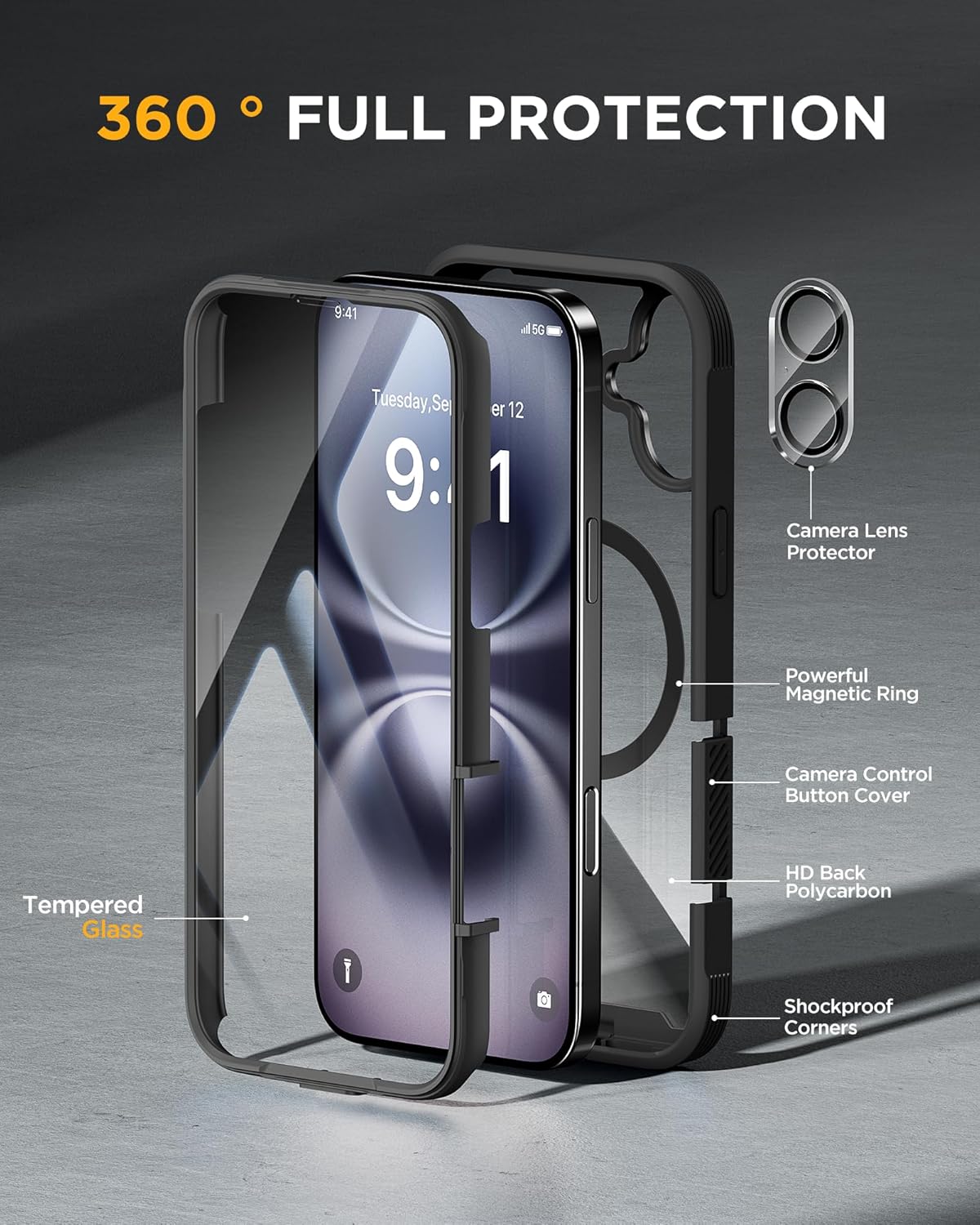
This image displays the various components contributing to the 360-degree full protection of the Miracase case, such as the tempered glass, magnetic ring, and shockproof corners.

This image emphasizes the 9H glass screen protection, demonstrating its ability to keep the iPhone screen safe from impacts.

This image details the military-grade drop protection, highlighting the case's ability to withstand drops from 12 feet due to its reinforced corners and airbag design.
4. Орнотуу жана орнотуу
Follow these steps to properly install and remove your Miracase Full-Body Case:
- Орнотуу:
- Install the front cover onto your iPhone 16 Plus.
- Install the back cover by aligning it from the bottom of the phone.
- Close the camera control cover to secure the camera protection.
- Алып салуу:
- Open the camera control cover.
- Press the bottom cover from the bottom to separate the case.
This video demonstrates the unboxing and installation process for a Miracase full-body case, showing how to fit the phone into the two-piece case.
Бул видео чынчыл жооп беретview of the Miracase Magnetic Phone Case, including a demonstration of its installation and features.
This video covers essential information about the Miracase Phone Case, including its installation process and protective qualities.
This video evaluates the Miracase full-body case, demonstrating its features and installation for an iPhone model.
5. Operating the Camera Control Cover
The unique camera control ON-OFF cover is designed to provide additional protection for your camera lenses while maintaining ease of use. Simply open the cover when you need to take photos and close it when not in use to prevent scratches and impacts.

This image illustrates the functionality of the camera control cover, showing how it can be opened for camera use and closed for protection.
6. MagSafe Functionality
The integrated MagSafe ring ensures strong magnetic attachment for various MagSafe accessories. This allows for:
- Faster and more secure wireless charging.
- Compatibility with MagSafe wallets, power banks, and car phone mounts.

This image showcases the seamless integration of MagSafe accessories like chargers, wallets, and car mounts with the Miracase case.
This video highlights the perfect fit and strong magnetic capabilities of the Miracase case, demonstrating its compatibility with MagSafe accessories and overall protection.
7. Техникалык тейлөө
To ensure the longevity and clarity of your Miracase case:
- Корпусту жумшак, d чүпүрөк менен үзгүлтүксүз тазалап туруңузamp кездеме.
- Avoid using harsh chemicals or abrasive materials, as these can damage the case or screen protector.
- Periodically remove the case to clean any dust or debris that may accumulate between the phone and the case, especially around the screen protector area.
8. Кыйынчылыктарды
- Dust/Particles under Screen Protector: If you notice dust or particles accumulating between the built-in screen protector and your phone screen, carefully remove the case as per the removal instructions in Section 4. Clean both the phone screen and the inside of the screen protector with a microfiber cloth before re-installing the case.
- Тийүү сезгичтигинин төмөндөшү: Ensure the case is installed correctly and there are no air bubbles or foreign objects between the screen protector and your phone screen. If issues persist, try re-installing the case.
- MagSafe Not Attaching Securely: Verify that no foreign objects are obstructing the magnetic connection on the back of the case or your MagSafe accessory.
9. Техникалык шарттар
| Продукциянын өлчөмдөрү | 5.91 x 3.54 x 0.35 дюйм |
| Элемент Салмагы | 4.2 унция |
| Элемент моделинин номери | 6949312366074 |
| Материал | Температуралуу айнек |
| Шайкеш телефон моделдери | iPhone 16 Plus |
| Өзгөчөлүктөр | Built-in Screen Protector, Camera Protector |
| Түс | Magnetic Classic Black |
10. Кепилдик жана колдоо
For any product issues or concerns, please contact Miracase customer support for assistance or a replacement. Refer to the product packaging or the official Miracase webбайланыш маалыматы үчүн сайт.